
Upgrading your console storage is one of the most practical home-tech improvements you can make. As a home and furniture editor, I often look at technology through the lens of how it fits into your living space. A console that runs too hot doesn’t just throttle your gameplay; it increases fan noise in your living room, generates excess ambient heat inside your media console, and can even shorten the lifespan of nearby electronics.
To keep your PlayStation 5 running quietly and efficiently inside your entertainment center, adding an M.2 NVMe SSD with a compatible heatsink is essential. However, the console’s dedicated expansion bay has incredibly strict spatial tolerances. If you buy a heatsink that is even a millimeter too thick or too wide, the metal expansion cover will not close, compromising the console’s internal vacuum cooling system.
As an Amazon Associate we earn from qualifying purchases at no extra cost to you.




Our Top Picks
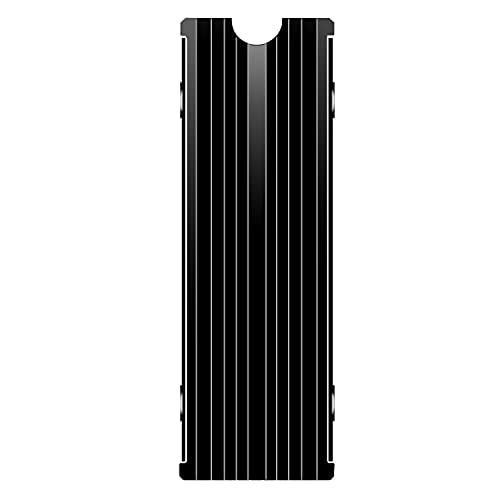 M.2 Heatsink Cooler 2280 SSD Double-Sided Heat Sink3"L x 0.95"W x 0.4"H3 x 0.95 x 0.4 inches0.1 PoundsCheck on Amazon

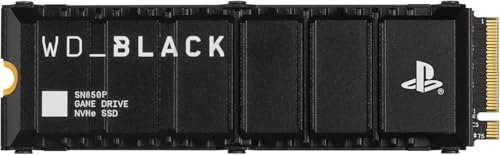

Top 3 picks at a glance
The Short Answer
To fit inside the PS5 internal expansion slot, your SSD and heatsink assembly must not exceed the maximum allowed dimensions of 110 mm (L) x 25 mm (W) x 11.25 mm (H).
Broken down into exact measurements, the allowed dimensions for a PS5 internal SSD heatsink are:
- Maximum Width: 25 mm (0.98 inches). This includes the SSD structure, thermal pads, and the heatsink casing.
- Maximum Length: 110 mm (4.33 inches). While most consumer M.2 SSDs are 80 mm long, the bay can physically accommodate boards up to 110 mm.
- Maximum Total Thickness/Height: 11.25 mm (0.442 inches).
- Sub-surface Height Limit: No more than 2.45 mm (0.096 inches) of the heatsink can sit below the SSD’s circuit board (PCB).
- Above-surface Height Limit: No more than 8.0 mm (0.314 inches) of the heatsink can sit above the SSD’s circuit board.
If your heatsink exceeds any of these parameters, you will not be able to reinstall the metal expansion slot cover. Leaving this cover off disrupts the pressure differential inside the console, pulling dust into the chassis and reducing overall cooling efficiency.
Standard Sizes
When shopping for an SSD and heatsink combo, you will encounter standard M.2 form factor numbers (like 2280 or 22110). The first two digits represent the width of the drive in millimeters (22 mm), while the remaining digits represent the length in millimeters (e.g., 80 mm or 110 mm).
The table below outlines the standard sizes of M.2 drives and how they correspond to the maximum allowed heatsink dimensions inside the PS5 expansion bay.
| Form Factor | SSD Dimensions (Without Heatsink) | Max Allowed Width (With Heatsink) | Max Allowed Height Above PCB | Max Allowed Height Below PCB | Max Allowed Length (With Heatsink) |
|---|---|---|---|---|---|
| M.2 2230 | 30 mm x 22 mm (1.18″ x 0.86″) |
25 mm (0.98″) |
8.0 mm (0.31″) |
2.45 mm (0.09″) |
30 mm (1.18″) |
| M.2 2242 | 42 mm x 22 mm (1.65″ x 0.86″) |
25 mm (0.98″) |
8.0 mm (0.31″) |
2.45 mm (0.09″) |
42 mm (1.65″) |
| M.2 2260 | 60 mm x 22 mm (2.36″ x 0.86″) |
25 mm (0.98″) |
8.0 mm (0.31″) |
2.45 mm (0.09″) |
60 mm (2.36″) |
| M.2 2280 (Most Common) | 80 mm x 22 mm (3.15″ x 0.86″) |
25 mm (0.98″) |
8.0 mm (0.31″) |
2.45 mm (0.09″) |
80 mm (3.15″) |
| M.2 22110 | 110 mm x 22 mm (4.33″ x 0.86″) |
25 mm (0.98″) |
8.0 mm (0.31″) |
2.45 mm (0.09″) |
110 mm (4.33″) |
How to Measure Your Space
If you are assembling a custom cooling solution using a bare SSD and an aftermarket heatsink, you must measure your components carefully. Follow this step-by-step process using a digital caliper or a fine-metric ruler to ensure your hardware fits perfectly.
- Measure the Total Width: Place the SSD inside the heatsink structure, securing any side brackets or silicone bands. Measure the widest point of the assembly. It must be 25 mm (0.98 inches) or less. If the screws on the side of the heatsink protrude past 25 mm, it will not slide into the bay guide rails.
- Check the Top-Side Clearance: Lay the assembled drive flat on a table. Measure from the top surface of the green or black SSD circuit board (the PCB) to the highest peak of the heatsink fins. This height must not exceed 8.0 mm (0.314 inches).
- Check the Bottom-Side Clearance: Turn the drive over. Measure from the underside of the SSD circuit board to the lowest point of the bottom heatsink plate. This must not exceed 2.45 mm (0.096 inches). If the bottom plate is too thick, the SSD will not sit flush against the screw spacers inside the console.
- Calculate Total Combined Thickness: Measure the entire sandwich (bottom heatsink plate + thermal pad + SSD + top thermal pad + top heatsink). The total thickness must be under 11.25 mm (0.442 inches).
- Confirm Length and Screw Alignment: Ensure that your heatsink does not block the specific mounting hole on your SSD (for a 2280 drive, this is the 80 mm mark). The mounting screw and spacer must sit cleanly on the bare PCB or a designated flat notch on the heatsink.
By Room or Use Case
How you choose and size your heatsink depends largely on your budget, your desire for DIY assembly, and the thermal demands of your home entertainment environment.
The Minimalist Media Console Setup (Pre-Installed Heatsinks)
If your console sits inside a semi-enclosed TV stand, wooden credenza, or media cabinet, airflow is already restricted. In these environments, you want zero margin for error. Opting for an officially licensed, pre-assembled SSD and heatsink combo is the safest choice because these units are factory-certified to meet Sony’s exact structural specifications.
For example, the WD_BLACK SN850P NVMe M.2 SSD series is designed specifically for this use case. The 1TB version (typically retailing between $180 and $240) and the high-capacity 2TB version (ranging from $350 to $460) feature a low-profile, sleek aluminum heatsink. They slide effortlessly into the slot with millimeter-perfect clearance, ensuring your media console remains quiet and free of hot-air pockets.
The DIY Home Theater Rack (Custom Replacement Covers)
For home theater enthusiasts who mount their gear in dedicated AV racks or closets, thermal management is a top priority. In these setups, you can opt for specialized heatsinks that replace the PS5’s metal expansion bay door entirely, converting the entire bay cover into a massive heat dissipation plate.
The SABRENT M.2 NVMe PS5 Heatsink (SB-PSHS) is a prime example of this design. Priced around $13, this CNC-machined aluminum heatsink replaces the stock console plate. It utilizes a heat-pipe design that increases the cooling surface area far beyond a standard internal heatsink, drawing heat out of the bay and into the main fan’s exhaust stream. This is ideal for heavy gaming sessions where you want to keep internal temperatures as low as possible.
The Budget-Conscious Gaming Nook (Generic Double-Sided Heatsinks)
If you are setting up a gaming desk in a bedroom or home office and want to save money, you can pair a budget-friendly bare SSD with a generic heatsink. This requires careful manual assembly but is highly cost-effective.
A product like the M.2 Heatsink Cooler 2280 SSD Double-Sided Heat Sink (often priced under $10, typically around $5) fits this need. These kits include thin thermal silicone pads and a metal clamp. When assembling these budget options, you must pay extra attention to the bottom-side clearance. Ensure the silicone pads are compressed evenly so the bottom metal plate doesn’t push the drive up, which would prevent the mounting screw from threading correctly.
Common Sizing Mistakes
Even experienced PC builders make errors when fitting an SSD into the PS5. Avoid these common sizing pitfalls:
- Buying Tall PC-Specific Heatsinks: Many high-performance PC heatsinks feature large cooling towers or built-in miniature fans that stand 15 mm to 25 mm tall. These are far too tall for the PS5 and will prevent you from closing the outer console cover.
- Using Too-Thick Thermal Pads: Standard aftermarket heatsinks often ship with multiple thermal pads of varying thicknesses (e.g., 0.5 mm, 1.0 mm, and 1.5 mm). If you use a pad that is too thick, it will bloat the overall dimensions of the “sandwich,” pushing the height past the 11.25 mm limit.
- Screwing Down the Drive Without the Spacer: The PS5 bay has a cylindrical metal spacer that must be placed underneath the SSD at the correct length marker (usually the “80” hole). If you omit this spacer and screw the drive directly to the floor of the bay, the SSD will bend, causing structural stress and potentially shorting out the drive.
- Ignoring Side Screws: Some DIY heatsinks use small screws on the left and right sides to clamp the top and bottom plates together. If these screw heads protrude even half a millimeter too far, the assembly’s width will exceed 25 mm, preventing it from sliding down into the slot.
FAQ
Can I run my PS5 with the SSD cover off if my heatsink is too tall?
It is highly discouraged. While it might seem like a quick fix for a heatsink that is too tall, leaving the metal expansion bay cover off disrupts the internal airflow dynamics of the console. The PS5’s main intake fan relies on negative pressure to pull air through specific channels. Leaving the cover off allows hot air to recirculate inside the chassis, which can overheat other critical components. As we look ahead to 2026, keeping your gaming hardware properly sealed and ventilated is key to maintaining a quiet, efficient home entertainment setup.
What is the difference between single-sided and double-sided SSDs regarding fit?
Single-sided SSDs have memory chips mounted only on the top surface of the circuit board, making them naturally thinner. Double-sided SSDs have chips on both the top and bottom. If you use a double-sided SSD, you must use a very thin bottom thermal pad (typically 0.5 mm) to ensure the bottom-side clearance does not exceed the 2.45 mm limit.
Do I really need a heatsink, or can I install a bare SSD?
You absolutely must use a heatsink. Gen4 NVMe SSDs operate at speeds up to 7,300 MB/s, generating immense heat under load. Without a heatsink, the drive will rapidly reach its thermal limit (usually around 70°C to 80°C) and trigger thermal throttling, drastically reducing your load times and causing game stuttering.
Will a heatsink designed for the PS5 Slim fit the original PS5 console?
Yes. The internal SSD expansion bay dimensions and structural requirements are identical across the original PS5 (disc and digital editions), the PS5 Slim, and the PS5 Pro. A heatsink that complies with the 110 mm x 25 mm x 11.25 mm limit will fit perfectly in any version of the console.
Related guides
- Best Free MMOs on Steam: Subscription Limits, Pay-to-Win and Time Cost (2026)
- Best Free Horror Games on Steam: How to Pick One That Fits Your PC and Your Nerves (2026)
- Black Frame Insertion vs VRR: Which Smoothness Feature Should You Use?
- Best Webcams for Streaming: 11 Listings Compared by Resolution, Focus and Light (2026)








