
Our Top Picks

Top 3 picks at a glance
Currency Check
Verified as of October 2026: Sony raised U.S. prices for the PS5, PS5 Digital Edition and PS5 Pro on April 2, 2026, announced on the PlayStation Blog, citing pressures in the global economy. Sony also shipped an improved PSSR upscaler for the PS5 Pro in March 2026, enabled through a video output setting. Not confirmed: any PlayStation 6 launch date. Sony has said development is underway but has not set a date or shown hardware; reported windows from 2027 to 2029 are rumor.
For most people who already own a PS5, the PS5 Pro is not worth the upgrade. It makes sense if you are buying your first console and want the best image, or if you own a 4K TV with 120Hz and variable refresh rate and play demanding games where the standard PS5 compromises on image quality. If your TV is 1080p, or you mostly play lighter games, the standard PS5 plus more storage is the better use of money. This article covers what the Pro changes, what it does not, and how storage fits in.
Quick Verdict
| Your situation | Our verdict |
|---|---|
| Own a PS5, 1080p TV | Skip the Pro. Most of its gains target 4K output. |
| Own a PS5, 4K 120Hz VRR TV, play demanding games | The Pro is a reasonable luxury, mainly for image quality and smoother ray-traced modes. |
| First console, 4K TV, no disc library | Pro is worth pricing against the standard console; it ships with more storage. |
| Large disc collection | Standard disc PS5, or budget for Sony’s detachable disc drive with the Pro. |
| Library is outgrowing storage | An internal M.2 SSD solves this for far less than a console swap. |
What the Pro Actually Changes
GPU, ray tracing and upscaling
Sony’s published specification lists a GPU with 67 percent more compute units than the standard PS5 and memory that is 28 percent faster, which Sony says translates into up to 45 percent faster rendering in games. The Pro GPU is rated at 16.7 TFLOPS against 10.28 TFLOPS for the standard console, and Sony quotes ray tracing performance two to three times higher. The CPU is the same eight-core Zen 2 design with a boost mode, so games limited by CPU work, such as large crowds or heavy simulation, gain less than games limited by graphics.
The Pro also has PSSR, Sony’s machine-learning upscaler, which renders at a lower internal resolution and reconstructs a sharper image. In March 2026 Sony released an updated version of PSSR for the Pro, built from technology developed with AMD. It is Sony’s own console version rather than a direct port of AMD’s FSR 4, despite early reports that said otherwise. It is enabled in the video output settings and is applied by games that support it.
What this means in practice depends on the game. Developers decide whether to ship a Pro mode, and the benefit appears in those titles, not across your entire library. Reviewers generally describe the result as a meaningful image-quality improvement rather than a transformation; one 45 percent figure is a rendering-speed claim by Sony, not a guarantee of 45 percent more frames in every title.
Storage and disc drive
The Pro has 2TB of internal storage; the current standard model is 1TB according to retail listings, and usable space is less on both because of system software. The Pro ships without a disc drive. Sony sells a detachable drive separately, so a disc-heavy buyer should price the combination, not just the console.
Both consoles have an expansion slot for an internal M.2 SSD. Sony’s requirements for that slot are PCIe Gen4 x4 with a Socket 3 (key M) connector, a recommended sequential read speed of 5,500 MB/s or higher, a capacity from 250GB up to 8TB, and a heatsink; the drive plus heatsink must stay under 11.25 mm in total height. Gen3 and SATA M.2 drives are not supported, and Sony states that it cannot guarantee every drive that meets the spec will work. PS5 games can be played from this internal drive.
External USB drives: storage only for PS5 games
Per Sony’s support guidance, PS5 games cannot be played from a USB extended storage drive. You can store them there and copy them back to the console’s internal storage or M.2 SSD to play, and PS4 games can run directly from the USB drive. Sony’s USB requirements are a SuperSpeed USB 5Gbps or faster drive between 250GB and 8TB, connected directly to the console. Formatting erases the drive.
| Option | Plays PS5 games directly | Plays PS4 games directly | Notes |
|---|---|---|---|
| Internal console storage | Yes | Yes | 1TB standard model; 2TB Pro (retail and Sony specs) |
| Internal M.2 SSD | Yes | Yes | Gen4, heatsink, size limits apply |
| USB extended storage | No (archive only) | Yes | Needs 5Gbps or faster USB |
What does not change
The game library is the same. Both consoles play the same PS5 and PS4 games, and many titles look and run identically on either. The Pro does not add exclusive games. It also does not change the controller or the online services.
Reading the 45 percent claim
The raw compute numbers and Sony’s rendering claim measure different things. Dividing the Pro’s 16.7 TFLOPS by the standard console’s 10.28 gives a ratio of about 1.62, or 62 percent more raw compute, yet Sony quotes up to 45 percent faster rendering. The gap exists because games depend on memory bandwidth, the CPU and other parts, not on compute alone. As purely illustrative arithmetic, not a measured result, a game that is limited by the GPU at 40 frames per second could in theory reach about 58 frames per second at a 45 percent gain. Real results vary by title, and developers often spend the extra headroom on higher resolution or better ray tracing instead of raw frame rate.
This is also why a 1080p TV blunts the upgrade. Extra GPU power is most visible when it goes toward a sharper 4K image, a more stable frame rate in a performance mode, or ray-traced reflections. Without a display that shows those differences, the extra cost buys less.
How to Decide
- Check your display first. The Pro’s strengths are 4K output, higher-quality ray tracing modes and 120Hz with VRR. A TV that lacks 120Hz and VRR will not show the smoother modes at their best. A 1080p TV loses most of the benefit.
- List the games you play. If your favorites are lighter games or older titles with no Pro enhancements, nothing changes. If you play large, demanding releases that ship a Pro mode, the upgrade is more tangible.
- Count your storage. A rule of thumb: if your installed library is larger than about 70 percent of internal space, you will be deleting and redownloading games. A 1TB M.2 drive roughly doubles a standard console’s room for a fraction of a console swap.
- Disc or digital? The Pro has no drive. If your collection is physical, price in the detachable disc drive.
- Consider the total cost. After the April 2026 increase, the standard PS5 and the Pro both cost more than at launch, and the gap between them is large. Compare the gap with what the same money would buy in storage, a controller, or a TV upgrade.
Worked example: you own a standard 1TB PS5 and a 4K TV without VRR. Your pain point is running out of space, not image quality. An internal Gen4 M.2 SSD with heatsink solves the problem. The Pro would add faster rendering you cannot fully use on that display.
Products That Fit
The three drives below are examples that fit the storage situations above, not a ranking. They matter to this comparison because adding storage is often the cheaper alternative to upgrading a console.
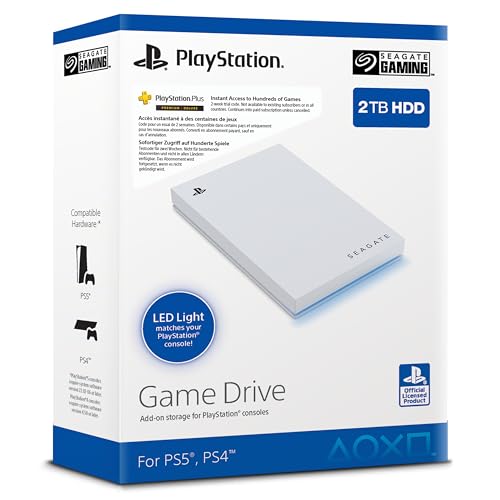
Seagate Game Drive for PS4/PS5, 2TB – archive for PS5 games, play PS4 games
As an Amazon Associate we earn from qualifying purchases at no extra cost to you.

This external drive suits someone who wants to keep PS5 games off the internal SSD without reinstalling them, and who still plays PS4 titles. It fits the “library is outgrowing storage” row, with the limits noted above: PS5 games must be copied back to play. The retailer listing describes it as licensed for PS5 and PS4, with a 2.5-inch form and USB 3.0.
- 2TB capacity, 2.5-inch external drive
- USB 3.0 interface (5Gbps class; confirm on listing)
- Marketed as officially licensed for PS5 and PS4
- LED lighting; the listing shows both blue and white, so confirm the color
Caveat: this listing’s title is not in English and is labeled an external SSD, so confirm the regional listing and drive type before buying. As USB storage, it will not run PS5 games directly.
WD_BLACK SN850P 1TB – playing PS5 games from expansion storage

This is the product that directly competes with a console upgrade for the “I just need more room” buyer. It is an internal M.2 drive and, because it sits in the console’s expansion slot, PS5 games can be played from it. It fits a standard PS5 owner on a non-VRR TV who has run out of space. It also works in a Pro, but a Pro owner has less urgency to expand.
- M.2 2280, PCIe Gen4 x4, NVMe
- Rated up to 7,300MB/s read (the maker lists lower write speeds)
- Includes a PlayStation-branded heatsink
- Officially licensed for PS5 per the listing
Caveat: installation means removing the console’s side panel and opening the expansion bay. Follow Sony’s guide for your model, and note that read speed in games will not match the rated maximum.
SanDisk Extreme Portable SSD for PS5, 2TB – fast external archive and portable use

This portable SSD fits an owner who wants a fast external drive that also works with a laptop or a second console. Its rated read speed is up to 1,050MB/s, far above what a hard drive provides, which shortens the copy-back time when you move a PS5 game from the drive into internal storage. It is a USB drive, so the same rule applies: PS5 games are stored, not played, from it.
- 2TB capacity, USB-C (USB 3.2 Gen 2 family)
- Up to 1,050MB/s read
- Marketed for PS5; confirm exact model and durability rating on listing
- Pocket-sized, solid-state
Caveat: SanDisk sells several versions of its Extreme Portable line with different durability and speed ratings, so check the model number on the listing.
Common Mistakes
- Buying a Pro for a 1080p TV, where most of its image gains do not show.
- Expecting a USB drive to run PS5 games directly.
- Buying a Gen3 or SATA M.2 drive for the expansion slot; Sony requires Gen4 at 5,500MB/s or higher.
- Skipping the heatsink or exceeding the height limit.
- Forgetting the Pro has no disc drive when the collection is physical.
- Trusting older price articles; figures changed in April 2026.
Buy Now or Wait?
- Buy a Pro now if you are new to PlayStation and want the best version, and you have the TV to use it.
- Do not wait for a PS6 date: Sony has not announced one, and the rumored windows have moved.
- Upgrading storage is the lower-risk move for an existing owner who just needs space.
- If memory-driven price rises continue, waiting is unlikely to reduce console costs soon; this is an inference from Sony’s stated reasons, not a promise from Sony.
Questions
Is the PS5 Pro worth it if I already own a PS5?
Usually not. The gains are mostly image quality and smoother ray-traced modes on a 4K display. If you are happy with your current performance, spend on storage or a better TV first.
Do I need a 4K TV for the Pro?
You do not need one, but you gain much less without it. A 4K TV with 120Hz and VRR gets the most from the console.
Can I play PS5 games from an external drive?
No. Sony says PS5 games cannot be played from USB extended storage; you can store them and copy them back. PS4 games can run directly from the external drive.
What M.2 SSD works in a PS5?
Sony requires PCIe Gen4 x4 with a Socket 3 key M connector, 5,500MB/s or faster recommended read speed, a heatsink and a combined height under 11.25 mm. Capacity can range from 250GB to 8TB. Sony does not guarantee every drive that fits the spec.
Does the Pro come with a disc drive?
No. Sony sells a detachable disc drive separately. If you own many discs, add that to your price comparison.
Will a PS6 make the Pro obsolete?
Sony has not announced a PS6 or its date. Rumors range from 2027 to 2029. Games for the PS5 family are expected to keep arriving during that time, but that is an expectation, not a Sony commitment.
Update History
- October 14, 2026 – Initial publication.
- Check the product page for current specifications and availability before buying.
Sources and Methodology
We compared Sony’s published console specifications, PlayStation Blog and support guidance with press coverage, then checked storage product facts against manufacturer and retailer listing fields. Where outlets disagreed on a number, we left it out.
- PlayStation Blog announcement of the April 2026 price changes
- Sony’s published PS5 Pro specifications as reported by Video Games Chronicle
- PlayStation support guidance on M.2 SSD and USB extended storage
- Push Square, Video Games Chronicle and TweakTown coverage of the PSSR update
- Tom’s Guide comparison of PS5 and PS5 Pro
- SanDisk and Western Digital product pages; Seagate retailer listing fields
Related guides
- Best Free MMOs on Steam: Subscription Limits, Pay-to-Win and Time Cost (2026)
- Best Free Horror Games on Steam: How to Pick One That Fits Your PC and Your Nerves (2026)
- Black Frame Insertion vs VRR: Which Smoothness Feature Should You Use?
- Best Webcams for Streaming: 11 Listings Compared by Resolution, Focus and Light (2026)








