
Integrating a modern gaming console into a sophisticated living room setup is a balancing act. The PlayStation 5 is a powerhouse of entertainment, but using a dual-handed, 280-gram DualSense controller to pause a movie or skip a track on Spotify feels clumsy. It also clutters your coffee table with gaming gear when you want a clean, minimalist aesthetic. The solution is a dedicated media remote control.
The real decision a buyer faces isn’t just about saving a few dollars; it is about choosing between seamless system integration and budget-friendly utility. If you choose the official route, you get a device designed by the same engineers who built the console. If you go with a third-party alternative, you often save money and sometimes gain more tactile buttons, but you risk dealing with unstable Bluetooth connections, cheap plastics, or annoying USB dongles that take up valuable port space on your console.
As an Amazon Associate we earn from qualifying purchases at no extra cost to you.
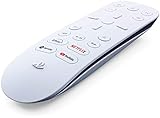


When curating your media room, you want accessories that feel intentional. Let us dive deep into how the official Sony offering stacks up against third-party alternatives to help you decide which controller deserves a permanent spot on your sofa console table.
Our Top Picks


Top 3 picks at a glance
Quick Verdict
For most households, the official Playstation Media Remote ($29) is the superior choice. Its sleek, curved aesthetic perfectly matches the PS5 console, and it connects directly via the console’s internal Bluetooth without occupying a USB port. However, if you are setting up a secondary media room, outfitting a playroom for kids, or simply want to save a few dollars, a third-party option like the JDDWIN Media Remote Control Compatible with PlayStation 5 (around $22) offers highly comparable functionality at a lower price point, albeit with slightly cheaper plastics and less refined tactile feedback.
Side by Side
To help you visualize how these two classes of remotes compare in daily use, we have laid out their design, physical footprint, and practical ownership characteristics side by side.
| Feature | PS5 Official Media Remote | Third-Party Media Remotes |
|---|---|---|
| Comfort & Ergonomics | Ergonomic curved underside; flush, low-travel buttons; very slim profile. | Often blockier or thicker; more traditional rubberized buttons with higher travel. |
| Durability | Premium matte white polymer; resists yellowing; solid internal weighting. | Lightweight, thinner plastics; buttons may lose their printed labels over time. |
| Price Range | Check on Amazon | around $12 to around $23 |
| Maintenance | Wipe down with a dry microfiber cloth; flush buttons prevent dust accumulation. | Deep button wells can collect dust, lint, and debris over time. |
| Space Needed | Minimal (approx. 6.2 x 1.8 x 0.7 inches); easily slips into a drawer. | Varies; typically slightly bulkier but shares a similar footprint. |
| Aesthetic & Look | Matches the PS5’s signature “collar” design (white exterior, black core). | Often generic black or plain white; rarely matches the console’s exact curves. |
| Resale Value | Moderate; holds value well as an official PlayStation accessory. | Very low; generally considered a consumable electronic item. |
| Best For | Main living rooms, home theaters, and design-focused spaces. | Kids’ playrooms, secondary TVs, and budget-conscious buyers. |
Where Ps5 Official Media Remote Wins
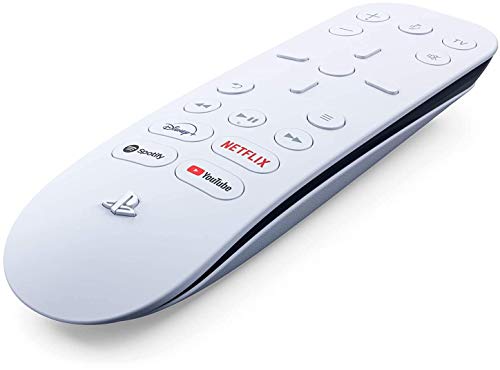
The official Playstation Media Remote is a masterclass in industrial design coordination. It does not just control your console; it visually belongs next to it. Measuring approximately 6.2 inches long and weighing a featherlight 55 grams (without its two AA batteries installed), it features a striking dual-tone aesthetic that mirrors the console’s white-on-black sandwich design.
The primary advantage of the official remote is its seamless, driver-free integration. It pairs directly with the console’s internal Bluetooth receiver during initial setup. This means you do not have to sacrifice one of your PS5’s precious USB ports to a wireless receiver dongle. Additionally, it features dedicated, hard-coded launch buttons for four major streaming services: Disney+, Netflix, Spotify, and YouTube. With a single press, you can boot your console from rest mode directly into your favorite streaming app in under ten seconds.
From a home decor perspective, the official remote is incredibly unobtrusive. The buttons are virtually flush with the body, meaning it won’t snag on fabric if left on a sofa cushion. It also features a built-in IR transmitter, allowing you to program it to control your TV’s volume and power directly, eliminating the need to juggle multiple remotes during a movie night.
Where Third Party Remote Wins
Third-party remotes shine brightest when it comes to raw value and tactile practicality. While options like the JDDWIN Media Remote Control Compatible with PlayStation 5 (around $22) closely mimic the official design, they often introduce small quality-of-life differences that some users prefer.
First and foremost is the cost. At roughly 20% to 50% less than the official version, third-party remotes are far easier to replace if they are lost, dropped on hardwood floors, or chewed on by family pets. If you have ever had a child lose an expensive remote down the heating vent, you will appreciate the lower replacement anxiety of a budget model.
Furthermore, many users actually prefer the button design of third-party alternatives. The official Sony remote uses stiff, flush-mount buttons that can be difficult to locate by feel in a darkened home theater. Many third-party remotes feature raised, rubberized buttons with distinct tactile clicks, making them much easier to operate blindly while keeping your eyes on the screen. Additionally, some third-party models omit the branded hotkeys (like Disney+ or Spotify) in favor of generic programmable buttons or standard play/pause controls, which is highly beneficial if you prefer using apps like Plex, Crunchroll, or Prime Video.
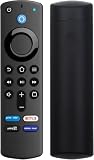
To put this in perspective, think about how we choose controllers across different rooms. While you might opt for a premium, dedicated remote for your primary media space, you might use simpler, multi-pack controllers for secondary setups—much like how families keep a budget-friendly Tevodo Wii Remote Controller, 2 Packs Upgrade Wireless Controller Compatible with Wii Wii U(Red and Blue) (around $27) in a basement playroom, or rely on a simple Replacement Remote for Fire TV Stick 3rd Gen with Voice Search & Bluetooth (around $12) for a guest bedroom television. Third-party PS5 remotes fill this exact utility role perfectly.
Cost Over 5 Years
When calculating the true cost of ownership for a media remote, you must factor in the initial purchase price, battery consumption, and potential replacement cycles over a five-year period.
The official Playstation Media Remote retails for $29. It runs on two standard AA batteries. Thanks to its highly optimized Bluetooth firmware, it manages power exceptionally well, typically requiring battery replacements only once every 12 to 18 months under normal usage. Over five years, you can expect to use about 8 to 10 AA batteries (approx. $10). Because of its high-grade polymer construction, the likelihood of physical failure is low. Your total estimated 5-year cost is roughly .
A third-party remote like the JDDWIN model costs around $22 upfront. However, some cheaper third-party remotes use less efficient Bluetooth chips or continuous IR polling, which can drain batteries in 6 to 9 months. Over five years, you might go through 14 to 16 AAA or AA batteries (approx. $16). Additionally, because of cheaper plastic casings and solder joints, there is a higher probability that a drop on a hard floor could require a full replacement of the unit. Assuming one replacement over five years, your total cost could range from around $38 to around $61.
In short, while a third-party remote saves you money on day one, the official remote’s build quality and power efficiency often make it the more economical choice in the long run.
Which One for Your Home
Every living space has its own unique demands. Here is how to choose the right remote based on your specific household setup.
Small Apartment
In a small apartment or studio, your living room often doubles as your bedroom and office. Clutter is your main enemy. The official Playstation Media Remote is the ideal fit here. Its ultra-slim, flush-button profile takes up almost zero space on a small coffee table or nightstand, and its design blends seamlessly into minimalist, modern decor.
Family with Kids or Pets
If your home is a bustling environment filled with spill hazards, teething puppies, and kids who treat remotes like toys, go with a third-party remote. Losing or breaking a $23 JDDWIN remote is a minor inconvenience, whereas replacing a $29 official remote multiple times can quickly become an annoying recurring expense.
Rental Property
For temporary living spaces or Airbnb setups, a third-party remote is highly practical. Guests can be rough on electronics, and a cheaper remote gets the job done without you having to worry about premium gear walking out the door. Its raised, easy-to-read buttons are also highly intuitive for guests of all ages who may not be familiar with the PS5’s interface.
Long-Term Home
If you are building out your forever home theater or a dedicated gaming lounge that you plan to enjoy well into 2026 and beyond, invest in the official Playstation Media Remote. It offers the cleanest integration, does not waste a USB port, and perfectly matches the premium look of your console setup, ensuring your entertainment center looks cohesive and polished.
FAQ
Can I use the official PS5 remote to turn my TV on and off?
Yes. The official Playstation Media Remote features a built-in IR (infrared) transmitter. During setup, the PS5 will guide you through programming the remote to sync with your TV’s brand, allowing you to control power, volume, and input sources directly.
Do third-party PS5 remotes require a USB receiver?
Some do, and some do not. High-quality third-party remotes connect directly via the PS5’s built-in Bluetooth, just like the official remote. However, some budget models require you to plug a small USB dongle into the front or back of your console, which can clutter the console’s clean look and take up a port.
Can I use my smartphone as a PS5 media remote instead?
Yes, you can use the official PlayStation App on your phone to navigate console menus, or use your TV’s existing remote if your television supports HDMI-CEC (Consumer Electronics Control). However, a physical remote control is generally much faster, more tactile, and does not require unlocking your phone or draining its battery.
Does the official PS5 remote have a microphone for voice search?
Yes, the official remote features a microphone icon button at the top, allowing you to use voice commands to search for media or launch games, provided your console’s voice command settings are enabled.
Related guides
- Best Free MMOs on Steam: Subscription Limits, Pay-to-Win and Time Cost (2026)
- Best Free Horror Games on Steam: How to Pick One That Fits Your PC and Your Nerves (2026)
- Black Frame Insertion vs VRR: Which Smoothness Feature Should You Use?
- Best Webcams for Streaming: 11 Listings Compared by Resolution, Focus and Light (2026)








