
Designing the ultimate home gaming setup is no longer just about choosing the fastest graphics card or the most ergonomic chair. Today, interior design and home utility intersect directly with the peripherals we place on our desks and media consoles. One of the most critical, yet frequently overlooked, decisions a modern homeowner faces when curating their entertainment space is choosing the underlying technology of their input devices: optical switches vs mechanical switches for gaming controllers.
For a home editor, this decision goes far beyond simple reaction times in a video game. It is a choice that directly impacts the acoustic environment of your living room, the clutter on your shelves, the frequency of replacement purchases, and how well your tech integrates into a shared family space. Do you opt for the cutting-edge, light-speed performance of optical switches, or do you stick with the tactile, highly customizable, and classic feel of traditional mechanical switches? Balancing the sensory experience of your home with the practicalities of daily wear and tear requires a deep dive into how these two technologies compare under one roof.
As an Amazon Associate we earn from qualifying purchases at no extra cost to you.


Our Top Picks


Top 3 picks at a glance
Quick Verdict
For most shared households, busy living rooms, and modern apartments, optical switches are the superior choice. They offer silent operation, immense durability against dust and accidental spills, and a maintenance-free lifespan that keeps your living space free of repair clutter. However, if you have a dedicated, closed-door gaming den and deeply value the tactile “click” and modular customization of your gear, mechanical switches remain the gold standard for sensory satisfaction and DIY maintainability.
Side by Side
To help you visualize how these technologies fit into your daily home life, here is a direct comparison across key household and performance categories:
| Feature | Optical Switches | Mechanical Switches |
|---|---|---|
| Comfort & Feel | Smooth, linear, and lightweight actuation; requires less physical pressure (around 40g to 45g of force). | Highly tactile with distinct physical feedback; customizable actuation forces (ranging from 45g to 65g). |
| Durability | Rated for up to 100 million clicks; no physical contact points to wear down over time. | Rated for 50 to 80 million clicks; metal leaf contacts can degrade or oxidize over time. |
| Price Range (Controllers) | Premium tier ($130 to $250) due to advanced optoelectronic sensors. | Budget to high-end ($40 to $180); highly accessible entry points. |
| Maintenance | Virtually zero; completely sealed units that resist dust, pet hair, and minor liquid exposure. | Moderate; requires occasional cleaning or swapping of switches to prevent key chatter or double-clicking. |
| Acoustic Profile (Noise) | Near-silent or soft dampening; ideal for shared living rooms and late-night sessions. | Distinct, audible “clack” or sharp “click”; can easily carry through thin apartment walls. |
| Look & Aesthetic | Sleek, integrated, and modern; usually found on streamlined, high-tech controller profiles. | Classic, industrial, and retro; great for showcasing custom keycaps and exposed mechanical parts. |
| Resale Value | High; holds value well due to the low rate of physical wear and long-term reliability. | Moderate; buyers often worry about physical spring wear or switch degradation in pre-owned units. |
| Best For | Shared households, competitive gamers, minimalists, and homes with pets or children. | DIY enthusiasts, dedicated home offices, retro gaming setups, and sensory-focused players. |
Where Optical Switches Wins
Optical switches represent a fundamental shift in how commands are registered. Instead of relying on physical metal pieces striking one another to close an electrical circuit, optical switches use an uninterrupted beam of infrared light. When you press a button or trigger on an optical controller, the physical stem blocks or unblocks this light beam, instantly sending the signal to your console or PC.
From a home management perspective, the greatest victory for optical switches is their acoustics and environmental durability. Because there are no metallic contacts colliding inside the housing, these switches operate with a hushed, fluid motion. If your gaming setup is located in a shared living room or a bedroom corner, the absence of sharp, repetitive clicking sounds means you can game late into the night without disturbing your sleeping family members or roommates.
Furthermore, optical switches are incredibly resilient against the typical hazards of a busy home. Dust bunnies, pet dander, and microscopic debris that naturally float through residential air can easily slip into traditional controllers, causing input failures. Optical sensors are immune to this type of debris-induced lag. This focus on seamless, high-end digital signal routing is a common theme in modern home entertainment setups. For instance, homeowners often use specialized routing hardware like the LiNKFOR Digital Toslink Optical 4×1 Switch with 3ft Optical Cable and IR Remote Control Aluminum Alloy Digital Audio SPDIF Toslink Optical Fiber Switcher 4 in 1 Out for PS3 Xbox Blue-Ray DVD HDTV (around $23) or the BlueRigger Digital Toslink Optical 3×1 Switch – (LPCM 2.0, SPDIF Optical Audio Switcher with IR Remote Control, 3 in 1 Fiber Optic Switch) – Compatible with Gaming Console, HDTV, Amplifier, Soundbar (around $29) to keep their audio signals pristine and clutter-free. Choosing optical controllers mirrors this philosophy, prioritizing clean, light-based pathways over physical degradation.
Where Mechanical Switches for Gaming Controllers Wins
While optical switches dominate in terms of raw speed and durability, mechanical switches hold an iron grip on physical feedback and tactile satisfaction. A mechanical switch utilizes a physical spring and a metal leaf contact. When pressed, the spring compresses, and the metal pieces touch to complete an electrical circuit, providing a physical “bump” or an audible “click” that tells your fingers exactly when the action has been registered.
This physical feedback is highly prized by gamers who rely on muscle memory and sensory confirmation. The tactile resistance prevents accidental button presses, offering a level of precision that linear optical switches sometimes struggle to replicate. For many, the physical sensation of a mechanical controller makes the gaming experience feel more grounded and responsive.
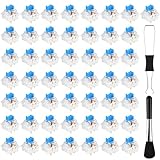
Additionally, mechanical switches are the champions of personalization and repairability. If a switch on an optical controller fails, the complex optoelectronic circuit board usually requires a professional repair or a complete replacement of the controller. In contrast, mechanical setups are inherently modular. If a button starts to stick or lose its bounce, you can easily open the housing and replace the individual parts yourself. Many home users keep affordable maintenance kits on hand, such as the BlingKingdom 10 PCS Mechanical Keyboard Switches, MX Clicky Blue for Gaming (around $4) or the Deftomo 50 Pcs Blue Keyboard Switches, 3-Pin Clicky Tactile Mechanical Keyboard Switches, Complete DIY Replacement Kit with Switch Puller & Brush (around $7), to quickly swap out worn parts on hybrid desk setups. This DIY approach appeals heavily to homeowners who prefer maintaining and repairing their possessions over throwing them away.
Cost Over 5 Years
When budgeting for a home media center, it is essential to look beyond the initial price tag and consider the total cost of ownership over a five-year horizon. Tech products that seem cheap upfront can end up costing more in replacements, tools, and accessories over time.
- Optical Switch Controller (Upfront: $150 – $250): While the initial buy-in for an optical-equipped controller is high, its long-term cost is remarkably stable. Because there are no physical contacts to oxidize or wear down, these controllers easily survive five years of heavy daily use. Aside from occasional outer surface cleaning, you will spend $0 on maintenance, replacement parts, or specialized repair tools. Total 5-year cost: $150 – $250.
- Mechanical Switch Controller (Upfront: $70 – $120): A quality mechanical controller is friendlier on your wallet at checkout. However, mechanical springs and metal contacts are subject to physical fatigue. Over five years of regular gaming, you are highly likely to experience “stick drift” or unresponsive face buttons. To keep the controller alive, you will either need to replace the entire unit once (an additional $70 – $120) or invest in DIY solderless switch replacement kits, contact cleaners, and specialized screwdrivers ($20 – $40 cumulative). Total 5-year cost: $110 – $280.
Which One for Your Home
Every home has its own unique layout, noise tolerance, and daily rhythm. Choosing the right switch technology depends heavily on how your household functions on a day-to-day basis.
Small Apartment
In a compact apartment or a studio space, sound travels fast. Thin drywall and shared living spaces mean that the repetitive, high-pitched click of a mechanical controller can quickly become a source of domestic tension. For these environments, an optical switch controller is the clear winner. Its muted acoustic footprint allows you to enjoy immersive gaming sessions without forcing your partner or roommate to listen to every button press while they try to read, watch TV, or sleep in the same room.
Family with Kids and Pets
If your home is filled with children, curious pets, and the inevitable floating pet hair, optical switches are a lifesaver. Traditional mechanical switches are highly susceptible to failing when dust, crumbs, or pet dander settle into their open physical contacts. Optical controllers, which rely on sealed light pathways, are far more resilient against these daily household hazards. They can handle the chaotic environment of a family living room with minimal risk of developing double-clicking issues or dead buttons.
Rental Home
For renters who move frequently, portability, durability, and versatile setups are key. You want gear that can survive being packed into boxes and adapted to different room layouts. Mechanical controllers, with their modularity, are excellent for renters who enjoy personalizing their temporary desk setups. However, if you want a reliable plug-and-play device that won’t require you to pack soldering irons or spare parts kits from one apartment to the next, optical controllers offer a worry-free, self-contained solution.
Long-Term Home
If you are settling into a permanent home and designing a dedicated, future-proof entertainment center or home theater room, optical switches are the forward-looking choice. As smart homes and media rooms evolve into 2026 and beyond, the demand for ultra-low latency, high-durability digital integration will only grow. Optical switches offer the clean aesthetic, modern engineering, and zero-maintenance reliability that perfectly align with a sophisticated, long-term home design strategy.
FAQ
Do optical switches feel completely different from mechanical switches?
Yes, there is a distinct tactile difference. Optical switches feel smoother, lighter, and more linear because there is no physical metal leaf for the internal stem to push past. Mechanical switches offer a more pronounced physical “bump” or “click” at the actuation point, which many users find more satisfying for tactile feedback.
Can pet hair or dust stop an optical switch from working?
It is incredibly rare. Because optical switches are sealed and do not rely on physical metal-on-metal contact, they are highly resistant to the dust, dander, and pet hair that typically plague mechanical switches. Only a massive, direct obstruction of the internal light path (which is highly unlikely inside a sealed controller housing) could disrupt the signal.
Are mechanical controllers easier to customize at home?
Absolutely. The mechanical peripheral market is highly standardized, making it easy to find custom keycaps, faceplates, and replacement parts. If you enjoy taking apart your gear, customizing its appearance, or swapping out components to change the physical press resistance, mechanical controllers offer a much friendlier platform for DIY hobbyists.
Which switch type is better for casual, family-friendly couch gaming?
For casual family gaming, optical switches are generally better due to their durability and quiet operation. They can withstand being dropped, shoved into couch cushions, or handled with sticky fingers far better than mechanical controllers, which have delicate internal metal contacts that can easily bend or lose alignment under rough handling.
Related guides
- Best Free MMOs on Steam: Subscription Limits, Pay-to-Win and Time Cost (2026)
- Best Free Horror Games on Steam: How to Pick One That Fits Your PC and Your Nerves (2026)
- Black Frame Insertion vs VRR: Which Smoothness Feature Should You Use?
- Best Webcams for Streaming: 11 Listings Compared by Resolution, Focus and Light (2026)








