
If you have ever stared at the storage warning on your PlayStation 5 screen, you know the frustration of deciding which game to delete to make room for a new patch. Expanding your console’s internal storage with an M.2 NVMe SSD is the ultimate quality-of-life upgrade for any modern home entertainment setup. However, as you browse the market, you will notice a stark price difference between bare drives and those equipped with bulky metal blocks. This brings us to a crucial question: is a heatsink necessary for ps5 storage expansion?
Our Top Picks

The Short Answer
Yes, a heatsink is absolutely necessary for PS5 storage expansion. Sony explicitly states in its official hardware guidelines that any M.2 SSD installed in the console’s expansion slot must have a heat-dissipation mechanism. The one condition that makes this non-negotiable is the PS5’s enclosed physical architecture: the expansion slot sits in a sealed, unventilated metal bay next to the console’s main intake fan. Without a heatsink to draw heat away from the drive’s controller and flash memory chips, a high-performance PCIe Gen4 SSD will rapidly overheat, trigger severe thermal throttling, and potentially suffer permanent hardware failure.
What You Actually Get
To understand why heat management is so critical in your living room media console, you have to look at how modern solid-state drives operate. The PlayStation 5 requires a PCIe Gen4 x4 M.2 NVMe SSD with a sequential read speed of at least 5,500 MB/s. When a drive transfers massive game assets at these speeds—often drawing between 6 and 9 watts of power under heavy load—it generates a substantial amount of thermal energy.
As an Amazon Associate we earn from qualifying purchases at no extra cost to you.

The PS5 expansion bay is a dedicated metal compartment measuring approximately 110mm long, 25mm wide, and 11.25mm deep. Once you screw the metal cover plate back over this compartment, it becomes a sealed chamber with virtually zero active airflow. Within minutes of launching a demanding game, a bare SSD’s controller chip can skyrocket past 80°C (176°F). At these temperatures, the drive’s internal firmware immediately slashes read and write speeds to protect the delicate silicon from melting. This results in stuttering gameplay, pop-in textures, prolonged loading screens, or sudden system crashes.
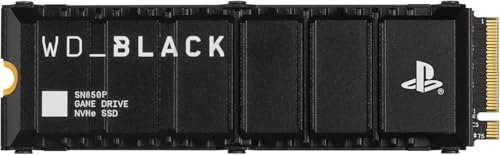
When you purchase a premium, officially licensed option like the WD_BLACK 1TB SN850P (around $240) or the 2TB SN850P (around $470), you are paying for an engineered thermal solution. These drives come pre-fitted with a high-grade aluminum heatsink designed specifically to fit the exact physical dimensions of the PS5 expansion slot. Sony’s clearance guidelines are incredibly strict: the total height of the SSD and its heatsink cannot exceed 11.25mm (with a maximum of 8.0mm of structure above the SSD board and 2.45mm below it). A pre-installed heatsink guarantees that the drive will slide perfectly into place, make proper contact with the internal space, and dissipate heat efficiently without bulging against the expansion bay cover.
Pros
- Sustained High Performance: By keeping the SSD controller cool, a heatsink ensures your drive consistently hits speeds up to 7,300 MB/s, preventing the sudden frame drops or loading delays associated with thermal throttling.
- Long-Term Hardware Protection: Extreme heat degrades NAND flash memory over time. Efficient thermal dissipation significantly extends the lifespan of your expensive storage expansion.
- Console Warranty Compliance: Installing an SSD with a heatsink fulfills Sony’s strict hardware requirements, ensuring you do not void any protections or risk damaging the console’s motherboard due to thermal runaway.
- Worry-Free Media Cabinets: If your PS5 is housed inside a closed wooden media console or home entertainment center with limited ambient airflow, a heatsink offers critical insurance against system-wide overheating.
Cons
- Higher Upfront Financial Investment: Premium pre-assembled drives with integrated heatsinks carry a major price premium. Licensed options like the WD_BLACK SN850P range from around $240 up to around $470.
- Strict Dimensional Constraints: Not all aftermarket heatsinks fit the PS5. If you purchase a heatsink that is even 1mm too tall or too wide, you will not be able to screw the metal expansion bay cover back on.
- Installation Complexity for DIY Kits: Opting for a separate bare drive and a third-party heatsink requires manual assembly, which involves carefully applying delicate thermal pads and securing tiny screws without damaging the drive.
Who Should Buy It
You should invest in a premium, pre-assembled SSD with an integrated heatsink if you want a seamless, zero-stress installation experience. If you are a gamer who frequently downloads and plays massive, high-bandwidth titles that push hardware to its limits, the peace of mind offered by an officially licensed drive is worth the premium. This is also the ideal route for anyone setting up a premium home entertainment center designed to last well into 2026 without needing to reopen the console chassis for maintenance or repairs.
Who Should Skip It
You should skip buying expensive, pre-assembled licensed drives if you are on a strict budget and possess a basic level of comfort with DIY hardware assembly. If you are willing to spend ten minutes applying thermal pads and mounting a cheap, compatible aftermarket heatsink onto a bare Gen4 SSD, you can save a significant amount of money while achieving identical thermal performance.
Cheaper Alternatives
While premium licensed options provide ultimate peace of mind, budget-conscious gamers have several excellent paths to expand their storage without overpaying. Below is a breakdown of the most common cost-saving strategies.
| Option | Typical Cost Range | Key Trade-off |
|---|---|---|
| Bare Gen4 SSD + Third-Party Heatsink | around $110 – around $180 (Total) | Requires manual assembly; must double-check dimensions to ensure the heatsink is under 11.25mm tall. |
| Budget SSD with Factory Heatsink | around $130 – around $190 (2TB) | Slightly slower sequential speeds (approx. 6,000 MB/s) and lacks official PlayStation branding or licensing. |
| External USB Extended Storage (No Heatsink) | around $60 – around $110 (2TB) | Cannot play PS5 games directly from the drive; must transfer PS5 games back to internal storage to play them. |
FAQ
What happens if I run a PS5 SSD without a heatsink?
If you run a high-speed PCIe Gen4 SSD without a heatsink, the drive will quickly reach critical temperatures (above 80°C / 176°F) under load. To prevent permanent damage, the SSD will trigger its internal thermal throttling mechanism, drastically cutting your read and write speeds. This will manifest as stuttering graphics, severe texture pop-in, freezing, and eventually, the console crashing or shutting down entirely to protect its hardware.
Can I use any standard M.2 SSD heatsink inside the PS5?
No. The PS5 expansion bay has very strict physical limitations. The entire assembly—including the SSD, thermal pads, and heatsink—cannot exceed 110mm in length, 25mm in width, and 11.25mm in height. Many standard PC heatsinks are designed with large fins that stand 15mm to 20mm tall; these will prevent you from closing the PS5’s metal expansion plate and outer console cover. Always check for “PS5-compatible” specifications before purchasing an aftermarket cooler.
Does installing a third-party heatsink void my PS5 warranty?
No, installing a third-party SSD or a separate heatsink does not void your PlayStation 5 console warranty. Sony designed the console with a user-accessible expansion bay specifically to encourage storage upgrades. However, if you physically damage the internal components of the console or the expansion bay screw threads during a careless DIY installation, that specific physical damage would not be covered under warranty.
Do external USB hard drives or SSDs need a heatsink for the PS5?
No, external USB drives do not require a heatsink. These external drives operate at much lower speeds and wattages (typically drawing under 4.5 watts) compared to internal NVMe M.2 SSDs. Furthermore, because they sit outside the console chassis in the open air, natural convection is more than enough to keep them within safe operating temperatures.
Related guides
- Best Free MMOs on Steam: Subscription Limits, Pay-to-Win and Time Cost (2026)
- Best Free Horror Games on Steam: How to Pick One That Fits Your PC and Your Nerves (2026)
- Black Frame Insertion vs VRR: Which Smoothness Feature Should You Use?
- Best Webcams for Streaming: 11 Listings Compared by Resolution, Focus and Light (2026)








