
Most PS5 storage upgrades fail before the drive is ever installed — and the culprit is almost always the heatsink. Buyers grab the cheapest aluminum slab they can find, then discover it’s 2 millimeters too tall for the console’s internal cover, or too wide to clear the retention clip, or shaped in a way that blocks the cooling fins Sony designed into the expansion slot area. Others swing the opposite direction, buying a full retail SSD with an oversized tower cooler that physically cannot close the PS5’s M.2 slot cover. The result is either a return shipping label or a drive that thermal-throttles anyway because the pad never made proper contact.
This guide cuts through the noise. The PS5 has unusually strict heatsink requirements compared to a PC, and once you understand three quick decisions and a handful of measurements, choosing the right one takes about ten minutes.
As an Amazon Associate we earn from qualifying purchases at no extra cost to you.


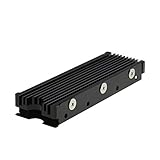
Our Top Picks
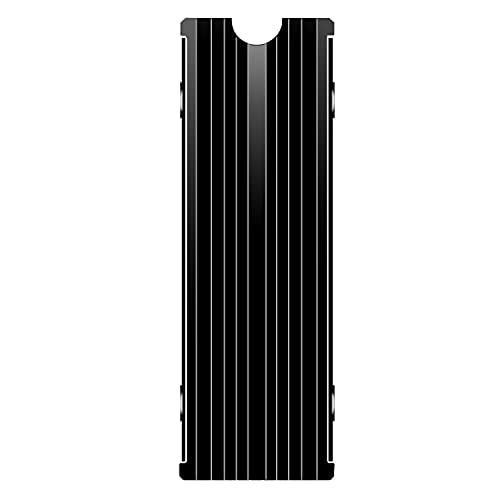 M.2 Heatsink Cooler 2280 SSD Double-Sided Heat Sink3"L x 0.95"W x 0.4"H3 x 0.95 x 0.4 inches0.1 PoundsCheck on Amazon
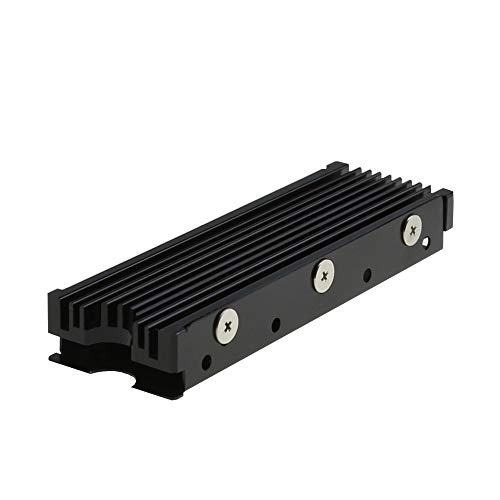 MHQJRH M.2 2280 SSD heatsink for PC /Double Side Heatsink(black)3 x 0.95 x 0.4 Inches0.1 poundsCheck on Amazon


Top 3 picks at a glance
Decide These 3 Things First
1. Is the heatsink going on a bare drive, or are you buying a drive that already has one? A bare NVMe SSD plus a $6–$14 add-on heatsink is almost always the better value. Pre-heatsinked drives like officially licensed options typically add $30–$50 to the price for the same thermal performance.
2. Single-sided or double-sided drive? Flip your SSD over. If both faces have chips, you need a heatsink with thermal pads on both sides. Many budget sinks are single-sided only, which leaves half your drive’s surface uncooled.
3. Do you care about using the drive in a PC later? If yes, check the total installed height. PC motherboard shields often allow less clearance than the PS5 does, so a low-profile design is more versatile.
Size and Dimensions: The PS5’s Hard Limits
Sony’s official specification allows an M.2 SSD with a total thickness of up to 11.25 millimeters, measured from the motherboard to the top of the heatsink. Your drive itself typically takes 2.2–3.8 mm of that, leaving roughly 7.5–8 mm of headroom for the sink and its thermal pads. Practically every flat heatsink on the market clears this — the problems come with tall finned designs or sinks bundled with thick towers.
The drive slot itself accepts the 2230, 2242, 2260, 2280, and 22110 form factors, but 2280 (80 mm long, 22 mm wide) is by far the most common and what nearly all aftermarket sinks are cut for. A sink designed for 2280 measures roughly 80 × 22 mm on its base, often extending a few millimeters wider once the side clips are factored in — total widths of 24–28 mm are normal and fine. Check the listed installed height: anything under 8.5 mm total is safe for the PS5. Weight is negligible across the category; even full metal sinks run 10–30 grams.
Material: Aluminum Is Fine, Copper Is a Bonus
Nearly every heatsink in this class is extruded aluminum, and that is genuinely sufficient for a single M.2 drive. An SSD generating sustained loads only produces a few watts of heat — nothing like a GPU. Aluminum’s thermal conductivity of roughly 205 W/mK handles this easily when contact is good.
Some models add a copper plate or copper core between the pad and the aluminum fins. Copper conducts at around 385 W/mK, which helps spread heat from the controller more quickly, but the real-world difference on a PS5 drive is modest. Do not pay a large premium for copper. What matters far more is pad quality and clamping pressure, covered below.
Construction: Pads, Clamping, and Coverage
This is where cheap and good heatsinks actually diverge. Look for three things:
Thermal pad thickness and count. A proper PS5-capable sink includes pads on both sides for double-sided drives. Pad thickness of 1–1.5 mm on the controller side is typical; thicker pads (2–3 mm) are sometimes used to fill gaps on single-sided sinks over double-sided drives, which works but reduces efficiency. Silicone pads are standard; some premium kits include multiple pad thicknesses so you can match your specific drive.
Clamping mechanism. Screw-down designs with a backing plate apply even pressure across the whole drive and hold pads in consistent contact. Simple push-on or clip designs are faster to install but can leave air gaps, and air gaps kill heat transfer. If you can, choose a two-piece screw-together design over a friction-fit shell.
Fin or surface design. Grooved or finned top surfaces add surface area, but inside a closed PS5 with limited airflow over the M.2 bay, this matters less than manufacturers imply. A flat, well-clamped sink performs nearly as well in the console’s real conditions.
Performance and Compatibility in Real Use
The PS5’s M.2 slot runs at PCIe Gen4 speeds, and Sony requires a read speed of 5,500 MB/s or faster — a spec that applies to the drive, not the heatsink. The heatsink’s job is simply preventing thermal throttling, where a drive drops from 7,000+ MB/s sequential speeds to a fraction of that under sustained load to protect itself. A properly fitted heatsink keeps controller temperatures in a range where a Gen4 drive sustains its rated performance during long game transfers and play sessions.
One honest caveat: any functioning heatsink — even a $6 basic model — will keep a Gen4 drive well below throttling thresholds in a PS5. The premium options buy you better pad materials, cleaner installation, and officially licensed peace of mind, not dramatically lower temperatures. If a listing claims specific degree-level temperature drops, treat it as marketing unless independently verified; you don’t need lab-grade claims to make a good choice here.
Price Tiers: What Each Level Buys You
Budget ($5–$10): Basic aluminum sinks like the M.2 double-sided models around $5–around $6. You get a screw or clip mounting kit, silicone pads, and adequate cooling. The tradeoffs are thinner pads, occasional fit sloppiness, and you must verify double-sided pad coverage yourself since listings can be vague.
Mid-range ($10–$20): Models like the Sabrent SB-PSHS at around $13, designed explicitly around the PS5’s clearance and cover-fit requirements. Pads are pre-applied or precisely sized, instructions are clear, and the failure risk of an ill-fitting sink essentially disappears.
Premium ($50+ standalone heatsinks, or bundled drives): Here you’re mostly paying for branding and bundling. Officially licensed options like the WD_BLACK SN850P with integrated heatsink run around $240 for 1TB and remove all guesswork — the sink is guaranteed to fit the cover and the drive meets the speed spec. You pay a $30–$50 premium over buying a comparable bare drive plus a separate sink.
Warranty and Support
Heatsinks themselves carry little to break, but warranty quality signals how a company handles fit problems. Look for at least a 1-year warranty on third-party sinks; established brands often offer longer coverage on bundled drives (check the SSD warranty separately — many Gen4 drives carry 5-year warranties). Buying a bundled, officially licensed drive means one warranty covers the whole assembly, which simplifies any RMA if a thermal pad shifts or the sink arrives damaged.
Delivery and Installation Considerations
Installation in a PS5 takes 10–15 minutes with a small Phillips screwdriver: remove the side panel, unscrew the M.2 slot cover and spacer, seat the drive at the correct standoff position (the slot supports multiple lengths — set the spacer for 2280), and reassemble. No thermal paste is involved; the pads handle everything. Order a heatsink with a few days of buffer before you plan to install it, so you can test-fit and return if needed. If a sink arrives with pads already peeled or misaligned, request a replacement rather than improvising — pad placement matters for contact.
Spec Checklist
| Spec | Budget ($5–$10) | Mid ($10–$20) | Premium / Bundled ($50+) |
|---|---|---|---|
| Total installed height | ~6–8.5 mm (verify listing) | Under 8.5 mm, PS5-verified | Guaranteed PS5 fit (licensed) |
| Thermal pads | Single-sided or thin double-sided, 1–2 mm | Pre-sized double-sided, 1–1.5 mm | Factory-applied, matched to drive |
| Material | Aluminum | Aluminum, some with copper plate | Aluminum/copper, integrated design |
| Mounting | Clip or basic screws | Screw-down with backing plate | Integrated, no assembly |
| PS5 cover clearance tested | Not stated — check reviews | Explicitly stated | Certified |
| Warranty | 30–90 days typical | 1 year or more | 5 years (drive) + sink coverage |
Red Flags
No total height listed. If the listing doesn’t state installed thickness, assume it may not clear the PS5 cover and look elsewhere.
“Universal” fit with no pad thickness specs. Vague listings usually mean single-sided pads and inconsistent clamping.
Tall finned tower designs. Anything exceeding 8.5 mm installed height won’t close the cover.
Missing mounting screws or standoff. The PS5’s original screw and spacer reuse is standard, but the heatsink must include its own drive-clamping hardware.
Inflated performance claims. A heatsink cannot make a 5,000 MB/s drive faster, and no sink “unlocks” Gen4 speeds — the drive’s controller determines speed.
FAQ
Do I really need a heatsink for a PS5 SSD?
Sony requires one. The console’s design assumes a heatsink is installed, and without it a Gen4 drive can throttle during long transfers. Even a basic $6 sink satisfies the requirement.
Can I use a PC M.2 heatsink in a PS5?
Yes, as long as total installed height stays under 11.25 mm — Sony’s own limit — and the sink supports double-sided drives if yours is double-sided. Most flat 2280 sinks fit fine.
Is it cheaper to buy a heatsink separately or a drive with one pre-installed?
Separate is cheaper. A quality $6–$14 sink plus a bare drive typically saves $30–$50 versus the same drive bundled with a heatsink, with little real thermal difference.
Do thicker thermal pads mean better cooling?
No. Pads should be just thick enough to fill the gap — typically 1–1.5 mm. Overly thick pads reduce contact pressure and actually insulate the drive rather than cool it.
Related guides
- Best Free MMOs on Steam: Subscription Limits, Pay-to-Win and Time Cost (2026)
- Best Free Horror Games on Steam: How to Pick One That Fits Your PC and Your Nerves (2026)
- Black Frame Insertion vs VRR: Which Smoothness Feature Should You Use?
- Best Webcams for Streaming: 11 Listings Compared by Resolution, Focus and Light (2026)








