
Our Top Picks

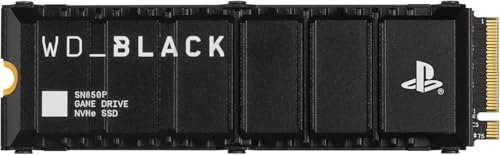


Top 3 picks at a glance
The Short Answer
To fit inside the PlayStation 5 console’s dedicated expansion slot, an M.2 Solid State Drive (SSD) must meet strict physical and technical specifications. The short answer is that the PS5 supports M.2 NVMe PCIe Gen4 x4 SSDs with a width of up to 25 mm (0.98 inches), a length of up to 110 mm (4.33 inches), and a total thickness of up to 11.25 mm (0.44 inches) including the mandatory heatsink.
While the PS5 can accommodate several standard M.2 lengths (specifically the 2230, 2242, 2260, 2280, and 22110 form factors), the vast majority of gaming SSDs on the market are the 2280 size. This means the drive itself measures 22 mm wide by 80 mm long. However, the critical bottleneck is almost always the heatsink height. Sony requires that the cooling structure rises no more than 8.0 mm (0.31 inches) above the SSD’s board, and extends no more than 2.45 mm (0.09 inches) below it. If your chosen drive exceeds these dimensions, the metal slot cover will not close, potentially disrupting the console’s internal air pressure and cooling efficiency.
As an Amazon Associate we earn from qualifying purchases at no extra cost to you.



Standard Sizes
When selecting an SSD for your home entertainment setup, spatial planning is just as important as matching the decor of your media room. Below is a detailed breakdown of the exact dimensions permitted by Sony for the PS5 SSD expansion bay. Ensure your drive and heatsink combination fits comfortably within these parameters before purchasing.
| Dimension Parameter | Maximum Metric Limit (mm) | Maximum Imperial Limit (inches) | Standard Form Factors Supported |
|---|---|---|---|
| Total Width | 25.0 mm | 0.98 in | 22 mm (standard M.2 width) |
| Supported Lengths | 30 mm, 42 mm, 60 mm, 80 mm, 110 mm | 1.18 in, 1.65 in, 2.36 in, 3.15 in, 4.33 in | 2230, 2242, 2260, 2280, 22110 |
| Total Thickness (with Heatsink) | 11.25 mm | 0.44 in | Combined top, bottom, and PCB thickness |
| Top-side Clearance (Above PCB) | 8.0 mm | 0.31 in | Main heatsink body |
| Bottom-side Clearance (Below PCB) | 2.45 mm | 0.09 in | Under-drive cooling plate or thermal pad |
How to Measure Your Space
Upgrading your console’s storage is highly satisfying, but it requires a careful layout plan. Just as you would measure a wall alcove before buying a new sideboard, you must measure and verify your SSD’s physical footprint. Follow these steps to ensure a flawless physical integration:
- Verify the M.2 Form Factor Code: Look at the product description of your prospective SSD. It will typically be labeled with a four or five-digit code like “2280”. The first two digits represent the width (22 mm), and the last two or three digits represent the length (80 mm). Ensure this matches one of the five accepted lengths.
- Check the Heatsink Dimensions Separately: Many high-performance SSDs are sold as bare drives, requiring you to purchase an aftermarket heatsink. Measure the heatsink’s external dimensions with a caliper if possible. The total width of the assembled unit must not exceed 25 mm.
- Calculate the Vertical Profile (Thickness): If assembling a separate drive and heatsink, add the thickness of the thermal pads, the SSD circuit board (usually around 0.8 mm to 1.2 mm), and the heatsink itself. The portion of the assembly sitting above the circuit board must remain under 8.0 mm.
- Assess the Base Clearance: Some heavy-duty, dual-sided heatsinks wrap entirely around the SSD. Measure the thickness of the metal plate on the underside of the drive. If this bottom plate is thicker than 2.45 mm, the SSD will not sit flat in the expansion bay, which can bend the connector pins.
- Inspect the Expansion Bay Standoffs: Once you slide off the PS5’s outer faceplate and unscrew the metal expansion cover, look at the screw-hole track. You will see numbered holes corresponding to 30, 42, 60, 80, and 110 mm. Ensure the spacer (the small metal ring) is placed in the correct slot corresponding to your measured drive length before tightening the retention screw.
By Room or Use Case
How you upgrade your PS5 storage depends heavily on how your console fits into your wider household. Whether your console lives in a high-traffic family room or a dedicated, high-end entertainment cave, matching your storage size and budget to your lifestyle is essential.
The Casual Family Media Room (1TB Upgrades)
If your PS5 is situated in a shared living room where it serves as both a casual gaming hub and a streaming device, a modest 1TB storage expansion is usually the sweet spot. This setup typically accommodates a handful of active multiplayer games, family party titles, and essential media apps without breaking the bank.
For this use case, drives like the entry-level Fanxiang 1TB PCIe Gen4 (with read speeds up to 4800 MB/s, typically priced between $100 and $170) or high-speed alternatives like the Fanxiang 1TB NVMe with built-in heatsink (offering up to 7000 MB/s, priced in the $130 to $190 range) are ideal. They offer plenty of space for casual rotation while keeping the console quiet and running cool in standard living room media consoles.
The Dedicated Gaming Den (2TB to 4TB Upgrades)
In a dedicated gaming environment or home theater where performance is paramount, a 2TB or 4TB drive is the standard. Modern high-fidelity games regularly demand over 100GB of storage space each. A larger drive ensures that you do not have to constantly delete and redownload files, preserving your solid-state drive’s lifespan and saving you time.
For serious setups, premium, officially licensed drives like the WD_BLACK SN850P series are the industry standard. A 2TB WD_BLACK SN850P with an integrated low-profile heatsink (priced between $250 and $460 depending on retail promotions) offers blazing-fast read speeds of up to 7,300 MB/s. These drives are specifically engineered to fit the exact physical envelope of the PS5 expansion bay, guaranteeing a perfect fit and optimum thermal performance under heavy, multi-hour gaming sessions.
The Future-Proof Living Room Setup (8TB Ultra Storage)
For collectors, digital archival enthusiasts, and households with multiple active gamers sharing a single console, maximum capacity is the ultimate luxury. The PlayStation 5 supports storage capacities up to 8TB. As game sizes continue to swell, looking forward to 2026, a massive storage buffer ensures that your physical entertainment hub remains completely self-contained and future-proof. While 8TB NVMe Gen4 drives are premium investments—often ranging from $700 to over $1,000—they eliminate storage anxiety entirely, allowing you to keep hundreds of titles ready to play instantly in your home theater room.
Common Sizing Mistakes
Even seasoned tech enthusiasts can make simple installation mistakes when upgrading console hardware. Avoid these common pitfalls to protect your investment and your console:
- Buying a High-Profile PC Heatsink: Many SSDs marketed for desktop PCs feature massive, finned aluminum heatsinks or even integrated cooling fans. These are far too tall for the PS5’s shallow 11.25 mm bay. Always look specifically for “low-profile” heatsinks or PS5-compatible labels.
- Leaving the Metal Cover Plate Off: Some users attempt to bypass height restrictions by leaving the PS5’s internal metal slot cover off so a tall heatsink can stick out. This is a critical mistake. The PS5’s cooling system relies on negative pressure; leaving this cover off disrupts the intended airflow, causing the SSD—and nearby console components—to run much hotter.
- Forgetting the Mounting Spacer: The small metal spacer that comes inside the PS5 expansion bay must sit underneath the SSD, aligning with the screw hole. If you screw the SSD directly down to the green motherboard without the spacer underneath, the drive will bend at an angle, risking permanent structural damage to the M.2 connector.
- Ignoring Underside Clearance on DIY Heatsinks: If you buy a bare drive and attach a third-party, clamp-style heatsink, the bottom metal tray can easily exceed the 2.45 mm lower clearance limit. This prevents the SSD from slotting straight into the port, putting dangerous vertical tension on the interface.
FAQ
Can I use an SSD without a heatsink in my PS5?
No, Sony strongly recommends against using an M.2 SSD without a heatsink. High-performance PCIe Gen4 SSDs generate significant heat under load, easily reaching temperatures over 80°C (176°F). Without a proper thermal management system, the drive will rapidly overheat, leading to thermal throttling (where performance drops dramatically to prevent damage) or system crashes.
What happens if my SSD heatsink is too tall for the expansion bay cover?
If your heatsink is too tall, you will not be able to screw the metal expansion bay cover back in place. Leaving the cover off is not recommended, as it alters the console’s internal air channels and can lead to excessive dust buildup and overheating. If your heatsink is too big, you should replace it with a low-profile, PS5-compatible model.
Does the PS5 Slim use the same SSD sizes as the original PS5?
Yes. Although the overall chassis of the PS5 Slim is smaller and lighter, the internal M.2 expansion bay utilizes the exact same dimensional requirements. It supports the same 2230, 2242, 2260, 2280, and 22110 lengths, and the same height limits (up to 11.25 mm total thickness) apply.
What speed does my PS5 SSD need to be?
The PlayStation 5 requires a PCIe Gen4 x4 M.2 NVMe SSD with a sequential read speed of at least 5,500 MB/s. While some slower Gen4 drives (such as those running at 4,800 MB/s) may physically fit and function for basic storage, they may cause stuttering or loading errors in demanding, next-generation games that rely on rapid asset streaming.
Related guides
- Best Free MMOs on Steam: Subscription Limits, Pay-to-Win and Time Cost (2026)
- Best Free Horror Games on Steam: How to Pick One That Fits Your PC and Your Nerves (2026)
- Black Frame Insertion vs VRR: Which Smoothness Feature Should You Use?
- Best Webcams for Streaming: 11 Listings Compared by Resolution, Focus and Light (2026)








