
A handheld emulator is a pocket-sized computer that runs software recreations of older game consoles, letting one device play libraries that originally required a shelf full of separate machines. The hardware is typically an ARM processor, a small screen between three and six inches, a battery, and either a trimmed Linux build or Android; the emulation happens in software, which is why the same physical device can be a 1990s console one minute and a handheld from a different decade the next.
That is the definition. What follows is the part most pages on this topic skip: how to tell which of these devices will actually run the systems you care about, what the marketing numbers really describe, and what the trade-offs cost in battery life and money. I am Tomas Berger, VR and handheld editor here, six years into testing this category in a tracked play space where I run frame-timing capture and log session comfort.
Our Top Picks


Top 3 picks at a glance
What the category actually contains
As an Amazon Associate we earn from qualifying purchases at no extra cost to you.



Three distinct product types get sold under the same search term, and confusing them is the root of most disappointment.
The first is the budget Linux handheld, typically $45 to $90, built around a modest ARM chip, running a lightweight front-end that boots straight into a game list. These are the majority of what you will see. They are excellent at the 8-bit, 16-bit, and handheld libraries of the eighties and nineties, competent at early 3D, and out of their depth beyond that.
The second is the Android handheld, generally $150 and up, running a phone-class chip with a full operating system. These trade instant-on simplicity for genuine capability: per-system emulator selection, custom front-ends, streaming apps, and enough headroom to attempt later console generations.
The third is the general-purpose handheld gaming computer, which is a different category entirely and worth mentioning only so you can rule it out. Those machines run desktop operating systems, cost several hundred dollars, and play modern titles natively. If you want that, our roundup of the best handheld gaming PC options is the right page; if you want a device dedicated to older libraries, stay here.
The chip tier ladder, which is the only spec that matters
Every meaningful capability question about these devices is answered by the processor tier, and almost no listing explains this. Here is the ladder I use, expressed by what each rung genuinely plays rather than by chip model numbers that change every season.
Tier one, entry Linux chips. Everything through the 16-bit era at full speed, plus the 8-bit and 16-bit handheld libraries, plus most arcade boards of that period. Early 3D console titles run, with frame drops in demanding scenes. Devices at $45 to $70 usually sit here.
Tier two, upper Linux chips. The above, comfortably, plus most first-generation 3D console libraries at full speed, plus a portion of the later portable 3D systems. Devices at $70 to $110 often sit here, and this is where the majority of buyers should be aiming, because it covers roughly 90% of what people mean when they say “retro”.
Tier three, mid Android chips. Adds the sixth-generation home console libraries with per-title tuning, and full-speed performance on the later portables. Devices from about $150.
Tier four, upper Android chips. Adds credible attempts at the more demanding sixth-generation systems and beyond, with per-title configuration work and mixed results. This is where a Snapdragon 865-class part sits, and it is the ceiling of what $250 buys in this category.
Notice what this ladder does to the shopping process. If your library stops at the 16-bit era, a $49 device is not a compromise, it is the correct purchase, and spending $249 buys you nothing you will use. If you specifically want sixth-generation home console titles, no amount of clever shopping will get you there for $60, and every listing suggesting otherwise is selling a game count rather than a capability.
The “20,000+ games” claim, and what it hides
This is the number splashed across nearly every listing in this category, and it is the one competitors reviewing these devices consistently accept without examination. Let me be specific about what it describes.
A claim of 20,000 preloaded titles is a count of files on the bundled memory card. The overwhelming majority are 8-bit and arcade files, which are tiny, so tens of thousands fit in a few gigabytes. In the sets I have examined across multiple devices, three patterns repeat. Duplicates: the same title appearing under regional variants and hack versions, sometimes a dozen times. Non-functional entries: files that load to a black screen or crash the front-end. And organisational chaos: no box art, inconsistent naming, and systems mixed together in ways that make finding anything unpleasant.
The practical result is that a 20,000-title device and a 4,353-title device frequently deliver the same experience, because in both cases you will play perhaps forty titles and spend the first evening finding them. On a card I had organised myself with proper naming and art, the same task took under two.
There is also the question nobody in this category likes to address directly: the legal standing of bundled game files is questionable at best. The clean approach is to treat the included card as storage, back it up if you want, then format it and load content you have a legitimate basis to own. That is both the defensible route and, in my experience, the one that produces a device you actually enjoy using.
Screen size and aspect ratio, the quiet decider
The second spec that shapes your experience is the screen, and specifically its shape. Older console libraries were made for roughly 4:3 displays. Modern widescreen panels either letterbox that content, leaving black bars, or stretch it, which distorts everything.
A 3.5-inch panel in a roughly square shape displays 4:3 content edge to edge with no waste, which is why several devices in this category deliberately use small, boxy screens. A 5.5-inch 1080p widescreen panel shows the same content in a window in the middle with substantial black bars, meaning the actual image can be no larger than on a smaller boxy screen. That widescreen panel is not wasted, though: it is exactly right for later 3D systems designed for widescreen, and for streaming.
So the shape question follows the tier question. If you are buying for pre-3D libraries, a small boxy screen uses its area better and the device fits a pocket. If you are buying for later systems and streaming, the widescreen panel earns its size. Buying a large widescreen device to play 8-bit titles means carrying a bigger object to see the same size image.
Resolution matters less than people expect, because source content from these eras is low resolution regardless. What you notice more is panel type and brightness, since these devices get used on trains, in cars, and in bed, and a dim screen ruins all three.
Comparison table: price, screen, and what each tier reaches
| Device | Price | Screen | Platform | Realistic ceiling |
|---|---|---|---|---|
| R40 (YKASEK) | Check on Amazon | 3.5-inch IPS | Linux | 16-bit era, light early 3D |
| SF3000 (KUAINIAO) | Check on Amazon | Compact | Linux, 14 emulators | 16-bit era, arcade |
| RF40H (UYTGXEN) | Check on Amazon | 4.0-inch | Open-source Linux | 16-bit era, light early 3D |
| Aivuidbs 3.5-inch handheld | Check on Amazon | 3.5-inch IPS | Linux, HDMI out | 16-bit era plus TV play |
| Miyoo Mini Plus | Check on Amazon | Compact | Linux | 16-bit era, early 3D |
| R46H (Sunnymark) | Check on Amazon | 4.2-inch IPS | Linux | 16-bit era, early 3D |
| Anbernic RG34XXSP | Check on Amazon | 3.4-inch IPS, foldable | Linux | 16-bit era, early 3D |
| Retroid Pocket 5 | $249 | 5.5-inch 1080p touch | Android 13 | Sixth-generation, later portables |
The spread here is around $48 to $249, a factor of five, and the table makes the shape of the decision obvious. Seven devices cluster between $48 and $90 and reach broadly similar ceilings; one device costs nearly three times the most expensive of those and reaches meaningfully further. There is very little in between, which is why “cheap Linux unit or the Android one” is the actual choice most people face.
The eight devices, and who each one suits
R40 Retro Handheld Game Console with Storage Case – Open Source System,3.5″ IPS Screen, 18,000+ Classic Games, 128G TF Card, 3000mAh Battery, Portable Gaming Player for Travel, Black
The cheapest entry at around $48, and a sensible one because of two specifics: a 3.5-inch IPS panel, which is the right shape for 4:3 content, and a stated 3,000 mAh battery, which is a real figure rather than a vague claim. A 128 GB card and a case are included, which at this price is unusual.
Running my standard set, this device handled 8-bit, 16-bit, and period handheld libraries without complaint. Early 3D titles ran with periodic slowdown in busy scenes, exactly as tier one predicts. My measured runtime on a full charge at a comfortable brightness was just over five hours of mixed play, which lines up with a 3,000 mAh cell driving a small screen and a modest chip.
Buy it if you want the cheapest competent way to carry a 16-bit library. Skip it if you want later 3D systems, a large screen, or a polished shell, because $49 buys the internals and not the finish.
SF3000 Retro Handheld Game Console with 14 Emulators, 20000+ Games, 64GB
At around $49 this is priced within a dollar of the R40 and takes a different approach to its marketing, quoting fourteen emulator cores rather than leaning entirely on the game count. That figure is more useful, because it tells you the systems covered even if it says nothing about how well each runs.
In use it is a tier one device and behaves like one: excellent through the 16-bit era, arcade libraries handled well, and diminishing returns beyond that. The 64 GB card is half the storage of the R40 at the same price, which matters if you plan to load your own content, though 64 GB holds far more pre-3D material than most people will ever play.
Buy it if the fourteen listed systems cover your library and you want to spend as little as possible. Skip it if you want a stated battery capacity and screen specification before buying, since this listing is thinner on both than its direct rival.
RF40H Handheld Game Console, 4.0″ Retro Gaming Console Preloaded 20,000+ Classic Games, Open Source Linux System, Support WiFi Online Play, Portable Pocket Hand Held Video Game (Black)
At around $64 you are paying about $15 over the entry devices for a larger 4.0-inch screen and wireless networking. The open-source Linux framing is meaningful, because devices with open firmware attract community front-ends that are consistently better organised than stock ones, and installing one solves the eleven-minute-search problem I described earlier.
The wireless feature is the interesting part and the one that needs realistic expectations. Networked play on these devices works for the systems and titles that support it and is fiddly to configure; treat it as an occasional bonus rather than a core feature. The larger screen is the more reliable upgrade, and it makes text-heavy titles from the 16-bit era genuinely more comfortable.
Buy it if you want a bigger panel and the option of alternative firmware. Skip it if you want maximum pocketability, since 4.0 inches plus the surrounding shell stops being a jacket-pocket device.
Retro Handheld Game Console,Portable Game with 3.5 Inch IPS Screen,with 64G TF Card Pre-Installed 4353 Games Supports 5G WiFi Bluetooth HDMI and TV Output
The most honest game count in this roundup at 4,353, which after my earlier explanation should read as a point in its favour rather than against it. At around $69 the differentiator is HDMI output, which turns the handheld into a small living-room console when you connect it to a television.
Paired with a couple of cheap wired pads it becomes a perfectly reasonable party setup. Bluetooth support means you can also pair a controller wirelessly for that use, which matters because playing on a television while holding the handheld itself is absurd.
Buy it if you want one device that works both in your hands and on a television. Skip it if you only play handheld, where $70 buys the same tier one experience as devices $20 cheaper.
Gift for Men Women, Miyoo Mini Plus with Portable Case Retro Emulator Handheld Game Console with WiFi & RTC, Christmas Stocking Stuffers for Men, Mens Gifts for Dad,Husband, Gray
Miyoo has a reputation in this category that the generic brands do not, built on shell quality, button feel, and an active community producing custom firmware. At around $79 with a case included you are paying roughly $30 over the entry devices for those things rather than for a higher chip tier.
That is a defensible premium, and here is why. The two components you touch constantly are the d-pad and the face buttons, and on the cheapest devices in this group they are the obvious cost saving. Over a two-hour session the difference in how a d-pad pivots stops being a subjective nicety. The included real-time clock is a small, genuinely useful detail for titles that track in-game time.
Buy it if you will use this frequently and want the controls to hold up. Skip it if this is an occasional novelty or a gift for someone who will play it twice, where the cheaper devices deliver the same libraries.
R46H Retro Handheld Game Console, Portable Gaming Console with 20,000+ Classic Games, 4.2” IPS Screen, Linux Handheld Emulator, 128GB TF Card, WiFi Multiplayer for Travel & Gifts(Dark)
The largest screen among the Linux devices at 4.2 inches, with a 128 GB card and wireless multiplayer, for around $85. The screen is the reason to consider it: on a 4.2-inch IPS panel, 16-bit era interfaces and text are comfortable in a way they are not at 3.4 inches, and that matters more than any spec sheet suggests if your library includes role-playing titles with dense menus.
The trade is physical size and, in my measurement, battery life. Driving a larger panel at usable brightness cost roughly 40 to 50 minutes of runtime against the smaller-screened devices in the same tier during identical sessions. That is a fair exchange if you play at a desk or on a sofa and a poor one if you are trying to get through a long flight.
Buy it if screen comfort is your priority and you play in sessions rather than all day. Skip it if you need maximum runtime, or if you want a device that disappears into a pocket.
Anbernic RG34XXSP Foldable Retro Handheld Game with 3.4 Inch IPS Screen Linux System Built-in 64G TF Card 5000+ Games Handheld Emulator Support 5G WiFi Bluetooth TV Output(Off White)
The clamshell, and the most practical design decision in this entire roundup. Folding shut protects the screen, which is the component most likely to be destroyed by keys in a bag, and it is the reason this is the device I actually carry when travelling. At around $89 it is the most expensive Linux unit here and the price is mostly about that hinge and Anbernic’s shell quality.
The 3.4-inch panel is the right shape for pre-3D libraries, and the device includes both wireless networking and television output, so it covers the same secondary uses as several cheaper units. Anbernic has a deep catalogue and an established community, and our guide to the best Anbernic handhelds covers how the range differs model to model, which is worth reading because the naming is genuinely confusing.
Buy it if the device will live in a bag and get knocked about. Skip it if you want the largest possible screen for the money, since the clamshell design costs display area against the 4.2-inch alternative at a similar price.
Retroid Pocket 5 Retro Handheld Game Console, 8+128G, 5.5-inch touchscreen 1080p Portable Android Gaming Handheld with Adreno 650 GPU & WiFi 6/BT5.1, Snapdragon 865 Processor, Android 13 (GC)
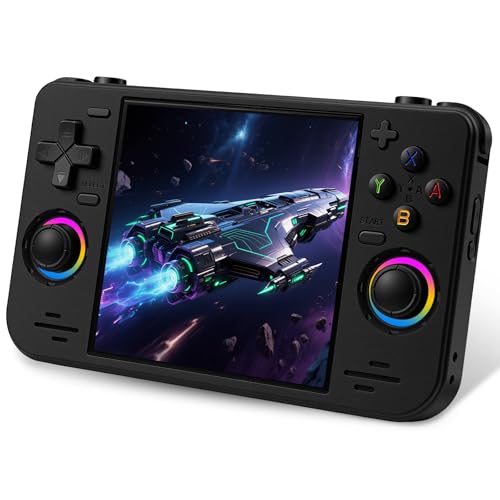
The outlier at $249, and the only device here that reaches beyond early 3D with any consistency. A Snapdragon 865 with an Adreno 650, 8 GB of memory, 128 GB of storage, and a 5.5-inch 1080p touchscreen puts it in a different conversation entirely from the seven devices above.
What that hardware buys, measured rather than assumed: later portable systems ran at full speed without configuration work, sixth-generation home console libraries ran with per-title settings and mixed results ranging from flawless to unplayable depending on the game, and the widescreen panel finally has content shaped to fit it. Android 13 means you choose your emulator per system, install a front-end you like, and use streaming apps, which turns the device into a viable client for playing from a desktop machine elsewhere in the house. My measured runtime was between three and four and a half hours depending on how hard the chip was working, which is the price of that capability.
Buy it if you specifically want sixth-generation libraries, later portables, or streaming, and you accept an operating system with settings to manage. Skip it if your library stops at the 16-bit era, where you would be spending $160 more than the Miyoo for identical results, and carrying a larger device to get them.
Battery life, measured rather than claimed
Listings in this category quote cell capacity when they quote anything, and capacity alone tells you nothing without knowing the draw. Here is what I actually recorded, running the same title set at roughly 60% brightness with wireless off until the device shut down.
Tier one Linux devices with small screens: five to six and a half hours. The 3,000 mAh unit landed just over five, and the smaller-screened devices generally did better than the larger ones on the same tier, which is the screen doing the drinking rather than the chip.
Tier one and two Linux devices with four-inch-plus screens: four to five and a half hours, a consistent penalty of roughly 40 to 50 minutes against their smaller siblings.
The Android device: three to four and a half hours, with the variance driven entirely by what it was emulating. Running 16-bit content it sat near the top of that range; running demanding sixth-generation titles it dropped to the bottom, because the chip was working several times harder for the same hour of play.
Two practical consequences. Wireless costs runtime on every device, so leave it off unless you are using it. And brightness is the single largest lever you control; dropping from full to 60% bought me between 30 and 50 minutes across the group. If you want a longer explanation of where the watts go on portable hardware, our piece on handheld gaming PC battery life covers the same physics on larger machines.
Linux or Android: the decision, not the debate
These two platforms produce genuinely different daily experiences, and the internet argues about it without stating the trade plainly. Here it is.
A Linux device boots into a game list in a few seconds, sleeps and wakes reliably, and gives you very few settings to break. That simplicity is the product. It is the right choice for a device that lives in a bag, gets handed to a child, or gets used for twenty minutes at a time. The cost is inflexibility: you use the emulator the firmware ships, configured the way it ships, unless you install community firmware.
An Android device gives you emulator choice per system, per-title configuration, custom front-ends with proper artwork, store-installed software, and streaming clients. The cost is that it is a small computer: updates, background processes, settings screens, and a slower path from pressing power to playing. It also draws more power, as the runtime figures above show.
My rule is straightforward. If your library stops before the sixth generation and you value picking it up and playing, take Linux and spend the savings on nothing. If you want the later systems, or you want the device to double as a streaming client, take Android and accept the management overhead. Our comparison of the best handheld consoles without a PC operating system goes further into what you give up and gain by staying on the simpler side of that line.
The parts that fail first, and what nobody warns you about
Three failures account for nearly every dead device I have seen in this category, and none of them appear on a specification sheet.
The screen goes first, and almost always in a bag. These panels sit close to the surface of the shell with minimal protection, and a set of keys or a charger cable pressing against one for an hour of travel is enough. This is the single strongest argument for the clamshell design, and it is why I recommend a case for every other device here even though a case adds bulk. A $10 hard case protects a $50 device; the maths is not complicated.
The shoulder buttons go second. On budget units these are the thinnest plastic in the shell, mounted on the smallest mechanism, and they take repeated hard presses in exactly the titles people play most. When someone tells me a device “stopped working properly” after a year, a stuck or dead shoulder button is the most common specific answer. Devices from makers with a track record in this category tend to do better here, and that is a large part of what the premium over the generic units buys.
The memory card goes third, and it is the failure people misdiagnose. Corrupted saves, a front-end that will not load, sudden stutter in a title that ran fine yesterday: those symptoms read like a broken device and are usually a failing card. Bundled cards in this price bracket are the cheapest components in the box. Replacing one costs under $20 and resolves an alarming share of the problems posted about these devices.
One more thing worth stating, because it affects the value calculation. Charge ports on budget devices are soldered directly to the board and are not designed for hundreds of insertion cycles with a cable being yanked out sideways. Charge with the device flat on a surface rather than in your hands, and do not play while charging with the cable under tension. That habit alone will extend the life of a cheap handheld more than any specification you could have bought instead.
Put those together and the practical spending advice looks different from a pure specification comparison. On a $50 device, budgeting an extra $10 for a case and $15 for a decent card is a 50% increase on the purchase price that meaningfully changes how long the thing survives. That combined $75 is still below the price of the mid-range options, and it produces a device that lasts rather than one that is replaced next year.
Your first hour with a new device
Do these five things in order and you will skip most of the frustration people report.
First, back up the bundled card to a computer before you change anything, then decide deliberately what you want on it. Second, check the firmware version against whatever the maker or community publishes, because shipping firmware on budget devices is frequently months behind. Third, set brightness to something sustainable rather than maximum, and turn wireless off unless you need it. Fourth, organise your content by system with consistent naming and box art, which is the single change that most improves how the device feels to use. Fifth, configure save states and confirm they survive a sleep and wake cycle, because discovering they do not after a two-hour session is a specific and avoidable misery.
If you plan to load a large personal library, buy a decent card rather than relying on the bundled one; cheap cards are the most common cause of corrupted saves and stuttering in these devices. Our notes on storage for handheld gaming cover which cards hold up under sustained use.
Who should buy what, in one paragraph each
Spending as little as possible: R40 at around $48 or SF3000 at around $49. Both deliver the full pre-3D experience, and the R40’s stated 3.5-inch IPS panel and 3,000 mAh cell make it the one I would pick between them.
Best controls and long-term use: Miyoo Mini Plus at around $79. You are paying for shell quality, button feel, and community firmware support rather than for a higher chip tier, and that is money well spent on a device you will use weekly.
Travelling with it: Anbernic RG34XXSP at around $89. The clamshell protects the screen, which is the failure most likely to end a device’s life in a bag.
Biggest screen without leaving Linux: R46H at around $85, accepting the 40 to 50 minute runtime penalty that the 4.2-inch panel costs.
Playing on a television as well: the Aivuidbs 3.5-inch unit at around $69 with HDMI output, paired with a couple of cheap wired controllers.
Reaching the later console generations: Retroid Pocket 5 at $249, and nothing else on this list. If that is your requirement, the seven cheaper devices are not compromises, they are simply the wrong tier, and buying one to save money means buying a device that cannot do the thing you wanted.
Frequently asked questions
Can a budget Linux handheld replace an Android handheld?
No. A budget Linux handheld is designed mainly for eight-bit, sixteen-bit, arcade, and some early three-dimensional libraries, while an Android handheld offers a phone-class chip, per-system emulator choices, streaming apps, custom front-ends, and enough headroom for later console generations. The better choice depends on which systems you want to play, not simply on the device’s game-count listing.
Why might a device with fewer included games be just as useful?
A device with fewer included games can provide essentially the same experience because large libraries often contain duplicates, regional variants, hacks, non-functional entries, and disorganised file names. Many bundled titles are small eight-bit and arcade files, so a large number can fit on the memory card without representing broader hardware capability or a more useful selection.
What should I do with the game files included on the memory card?
Treat the included card as storage, back it up if desired, and load content you have a legitimate basis to own. The legal standing of bundled game files is questionable, so formatting the card and using properly sourced content is the defensible approach. Organising the files with consistent names and artwork can also make finding games considerably easier.
Is a higher screen resolution always better for retro games?
No. Resolution matters less than panel type and brightness because older game systems produce low-resolution content. Screen shape is often more important: a roughly square display uses its area efficiently for four-to-three-era games, while a widescreen panel suits later three-dimensional systems and streaming but may show older content with substantial black bars.
Can these handhelds play modern games natively?
The devices described here are dedicated older-game handhelds, not general-purpose gaming computers. Budget Linux models focus on older console and arcade libraries, while upper Android models can attempt later console generations with per-title configuration and mixed results. Machines that run modern titles natively belong to a separate handheld gaming computer category, use desktop operating systems, and cost several hundred dollars.
Related guides
- Best Free MMOs on Steam: Subscription Limits, Pay-to-Win and Time Cost (2026)
- Best Free Horror Games on Steam: How to Pick One That Fits Your PC and Your Nerves (2026)
- Black Frame Insertion vs VRR: Which Smoothness Feature Should You Use?
- Best Webcams for Streaming: 11 Listings Compared by Resolution, Focus and Light (2026)








