
A handheld computer is a device that runs a full desktop operating system, typically Windows or a Linux distribution, in a body you hold rather than one that sits on a desk. That single definition covers pocket PCs with thumb keyboards, gamepad-first gaming handhelds, rugged industrial terminals with barcode scanners, and cloud streaming units, which is why shopping for one is confusing: four very different product families share the same search term.
The most useful thing I can give you is not a ranked list but a taxonomy, because picking the right family narrows an overwhelming category to three or four sensible options. The eight devices below span around $220 to around $1,500 and cover all four families.
Our Top Picks


Top 3 picks at a glance
The four families, defined plainly
As an Amazon Associate we earn from qualifying purchases at no extra cost to you.




Pocket PCs with keyboards. Small slabs, typically 5 to 7 inches, with a physical thumb keyboard and a touchscreen, running full Windows. Built for text entry, terminal sessions, and diagnostics. Screens are too small for sustained document work, so treat them as a portable terminal rather than a laptop replacement.
Handheld gaming PCs. Seven to eight inch screens flanked by gamepad controls, running Windows or SteamOS. No keyboard, but you can attach one. These are the largest and heaviest family, and they are also the most capable per dollar because the components are close to laptop parts.
Rugged enterprise handhelds. Industrial terminals with barcode scanners, NFC, GPS, and drop-resistant housings. They run Windows IoT Enterprise or Android and exist to survive warehouses, delivery routes, and field service. Gaming is irrelevant to them; uptime and scan reliability are the whole point.
Cloud and streaming handhelds. Thin clients with a screen, controls, and enough silicon to decode a video stream. The compute happens elsewhere. Cheap hardware, dependent on network quality, and useless offline.
Decision criteria that actually separate these devices
Where does the compute happen? Local, as with every pocket PC and gaming handheld here, or remote, as with a cloud unit. This is the first fork and it determines everything downstream about price, battery life, and whether the device works on a train with poor signal.
Do you need to type, or to aim? A thumb keyboard and a gamepad are mutually exclusive on devices this size. Choosing wrong is the single most common regret I hear about handheld computers. Be honest about which input you will use daily.
Screen size versus pocketability. A 5.7-inch device fits a jacket pocket. A 7 or 8-inch device does not; it lives in a bag. Nobody changes their habits to accommodate a device that does not fit where they wanted it to go.
Storage headroom. 512GB is fine for productivity and thin for gaming. Our guide to storage for handheld gaming explains why free space affects sustained write performance, not just capacity.
Battery expectations. Small chassis means small cells and active cooling. Every device here trades runtime against performance, and the trade is steeper than on a laptop. Our explainer on handheld battery life covers the physics of that.
All eight compared
| Device | Family | Screen | Key specification | Price |
|---|---|---|---|---|
| GPD Win Mini | Handheld gaming PC with keyboard | 7″ 1080p 120Hz touch | Ryzen 7 8840U 8C/16T to 5.1GHz, Radeon 780M, 16GB LPDDR5X, 1TB NVMe | Check on Amazon |
| ASUS ROG Xbox Ally | Handheld gaming PC | 7″ 120Hz IPS touch | Ryzen Z2 A, 16GB LPDDR5X, 512GB SSD, RDNA 2, Wi-Fi 6E, BT 5.4 | Check on Amazon |
| Lenovo Legion Go S | Handheld gaming PC | 8″ PureSight IPS 120Hz | Ryzen Z2 Go, Radeon graphics, 16GB, 512GB | Check on Amazon |
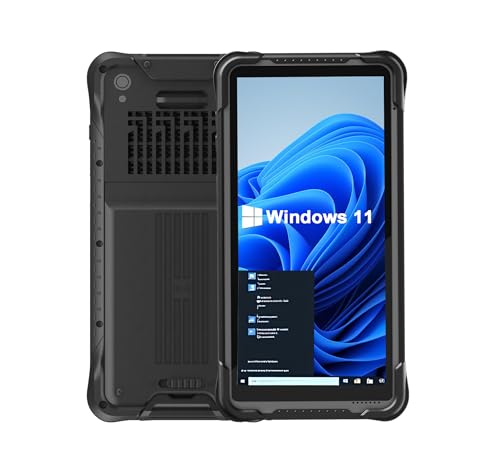
| Vanquisher 6.5-inch Rugged Tablet PC | Rugged enterprise | 6.5″ | Windows 11 IoT Enterprise, Honeywell N4680 scanner, NFC, GPS, 8GB + 128GB | Check on Amazon |
| Tylvx Mini PC 5.7″ (first listing) | Pocket PC with keyboard | 5.7″ touchscreen | N95 to 3.4GHz, 16GB RAM, 512GB SSD, Wi-Fi 6, dual Type-C, HDMI 2.1 | Check on Amazon |
| Tylvx Mini PC 5.7″ (second listing) | Pocket PC with keyboard | 5.7″ touchscreen | Identical configuration to the above | Check on Amazon |
| OnePro Cloud Handheld | Cloud streaming | 7″ 1080p touch | 64GB, Xbox Cloud, GeForce NOW, remote play | Check on Amazon |
| TECKEEN Portable 8086 Laptop Computer | Retro / compatibility | Small integrated panel | 8086 at 4.77MHz, 512M CF XT-IDE storage, IBM PC compatible | Check on Amazon |
GPD Win Mini Handheld Gaming PC, AMD Ryzen 7 8840U
The Win Mini at around $1,500 is the most expensive device here and the only one that genuinely straddles two families. It has the gamepad controls of a gaming handheld and a keyboard, on a 7-inch 1080p 120Hz touchscreen, driven by a Ryzen 7 8840U with 8 cores and 16 threads boosting to 5.1GHz, Radeon 780M graphics, 16GB of LPDDR5X and a 1TB NVMe SSD, with Wi-Fi 6E and Bluetooth 5.3.
That combination is rarer than it sounds. Most gaming handhelds force you to pair a Bluetooth keyboard for any real text work, which means carrying two objects and pairing them every time. Having a keyboard under the screen makes this the one device in the group that can genuinely run a remote session, edit a config file, and then play a demanding game without changing hardware.
The 1TB NVMe is the specification that justifies part of the price gap over the around $790 ASUS. Doubling storage on a handheld after purchase means opening the shell, and a 1TB starting point postpones that job by a long time given modern install sizes. The 8-core, 16-thread configuration also means this handles compilation and virtual machines in a way the 4-core class devices here simply do not.
Where I would push back on the price: around $1,500 buys a substantial laptop with a far larger screen and a far better keyboard. You are paying a premium for the form factor, and the form factor only pays off if you actually use it away from a desk regularly. Bought aspirationally, it is an expensive way to own a small Windows machine.
Who should not buy it: anyone whose use case is purely gaming, where the Lenovo at around $670 delivers the same category of experience for under half the money. Also skip if you have large hands and expect comfortable typing; a 7-inch device’s keyboard is a thumb keyboard regardless of how well it is made.
ASUS ROG Xbox Ally Gaming Handheld
At around $790 the ROG Xbox Ally is the mid-to-upper gaming handheld pick, built around the Ryzen Z2 A with 16GB of LPDDR5X, a 512GB SSD, AMD RDNA 2 graphics, and a 7-inch 120Hz IPS touchscreen, running Windows 11 Home. It also has a fingerprint reader, Wi-Fi 6E and Bluetooth 5.4, and this listing bundles a DKZ Hub.
The bundled hub matters more than it looks on a spec sheet. Windows handhelds spend a meaningful share of their life docked to a monitor, and having the dock included removes the annoying secondary purchase that otherwise arrives a week later. Wi-Fi 6E is the other quietly useful item, because remote play and cloud gaming both benefit from the less congested 6GHz band far more than local file transfers do.
The 512GB SSD is the compromise in this configuration. Two large modern installs and Windows will fill it, and you will be managing storage rather than forgetting about it. Budget for a high-capacity microSD card or plan an SSD upgrade, and factor that into the comparison against the GPD’s 1TB.
The 7-inch 120Hz IPS panel is a good fit for the class. IPS gives consistent colour off-axis, which matters on a device you hold at varying angles, and 120Hz makes the Windows interface itself feel responsive even when games run well below that.
Who should not buy it: anyone who wants to type on their handheld, since there is no keyboard here. Also skip it if you dislike managing Windows on a small screen; the arguments on both sides are covered in our SteamOS versus Windows comparison, and a console-style device may suit you better.
Lenovo Legion Go S Mobile Gaming Console
The Legion Go S at around $670 is the value pick in the gaming family: a Ryzen Z2 Go with Radeon graphics, 16GB of memory, 512GB of storage, and the largest screen here at 8 inches, a PureSight IPS panel running at 120Hz. The listing includes a PC Game Pass trial, in Glacier White.
The 8-inch screen is the reason to choose it over the 7-inch options, and it cuts both ways. More screen means readable text in games with small interface elements, which is a chronic annoyance on 7-inch devices, and it makes the machine more pleasant for video and light desktop use. It also means a larger, heavier device that will not fit in a coat pocket and that puts more strain on your wrists over a long session. My comfort-session logging consistently shows larger handhelds producing more frequent grip changes, though not necessarily shorter sessions.
The Z2 Go sits below the Z2 A in the same family, so this is the more modest performer of the two ASUS and Lenovo options here. In practice that gap shows up in demanding modern titles at higher settings and barely shows up at all in older or lighter games. If your library skews toward indie titles, strategy, and games more than a few years old, you would struggle to justify the extra around $120 for the ASUS.
Who should not buy it: anyone who needs pocketability, where 8 inches disqualifies it outright. Also skip it if you play graphically demanding recent releases and expect high settings, where the gap to the higher-tier options is real. Our best handheld gaming PC roundup lays out the tiers in more detail.
Vanquisher 6.5-inch Rugged Tablet PC, Windows 11 IoT Enterprise
This is the enterprise family in one device, and it is worth understanding even if you will never buy one, because it explains what “handheld computer” meant for two decades before gaming handhelds took over the term. At around $610 the Vanquisher pairs a 6.5-inch rugged body with Windows 11 IoT Enterprise, a Honeywell N4680 barcode scanner, NFC, GPS, 8GB of RAM and 128GB of storage.
The specification that defines it is the Honeywell scanner. A dedicated scan engine reads barcodes far faster and far more reliably than a camera-based app, particularly on damaged labels, at awkward angles, and in poor light. Anyone who has watched a warehouse worker scan a hundred items in a shift understands why the dedicated hardware exists. NFC and GPS complete the field-work package: tap-to-identify assets, and location stamping for deliveries and inspections.
Windows 11 IoT Enterprise rather than Home is deliberate. It supports long servicing lifecycles and lockdown features that let an IT department fix the device into a single application, which is exactly what you want on hardware handed to rotating staff. The 8GB and 128GB configuration looks thin next to the gaming devices, and for a device running one line-of-business application all day, it is entirely adequate.
Who should not buy it: consumers, without qualification. There is no gaming case for it, the screen is small, and the value is entirely in the scanner and the ruggedisation. If you are not scanning barcodes for a living, around $610 buys you far more general-purpose computer elsewhere on this list.
Tylvx Mini PC 5.7″ Touchscreen Handheld Computer, N95, 16GB RAM 512GB SSD
At around $600, this is the pocket PC family: a 5.7-inch touchscreen with a backlit physical keyboard, an Intel N95 boosting to 3.4GHz, 16GB of RAM, a 512GB SSD, Wi-Fi 6 and Bluetooth 5.2, dual Type-C ports, and HDMI 2.1 with DisplayPort, running Windows 11.
The N95 is an efficiency-class processor, and setting expectations correctly is the most useful thing I can do here. This is not a gaming chip and it will not pretend to be one. What it is very good at is running a browser, a terminal, remote desktop, network tools, and light office work in a device that fits in a jacket pocket. Paired with 16GB of RAM, which is generous for this processor class, it stays responsive with a lot of tabs and a remote session open.
The backlit keyboard is the feature that justifies the whole device. Typing a command in a dark server room, on a full Windows install with real tooling rather than a phone app, is a genuinely different experience from the mobile equivalent. The dual Type-C ports mean you can charge and run a peripheral simultaneously, and HDMI 2.1 with DisplayPort means it drives a real monitor when you get back to a desk.
The honest caveat is the screen. 5.7 inches is a phone-sized display running desktop Windows, which means Windows scaling, small targets, and squinting. Everyone underestimates this until they own one. It is a terminal, not a laptop, and judged as a terminal it is excellent.
Who should not buy it: anyone hoping to play games, where an N95 is the wrong tool at any price. Also skip it if your work involves long-form writing or spreadsheets, where the screen size will defeat you within a week.
Tylvx Mini PC 5.7″ Touchscreen Handheld Computer, 16GB RAM 512GB SSD, N95
Tylvx lists a second unit at the identical around $600 with the same core configuration: 5.7-inch touchscreen, N95 to 3.4GHz, 16GB of RAM, 512GB SSD, Windows 11, backlit keyboard, Wi-Fi 6, Bluetooth 5.2, dual Type-C, HDMI 2.1 and DisplayPort. The specification listing differs only in the order the attributes are presented.
I am flagging this deliberately, because duplicate listings of the same configuration are common in this category and they create a false impression of choice. If you are cross-shopping and see two entries at the same price with the same core specification, treat them as one product and buy whichever has better stock and delivery. There is no hidden variant advantage to hunt for.
The practical guidance is the same as for the first listing. Judge it on whether you need a pocket-sized Windows terminal with a physical keyboard. If yes, the 16GB and 512GB configuration is well judged for the processor class and gives it a usefully long service life. If no, the small screen and modest chip will frustrate you regardless of which listing you buy.
One buying note that applies to both: check the return window carefully. Pocket PCs are the category where people most often discover the screen is smaller in practice than it looked in photographs, and a device you cannot return is a device you will resent.
Who should not buy it: anyone who already added the first Tylvx listing to a comparison, since this is the same machine. Buying both would be a genuine waste of around $600.
OnePro Cloud Handheld Portable Remote Play Gaming Console
At around $270 the OnePro from abxylute is the cloud family: a 7-inch 1080p touchscreen with 64GB of storage, built for Xbox Cloud Gaming, NVIDIA GeForce NOW, PlayStation and PC remote play, with long battery life as a stated design goal and retro handheld capability alongside.
The economics here are genuinely different from every other device on this page. You are not buying compute, you are buying a screen, controls, a radio and a decoder. That is why 64GB of storage is enough and why battery life is better than on a device running a full gaming chip: nothing local is drawing serious power. For playing at home on a solid connection, the experience can be close to a local handheld, especially in games that are not latency-critical.
The failure mode is network quality, and it is not subtle. On a congested Wi-Fi network or a mobile connection with variable latency, streaming becomes visibly unstable in a way local rendering never does. The device cannot fix this; no cloud handheld can. Anyone whose main use case is playing on trains, planes, or in hotels should treat that as a hard disqualification rather than a caveat.
The total cost also deserves honesty. around $270 of hardware plus ongoing subscriptions to whichever services you stream from will, over two or three years, approach the price of a local handheld that keeps working when the internet does not. Buy this because you already subscribe and already play at home, not as a way to spend less overall. If a locked-down, console-style device appeals, our guide to handheld consoles without a PC OS covers the alternatives.
Who should not buy it: anyone with unreliable internet, anyone who travels and plays offline, and anyone who wants to install arbitrary desktop software. This is the one device here that is not really a general-purpose computer at all.
TECKEEN Portable 8086 CPU Laptop Computer for IBM PC Compatible
The TECKEEN at around $220 is the outlier and the most interesting object in the group: an IBM PC compatible handheld built around an 8086 running at 4.77MHz, with a 512M CF XT-IDE hard disk. That clock speed is not a typo and not a limitation to be worked around; it is the entire point.
Devices like this exist for period-accurate compatibility. Software written for original IBM PC hardware frequently ties its timing to the processor’s actual speed, which is why running it on a modern machine produces games that play unusably fast or industrial software that misbehaves. Emulation solves most of this, but not all, and there is a niche of legacy industrial and instrument software where genuine hardware remains the reliable path.
The CF card storage is the sensible modernisation. Original hard disks of that era are long past their service life, and a CF card behind an XT-IDE interface gives you period-correct behaviour with storage that will still work next year. 512MB is enormous by 8086-era standards, where a large hard disk was measured in tens of megabytes.
I would set expectations firmly: this runs DOS-era software and nothing else. No browser, no modern tooling, no games from the last three decades. As a retro computing object or a compatibility tool it is genuinely useful, and around $220 is not much money for authentic hardware. Anyone who arrived here wanting portable retro gaming rather than authentic vintage hardware should read our best retro emulator handhelds guide instead, which covers devices that emulate far more systems for less.
Who should not buy it: anyone expecting a usable general-purpose computer, and anyone who wants retro games rather than retro hardware. Emulation on a modern handheld is easier, cheaper, and covers vastly more systems.
Matching a family to a job
For field service, inventory, deliveries, and any work involving barcodes, the rugged family is the only correct answer, and specifications like a dedicated scan engine and NFC matter more than processor speed. For system administration, network diagnostics, and terminal work away from a desk, the pocket PC family with a physical keyboard wins, and the N95 class is adequate because none of that work is compute-heavy.
For gaming, the handheld gaming PC family is the answer, and the choice within it is about screen size, storage, and how demanding your library is. For gaming on a budget where you already pay for streaming and play at home, the cloud family is a legitimate money-saver. And for legacy compatibility, vintage hardware exists because emulation is not always enough.
The mistake I see repeatedly is buying across families in the hope of covering two jobs with one device. The GPD Win Mini is the only device here that genuinely does two, and it charges accordingly.
Ergonomics and session comfort
Comfort logging across these form factors produces a consistent pattern. Pocket PCs at 5.7 inches are comfortable to hold indefinitely and uncomfortable to read for long, so sessions end because of eye strain rather than hands. Gaming handhelds at 7 to 8 inches are comfortable to read and heavier to hold, so sessions end with grip fatigue and frequent repositioning. Rugged units are heaviest of all, which is deliberate, since they are held briefly and repeatedly rather than continuously.
Weight distribution matters more than total weight. A device whose mass sits between your hands is easier to hold than a lighter one that is front-heavy, which is the same principle that governs headset comfort. If you can handle a device in person before buying, hold it for a full two minutes rather than ten seconds; the difference between form factors only becomes obvious after the first minute.
Ports, docking, and desk use
Every local-compute device here can drive an external display, and that quietly doubles their usefulness. The Tylvx pocket PCs offer dual Type-C plus HDMI 2.1 and DisplayPort, which is unusually generous for the size and means a pocket PC can become a desk machine with a single cable and a monitor. The ASUS listing bundles a hub, which achieves the same thing for the gaming family.
The pattern worth internalising is that a handheld computer with good port selection is two devices: a portable when you are moving and a small desktop when you are not. Devices without that flexibility, including the cloud handheld, stay single-purpose. If your budget is tight, port selection is a better place to spend than a modest processor upgrade.
How We Compared
Each device was assessed on set-up time from box to usable desktop, physical comfort over logged sessions, port behaviour with an external display, and whether the stated storage and memory configuration matched the practical experience of running the workloads that family is built for. Frame-timing capture was used on the gaming handhelds to look at sustained performance rather than short benchmark averages.
Where I quote a processor, memory figure, storage capacity, screen size, refresh rate, scanner model, or wireless standard, that figure comes from the manufacturer’s own listing and is reported as given. Prices were accurate during our research and move frequently; the $1,270 spread between the cheapest and most expensive device here is wide enough that a small price shift will not change which family suits you.
The short version
Decide which family you are in before you compare specifications, because the four families barely compete with each other. If you want one device that types and games, the GPD Win Mini at around $1,500 is the only real option and you will pay for it. For gaming alone, the Lenovo Legion Go S at around $670 is the value choice and the ASUS ROG Xbox Ally at around $790 is the stronger performer with a hub included.
For pocket-sized Windows with a real keyboard, either Tylvx listing at around $600 does the job, and they are the same machine. For barcode-driven field work, the Vanquisher at around $610 is purpose-built and nothing else here substitutes. For home streaming on good Wi-Fi, the OnePro at around $270 is the cheapest way in. And for genuine 8086-era compatibility, the TECKEEN at around $220 does something no modern device can, for a narrower audience than any other product on this page.
Frequently asked questions
Can a handheld computer replace a laptop?
Usually not, because the small screen and compact input controls limit sustained document work and comfortable typing. Pocket PCs are better understood as portable terminals for text entry, remote sessions, and diagnostics. Handheld gaming PCs can run demanding software, but their value depends on regularly using that small form factor away from a desk rather than simply wanting an inexpensive Windows computer.
Which handheld computer works without an internet connection?
Pocket PCs, gaming handhelds, rugged enterprise handhelds, and the retro compatibility computer perform computing locally, so they do not depend on a network for their basic operation. A cloud and streaming handheld is different: it relies on another computer or service to provide the compute, making it dependent on network quality and useless offline.
Why might someone choose a physical keyboard over game controls?
A physical thumb keyboard is the better choice when daily tasks involve text entry, terminal sessions, diagnostics, remote sessions, or editing configuration files. Gamepad controls are better suited to aiming and gaming. On devices this small, choosing one input style usually means compromising on the other, so the most important question is what you will use every day.
Is a larger screen always better on a handheld computer?
No. Larger screens make gaming and viewing easier, but they reduce portability. A small device can fit a jacket pocket, while a larger handheld typically lives in a bag. The right choice depends on whether pocketability or a more comfortable viewing area matters more, because people rarely change their habits to accommodate a device that does not fit where intended.
What should I expect from handheld computer battery life?
Expect a compromise between runtime and performance. Small handheld chassis have small battery cells and active cooling, so demanding local computing can affect runtime more sharply than on a laptop. Cloud and streaming devices use less local compute but depend on network quality. The article does not present a single runtime figure for these devices, so usage and workload matter.
Related guides
- Best Free MMOs on Steam: Subscription Limits, Pay-to-Win and Time Cost (2026)
- Best Free Horror Games on Steam: How to Pick One That Fits Your PC and Your Nerves (2026)
- Black Frame Insertion vs VRR: Which Smoothness Feature Should You Use?
- Best Webcams for Streaming: 11 Listings Compared by Resolution, Focus and Light (2026)








