
Our Top Picks
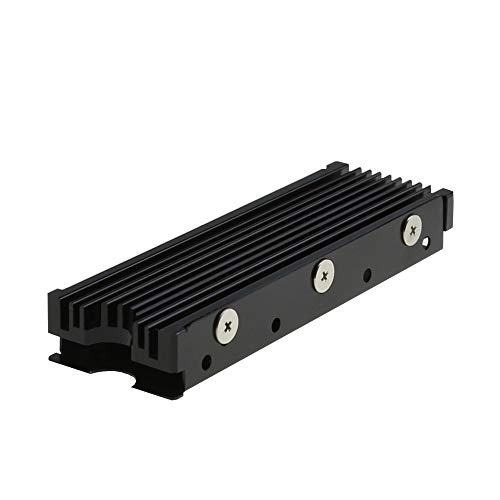 MHQJRH M.2 2280 SSD heatsink for PC /Double Side Heatsink(black)3 x 0.95 x 0.4 Inches0.1 poundsCheck on Amazon

The Short Answer
Yes, you absolutely need a heatsink if you plan to install an internal M.2 NVMe solid-state drive (SSD) into your PlayStation 5 expansion slot. Sony officially mandates thermal dissipation for all internal expansion drives to prevent high-speed memory controller failure. However, whether you need to buy a separate, standalone aftermarket heatsink—often referred to by shoppers as an external or add-on heatsink—depends on one simple condition: whether your M.2 SSD was purchased as a bare drive without a pre-attached factory cooling structure, or if its existing factory heatsink fails to conform to Sony’s physical clearance dimensions (maximum 25 mm width, 110 mm length, and 11.25 mm total thickness).
What You Actually Get
When upgrading a console setup inside a modern living room or media cabinet, airflow is often restricted. Modern PCIe 4.0 NVMe drives operate at blazingly fast read speeds between 5,500 MB/s and 7,300 MB/s, pulling anywhere from 3 to 8 watts of power during heavy loading screens. Without passive cooling, high-end flash memory controller chips quickly exceed 70°C (158°F), triggering aggressive thermal throttling that drastically slows down game loading times and reduces the long-term lifespan of your drive.
As an Amazon Associate we earn from qualifying purchases at no extra cost to you.

Aftermarket heatsink solutions fall into two primary physical designs:
1. Direct-Fit Module Heatsinks: Compact, metal-clad enclosures like the MHQJRH M.2 2280 SSD Heatsink (typically priced around $6 to around $8) clamp directly onto a bare 2280-form-factor drive. Measuring roughly 76 mm in length, 24 mm in width, and 10 mm in height, these aluminum designs weigh around 40 to 50 grams. They rely on double-sided silicone thermal pads (0.5 mm to 1.5 mm thickness) to sandwich the memory chips, transferring heat into extruded aluminum fins while fitting neatly underneath the stock PS5 metal expansion bay cover plate.
2. Expansion Hatch Replacement Heatsinks: Engineered specifically for the console’s physical footprint, options like the SABRENT M.2 NVMe PS5 Heatsink (SB-PSHS, priced around $13 to around $15) discard Sony’s original thin metal cover door entirely. Made from CNC-machined or extruded aluminum weighing roughly 70 to 90 grams, this unit serves a dual purpose: it acts as a massive thermal mass resting directly on top of your drive via thermal tape while simultaneously acting as the structural hatch cover. Its specialized fin structure extends directly into the PS5 console’s primary internal airflow channel, utilizing negative air pressure drawn by the main intake fan to pull heat out of the expansion cavity.
Pros
- Maximum Thermal Protection: Keeps PCIe 4.0 controller chips operating under 60°C even during extended, continuous gaming sessions or huge 100GB+ patch downloads.
- Cost Optimization: Allows you to buy cheaper, high-performance “bare” M.2 NVMe drives (such as bare WD_BLACK or Samsung drives) and equip them yourself, saving $15 to $30 compared to purchasing factory-preassembled heatsink models.
- Enhanced Console Airflow Integration: Replacement hatch models like the SABRENT SB-PSHS convert the sealed expansion bay into an active heat dissipation channel by venting thermal energy directly into the main airflow pathway.
- Structural Rigidity and Fitment: High-quality aluminum heatsinks stabilize the thin M.2 circuit board inside the bay, preventing physical flexing caused by repeated thermal expansion cycles.
- Zero Added Noise: Entirely passive operation adds no mechanical fans or extra noise clutter to your entertainment center or media furniture.
Cons
- Manual Assembly Required: Installing a standalone heatsink requires careful placement of delicate silicone thermal pads and precise screw torque to ensure even contact without cracking flash chips.
- Strict Clearance Limitations: Oversized PC heatsinks or units exceeding 11.25 mm in height will block the PS5 metal cover plate or scrape against the outer plastic console side panels.
- Redundancy for Bundled Drives: Buying a standalone heatsink is a complete waste of money if your drive already includes a Sony-compliant factory heatsink pre-installed.
- Irrelevant for External USB Storage: These heatsinks do not fit and provide zero thermal benefit to external USB desktop hard drives or portable USB-C drives resting on your TV stand.
Who Should Buy It
You should purchase an aftermarket heatsink if you bought a bare M.2 NVMe PCIe 4.0 SSD (2280 form factor) without any cooling apparatus attached. It is also ideal for gamers looking to optimize thermal performance inside enclosed entertainment centers or media consoles, where ambient room temperatures run warm. If you prioritize long-term hardware reliability, assembling a bare drive with a dedicated slot-cover heatsink like the SABRENT SB-PSHS yields superior cooling over stock factory shields.
Who Should Skip It
Skip buying an aftermarket heatsink if your M.2 SSD arrived out of the box with a factory-installed heatsink designed specifically for the PS5 (such as the Western Digital WD_BLACK SN850X with Heatsink or Samsung 990 Pro with Heatsink). You should also skip this hardware if you only plan to connect plug-and-play external USB drives to the back ports of your console for playing legacy PS4 games, as external drives use sealed plastic or aluminum external enclosures that do not interface with the internal expansion slot.
Cheaper Alternatives
If you purchase a bare M.2 drive, you do not necessarily need to buy high-end branded hatch replacements. Several functional options exist across different price points to keep your installation within budget:
| Option | Cost | Trade-off |
|---|---|---|
| Generic Aluminum Fin Heatsink (e.g., MHQJRH M.2 2280) |
around $6 – around $8 | Requires manual thermal pad layering; relies on still air trapped inside the standard metal expansion compartment. |
| Low-Profile Copper Heat Spreaders | around $4 – around $6 | Ultra-thin (2 mm–3 mm); very low thermal mass, making it less effective for prolonged heavy data transfer sessions. |
| Dedicated Hatch Heatsink (e.g., SABRENT SB-PSHS) |
around $13 – around $15 | Slightly higher upfront cost; permanently replaces original OEM metal door, but provides superior direct-airflow cooling. |
| Pre-Installed Factory Heatsink Bundle | Included in drive cost (+$15 – $25 premium) |
Zero manual installation effort, but locks you into higher overall upfront drive pricing and fixed manufacturer dimensions. |
FAQ
Will the PS5 run if I install an M.2 SSD without any heatsink?
The console will physically boot and recognize the drive, but running an M.2 NVMe SSD without a heatsink is strongly discouraged. Under load, bare flash memory controllers reach critical temperatures within minutes. The drive will immediately enter severe thermal throttling to prevent permanent chip destruction, resulting in stuttering, dropped frame rates during game asset streaming, corrupted save files, or complete console shutdowns.
Does adding a heatsink reduce the fan noise of my PS5 console?
An aftermarket heatsink does not reduce the mechanical decibel level of the internal PS5 fan. In fact, a specialized hatch-replacement heatsink like the SABRENT SB-PSHS works by conducting heat directly into the path of the internal fan’s airflow, allowing heat to dissipate naturally through the console’s main exhaust vents without requiring the fan to increase its baseline RPM settings.
Can an aftermarket heatsink cause physical damage to the expansion bay?
It can if improper dimensions or incorrect screws are used. Always ensure your chosen heatsink does not exceed Sony’s recommended dimensions (110 mm long by 25 mm wide by 11.25 mm thick). When securing the M.2 drive and heatsink structure inside the compartment, use the original metric M3 screw provided inside the PS5 slot, taking care not to overtighten or strip the small threading.
Do I need a heatsink for an external USB hard drive or external portable SSD?
No. External drives connected to the PS5 via USB-A or USB-C cables rely on their own self-contained housing for thermal dissipation. Because external USB drives run at substantially lower bandwidth limits (typically capped at 10 Gbps) compared to internal PCIe 4.0 slots (up to 64 Gbps), external drives generate significantly less heat during operation and do not require additional heatsink attachments as game storage expands into 2026 and beyond.
Related guides
- Best Free MMOs on Steam: Subscription Limits, Pay-to-Win and Time Cost (2026)
- Best Free Horror Games on Steam: How to Pick One That Fits Your PC and Your Nerves (2026)
- Black Frame Insertion vs VRR: Which Smoothness Feature Should You Use?
- Best Webcams for Streaming: 11 Listings Compared by Resolution, Focus and Light (2026)








