
If you want to play Steam PC games in VR, choose a headset that can run SteamVR from your computer: either a dedicated PC headset or a standalone one that also connects to a PC. Of the ten listings here, the two Meta Quest models and the HTC standalone-style units can do both, while the Pimax, Rift S, DPVR and Valve Index listings are built around the PC. The main differences are how the headset links to your computer, how it tracks, and how much graphics power its screens demand. We cover each listing below, then explain how to match one to your PC.
Our Top Picks

Top 3 picks at a glance
The short list
As an Amazon Associate we earn from qualifying purchases at no extra cost to you.




- Meta Quest 3S 128GB – best for a standalone headset that can also stream PC games
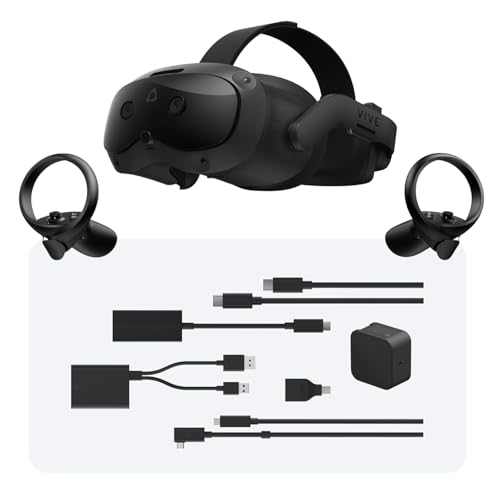
- HTC Vive Focus Vision Wired Bundle – best for a direct DisplayPort connection
- Meta Quest 3 512GB – best for more storage in a headset that also links to a PC
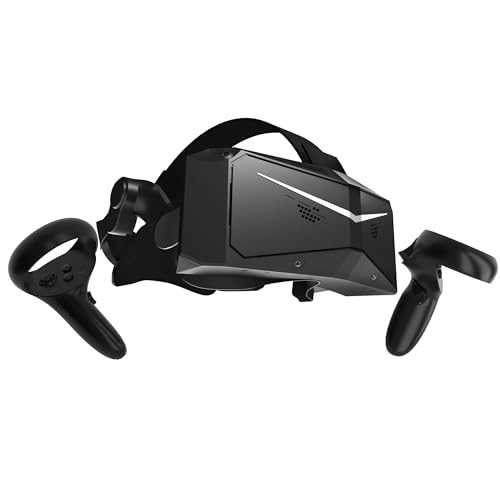
- Pimax Crystal Light – best for a high-resolution PC headset for sims
- HTC Vive XR Elite with Deluxe Pack – best for mixed reality plus PC VR
- Pimax Crystal Super – best for the sharpest and widest view in this guide
- HTC Vive Focus Vision (Consumer Edition) – best for the same headset without the DisplayPort kit
- Oculus Rift S – best for an older, PC-only design if you find it in good condition
- DPVR E4 – best for a SteamVR-compatible 120Hz PC headset
- Valve Index (Renewed) – best for fans of Valve’s own headset, with renewed-unit caveats
Side-by-side specs
| Model | Type | Key specs as stated in the title | Best for |
|---|---|---|---|
| Meta Quest 3S 128GB (Gorilla Tag bundle) | Standalone, PC link | 128GB, bundle with Gorilla Tag; PC support: check the listing | Entry-level hybrid |
| HTC Vive Focus Vision Wired Bundle | XR headset, wired PC | DisplayPort PC VR streaming kit | Wired PC play |
| Meta Quest 3 512GB (Monkenaut bundle) | Standalone, PC link | 512GB, 3-month Meta Horizon+ trial; PC support: check the listing | Storage plus flexibility |
| Pimax Crystal Light | PC VR | 2880×2880 per eye, 8K QLED with local dimming, inside-out tracking | Flight sims and racing |
| HTC Vive XR Elite with Deluxe Pack | Mixed reality and PC VR | Controllers included; Deluxe Pack contents: check the listing | Hybrid users |
| Pimax Crystal Super | PC VR | 3840×3840 per eye, ultrawide, 140 degree FOV, eye tracking, DP connection | Top-tier clarity |
| HTC Vive Focus Vision (Consumer Edition) | Mixed reality and PC VR | Controllers included | Hybrid, no wired kit |
| Oculus Rift S | PC-powered VR | PC-powered; other specs: check the listing | Older PC-only option |
| DPVR E4 | PC VR | 3664×1920, up to 120Hz, 116 degree FOV, 6DoF, flip-up design, SteamVR | Mid-tier PC VR |
| Valve Index (Renewed) | PC VR, renewed | PC/SteamVR, 1-year seller warranty; kit contents: check the listing | Index fans |
Each headset in turn
Meta Quest 3S 128GB, Gorilla Tag Bundle
The 3S is a standalone headset, which means it plays its own library without a PC, but it can also be used for PC VR by streaming over Wi-Fi or through a cable, a setup Meta documents (check the current requirements before you buy). The title says only 128GB and a Gorilla Tag bundle, so lens type, resolution and controller details come from the page. Storage matters for standalone games, not for PC streaming, where your computer does the work. Expect an extra setup step compared with a headset that plugs in as a PC display.
Pros
- Works with or without a PC
- Bundle includes a game
Cons
- PC streaming needs setup and a capable GPU
- Storage figure is irrelevant to PC games
Who it’s for: Players who want one headset for standalone and Steam games. Who should skip it: Anyone who wants a direct, always-wired PC headset.
HTC Vive Focus Vision Wired Bundle
The title calls this an XR headset with a DisplayPort PC VR streaming kit, which suggests a wired link to the graphics card instead of Wi-Fi streaming. A cable generally cuts compression and wireless setup problems, though cable management and port availability become your concern. It is the only listing apart from the Pimax Crystal Super that names DisplayPort, so confirm your GPU has a free DisplayPort output and check what the kit actually contains. Resolution and refresh figures are not in the title.
Pros
- Named DisplayPort kit for a wired connection
- Can work as an XR headset on its own
Cons
- Needs a free DisplayPort output
- Display specs not in the title
Who it’s for: PC players who prefer a cable over wireless streaming. Who should skip it: Laptop users without a spare DisplayPort connection.
Meta Quest 3 512GB, Gorilla Tag Cardboard Monkenaut Bundle
This is the larger-storage Quest 3 with a retailer-exclusive Gorilla Tag bundle and a three-month Meta Horizon+ trial. As a standalone headset it is self-contained, and it can also stream Steam games from a PC, subject to Meta’s current requirements. Bundle extras such as the cardboard Monkenaut and subscription benefit standalone play, not Steam. Storage is useful for standalone games only; PC titles install on your computer.
Pros
- More standalone storage than the 3S listing
- Includes a three-month Horizon+ trial
Cons
- Extras do little for Steam play
- PC link needs a strong GPU and good Wi-Fi or a cable
Who it’s for: Shoppers who play both standalone and PC titles. Who should skip it: PC-only players who would pay for features they never use.
Pimax Crystal Light VR Headset for PC
Pimax lists 2880×2880 per eye, an 8K QLED display with local dimming and inside-out tracking, and aims the headset at flight sims, iRacing and general gaming. The “Full Payment Version” wording suggests a payment-plan distinction, so check what ships and any support terms. That pixel count is demanding: it asks for a strong graphics card, and the title does not say what is needed. Pimax uses its own software layer, so check SteamVR behavior in the listing and the maker’s documentation.
Pros
- High per-eye resolution stated
- Targets sim racing and flight
Cons
- Needs a powerful GPU
- Software and support terms need checking
Who it’s for: Sim fans with a top-tier graphics card. Who should skip it: Anyone with a modest GPU or a small desk.
HTC Vive XR Elite with Deluxe Pack
A mixed reality and PC VR headset sold with controllers and a Deluxe Pack. The title does not say what the pack contains, so check the listing and the box contents. A headset that does both standalone and PC play may suit people who want freedom in the living room and a desk-bound option as well. Resolution, field of view and refresh rate are not given in the title, so compare them to the other HTC listing before deciding.
Pros
- Mixed reality and PC VR in one
- Controllers included
Cons
- Pack contents are not specified
- Display specs are not in the title
Who it’s for: Users who want a convertible headset with accessories. Who should skip it: Players who only need a plain wired PC unit.
Pimax Crystal Super VR Headset, DP Connection
The top spec sheet here: 3840×3840 per eye, an ultrawide 140 degree field of view, eye tracking and a DisplayPort connection to the PC, aimed at flight and racing simulators. A wide field of view reduces the tunnel-vision feel but increases the load on the GPU. Pimax markets it as a flagship, so power, cable length and software setup deserve a read before ordering. Treat the numbers as seller claims. Only buy it with a matching PC.
Pros
- Highest resolution and widest FOV stated
- Eye tracking and DisplayPort listed
Cons
- Needs an extremely powerful GPU
- Likely a premium-budget purchase; check the listing
Who it’s for: Enthusiasts building a sim rig around a flagship headset. Who should skip it: Mid-range PC owners and casual gamers.
HTC Vive Focus Vision, Consumer Edition
This is the same-named headset as the wired bundle but without the DisplayPort kit in the title. It is described as a mixed reality and PC VR headset with controllers. Without the kit, the connection method may be wireless streaming or another link, so check what comes in the box and whether the DisplayPort kit is sold separately. Treat the two HTC Focus Vision pages as variants of one product and compare them side by side.
Pros
- Mixed reality and PC VR support stated
- Controllers included
Cons
- Wired kit not named in this listing
- Display specs not in the title
Who it’s for: Buyers who plan to stream wirelessly or add a cable later. Who should skip it: Anyone who wants the PC connection solved in one purchase.
Oculus Rift S PC-Powered VR Gaming Headset
The Rift S is a PC-powered headset, and its listing names few specs. It is an older design that Meta stopped selling some years ago, so it may be new-old-stock or used, and software support is a risk. Check whether the page says new or used, whether controllers and cables are included, and whether your PC has the required ports, which for this headset were a USB 3.0 port and a DisplayPort connection (verify before buying). It is cheap to try but not future-proof.
Pros
- PC-only design with inside-out tracking, no external sensors
- Works with SteamVR via Oculus software
Cons
- Older design with uncertain support
- Condition and contents are unclear
Who it’s for: Budget shoppers who find a clean unit. Who should skip it: Anyone who wants current hardware or a long support runway.
DPVR E4 PC VR Headset
The title lists a 3664×1920 display, up to 120Hz, a 116 degree field of view, 6DoF tracking, a flip-up design and SteamVR compatibility. SteamVR compatibility is the key claim for this guide, and the flip-up visor lets you glance at your desk. DPVR is a less familiar brand, so check warranty terms, controller inclusion and driver support. The title does not mention controllers, which are essential for most Steam VR games. Treat the figures as seller claims.
Pros
- SteamVR compatibility and 120Hz are stated
- Flip-up design is convenient
Cons
- Lesser-known brand, so support is a question
- Controllers are not mentioned in the title
Who it’s for: PC players who want a stated 120Hz headset on a moderate budget. Who should skip it: Anyone who wants a large community and accessory ecosystem.
Valve Index VR Headset (Renewed), USBNOVEL
The listing is for Valve’s PC headset in renewed condition, sold by USBNOVEL with a seller-provided one-year warranty. The Index traditionally relies on external base stations for tracking, and the title does not say whether they or the controllers are included, so confirm the full kit. Renewed means previously owned, and the seller’s warranty may not match Valve’s own. Compare it with the other PC-focused listings only if the box contents are complete.
Pros
- Designed for PC and SteamVR
- One-year seller warranty stated
Cons
- Renewed unit from a third-party seller
- Kit contents and base stations are unclear
Who it’s for: Index fans who accept a renewed purchase and verify the kit. Who should skip it: Buyers who want a new item with manufacturer warranty.
How we picked these
We gathered the VR headset listings that mention PC or SteamVR use and sorted them by how each title describes the link to a computer, the display, and what is included. Standalone headsets that can also stream PC games are kept, but marked as hybrids. Our basis is published specifications, manufacturer documentation and buyer reviews. Nobody on the team used or measured these units. Specifications are seller claims taken from the titles, anything missing is marked “check the listing”, and renewed or older units are flagged as such.
What to look for in a headset for Steam PC games
How the headset reaches your PC
There are three routes. A PC-native headset plugs into the graphics card and a USB port. A standalone headset can stream over Wi-Fi or a USB cable using the maker’s software or the Steam Link app. A DisplayPort kit, as on one HTC listing and the Pimax Crystal Super, gives a direct video link. Wireless streaming is convenient, but it depends on a good router and compresses the image. Wired is more predictable but limits movement, and a long, light cable or a ceiling hook keeps it out of your way. Whichever route you choose, update the headset software and graphics drivers first, since many early problems come from outdated versions.
| Connection | Typical pro | What to check |
|---|---|---|
| Standalone plus PC link | One headset for both | Required GPU, Wi-Fi and cable details |
| PC-native cable (Rift S, Index) | Predictable video | Free USB and DisplayPort ports |
| DisplayPort kit (Focus Vision bundle, Crystal Super) | Direct video link | DisplayPort output on the GPU |
Tracking: inside-out or base stations
Inside-out tracking uses cameras on the headset and needs no extra hardware, which is simpler to set up. Base stations, as on the Valve Index, usually give more reliable tracking for fast movement but need wall or tripod mounting. The Pimax Crystal Light lists inside-out tracking, and the DPVR E4 lists 6DoF, which means movement and rotation are both tracked.
Resolution, refresh rate, field of view and your GPU
More pixels and a wider view look better but cost frame rate. A 3840×3840-per-eye panel asks far more from a graphics card than a 3664×1920 one. A refresh rate of 90 Hz is a common baseline for comfort, and 120 Hz is a bonus if your GPU can keep up. Field of view is the extra width you see: narrow views feel like looking through goggles, while the 140 degree claim on the Pimax Crystal Super is wide for consumer headsets. Lens type, brightness and contrast also change how clear a scene looks, and the titles rarely cover them. Our CPU for VR guide explains the processor side, and the GPU requirement should be checked against the maker’s recommended specification.
Comfort, lenses and glasses
Weight balance, strap design and facial interface decide whether a session lasts 30 minutes or three hours. Standalone headsets carry their battery and computer on your head, while PC-native ones are lighter in front but tethered by a cable. Look for replaceable face padding and a strap that spreads weight to the back of the head, since a heavy front tires the neck. Check for interpupillary distance adjustment, which makes the image sharper for your eyes, and room for glasses. Flip-up designs help with quick desk tasks, such as checking a message without removing the headset. If you wear glasses, check the maker notes on spacing, because wide frames can scratch lenses.
Controllers and software support
Most Steam VR games assume two motion controllers. Check that the bundle includes them. If you buy a headset that uses its own runtime, as some Pimax and standalone units do, confirm SteamVR compatibility and see which games you plan to play in our PC VR games list.
Worked example: a five-minute PC readiness check
- Open your graphics card model and note its video outputs; a DisplayPort output matters for the DisplayPort-kit listings.
- Count free USB 3 ports; PC-native headsets and wired links often want one.
- Look up the maker’s recommended graphics card for the headset you like and compare it to yours.
- Measure the clear floor area and the distance from the PC to where you will stand.
- If you plan to stream wirelessly, check that your router supports a fast, uncongested connection near the play space.
Mistakes buyers make
The first mistake is buying a headset for its screen specs without checking the GPU: a flagship panel on a mid-range card means lowering quality or frame rate. The second is assuming a standalone headset is a PC headset out of the box; it usually needs the maker’s app or a cable, and requirements may change. Third, buyers choose renewed or older units without checking the controllers, base stations and warranty. Fourth, they overlook the room: base stations and wired headsets need space and cable management. Finally, they pay for bundled games and subscriptions that only help standalone play. For deeper flagships, see our guide to high-end PC VR headsets.
Verdict
If you want one headset for the living room and the PC, one of the Meta Quest listings is the simplest hybrid. For wired, simulator-grade clarity, the Pimax Crystal Super and Crystal Light are the specification leaders, but only with a strong graphics card. For a PC-only budget route, the DPVR E4, Rift S and renewed Index need extra checks on support and contents.
Related guides
- Vr Facial Interfaces For Glasses Wearers
- Retro Gaming Controllers Nintendo Switch Pc
- Standalone Vr Headsets For Beginners
Frequently asked questions
Do these VR headsets need a powerful PC?
It depends on the headset. Higher-resolution models such as the Pimax Crystal Super need a very strong graphics card, while lower-resolution or standalone headsets are less demanding. Check the maker’s recommended specification for each model and compare it to your GPU, CPU and available ports before you order. If your card is mid-range, a lower-resolution headset or a standalone one with a PC link will usually feel smoother than a flagship panel run at reduced quality.
Can a Meta Quest headset play Steam games?
Yes, through a PC connection. Meta has offered options such as a cable link and wireless streaming, and Steam VR titles can be run from the computer. Requirements change over time, so check Meta’s current documentation, your GPU and your Wi-Fi setup before relying on it for demanding games. A wired link is usually the safer choice for fast action titles, while wireless suits seated or casual play.
Is inside-out tracking good enough for Steam games?
For most games, yes. Cameras on the headset track your controllers and position without external sensors. Base station systems, like the Valve Index, usually track fast movement more reliably but need installation. If you play rhythm or fast action games, consider which method suits your room, and remember that base stations need clear mounting spots and power outlets near the play area.
Is a renewed Valve Index a safe buy?
It can be, but renewed means previously owned and refurbished by the seller, not the manufacturer. Confirm exactly what is included, such as controllers, base stations and cables, and read the seller’s warranty terms. The one-year warranty in the title comes from the listing seller, not from the maker, so ask how a claim works and who pays for return shipping before you commit.
What is the difference between the two HTC Focus Vision listings?
The titles suggest one includes a DisplayPort PC VR streaming kit, while the other is described as a consumer edition without naming the kit. Treat them as variants of one headset. Check each listing’s contents and decide how you want to connect to your PC before choosing. If you already own a DisplayPort-ready graphics card and want a cable, the bundle with the kit named in the title is the more direct fit.


