For most gamers and PC builders who want to try a vertical mouse, the Logitech MX Vertical suits medium to large hands, the Logitech Lift suits small to medium hands (and has a left-handed version), and a budget wireless vertical model from a brand such as Anker is the low-risk way to find out whether the shape works for you. If you play fast shooters at a high level, be realistic: vertical mice are built around forearm posture, not around the lightest weight or the highest sensor ceiling.
As an Amazon Associate we earn from qualifying purchases at no extra cost to you.


Our Top Picks
 Anker 2.4G Wireless Ergonomic Mouse4.72"L x 2.94"W3.98 x 3.23 x 3.15 inches0.28 poundsCheck on Amazon
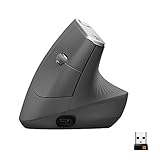
 Logitech MX Vertical Wireless Mouse Ergonomic Design1 Pack4.7 x 3.11 x 3.09 inches0.5 poundsCheck on Amazon


Top 3 picks at a glance
Who a vertical mouse is actually for
A vertical mouse tilts your hand into a “handshake” position instead of turning your forearm palm-down. Makers and reviewers say this reduces forearm twisting, which some people find more comfortable during long desk sessions. It is not a medical device, and no mouse cures wrist or arm problems. If you have ongoing pain, numbness or tingling, see a doctor or physiotherapist rather than relying on a peripheral swap.
The trade-off is well known among reviewers. Vertical mice usually have fewer and less accessible buttons, heavier bodies and sensors aimed at office precision rather than esports speed. They also take days or weeks to get used to, because cursor control moves from the wrist toward the whole arm. Treat the first week as an adjustment period, not a verdict.
Vertical mouse at a glance
| Model | Best for | Key stated specs | Limits |
|---|---|---|---|
| Logitech MX Vertical | Medium to large right hands, all-day desk use | Roughly 57 degree angle (per reviewers and the maker), up to 4000 DPI, rechargeable USB-C battery, Bluetooth and receiver connection | Older design, no left-handed version, no premium scroll wheel, large footprint |
| Logitech Lift | Small to medium hands, left-handed users (separate model) | Around 57 degree angle, quieter clicks, long battery life stated by the maker, Bluetooth and Logi Bolt receiver options | No wired fallback, not designed for competitive gaming |
| Anker 2.4G Wireless Vertical | Budget trial of the vertical shape, large hands | Up to 1600 DPI, about 60 degree angle (per reviewers), AAA batteries, 2.4 GHz receiver | Maker says it is not suited to small hands, basic sensor, no Bluetooth |
| Contour UniMouse | Users who want an adjustable angle and a wrist rest | Adjustable tilt, thumb support, wired and wireless options | Unusual shape, takes the longest to learn, mid-range to premium tier |
Specifications change between revisions and regions, so confirm the exact variant on the maker’s page before buying.
Logitech MX Vertical: the default for larger hands
The MX Vertical is the model most 2026 round-ups keep returning to. Reviewers at outlets such as CNN Underscored and TechGearLab describe it as a well-built option with a steep tilt, a thumb rest, and a button layout that includes a precision-mode button for slowing the cursor. Logitech lists a sensor that goes up to 4000 DPI, which is enough for desktop work and casual gaming, but it is not a competitive sensor in the way a dedicated gaming mouse is.
Fit notes matter here. The body is tall and wide, so people with smaller hands often report that they cannot reach the buttons comfortably without lifting their palm. It is a right-handed design only. If you share a desk setup with a left-handed person, the MX Vertical is not the answer.
Connection options include Bluetooth and the supplied receiver, and the maker lists a rechargeable battery that charges over USB-C, with the ability to keep using the mouse while it charges. For a PC builder who runs a multi-device desk, the ability to switch between a desktop and a laptop is a practical bonus.
Logitech Lift: the smaller, quieter alternative
The Lift is aimed at small to medium hands. Reviewers point out that its lighter body and lower profile are easier to manoeuvre, and the clicks are quieter than on many mice, which is useful in shared rooms. Logitech also sells a left-handed version, which is rare in this category and is the main reason some buyers choose it over the MX Vertical.
Limits are straightforward. It uses a more modest sensor than a gaming mouse, it has fewer buttons than the MX Vertical, and it does not offer a wired fallback. As with all mice in this guide, it is a posture-first tool. Some reviewers rate it the best vertical mouse overall for typical hands, but that assessment applies to office and general use, not to ranked shooters.
Budget option: Anker-style wireless vertical mice
If you only want to test whether a vertical grip suits you, a budget model avoids a bigger commitment. The Anker 2.4G Wireless Vertical is the one most roundups mention. Reviewers describe it as simple and serviceable: a tilted body, a few DPI steps up to about 1600, and a USB receiver. It runs on AAA batteries instead of a built-in rechargeable cell.
Anker states that the mouse is not designed for small hands, so check sizing before you order. The plastic feel and the basic sensor are the trade-offs. For general work and light gaming such as strategy or casual titles, it is adequate. For anything twitchy, the sensor and button response will feel limited.
Contour UniMouse: when you want to tune the angle
The Contour UniMouse stands apart because the tilt can be adjusted, and it includes a thumb and wrist support. Reviewers who liked it said the adjustment let them find a comfortable angle, while those who disliked it said the shape was awkward and the learning curve steep. It is not a typical gaming shape. Pick it if you have already tried a fixed-angle vertical mouse and want finer control over how steep the grip is.
Can you game on a vertical mouse?
Yes, with expectations set correctly. Slower genres such as strategy, MMOs, city builders, simulation and many single-player games work fine. Fast aim-heavy games are harder because vertical mice generally weigh more, use sensors with lower tracking ceilings, and require a different aiming motion. Many players keep a lightweight gaming mouse for ranked shooters and use a vertical mouse for desk work, editing and relaxed play.
Check these points before you commit:
- Hand length: measure from the wrist crease to the tip of your middle finger. Small hands usually fit the Lift better than the MX Vertical.
- Handedness: only a few models have left-handed versions.
- Weight: the lighter the body, the easier it is to lift and reposition during low-sensitivity play.
- Battery type: rechargeable cells reduce waste, while AAA models are easy to swap mid-session.
- Surface: a cloth pad with a consistent texture works well with all sensors listed here.
Budget tiers
- Budget: Anker-style wireless vertical mice. Good for a trial, with basic sensors and plastic feel.
- Mid-range: Logitech Lift and similar models. Better build, quieter clicks, Bluetooth, and a left-handed option.
- Premium: Logitech MX Vertical and the Contour UniMouse. More refined features or adjustability, but a larger investment and, in the MX Vertical’s case, an older design.
Pick X if… decision table
| Pick this | If you… |
|---|---|
| Logitech MX Vertical | have medium to large right hands, want Bluetooth and a rechargeable battery, and spend most of the day at a desk |
| Logitech Lift | have small to medium hands, are left-handed, or want quieter clicks |
| Anker 2.4G Wireless Vertical | want to try the grip cheaply and have larger hands |
| Contour UniMouse | want to adjust the tilt angle and add a wrist support |
| A regular lightweight gaming mouse | play competitive shooters and want maximum speed |
Alternatives worth considering
- Trackball mice: models such as Logitech’s MX Ergo series let you keep your arm still and move only your thumb or fingers. They help some people but need a different skill set again.
- Semi-vertical or ergonomic gaming mice: several brands make right-handed ergonomic shapes with a modest tilt and gaming-grade sensors. They are a middle path if a full 57 degree tilt feels too extreme.
- Keyboard and desk posture changes: raising the monitor, moving the mouse closer, and using a supportive chair often improve comfort as much as a mouse swap.
Frequently Asked Questions
Is a vertical mouse good for gaming?
It depends on the genre. Strategy, simulation and relaxed single-player games work fine, but competitive shooters favor lighter mice with high-end sensors. Many players use a vertical mouse for work and a conventional gaming mouse for ranked play.
How long does it take to get used to a vertical mouse?
Reviewers commonly report days to a couple of weeks of adjustment. Cursor control shifts from the wrist to the arm, so precision feels worse at first. Give it a fair trial before judging it.
Will a vertical mouse fix wrist pain?
No mouse is a treatment. Some people find the handshake posture more comfortable, but persistent pain, numbness or tingling should be checked by a doctor or physiotherapist. Posture, breaks and desk setup also matter.
Which vertical mouse is best for small hands?
The Logitech Lift is the usual recommendation because of its smaller body. Anker says its own vertical mouse is not suited to small hands, so check the maker’s sizing guidance before buying.
Are there left-handed vertical mice?
A few exist. Logitech offers a left-handed Lift, while many other vertical mice, including the MX Vertical, are right-handed only. Check the product listing carefully.
Do vertical mice work with a mousepad or desk surface?
Yes. Optical sensors work on most surfaces, and a cloth or hard pad with a consistent texture gives the smoothest tracking. Avoid glossy glass or very reflective desks.