
A PS5 controller with back paddles lets your middle fingers handle jump, crouch or reload while both thumbs stay on the sticks, and the seven listings below chase that idea at very different price points. Not every title states paddles. The HIKICESOM, NBCP and JUNHUAN listings say so outright, the SCUF lists “11 Custom Inputs”, the DualSense Edge title is silent on the subject, and the plain DualSense is here as a baseline rather than a paddle pad. Shooter and action players who want extra inputs without lifting a thumb will get the most from this group; casual players may be happier with a stock pad. Below are a quick-pick list, a comparison table, one section per listing, and a worksheet for deciding what to bind to the back.
Our Top Picks

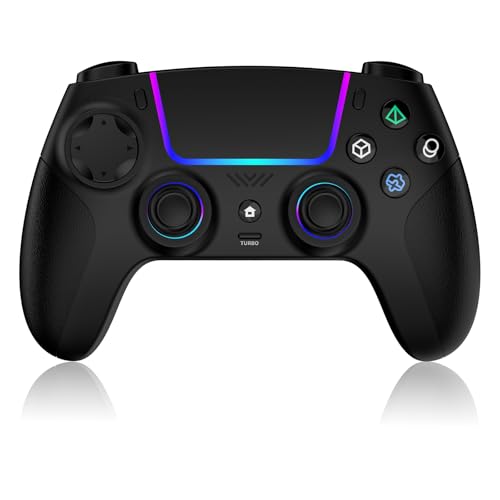
Top 3 picks at a glance
Quick picks
As an Amazon Associate we earn from qualifying purchases at no extra cost to you.


- DualSense Edge (Midnight Black) – best for buyers who want a first-party pro-style pad and will confirm the back inputs on the listing.
- SCUF OMEGA – best for players who want a licensed performance pad with many custom inputs and a Windows PC option.
- HIKICESOM Hall Effect – best for broad device compatibility with paddles at a budget tier.
- NBCP Wireless Controller – best for feature-heavy extras such as a 3.5mm jack, gyro and RGB ring.
- JUNHUAN Hall Effect – best for a 1500mAh battery claim and Hall effect triggers on a tight budget.
- VidPPluing Gamepad – best for casual play where paddles are not the priority; check the listing for them.
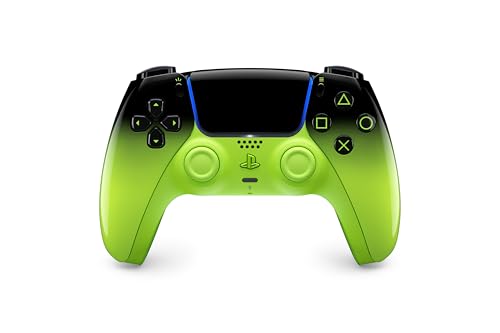
- DualSense Remix Green – best as a no-paddle baseline and spare pad (runner-up, not a paddle controller).
Comparison table
| Model | Type | Key specs as stated in the title | Best for |
|---|---|---|---|
| PlayStation DualSense Edge, Midnight Black | First-party pro pad (premium tier) | Wireless controller; back inputs not stated in title | Players who prefer a Sony-made pad |
| SCUF OMEGA PS5 | Licensed performance pad (premium tier) | 11 custom inputs, instant triggers, low latency, TMR thumbsticks, Windows PC compatible | Competitive players on PS5 and PC |
| HIKICESOM Wireless Hall Effect | Third-party paddle pad (budget tier) | Back paddles, Hall effect anti-drift sticks, turbo/macro, 10+ hr, PS5 Pro/PC/Mac/iOS/Android/Steam Deck | One pad across many devices |
| NBCP Wireless Controller | Third-party paddle pad (budget tier) | Hall effect joysticks, back paddles and macro, Bluetooth 5.0, 6-axis gyro, RGB ring, 1000mAh, 3.5mm jack | Extras-focused buyers |
| JUNHUAN Wireless Hall Effect | Third-party paddle pad (budget tier) | Hall effect joysticks and triggers, 1500mAh, back paddles, turbo, gyroscope, PC/Mac/iOS | Battery capacity on a budget |
| VidPPluing Gamepad | Third-party pad (budget tier) | Hall effect trigger, turbo/macro, LED lighting, 3.5mm jack, 1500 mAh; paddles not stated | Casual play, mobile pairing |
| PlayStation DualSense, Remix Green | First-party standard pad (mid tier) | For PS5, PC, Mac and mobile; no paddles in title | Baseline or spare controller |
The seven listings, one by one
PlayStation DualSense Edge Wireless Controller – Midnight Black
The Edge is the only first-party pro-style pad in the group, and the listing title is brief: “PlayStation DualSense Edge Wireless Controller – Midnight Black”. It does not mention paddles, back buttons or stick modules, so check the product page for the back-input details before you assume them. Sony’s Edge line is generally described as a customizable pad with remappable back inputs, which is why it keeps appearing in paddle searches, but that is general background and not something this title confirms.
What the name does give you is a known brand, which tends to mean fewer pairing surprises on a PS5 than a lesser-known pad. The cost is a premium-tier listing, so you pay for the brand and customization rather than for a longer feature list on paper.
- Pros: First-party maker; simple title with no inflated claims; the natural choice if you want the console’s own ecosystem.
- Cons: Back inputs and battery details are not in the title; sits in the premium tier; fewer headline extras than the budget pads.
Who it’s for: PS5 players who want a Sony-made pad with extra inputs and are willing to read the full listing. Who should skip it: Anyone who needs Hall effect sticks, turbo or macro features by name, because the title promises none of them.
SCUF OMEGA PS5 Wireless Performance Controller – Black
This is the most specific premium listing. The title calls it “Officially Licensed”, with “11 Custom Inputs, Instant Triggers, Low Latency, TMR Durable Thumbsticks” and Windows PC compatibility. “11 custom inputs” suggests a generous number of remappable controls, though the title does not say how many sit on the back, so confirm the paddle count and layout on the listing. TMR is a newer stick-sensor type; the title presents it as the durability feature, and as with any seller claim it is worth reading buyer feedback on long-term drift.
“Instant Triggers” most likely refers to switchable trigger stops, but the title does not explain them, so treat that as something to verify. The Windows PC note matters if you split time between console and desktop.
- Pros: Officially licensed per the title; many custom inputs; Windows PC compatibility stated; durable-stick claim.
- Cons: Premium tier; “custom inputs” is not the same as “four back paddles”; marketing terms need confirming.
Who it’s for: Competitive players who want a licensed performance pad for PS5 and a Windows PC, and who accept a premium-tier price for it. Who should skip it: Casual players who rarely use more than two extra inputs.
HIKICESOM Wireless Hall Effect Controller for PS5 with Back Paddles
The title ticks most of the boxes this keyword implies: “Back Paddles”, “Anti-Drift Sticks”, “Turbo/Macro”, “10+ Hr Gaming” and a long compatibility line covering PS5 Pro, PC, Mac, iOS, Android and Steam Deck. Hall effect sticks use magnets instead of contact pads, which is why sellers market them as drift-resistant, though “anti-drift” is still a seller claim and not a guarantee.
The “10+ Hr” figure is stated as a minimum-style claim, so treat it as the lower end of what the listing promises and check the battery capacity if it is listed. Wide compatibility is useful, but every extra platform is another pairing mode to learn; look for how the listing describes switching between PS5 and PC, and whether pairing needs a cable or a button combination. The title does not say the pad is Sony-licensed.
- Pros: Paddles stated outright; Hall effect sticks; turbo and macro; very broad device list; budget tier.
- Cons: Not described as officially licensed; battery capacity not in title; turbo/macro may be unwelcome in some competitive settings.
Who it’s for: Players who want one paddle controller for a console, a laptop and a handheld. Who should skip it: Buyers who only accept first-party or licensed hardware.
NBCP Wireless Controller for PS5 with Hall Effect Joysticks, Back Paddles and Macro
This listing packs the longest spec string in the group: Hall effect joysticks, back paddles and macro, Bluetooth 5.0, turbo, dual vibration, 6-axis gyro, RGB ring, a 1000mAh battery and a 3.5mm audio jack. The title is cut off at “PS5 P”, so the final compatibility words are missing; read the full listing before you rely on PS5 Pro or other platforms.
At 1000mAh it has the smallest stated battery capacity in this group, though real runtime depends on the vibration and RGB settings, which the title does not quantify. The 3.5mm jack is a practical bonus if you plug in wired headphones. The brand is listed as NBCP, which is not a familiar console name, so lean on buyer feedback for build quality, warranty handling and how well the paddles hold up under repeated presses.
- Pros: Paddles and macro stated; Hall effect joysticks; gyro and 3.5mm jack; Bluetooth 5.0.
- Cons: Smallest stated battery capacity here; title is truncated; RGB ring may drain power.
Who it’s for: Tinkerers who want gyro, an audio jack and paddles in one budget pad. Who should skip it: Players who want the longest possible battery between charges.
JUNHUAN Wireless Hall Effect Controller for PS5 Series with Back Paddles
JUNHUAN’s title is the only one that applies Hall effect to both joysticks and triggers (“Anti Drift Hall Effect Joysticks&Triggers”). It also lists a 1500mAh battery, back paddles, turbo, dual vibration and a gyroscope, with compatibility given as PC, Mac and iOS. Hall effect triggers are a niche feature, and what they change in daily play is down to the individual unit, so treat the claim as a spec rather than a promise.
The phrase “for PS5 Series” is less specific than “PS5 Pro/Slim” in other titles, and Android is not listed here, so check the listing if you plan to pair it with a phone. It is the lowest-tier listing in the group, which makes it an easy pad to try as a first paddle controller, with the usual caution about unfamiliar brands and warranty terms. Because the title groups the triggers under the Hall effect claim, read the full description for how the triggers are meant to feel and whether the travel can be adjusted.
- Pros: Hall effect on sticks and triggers; 1500mAh stated; paddles and gyro listed; budget tier.
- Cons: Android not mentioned; “Series” wording is vague; brand is little known.
Who it’s for: Shoppers trying the paddle idea cheaply who value battery capacity. Who should skip it: Android-first players and anyone wanting clear licensing.
VidPPluing Wireless Controller Compatible with PS5/Android/iOS/Mac/Steam Deck
This one earns its slot as a caution. The title lists LED lighting, a Hall effect trigger, turbo and macro, dual vibration, a 3.5mm headset jack and a 1500 mAh battery, but it does not mention back paddles. Windows PC is also absent from the compatibility list, which matters if you planned to use it with a desktop. If the listing page does show paddles, it is a fair budget option; if not, it is a general gamepad with macro features.
Note the odd detail that only the trigger is called Hall effect, with no word on the sticks, so do not assume anti-drift sticks. Read the product images and bullet points before ordering, and look for any mention of the warranty period, because the title says nothing about support. If the paddles turn out to be absent, the macro and turbo features still make it a feature-rich general pad, but it will not answer the keyword you searched for.
- Pros: Large battery figure; headset jack; macro and turbo; mobile and Steam Deck listed.
- Cons: Paddles not stated in the title; PC not listed; Hall effect applies to the trigger only per the title.
Who it’s for: Casual players pairing with a PS5 and a phone. Who should skip it: Anyone who needs confirmed paddles or a PC-ready pad.
PlayStation DualSense Wireless Controller – Remix Green (not a paddle controller)
This is the baseline, listed because many paddle shoppers still need a standard spare. The title says “for PS5, PC, MAC and Mobile” and says nothing about back buttons, so it is not a paddle pad; it is here as a comparison point and a runner-up for anyone who decides the extras are not worth the trouble.
It gives you the first-party feel without the customization, and the colorway is the only thing the title adds. Many players keep one next to a paddle pad for couch co-op or for games where extra inputs do not help. If you are unsure whether you will use paddles at all, buying this first and adding a paddle pad later is a low-regret way to find out. Check the listing for the exact color and the seller, since limited colorways sometimes come from third-party sellers.
- Pros: First-party maker; works across PS5, PC, Mac and mobile per the title; no learning curve.
- Cons: No paddles; mid-tier listing for a standard pad; no stick-module or macro features in the title.
Who it’s for: Players who want a reliable spare or a stock pad. Who should skip it: Anyone searching for back paddles specifically.
How we picked these
We started from the product listings returned for this keyword and kept every paddle-related pad, plus one stock controller as a reference. For each model we read only the listing title, then flagged where the title stays silent, such as paddles on the VidPPluing and Edge listings or the truncated NBCP name. Where two pads share a feature string, we say so rather than ranking them on invented differences. Nobody on the team used or measured these units. Everything here comes from published specifications, manufacturer documentation and buyer reviews, and every title claim is a seller claim until the box is open.
What to look for in a PS5 paddle controller
Paddle count, placement and remapping
Two paddles is common, four is what higher-end pads advertise. The number matters less than whether you can bind any PS5 button to a paddle without extra software. Reach also matters: paddles that sit where your middle fingers rest are easy to hit, while those mounted too far back force a grip change. If a listing says “macro” it may mean recording button sequences, which is different from simple remapping. Look for plain wording about which buttons the paddles copy.
Also check whether the remap survives a power cycle. Some pads reset the layout when they sleep, and others store profiles on the controller; a listing that never mentions profiles probably offers only a simple fixed mapping. Finally, think about comfort: paddles add width and weight behind the grip, so hand size and grip style (claw, palm or fingertip) change how natural they feel.
Sticks and triggers: Hall effect, TMR and drift
Drift is the usual failure on any thumbstick pad. Hall effect and TMR sensors are marketed as more durable than traditional potentiometer sticks, which can be worth it on a pad you will use daily. Neither term is a warranty, so check the return window and the seller’s support terms. If a listing says “anti-drift”, note that it describes a design goal, not a measured result. Stick travel, cap shape and the presence of deadzone settings also affect aim, and these details usually sit in the bullet points, not the title. Replaceable stick caps or modules are a plus on higher-end pads, because wear can then be fixed without buying a new controller.
Platform and connection
Third-party PS5 pads vary in how they connect: some use Bluetooth, some a USB dongle, some a cable. A pad that works on PC may not support every PS5 system feature. Our guide to connecting a PS5 controller to a PC covers pairing basics that apply to many of these listings, and if you play shooters on a desktop the notes on the best controller for Overwatch 2 on PC cover aim-assist issues worth knowing. Whatever the platform list says, confirm that the PS5 is named in the title or bullets, that any dongle or cable is included, and whether firmware or system updates could affect a third-party pad.
Battery, latency and extras
Battery claims range from “10+ Hr” to 1500mAh; the milliamp figure is more useful when it is stated, but runtime also depends on vibration and lighting. Gyro, RGB and a 3.5mm jack are nice extras, not necessities. For latency, a wired mode or dongle usually beats Bluetooth, but the title rarely says which you get. Charging matters too: check whether the pad charges over USB-C, whether a cable is included, and whether the PS5’s own charging dock is compatible, because third-party pads often are not. A pad that cannot be used while charging is awkward during long sessions.
Worksheet: what to bind to the back
Before you buy, decide what the paddles will do. Fill in this table for your own games.
| Game type | Candidate paddle binds | Why it helps |
|---|---|---|
| Shooters | Jump, crouch or slide | Keeps the right thumb on the aim stick |
| Action RPG | Dodge, item use | Lets you roll while aiming the camera |
| Racing | Gear shifts, handbrake | Frees the thumbs from the face buttons |
| Fighting games | Macro-free shortcuts only | Many tournaments restrict turbo and macro |
If you cannot name two binds you would actually use, a stock DualSense is probably enough.
Listing checklist
- Does the title or bullet list say “paddles” or “back buttons” explicitly?
- Is Hall effect or TMR applied to sticks, triggers, or both?
- Is a battery capacity listed in mAh?
- Is the PS5 listed by name, and does the title say Windows PC if you need it?
- What are the return window and warranty terms?
Mistakes buyers make
Assuming “custom inputs” means paddles. The SCUF title says “11 Custom Inputs”, which is promising, but check how many are on the back before you count on four paddles.
Trusting anti-drift wording as a guarantee. Hall effect and TMR sensors are marketed as durable, but a title cannot prove it; read the return policy.
Buying a Windows-only claim for a console. Some titles list PC, Mac and phone platforms but not the PS5 specifically, or the reverse. Match the platform words to your setup.
Ignoring the chance of a banned feature. Turbo and macro buttons may be disallowed in some competitive play, so read the rules for your game or league first.
Paying for extras you will not use. RGB rings and gyro add cost and drain the battery; a stock pad plus a clear plan for two paddle binds often does more for your play. Keep the savings for a spare battery or a charging dock if the listing supports one.
Verdict
For a budget-tier paddle pad, the HIKICESOM listing states the most useful basics together: paddles, Hall effect sticks, turbo/macro and a wide device list. If you want a licensed pad with many custom inputs and a Windows PC option, the SCUF OMEGA is the explicit performance pick, and the DualSense Edge suits those who prefer Sony hardware and will verify the back inputs themselves. The JUNHUAN is the cheapest way to try paddles, the NBCP adds a headset jack and gyro, and the VidPPluing is best treated as a general gamepad until the listing confirms paddles. The plain DualSense Remix Green remains a sensible no-frills backup.
Related guides
- Vr Facial Interfaces For Glasses Wearers
- Retro Gaming Controllers Nintendo Switch Pc
- Standalone Vr Headsets For Beginners
Frequently asked questions
Do back paddles help in PS5 shooters?
They can, because mapping jump or crouch to a paddle keeps your right thumb on the aim stick. The benefit depends on how comfortable the paddle reach is and whether you practice the new layout. If your hands are small or you rarely use extra inputs, the advantage may be minor, so decide your binds before buying and practice them for a week.
Is the DualSense Edge the only official paddle controller?
Among these listings it is the only first-party option, while the SCUF OMEGA is described as officially licensed. The Edge title does not mention back inputs, so confirm them on the listing. Several other brands sell paddle pads without a license claim, which can affect warranty and PS5 compatibility, so check each product page carefully and keep the seller’s return window in mind.
Are Hall effect sticks worth paying for?
They are marketed as more resistant to drift because they use magnets rather than contact pads. That can be a reasonable reason to pay a little more if you play daily. Keep expectations modest, since no title can prove longevity, and look at return terms in case a unit does start to drift, since even good sensors can fail from dust or physical damage.
Do these controllers work on PC?
Several titles list PC, including HIKICESOM, JUNHUAN and the DualSense listings, and the SCUF says Windows PC compatible. The VidPPluing title does not list PC. Our guide to connecting a PS5 controller to a PC covers common pairing steps, but results with third-party pads can vary by model, so confirm the wireless mode on the listing before you buy.
Are turbo and macro buttons allowed in competitive play?
It depends on the game and the organizer. Some online games and tournaments restrict automated input features, so check the rule set before using them. If you want to stay safe, you can use paddles for simple remapping only and leave turbo and macro features switched off. When in doubt, ask the organizer or read the game’s terms of service.


