
Our Short List of 3

- Best for: Home mixing, editing, and anyone who wants an honest, uncolored sound.
- 3.5-inch woven-composite woofer
- 1-inch silk-dome tweeter
- 50W Class AB amplification
- TRS and RCA inputs
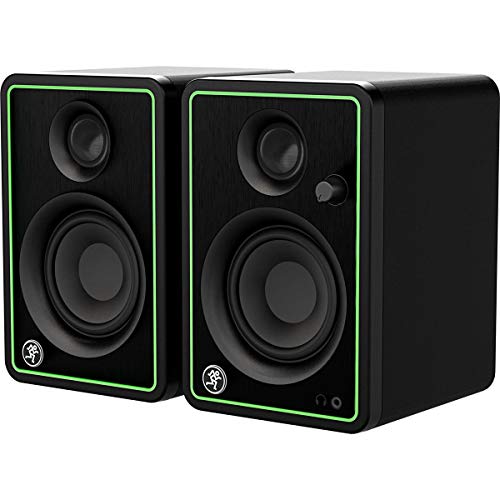
- Best for: Awkward desks, L-shaped setups, and listeners who want warm, easy sound.
- 3-inch woofer with brushed-metal front panel
- TRS, RCA, and AUX inputs
- Front-panel volume control
- Left and right speaker placement switch

- Best for: Beat-making, lively listening, and rooms where you want a bigger sound from a small pair.
- 3.5-inch low-frequency drivers
- 120W power output
- RCA and balanced TRS inputs
- High and low EQ controls
All 4 Picks at a Glance
| Product | Specs | Action |
|---|---|---|
| PreSonus Eris E3.5 |
| Check price on Amazon |
| Mackie CR3-X |
| Check price on Amazon |
| M-Audio BX3 |
| Check price on Amazon |
 JBL 104 |
| Check price on Amazon |
Small studio monitors exist for one reason: most home desks have no room for big speakers, yet music still needs to sound honest. A compact pair sits beside a laptop or a monitor, fills a small room with clear sound, and reveals the details that laptop speakers hide. The trade-off is bass, because a three-inch woofer cannot move as much air as a five-inch one, so the best small monitors are the ones that stay accurate within their limits instead of faking low end they cannot produce.
This guide compares four small studio monitors for home desks, all with woofers of four and a half inches or less. Every pair below was chosen from the name and specifications shown on its Amazon page, with driver size, inputs, placement flexibility, and tuning controls weighed against real desk use. Whether you mix music, edit video, or simply want better sound while you work, one of these four will fit your space.
Our Top Picks
Top 3 picks at a glance
Quick Picks
As an Amazon Associate we earn from qualifying purchases
| Product | Best for | Key spec from title |
|---|---|---|
| PreSonus Eris E3.5 | Accurate near-field mixing | 3.5-inch woven-composite woofer |
| Mackie CR3-X | Flexible desk layouts | 3-inch woofer with placement switch |
| M-Audio BX3 | Big sound from a small pair | 3.5-inch drivers with 120W power |
| JBL 104 | Compact reference listening | 4.5-inch coaxial driver design |
How to Choose
Woofer Size and Bass
Woofer size sets the lowest notes a small monitor can reproduce, and the physics are simple: a larger cone moves more air. A 3.5-inch woofer reaches down far enough for vocals, guitars, and most electronic music, while a 4.5-inch woofer adds a little more weight to bass lines and kick drums. Neither size will shake a room, so do not expect sub-bass from a desk pair. If deep bass matters to your music, plan for a subwoofer later rather than forcing a small monitor to do a job it cannot. Choose the woofer that matches your room and your music, not the biggest number on the box.
Placement and Room
Placement changes the sound of a small monitor more than any other factor. Speakers pushed against a wall gain bass from the boundary, while speakers pulled into open space sound thinner but clearer. Tweeters should sit near ear level and point at your head, forming a triangle with your listening position. Small monitors belong on a desk or on stands, never inside a shelf that traps the rear port. Before you judge a pair, try moving it a few inches in each direction, because placement fixes problems that no equalizer can.
Inputs and Connections
Inputs decide what you can plug in, so check them before you buy. Most small monitors accept RCA and balanced TRS connections from an audio interface, and many add a front aux input for phones and laptops. A front headphone jack lets you switch to private listening without reaching behind the speaker, and a volume knob on the front panel beats fumbling for software controls. Bluetooth is convenient for casual listening, but a wired connection stays cleaner for mixing work. Match the inputs to the gear you already own.
Listening Levels and Care
Small monitors are built for near-field listening at modest volume, and pushing them hard for hours can strain the drivers and your hearing. Keep the volume at a level where you can talk over the music comfortably, and give your ears regular breaks during long sessions. Place the speakers where air can move around them, since the amplifiers inside generate heat, and keep drinks away from the cabinets. Unplug the pair during storms and dust the rear panels occasionally, because a little care keeps a good pair sounding right for years.
The 4 Best Options
PreSonus Eris E3.5
- Best for: Home mixing, editing, and anyone who wants an honest, uncolored sound.
- 3.5-inch woven-composite woofer
- 1-inch silk-dome tweeter
- 50W Class AB amplification
- TRS and RCA inputs
Home mixing, editing, and anyone who wants an honest, uncolored sound.
Bass stays modest by design, so deep electronic music may need a subwoofer later.
The PreSonus Eris E3.5 is the most accurate small monitor in this group, built around a 3.5-inch woven-composite woofer and a 1-inch silk-dome tweeter that keep the midrange honest. Its 50W Class AB amplification drives the pair cleanly at desk volume, and the acoustic tuning controls on the rear let you trim bass and treble for rooms that push speakers against a wall. TRS and RCA inputs connect to any audio interface, while the front aux input and headphone jack handle quick checks. For mixing and editing in a small room, this is the pair to trust.
Watch out for: Bass stays modest by design, so deep electronic music may need a subwoofer later.
Mackie CR3-X
- Best for: Awkward desks, L-shaped setups, and listeners who want warm, easy sound.
- 3-inch woofer with brushed-metal front panel
- TRS, RCA, and AUX inputs
- Front-panel volume control
- Left and right speaker placement switch
Awkward desks, L-shaped setups, and listeners who want warm, easy sound.
The 3-inch woofer gives the least bass in this group, so place the pair near a wall for a fuller sound.
The Mackie CR3-X is the most flexible small monitor here, thanks to a rear switch that swaps the left and right speakers to suit any desk layout. Its 3-inch woofer and brushed-metal front panel give it a clean studio look, and the front volume knob sits where your hand naturally rests. TRS, RCA, and aux inputs cover interfaces, laptops, and phones, and the headphone jack switches output without unplugging cables. The sound leans warm and friendly, which makes long listening sessions easy. If your desk is awkwardly shaped or shared with other gear, this pair adapts to it.
Watch out for: The 3-inch woofer gives the least bass in this group, so place the pair near a wall for a fuller sound.
M-Audio BX3
- Best for: Beat-making, lively listening, and rooms where you want a bigger sound from a small pair.
- 3.5-inch low-frequency drivers
- 120W power output
- RCA and balanced TRS inputs
- High and low EQ controls
Beat-making, lively listening, and rooms where you want a bigger sound from a small pair.
The forward sound can flatter rough mixes, so check your work on headphones before finishing.
The M-Audio BX3 brings the most energy to this group, with 3.5-inch drivers and 120W of power that fill a small room without strain. Its rear panel offers RCA and balanced TRS inputs plus high and low EQ controls, so you can shape the sound for your space. A front headphone jack and volume knob keep daily use simple, and the included MPC Beats software gives beginners a starting point for making music. The sound is forward and lively, which suits beat-making and casual listening as much as careful mixing. For a small pair with real presence, this one delivers.
Watch out for: The forward sound can flatter rough mixes, so check your work on headphones before finishing.
JBL 104
- Best for: Reference listening, video editing, and small desks where accuracy matters most.
- 4.5-inch low-frequency transducer
- Coaxial driver design
- 60W Class D power amplifier
- Front volume, headphone, and aux controls
Reference listening, video editing, and small desks where accuracy matters most.
The compact cabinet limits low-end extension, so bass-heavy work benefits from checking on larger speakers.
The JBL 104 is the most compact reference monitor here, built around a 4.5-inch coaxial driver that places the tweeter inside the woofer for a single point of sound. Its 60W Class D amplifier powers the pair cleanly, and the front panel holds volume, headphone, and aux controls within easy reach. The coaxial design keeps the stereo image stable when you move your head, which helps during long editing sessions. It is a true reference monitor in a small cabinet, and it rewards careful placement with a clear, detailed picture of your audio.
Watch out for: The compact cabinet limits low-end extension, so bass-heavy work benefits from checking on larger speakers.
Which One Fits Your Situation
Bedroom Producers
Choose the PreSonus Eris E3.5 for producing in a bedroom, because its honest midrange and tuning controls help mixes translate to other speakers. Place the pair at ear level, pull them slightly away from the wall, and use the rear EQ to tame any boom. Check finished tracks on headphones and a car stereo before release, since no small monitor tells the whole story alone.
Video Editors
Pick the JBL 104 for video editing, since its coaxial driver keeps dialogue clear and the stereo image steady as you move. The front headphone jack makes it easy to switch to private listening when the room gets busy. Keep the volume moderate during long cuts, and let the monitors reveal clicks and room noise that laptop speakers would hide.
Small Desks
Take the Mackie CR3-X when desk space is tight or oddly shaped, because the placement switch and compact cabinets adapt to almost any layout. The warm sound stays pleasant during long workdays, and the front controls keep volume changes simple. Push the pair near the wall if you want a fuller low end without extra gear.
First Monitor Buyers
Start with the M-Audio BX3 if this is your first pair of studio monitors, because its lively sound and included software make the first steps into music-making fun. The EQ controls teach you how room placement changes the sound, and the front headphone jack keeps practice sessions private. Learn the pair well before adding a subwoofer or upgrading.
Common Mistakes
- Placing small monitors inside a shelf or against a cluttered wall, which muddies the bass and smears the stereo image.
- Turning the volume up to compensate for weak bass, which strains the drivers and tires your ears.
- Judging a pair before trying two or three placements, since a few inches can change the sound completely.
- Buying monitors without checking that your audio interface has matching outputs.
- Expecting sub-bass from a three-inch woofer instead of planning for a subwoofer later.
Frequently Asked Questions
Are small studio monitors good enough for mixing?
Yes, small monitors work well for mixing in a small room, because near-field listening reduces the influence of the room itself. Their honest midrange reveals vocal and instrument balance clearly. The limit is deep bass, which small woofers cannot reproduce fully, so check low end on headphones or a larger system. Many professional mixes start on small monitors and get verified elsewhere.
Do I need an audio interface for studio monitors?
An audio interface helps a lot, because it provides clean balanced outputs and a proper volume control. Many small monitors also accept RCA and aux inputs, so you can connect a laptop directly. For serious mixing, an interface reduces noise and gives you better control. For casual listening and editing, a direct connection works fine to start.
How far apart should small studio monitors sit?
Place them so the two speakers and your head form an equilateral triangle, usually with each speaker about an arm’s length away. Tweeters should sit at ear level, and the speakers should angle inward toward you. Keep them away from corners when possible, since corners boost bass unevenly. Small adjustments of a few inches can make a noticeable difference.
Can small studio monitors replace regular computer speakers?
Yes, and they usually sound far better, with clearer mids and a wider stereo image. The trade-off is size and cost, since monitors take more desk space and need their own power. If you mainly watch videos and listen to music while you work, a small monitor pair is a genuine upgrade. Keep headphones nearby for late nights and private listening.
Related guides
More from Amazon
Programs that pair well with the guide above. Offers and eligibility are set by Amazon and may change.
Free shipping on eligible items, Prime Video and more. Eligible new members can start with a free trial.
Start a Prime free trialAd-free music streaming. Eligible new subscribers can start with a free trial.
Try Music Unlimited freeA Prime membership for ages 18-24 with a trial period. Eligibility is set by Amazon.
See Prime for Young AdultsAudiobooks and podcasts to listen to on the go. Eligible new members can start with a free trial.
Try Audible freeAs an Amazon Associate we earn from qualifying purchases.









