
Our Short List of 3

- Best for: Buyers who want 1440p play now and the newest platform for later upgrades.
- AMD Ryzen 7 9700X, 3.8 GHz base and 5.5 GHz boost
- NVIDIA GeForce RTX 4060 8GB GDDR6, brand may vary
- 16GB DDR5 6000 memory with heat spreader
- 1TB NVMe solid state drive
- Best for: Players who want a balanced Intel tower for 1440p gaming and everyday multitasking.
- Intel Core i7-12700F, 2.1 GHz base and 4.9 GHz boost
- NVIDIA GeForce RTX 4060 8GB GDDR6X, brand may vary
- 16GB DDR4 3200 memory
- 1TB NVMe solid state drive

- Best for: Streamers and heavy multitaskers who need the most processor cores in this tier.
- Intel Core i7-13700F, 2.1 GHz base and 5.1 GHz boost
- NVIDIA GeForce RTX 4060 8GB GDDR6X, brand may vary
- 16GB DDR4 3200 memory
- 1TB NVMe solid state drive
All 4 Picks at a Glance
| Product | Specs | Action |
|---|---|---|
| Skytech Gaming Azure 3 |
| Check price on Amazon |
| Skytech Gaming Archangel |
| Check price on Amazon |
| Skytech Gaming Shadow |
| Check price on Amazon |
 Skytech Gaming Nebula |
| Check price on Amazon |
A mid range gaming PC is the point where 1440p play stops feeling like a compromise: the graphics card is strong enough for high settings at that resolution, the processor keeps frame rates steady in busy scenes, and the machine still leaves room to upgrade later. The real decision is which platform you build around, because memory generation, cooling and power supply choices shape what you can change in two or three years.
The four prebuilt desktops below all sit in the same graphics tier, so the differences that matter are the processor, the memory platform and the cooling. They suit buyers who want a ready-to-play tower for a 1440p monitor, streamers who need spare processor threads, and upgraders who want a modern platform. Every pick was chosen from the processor, graphics and memory listed on its product page.
Our Top Picks
Top 3 picks at a glance
Quick Picks
As an Amazon Associate we earn from qualifying purchases
| Product | Best for | Key spec |
|---|---|---|
| Skytech Gaming Azure 3 | Future-proof 1440p play | Ryzen 7 9700X, RTX 4060, 16GB DDR5 |
| Skytech Gaming Archangel | Balanced Intel value | Core i7-12700F, RTX 4060, 16GB DDR4 |
| Skytech Gaming Shadow | Streaming and multitasking | Core i7-13700F, RTX 4060, 360mm AIO |
| Skytech Gaming Nebula | First mid range tower | Core i5-13400F, RTX 4060, 16GB DDR4 |
How to Choose
Start with the graphics card tier
The graphics card decides your resolution and settings more than any other part. This tier of card carries 8GB of video memory and is built for smooth 1080p at high settings and 1440p at medium to high settings in most current games. If you plan to play at 1440p for years, treat this class as the floor rather than the ceiling, and check that the listing names the exact card rather than a vague graphics description before you buy. Also confirm the case leaves physical room for a longer card later.
Match the processor to your workload
Gaming alone rarely stresses a modern six or eight core processor, but streaming, recording and voice chat all compete for threads while you play. A higher core count Intel Core i7 or AMD Ryzen 7 gives that background work room to run without stealing frames. If you only play and browse, a Core i5 class chip in the same graphics tier saves money that is better spent on the monitor or a second storage drive later. Whatever you choose, avoid pairing a strong card with an older entry level chip.
Pick a memory platform you can grow
Two of the platforms here use DDR4 memory and two directions exist in this lineup: the DDR5 machine rides a newer socket with a longer upgrade path, while the DDR4 towers cost less today and still take larger memory kits and faster drives. Either way, 16GB is the sensible starting point for this tier, and a 1TB solid state drive fills quickly with modern game installs, so confirm the case and board leave a spare slot or bay for a second drive. Two free memory slots also make a later jump to 32GB simple.
Check cooling and the power supply
A mid range tower runs for long sessions, so cooling decides how quiet it stays and how consistently the processor holds its boost speeds. Liquid all-in-one coolers and well vented cases both work; what matters is that the listing states the cooler type and the power supply wattage and rating. A 600W to 650W Gold rated supply is the right size for this graphics tier and leaves modest headroom for a future card upgrade. Also check fan noise under load if the tower will sit on the desk beside you rather than on the floor.
The 4 Best Options
Skytech Gaming Azure 3
- Best for: Buyers who want 1440p play now and the newest platform for later upgrades.
- AMD Ryzen 7 9700X, 3.8 GHz base and 5.5 GHz boost
- NVIDIA GeForce RTX 4060 8GB GDDR6, brand may vary
- 16GB DDR5 6000 memory with heat spreader
- 1TB NVMe solid state drive
Buyers who want 1440p play now and the newest platform for later upgrades.
The graphics card brand may vary between units, so the exact cooler design on the card is not guaranteed.
The Azure 3 is the most modern machine in this group, pairing an AMD Ryzen 7 9700X with DDR5 memory on a current platform, which makes it the natural pick if you expect to upgrade the processor or memory years from now. Its 360mm liquid cooler and tempered glass white case suit a desk setup that stays visible, and the 650W Gold power supply gives the RTX 4060 comfortable headroom. For 1440p play today plus the longest upgrade runway, this is the strongest all-round specification here.
Skytech Gaming Archangel
- Best for: Players who want a balanced Intel tower for 1440p gaming and everyday multitasking.
- Intel Core i7-12700F, 2.1 GHz base and 4.9 GHz boost
- NVIDIA GeForce RTX 4060 8GB GDDR6X, brand may vary
- 16GB DDR4 3200 memory
- 1TB NVMe solid state drive
Players who want a balanced Intel tower for 1440p gaming and everyday multitasking.
The DDR4 platform has a shorter upgrade path than the DDR5 machine in this list.
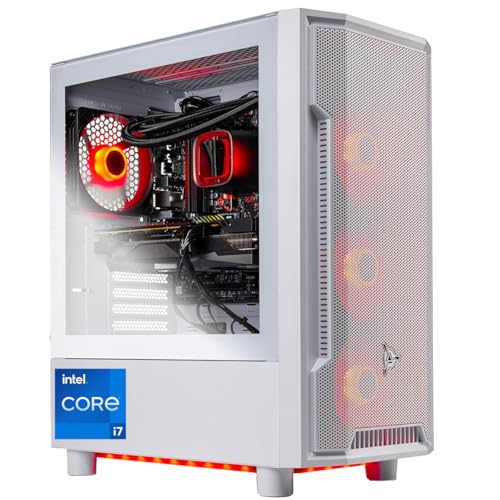
The Archangel pairs an Intel Core i7-12700F with the same RTX 4060 tier graphics, trading the newer memory platform for a proven DDR4 setup that keeps the specification focused on play rather than future swaps. Twelve cores give it comfortable room for gaming alongside voice chat, a browser full of tabs and game capture running in the background. A 240mm liquid cooler handles the processor, and the white case keeps the build looking clean on a desk. It is the balanced choice for players who want strong performance without paying for platform features they will not use.
Skytech Gaming Shadow
- Best for: Streamers and heavy multitaskers who need the most processor cores in this tier.
- Intel Core i7-13700F, 2.1 GHz base and 5.1 GHz boost
- NVIDIA GeForce RTX 4060 8GB GDDR6X, brand may vary
- 16GB DDR4 3200 memory
- 1TB NVMe solid state drive
Streamers and heavy multitaskers who need the most processor cores in this tier.
The extra cores help background work far more than raw frame rates, so pure gamers pay for capacity they may not use.
The Shadow is the multitasker of the group: its Intel Core i7-13700F brings sixteen cores, the most processor headroom here, which suits streamers who encode video, run overlays and keep a stream dashboard open while playing at 1440p. The 360mm liquid cooler is the largest radiator in this lineup and helps the chip hold its boost speeds through long sessions. Memory and storage match the tier at 16GB of DDR4 and a 1TB NVMe drive, and the black case keeps the build understated. Choose it when the PC has to play and produce at the same time.
Skytech Gaming Nebula
- Best for: First-time buyers who want this graphics tier in its simplest, cleanest form.
- Intel Core i5-13400F, 2.5 GHz base and 4.6 GHz boost
- NVIDIA GeForce RTX 4060 8GB GDDR6X, brand may vary
- 16GB DDR4 3200 memory
- 1TB NVMe solid state drive
First-time buyers who want this graphics tier in its simplest, cleanest form.
The cooler type is not stated, so check the listing details if quiet operation matters to you.
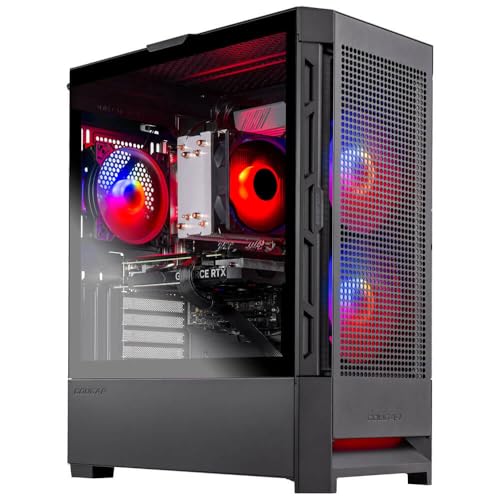
The Nebula is the straightforward entry into this tier: an Intel Core i5-13400F and RTX 4060 pairing that covers 1080p at high settings and 1440p at tuned settings without extras inflating the specification. Ten cores still leave room for voice chat and light recording, and the 1TB NVMe drive matches the rest of the lineup. The listing does not state the cooler type, so expect a basic cooling setup rather than the large liquid radiators on the other towers here. For a first mid range tower that simply plays well, it covers the essentials.
Which One Fits Your Situation
You play at 1440p and keep a PC for years
Choose the DDR5 machine. A current socket and faster memory generation mean a processor or memory upgrade later does not force a motherboard swap, and the large liquid cooler keeps the system composed under long sessions. It is the pick that treats this purchase as a platform rather than a one-off tower, which suits anyone upgrading piece by piece.
You stream or record while you play
Prioritize processor cores. Streaming software, overlays, chat tools and a browser all draw on the same chip that feeds your game, so the sixteen core option protects your frame rate when the background load grows. Pair it with a second drive sooner rather than later, because recordings fill storage quickly. A wired network connection also keeps the stream stable.
You mostly play solo games at 1080p or 1440p
Any tower here will serve you, so let the simpler specification win. The Core i5 machine covers high settings at 1080p and tuned settings at 1440p, and money saved against the higher core models is better spent on the monitor, a headset or a larger game library. Solo play also places the lightest load on cooling and storage.
You want a clean desk setup that looks the part
Two of these towers come in white cases with tempered glass, which suit a visible desk build. Check the case dimensions against your space before ordering, and plan cable runs for the tower, monitor and peripherals so the glass panel faces the room rather than a wall. Leave clearance behind the case for exhaust air as well.
Common Mistakes
- Buying by processor name alone while ignoring the graphics card, which decides resolution and settings far more than the chip does.
- Assuming every listing of the same model uses identical parts, when the graphics card brand may vary between units.
- Filling a 1TB drive within months and having no spare slot or bay planned for a second drive.
- Skipping the power supply details, then finding a future graphics upgrade needs more wattage than the fitted unit offers.
- Placing a glass-sided tower in a cramped, unventilated cabinet where its cooling cannot breathe.
Frequently Asked Questions
Is this tier of PC enough for 1440p gaming?
Yes, for most current games at medium to high settings. The RTX 4060 class card in all four towers is built around 1080p and 1440p play, and modern upscaling features help hold smooth frame rates at 1440p. Very demanding titles may need some settings turned down, which is normal for this tier.
Should I choose the DDR5 model or save with DDR4?
Choose DDR5 if you expect to upgrade the processor or memory in a few years, because the platform stays current longer. Choose DDR4 if you want the lowest cost into this graphics tier today and plan to replace the whole tower eventually. In-game performance between these specific builds is far closer than the platform gap suggests.
Can these PCs handle VR headsets?
The graphics tier and processor class in these towers meet the requirements of mainstream PC VR headsets, and the Wi-Fi and port selection suit a typical play space setup. Check your specific headset maker’s current requirements before buying, since individual titles and headsets vary in what they ask of the graphics card and memory.
What should I upgrade first on a mid range tower?
Storage usually comes first, because modern game libraries outgrow a 1TB drive quickly and adding a second NVMe or SATA drive is simple. Memory is next if you multitask heavily. The graphics card is the biggest performance step, but confirm your power supply wattage and case clearance before choosing a larger card.
Related guides
More from Amazon
Programs that pair well with the guide above. Offers and eligibility are set by Amazon and may change.
Free shipping on eligible items, Prime Video and more. Eligible new members can start with a free trial.
Start a Prime free trialAd-free music streaming. Eligible new subscribers can start with a free trial.
Try Music Unlimited freeA Prime membership for ages 18-24 with a trial period. Eligibility is set by Amazon.
See Prime for Young AdultsAudiobooks and podcasts to listen to on the go. Eligible new members can start with a free trial.
Try Audible freeAs an Amazon Associate we earn from qualifying purchases.









