
Buying a first gaming PC for a teenager is really two decisions at once. The machine has to run the games they play right now, and it also has to stay useful as homework, video calls, streaming and heavier new titles get added over the next few years. Because a parent usually carries the budget, the smartest move is a balanced prebuilt system rather than the cheapest tower on the shelf or the most powerful one.
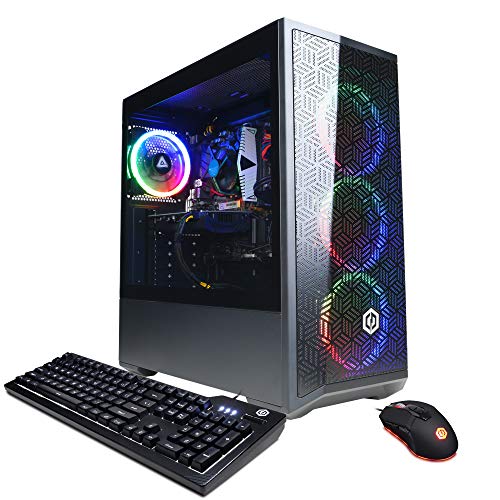
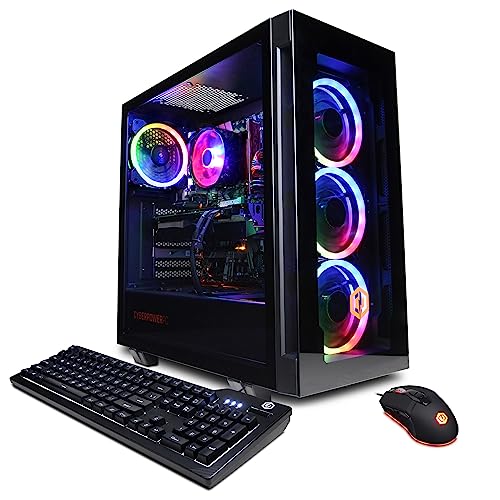
All three picks below come from one established prebuilt line and cover three clear levels. There is an entry build for lighter games and schoolwork, a mid-range system with real room to grow, and a stronger option for teens who play demanding titles or edit video. Each one was chosen from the processor, graphics card, memory, storage and connectivity listed on its own product page, so the differences between them are easy to compare side by side.
Quick Picks
As an Amazon Associate we earn from qualifying purchases
| Product | Best for | Key spec |
|---|---|---|
| CyberPowerPC Gamer Xtreme VR (GXiVR8060A12) | A first PC on a tight budget | GeForce RTX 3050 8GB graphics |
| CyberPowerPC Gamer Xtreme VR (GXiVR8060A24) | Balanced everyday gaming | GeForce RTX 4060 8GB graphics |
| CyberPowerPC Gamer Xtreme VR (GXiVR8040A14) | Demanding games and creating | GeForce RTX 4060 Ti 16GB graphics |
How to Choose
Match the graphics card to the games actually played
The graphics card does most of the work in games, so start with the titles your teenager plays most. Lighter games such as sandbox, sports and popular online titles run comfortably on an entry card, while newer story-driven games with detailed worlds reward a stronger one. Buying one step above today’s needs is usually wiser than buying the minimum, because game requirements climb every year. At the same time, there is little value in paying for a flagship card if the screen is a basic 1080p monitor and the game library is mostly casual titles.
Memory and storage decide how long the PC stays comfortable
Memory affects how smoothly a PC juggles a game, a browser, chat apps and schoolwork at the same time. Eight gigabytes is a workable starting point for lighter use, but sixteen gigabytes is the comfortable level for a machine expected to last several years. Storage matters just as much: modern games are large, and a small drive fills quickly once a few big titles, school projects and recorded clips pile up. A one terabyte solid state drive gives a teenager breathing room, while a smaller drive means deleting games to make space for new ones.
Look at the processor behind the graphics card
The processor handles game logic, streaming, video calls and everyday tasks, and a weak one can hold back an otherwise good graphics card. A modern six-core or better chip is a sensible floor for a first gaming PC. Newer processor generations also tend to pair with faster memory and storage, which keeps the whole system feeling responsive when several programs are open. For a teenager who only plays and does homework, a mid-range processor is plenty; one who streams gameplay or edits video benefits from stepping up to a stronger chip.
Check WiFi, ports and room to upgrade
A teenager’s desk rarely sits next to the router, so built-in WiFi saves running a long cable across the house. Check that the case offers enough USB ports for a keyboard, mouse, headset, controller and school peripherals without constant swapping. Upgrade room matters too: a standard tower with accessible memory slots and drive bays lets you add memory or storage later instead of replacing the whole PC. Finally, confirm the system ships with Windows 11 Home installed, so it works with current games, school platforms and security updates from day one.
The 3 Best Options
CyberPowerPC Gamer Xtreme VR (GXiVR8060A12)
This is the starter pick of the three, built around an Intel Core i5-11400F processor and a GeForce RTX 3050 graphics card with 8GB of video memory. That pairing handles popular online games, sandbox titles and schoolwork without strain, and the 500GB solid state drive keeps load times short. The honest trade-off is the 8GB of system memory, which is fine for lighter use today and can be raised later as needs grow. For a younger teen getting a first PC, it covers the essentials at the lowest step of this lineup.
Specs
- Processor: Intel Core i5-11400F at 2.6 GHz
- Graphics: GeForce RTX 3050 with 8GB
- Memory: 8GB DDR4
- Storage: 500GB PCIe NVMe SSD
- Connectivity: WiFi ready
- Operating system: Windows 11 Home
- Color: Black
Best for: A younger teenager’s first gaming PC for lighter games and homework.
Watch out for: The 8GB of memory is the entry point of this set, so plan on a memory upgrade if heavier games or multitasking arrive.
CyberPowerPC Gamer Xtreme VR (GXiVR8060A24)
The middle pick is the one most families should look at first. An Intel Core i5-13400F processor pairs with a GeForce RTX 4060 graphics card, 16GB of faster DDR5 memory and a 1TB solid state drive, which together cover current games, school projects and everyday multitasking with headroom to spare. Nothing in this configuration is at the bare minimum, so it should stay comfortable for longer than the entry build. WiFi is built in and Windows 11 Home comes installed, making it a straightforward set-up-and-play choice for a teenager’s bedroom or a shared family desk.
Specs
- Processor: Intel Core i5-13400F at 2.5 GHz
- Graphics: GeForce RTX 4060 with 8GB
- Memory: 16GB DDR5
- Storage: 1TB PCIe Gen4 SSD
- Connectivity: WiFi ready
- Operating system: Windows 11 Home
Best for: Most teenagers, as a balanced first PC that mixes gaming, schoolwork and room to grow.
Watch out for: The graphics card’s 8GB of video memory suits 1080p play well, but very demanding future titles at higher settings will test it sooner than the Ti model below.
CyberPowerPC Gamer Xtreme VR (GXiVR8040A14)
The strongest pick here steps up to an Intel Core i7-13700F processor and a GeForce RTX 4060 Ti graphics card with 16GB of video memory, double the graphics memory of the other two. That extra capacity suits detailed open-world games, higher settings and longer play sessions, while the processor gives extra strength for streaming and video editing. It keeps the same 16GB of DDR5 memory and 1TB solid state drive as the middle pick, so storage and everyday responsiveness stay on par. This is the choice for a teen who has outgrown lighter games or creates content alongside playing.
Specs
- Processor: Intel Core i7-13700F at 2.1 GHz
- Graphics: GeForce RTX 4060 Ti with 16GB
- Memory: 16GB DDR5
- Storage: 1TB NVMe SSD
- Connectivity: Wi-Fi ready
- Operating system: Windows 11 Home
Best for: Older teens playing demanding games, streaming or editing video on the same machine.
Watch out for: It is the biggest step up in this set, so it only makes sense if the games played or the creative work will actually use the extra graphics power.
Which One Fits Your Situation
A first PC for a younger teenager
If this is a first computer for a younger teen whose library is mostly lighter online and sandbox games, the entry GXiVR8060A12 covers the job without overspending. It runs schoolwork and everyday apps comfortably, and its memory can be upgraded later when tastes move to bigger titles. Starting here leaves budget room for the monitor, headset and desk gear a new setup also needs.
One machine for homework and gaming
When the same PC has to handle essays, research, video calls for school and evening gaming, the balanced GXiVR8060A24 is the sensible middle. Its 16GB of memory keeps several programs open at once, and the 1TB drive holds both a game library and school files without constant tidying. It is the pick least likely to feel limiting within a year or two.
A teen who streams or edits video
Creating content asks more of a PC than playing alone. Streaming gameplay, recording clips and editing video all lean on the processor and graphics card at the same time, which is where the GXiVR8040A14 earns its place. Its stronger processor and the graphics card’s 16GB of video memory give a teen room to play, capture and edit on one machine instead of upgrading again soon.
A gift that should last several years
For a birthday or holiday gift meant to stay relevant through several school years, weigh the middle and top picks most heavily. Both carry 16GB of memory and a 1TB drive, the two specs that age fastest when they fall short. Choosing the stronger graphics card now usually costs less than replacing a whole PC early because a newer game will not run well.
Common Mistakes
- Buying on the graphics card name alone while ignoring memory and storage, which decide how the PC feels day to day.
- Choosing the smallest drive available, then watching a handful of modern games fill it within months.
- Forgetting the rest of the setup: a monitor, keyboard, mouse and headset are separate purchases from the tower.
- Assuming every configuration with the same product name is identical; this line spans many builds, so check the exact model code and spec list.
- Skipping parental controls and account setup at first boot, when they are easiest to configure.
Frequently Asked Questions
Is a prebuilt PC a good choice for a teenager’s first computer?
Yes, for most families a prebuilt is the practical route. It arrives assembled, with Windows installed and the parts chosen to work together, so a teenager can start playing and studying the same day. It also gives parents a single product to evaluate, rather than a list of separate components whose compatibility needs checking one by one.
How much memory does a first gaming PC need?
Eight gigabytes is a workable minimum for lighter games and schoolwork, and the entry pick here runs at that level with an upgrade path later. Sixteen gigabytes is the more comfortable target for a machine expected to last several years, because games, browsers and chat apps together use more memory than any one of them alone.
Can a gaming PC handle schoolwork as well as games?
Easily. The same processor, memory and storage that run games also run word processors, browsers, presentation tools and video calls without difficulty. A gaming PC is simply a capable Windows computer with a stronger graphics card, so nothing about school use is compromised. Many families find one shared machine covers both roles for years.
What else needs budgeting for besides the tower itself?
Plan for a monitor, keyboard, mouse and headset, since a desktop tower ships without a display or peripherals. A desk and chair that fit the teenager’s room matter too, along with a surge protector for safety. Setting aside a small amount for a future memory or storage upgrade also stretches the PC’s useful life considerably.
Related guides
More from Amazon
Programs that pair well with the guide above. Offers and eligibility are set by Amazon and may change.
Free shipping on eligible items, Prime Video and more. Eligible new members can start with a free trial.
Start a Prime free trialAd-free music streaming. Eligible new subscribers can start with a free trial.
Try Music Unlimited freeA Prime membership for ages 18-24 with a trial period. Eligibility is set by Amazon.
See Prime for Young AdultsAudiobooks and podcasts to listen to on the go. Eligible new members can start with a free trial.
Try Audible freeAs an Amazon Associate we earn from qualifying purchases.









