Noise in a PC rarely comes from the processor itself. It comes from fans spinning faster than they need to, and fans speed up when the heatsink cannot move heat away quickly enough. That is why a silent build starts with a cooler that has more cooling capacity than the processor strictly needs: a large heatsink lets a fan idle at low speed even under load. The good news for budget buyers is that air coolers have reached a point where several inexpensive designs offer exactly that kind of spare capacity, without the pump hum or leak risk that comes with liquid loops.
This guide is for anyone assembling or refreshing a quiet desktop in 2026 who does not want to spend premium money on the heatsink: home-office users, late-night gamers, and anyone who works in a small room where a fan whine becomes a daily irritation. Seven budget-tier air coolers are compared based on what their listing titles state, namely tower design, heat pipe count, fan size, rated thermal capacity, and socket support, with practical advice on fit, mounting, and the parts of a silent build that cost nothing to get right.
Our Top Picks
 Cooler Master Hyper 212 Black CPU Air Cooler4 Heat Pipes4.7 x 3.1 x 6.3 inches1.54 poundsCheck on Amazon
 ID-COOLING FROZN A620 PRO SE Dual-Tower CPU Cooler5.59 x 4.72 x 6.18 inches2.6 PoundsCheck on Amazon



Top 3 picks at a glance
Quick Picks
As an Amazon Associate we earn from qualifying purchases at no extra cost to you.


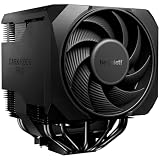

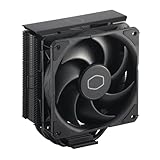


| Product | Best for | Key spec from the title |
|---|---|---|
| be quiet! Pure Rock Pro 3 | Quiet-first builds with a trusted silence brand | 250W TDP, double tower, 2 silent 120mm PWM fans |
| Thermalright Peerless Assassin 120 SE | Strongest cooling for the lowest cost tier | 6 heat pipes, dual towers, dual PWM fans |
| Cooler Master Hyper 212 Black | Mainstream builds on current sockets | 4 heat pipes, 120mm PWM fan, AM5/AM4 and LGA1851/1700 |
| JONSBO CR1400 EVO | Compact cases with height limits | 130mm fan height, 92mm fan, 4 copper heat pipes |
| ID-COOLING FROZN A620 PRO SE | Dual-tower value with a stated noise ceiling | 260W, 6 heat pipes, 27.2dB(A) max |
| Thermalright Peerless Assassin 120 Vision MAX | Show-off builds that still need real cooling | Dual PWM fans, ARGB, display screen |
| Cooler Master Hyper 212 Halo | Lighting fans on a familiar tower | 4 heat pipes, MF120 Halo2 ARGB fan |
The 7 Best Options
be quiet! Pure Rock Pro 3
The Pure Rock Pro 3 is the natural starting point for anyone who puts silence first. The title describes an AMD and Intel air cooler with a 250W TDP rating, a double-tower compact design, two silent 120mm PWM fans, and six high-performance 6mm heat pipes. A Silver variant exists with the same description, so the Black version here is treated as the one entry. The brand name has long been tied to quiet components, which is part of its appeal.
- A 250W TDP rating gives headroom for mainstream and many high-end processors.
- Two PWM fans share the load, so each can spin slowly and quietly.
- Six heat pipes on a double-tower design promise strong heat transfer for the cost tier.
- It sits at a higher cost tier than the lowest-cost towers in this list.
- Double-tower designs can interfere with tall memory modules and clearance near the top of the board.
Skip it if your case is narrow or you use tall RAM heat spreaders, since a dual-tower body can block them. Compared with the Thermalright Peerless Assassin 120 SE next in the list, the be quiet! takes a more conservative, brand-reassuring approach to silence, while the Thermalright offers similar hardware at a lower cost tier, so you are paying partly for the badge and the quiet-fan reputation. It suits someone who plans to build once, leave the fan curve on a gentle setting, and never open the case again for a year or two. The twin 120mm fans and the large fin stack also leave room to pair it with a processor upgrade later without having to replace the cooler, which stretches the value of the initial spending.
Thermalright Peerless Assassin 120 SE
This cooler built a following among cost-conscious builders by delivering dual-tower cooling at a modest cost tier. The title lists six heat pipes, dual towers, dual PWM fans, and support for AMD AM4 and more. It is the choice for builders who care about temperatures per unit of spending and are happy to forgo flashy extras.
- Six heat pipes and dual towers match the design of far more expensive coolers.
- Dual PWM fans allow low-speed, quiet operation under typical loads.
- A plain black finish avoids lighting extras that add little to cooling.
- The large body can clash with tall memory and tight cases.
- The listing shown does not give a noise figure, so quiet performance depends on fan curve settings.
Skip it if you want a stated noise ceiling or a small, low-profile cooler. Against the Cooler Master Hyper 212 Black, the Peerless Assassin 120 SE brings more heat pipes and a second tower, which is the main reason it is the stronger value for heavier processors, whereas the Hyper 212 wins on familiarity and simplicity. For a quiet gaming desktop with a mid-range or higher processor, the Peerless Assassin SE is arguably the sweet spot of this list: its design gives the fans room to idle at low speed, and its plain black finish keeps the focus on temperatures rather than lighting. Just measure the case and memory height first, since the bulk that makes it effective also makes it fussy to fit.
Cooler Master Hyper 212 Black
The Hyper 212 is a long-running name in air cooling, and this Black version keeps the formula simple. The title lists four heat pipes, a 120mm PWM fan, support for AMD AM5 and AM4 along with Intel LGA1851 and 1700, and quiet cooling. It is an approachable tower for mainstream processors in standard cases.
- Support for AM5, AM4, LGA1851, and LGA1700 covers most current sockets in a single package.
- A single tower is simpler to install and less likely to collide with memory.
- Four heat pipes and a PWM fan suit mid-range processors comfortably.
- A single tower offers less cooling capacity than the dual-tower models above it.
- It may run its fan faster than larger coolers under the same load, raising noise.
Skip it if you plan to use a power-hungry processor and want true silence under load. Compared with the Halo version later in this list, the Black model drops the lighting and focuses on plain cooling, which is the better fit for a quiet, understated build and the more sensible choice when RGB is irrelevant. It is a good match for an office or study machine with a modest processor, where the cooler only needs to be dependable and unobtrusive. Because the socket list in the title is broad, it also suits someone who expects to move from an older platform to a newer one and would like to reuse the same cooler without hunting for a new mounting kit.
JONSBO CR1400 EVO
The CR1400 EVO belongs in a different category: the compact tower. The title describes an ARGB Mute Series air cooler with a fan height of 130mm, a 92mm fan, and four copper heat pipes. It is aimed at small cases where taller coolers simply will not fit.
- A 130mm height lets it fit in compact and mid-size cases.
- Four copper heat pipes give it respectable heat transfer for its size.
- The Mute Series name points to a design intent focused on low noise.
- A 92mm fan must spin faster than larger fans to move the same air, which can increase noise.
- Cooling capacity is lower than the full-size dual-tower designs here.
Skip it if your processor is a high-power model or your case is spacious enough for a larger cooler. In a small-form-factor build, the JONSBO is the sensible pick; in a normal tower, one of the 120mm coolers above will usually deliver quieter results at similar cost. The compact approach makes sense for a living-room media box, a small-form-factor desktop, or a tidy office build where the processor is efficient and the limit is physical space rather than thermal capacity. Expect to set a gentler fan curve and accept that, under sustained load, a smaller fan will be heard sooner than a large one.
ID-COOLING FROZN A620 PRO SE
The FROZN A620 PRO SE is one of the few listings that gives a noise number. The title describes a dual-tower cooler at 157mm tall, rated for 260W, with six heat pipes, dual 120mm quiet fans at 27.2dB(A) maximum, and support for Intel sockets. That stated figure is the sort of detail a silent-PC builder wants.
- A stated maximum of 27.2dB(A) gives a concrete noise ceiling.
- A 260W rating and six heat pipes suggest strong capacity for the cost tier.
- Dual-tower design with two 120mm fans keeps fan speeds low.
- At 157mm tall, it may not fit in slim or compact cases.
- The noise figure applies to the fans at maximum speed, and real-world noise also depends on the case and the motherboard fan curve.
Skip it if your case has less than 157mm of clearance. Compared with the be quiet! Pure Rock Pro 3, the ID-COOLING lists a higher thermal rating and a specific noise figure, while the be quiet! carries the stronger brand reputation for silence, so the choice is between hard numbers and brand trust. For a quiet-first buyer who reads spec sheets carefully, the FROZN A620 PRO SE is attractive because the claim can be checked against the rest of the build: if your case, fans, and drives are all quiet, a cooler with a stated low ceiling will not be the weak link. Remember that the figure describes fans at full speed, so everyday noise should be lower.
Thermalright Peerless Assassin 120 Vision MAX
The Vision MAX takes the proven Peerless Assassin design and adds a display. The title lists an ARGB black air cooler with dual PWM fans, and a PC display screen built into the cooler. It is meant for builders who want a showpiece without giving up cooling.
- Dual PWM fans and the Peerless Assassin layout keep cooling capable.
- An integrated display screen adds a visual element for showcase builds.
- ARGB lighting integrates with common motherboard lighting systems.
- The display and lighting add cost and complexity that do not improve silence.
- It sits at a higher cost tier than the plain SE model.
Skip it if your priority is the lowest noise per spending tier; the plain SE covers the same job for less. The Vision MAX makes sense only when you want the display, and next to the Hyper 212 Halo it is the more ambitious design, though the Halo is simpler and easier to fit. Think of the Vision MAX as a display piece that also cools well: the dual-tower layout and dual PWM fans do the real work, and the screen is a bonus for anyone with a glass-sided case on show. Buyers who cannot picture themselves using the display should save the extra spending and take the SE model.
Cooler Master Hyper 212 Halo
The Hyper 212 Halo is the lighting-focused version of a familiar tower. The title describes a black aluminum finish, four heat continuous direct contact pipes, an MF120 Halo2 ARGB fan, and ARGB detection. It brings color to a build while keeping the proven single-tower layout.
- Four direct-contact heat pipes provide mainstream cooling capacity.
- The MF120 Halo2 ARGB fan adds a lighting effect that can match other components.
- A single-tower body fits most standard cases and memory heights.
- The lighting adds cost without making the build any quieter.
- A single fan and tower design is less capable than the dual-tower models.
Skip it if you want a plain, quiet build, since the plain Black model costs less and does the same cooling job. This one is for buyers who want a lit tower, are cooling a mainstream processor, and prefer a familiar brand and installation process. It also makes a good first cooler for someone building their first PC, because the single-tower layout leaves plenty of room around the memory slots, the mounting steps are well documented across the internet, and few cases will have trouble accepting a body of this size. The trade-off is that it is a cooler for modest, not extreme, workloads.
Why Choose a Budget Air Cooler for a Silent PC
Liquid coolers get most of the marketing, but air coolers remain the quietest and most dependable option for many builds. Here is why a budget tower can be exactly what a silent system needs.
No pump means one less noise source
Liquid coolers add a pump, and some pumps produce a hum or gurgle that fans alone never create. An air cooler has only fans as moving parts, so there is one noise source to tune instead of two. For a silent PC, that simplicity is a real advantage.
Fewer failure points over the years
An air cooler has no coolant to evaporate and no pump to wear out. A fan can be replaced for a small cost, and the heatsink will outlive several processors. For a machine you plan to keep for years, that reliability counts for more than a slightly lower temperature reading.
Large heatsinks let fans slow down
The principle behind a quiet cooler is surface area. A large dual-tower heatsink such as the Peerless Assassin 120 SE or the Pure Rock Pro 3 can shed heat while its fans turn slowly, and slow fans are quiet fans. Budget does not have to mean noisy; it just means you should favor mass and fin area over lighting.
How to Choose
Match the cooler’s rating to your processor
Coolers list a thermal design power rating, such as 250W or 260W. Pick a rating comfortably above your processor’s power draw: for a 65W mainstream chip, even a modest tower works, while 125W-plus processors benefit from dual-tower designs with 250W-class ratings. Extra capacity means the fans can stay slow. Remember that a processor can draw more than its base rating under boost, so look at the maximum power figure on the manufacturer page rather than the headline number. As a working rule, a cooler rated for roughly twice the processor’s maximum draw will be comfortably quiet in everyday use, while one rated barely above it will have to work hard whenever a game or an export job starts.
Check physical fit before anything else
Measure the interior height of your case and compare it to the cooler’s height, since a cooler that touches the side panel will not close the case. Check memory clearance, because dual-tower coolers can overhang the first memory slot. The FROZN A620 PRO SE at 157mm and the compact JONSBO at 130mm fan height show how much these dimensions vary. Leave at least a few millimeters of spare room between the top of the cooler and the side panel, and check that the lowest fin does not hang over the first memory slot unless your modules are low-profile. If the top PCIe slot sits close to the socket, a wide dual-tower body can also make graphics card installation awkward.
Confirm socket support
Current platforms use AM5 for newer AMD systems, AM4 for older ones, and LGA1700 or LGA1851 for Intel. Make sure the cooler lists your socket and includes the correct mounting hardware. Older coolers may require a separate bracket for newer sockets. The listing for the Cooler Master Hyper 212 Black names Intel LGA1851, which is useful if you plan a move to a newer Intel platform, while AM5 support matters for newer AMD boards. When in doubt, open the manufacturer compatibility chart before ordering, because a missing bracket can delay a build by days.
Look at fan quality and control
PWM fans adjust speed automatically based on temperature. For silence, look for 120mm or larger fans, and consider a cooler with two fans so each can run slower. A stated noise figure, like the 27.2dB(A) maximum on the ID-COOLING unit, is more useful than words like silent or mute. Bear in mind that a slow 120mm fan is generally easier on the ears than a fast 92mm one, which is why compact coolers such as the JONSBO trade size for noise. Fan bearing type also affects how the sound changes as the fan ages, so choose a known maker over an anonymous replacement.
Heat pipe count and tower design
Four heat pipes suit mid-range chips, while six pipes and a dual-tower layout handle hotter processors. Direct-contact pipes can carry heat efficiently, but the number of pipes is not the only factor; the fin area and fan pressure matter too. A well-made four-pipe tower can beat a poorly made six-pipe one, so look at overall weight and fin density in the full listing when it is available. Heavier coolers generally hold more heat in reserve, which smooths out the short spikes that otherwise make fans surge up and down.
What to ignore and where budget models cut corners
Ignore lighting, screens, and marketing names. Budget coolers may supply thinner fins, weaker mounting hardware, or fans with louder bearings. A dependable mounting kit and a fan with a smooth bearing matter more than any glowing logo. If you plan to run the fans at low speed all day, the fan bearing and motor design affect how long they stay quiet. Finally, check how the fans attach: clip-on fans are easy to replace later, while fans that are glued or fixed make future upgrades harder. A mounting kit that uses a proper backplate and thumbscrews will also save time compared with flimsy plastic clips.
Single Tower vs Dual Tower: The Real Decision for Quiet Builders
The biggest choice among budget air coolers is how many towers you need. A single tower is simple and compatible; a dual tower offers more capacity and quieter operation at the cost of size and memory clearance.
| Factor | Single tower (Hyper 212 Black, Halo, JONSBO) | Dual tower (Pure Rock Pro 3, Peerless Assassin, FROZN) |
|---|---|---|
| Cooling capacity | Suitable for mainstream chips | Suitable for hotter, higher-power chips |
| Fan speed needed | Often higher | Can stay low |
| Memory clearance | Usually easy | May need low-profile RAM |
| Case fit | Fits most cases | Needs a wide case |
| Typical choice | Office and mid-range builds | Gaming and silent high-power builds |
When a single tower is enough
If your processor draws modest power and your case is compact, a single tower is more than adequate. It installs quickly, avoids memory conflicts, and keeps the cost tier low. Choose this route for an office PC or a mid-range build where heat is not a concern.
When a dual tower is worth the bulk
If you run a processor that heats up under gaming or video work and you want truly quiet operation, the extra capacity of a dual tower lets the fans stay slow. The trade-off is size, so measure the case before buying. The pay-off is that two fans each carry half the load, which lets them run slower for the same temperature, and that is exactly what a silent build wants. If you are on the fence, a dual tower is the safer choice for any processor with a high boost power, because its extra capacity keeps the fans below the speed where they become audible.
Setup, Compatibility and Upgrade Tips
What to check before buying
Confirm your processor socket, measure case clearance, and note the height of your memory modules. Check whether the cooler ships with thermal paste and the right backplate for your socket. If you plan to move to a new platform in the next year, look for a cooler that supports both your current and future sockets. Also read the box contents list: you want a mounting kit, a small syringe of thermal paste, a fan splitter if two fans are included, and a clear manual. Take a photo of the original board before removing the old cooler, so you remember how the fan cables were routed.
What to upgrade first
Before replacing the cooler, adjust the fan curve in the motherboard settings, since a gentle curve often removes most of the noise. Next, add or reposition case fans to improve airflow. If the cooler is still loud, replacing its fans with higher-quality models is often cheaper than replacing the whole heatsink. Do not overlook the power supply and graphics card fans either, since in many quiet builds the loudest part is not the processor cooler at all. Setting the graphics card to a gentler curve, or adding a larger intake fan at low speed, can be a bigger win than any heatsink swap.
Common compatibility traps
Tall coolers clash with side panels and tall memory. Large dual-tower designs may block the top PCIe slot or the first memory slot. Mounting hardware varies by socket, so confirm the cooler includes the right kit. Apply thermal paste evenly, in a pea-sized amount, and tighten the mounting screws in a cross pattern. Finally, plug the fans into the CPU fan header so the motherboard can control their speed. Last, watch out for the plastic film on the cooler base: peel it off before installation, because leaving it on is a classic mistake that causes immediate overheating.
Which One Fits Your Situation
You want the quietest budget build with a trusted name
The be quiet! Pure Rock Pro 3 gives you two silent PWM fans, a double-tower body, and a brand known for quiet components. If your processor is a high-power model, pair it with a case that has a mesh front, so the cooler can draw cool air and stay at a calm fan speed.
You want the strongest cooling for the least spending
The Thermalright Peerless Assassin 120 SE brings six heat pipes and dual towers at a low cost tier, an excellent fit for a quiet gaming build.
You have a compact case with limited height
The JONSBO CR1400 EVO fits where taller coolers cannot, and the Cooler Master Hyper 212 Black is a straightforward alternative for mid-size cases.
You want a stated noise figure and plenty of capacity
The ID-COOLING FROZN A620 PRO SE lists a 27.2dB(A) maximum and a 260W rating, giving you concrete numbers to work with.
Common Mistakes
- Buying a cooler without measuring the case clearance.
- Choosing lighting and screens over heat pipes and fin area.
- Forgetting to check socket support and mounting hardware.
- Plugging the fan into the wrong header so it runs at full speed.
- Using too much thermal paste or skipping a fresh application during a swap.
- Ignoring the case airflow, which limits even the best cooler.
Related guides
- How To Clean Quest 3 Lenses And Facial Interface
- Vr Facial Interfaces For Glasses Wearers
- Micro Sd Cards For Samsung Galaxy Phones
Frequently Asked Questions
Are air coolers quieter than liquid coolers?
Often, yes, because they avoid pump noise and can use large, slow fans. A well-sized dual-tower air cooler can match or beat many liquid coolers for quiet operation.
Does a bigger cooler always mean less noise?
Not always, but larger heatsinks let fans run slower for the same temperature. Fan quality and case airflow also play a role.
What does the TDP rating mean on a cooler?
It is the maker’s guideline for the amount of heat the cooler can handle. Pick a rating comfortably above your processor’s power draw to leave room for slow, quiet fans.
Will these coolers fit a given processor?
Check the socket support in the listing. The Hyper 212 Black names AM5, AM4, LGA1851, and LGA1700, while other models list their own compatible sockets.
Do I need to replace the stock fan on a cooler?
Usually not. The fans bundled with these coolers are designed for them, but quality varies, and swapping in a better fan can reduce noise further.
Is lighting worth paying for?
It is a matter of taste. Lighting and screens do not make a build cooler or quieter, so spend on them only if the look matters to you.
Final Words
A quiet PC begins with a cooler that lets its fans stay slow, and budget air coolers deliver that better than many buyers expect. Choose the be quiet! Pure Rock Pro 3 for brand-backed silence, the Peerless Assassin 120 SE for the strongest value, the FROZN A620 PRO SE for a stated noise ceiling, and the JONSBO or Hyper 212 when space is tight. Measure first, check the socket, and tune the fan curve. A modest cooler set up carefully will often be quieter than an expensive one dropped in without a plan, and the savings can go toward better case fans or a larger power supply, both of which help the whole machine run softly.