A power supply is the one component in a PC that nobody brags about and everybody regrets skimping on. It feeds every other part, it ages quietly inside the case, and when it fails it can take a graphics card or a drive with it. The 80 Plus Gold badge is the usual shortlist filter because it promises a solid efficiency floor, but the label alone does not tell you whether a unit is modular, whether it carries the newer 12V-2×6 graphics connector, or whether its fan stays silent at idle. Two Gold units can differ more than their matching badge suggests.
This guide is written for people choosing a replacement or planning a new build in 2026: someone refreshing a tired mid-range tower, someone preparing for a power-hungry graphics card, or someone who simply wants a quiet machine on the desk. Seven Gold-rated units are compared using only what their listing titles state, with a focus on wattage tiers, connector support, modularity, fan behavior, and warranty length, because those are the traits that decide how a power supply feels over a decade rather than a week.
Our Top Picks


Top 3 picks at a glance
Quick Picks
As an Amazon Associate we earn from qualifying purchases at no extra cost to you.


| Product | Best for | Key spec from the title |
|---|---|---|
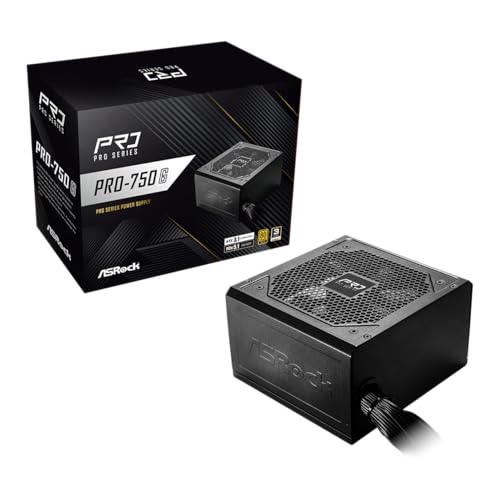
| ASRock PRO 750G | Straightforward mid-range builds | 750W, ATX 3.1, native 12V-2×6, 3-year warranty |
| MONTECH Century II 850W | Compact cases with a strong graphics card | 850W, fully modular, 140mm design, Zero RPM mode |
| MSI MAG A850GL PCIE5 | Long-term owners who value warranty length | 850W, fully modular, 10-year warranty |
| Segotep 650W | Lowest-cost tier with simple cabling | 650W, non-modular, 6+2 pin connectors |
| Thermaltake GF1 750W | Quiet, tidy mid-range builds | 750W, fully modular, Zero RPM |
| be quiet! Pure Power 13 M 1000W | High-wattage, future-proof systems | 1000W, Cybenetics Platinum, semi-passive fan |
| Rosewill VNG 650W | Budget builds that still want a new connector | 650W, non-modular, 450W 12V-2×6 connector |
The 7 Best Options
ASRock PRO 750G
The ASRock PRO 750G is the plain-spoken choice in this lineup. The title lists 750W output, 80 Plus Gold certification, ATX 3.1 and PCIe 5.1 readiness, a native 12V-2×6 connector, a 120mm low-noise fan, and a 3-year warranty. Nothing in that description is exotic, which is the point: it covers the specs that matter for a modern mid-range gaming or work PC without adding extras that raise the cost tier.
- A native 12V-2×6 connector means current high-end graphics cards can plug in directly, with no adapter.
- ATX 3.1 readiness suggests the unit was designed around current power-spike behavior.
- 750W is a flexible middle wattage that suits most single-graphics-card systems.
- The 3-year warranty is the shortest among the units that name one in the title.
- The title does not say the cables are modular, so cable management may be harder in a small case.
Skip it if you want a long warranty or a fully modular layout for a clean interior. Compared with the MONTECH Century II next in the list, the ASRock gives up modularity and extra wattage in exchange for a simpler, lower-cost approach, so it suits buyers who do not plan to add much to their systems. It is a natural fit for a first-time builder replacing an aging supply in a tower that already has decent airflow, or for a family PC where the goal is dependable power rather than a showcase interior. If the graphics card you are considering is a mainstream model, 750W leaves a comfortable margin without paying for capacity that would never be used.
MONTECH Century II 850W
The Century II is aimed at builders working inside tighter cases who still want room for a powerful graphics card. The title describes 850W, ATX 3.1, fully modular cables, 80 PLUS Gold, PCIe 5.1, a native 12V-2×6 cable, a compact 140mm design, and a Zero RPM mode. That combination is common on more expensive units, which makes the listing interesting for budget-minded buyers.
- Fully modular cabling lets you connect only what you need, which helps airflow in small cases.
- A compact 140mm design is described, helpful for cases with limited depth.
- Zero RPM mode means the fan can stay off at low loads for near-silent idle operation.
- The brand has a shorter track record than long-established power supply makers.
- The visible title does not state the warranty length, so check the full listing.
Skip it if you want the reassurance of a decade-long warranty, which the MSI model next on the list provides. The MONTECH is also a step above the ASRock in wattage and connector layout, making it the better pick for a system that may grow, while the MSI is the better pick for the buyer who wants the longest coverage. Because the Century II combines a compact body with a high wattage, it is easiest to suggest for small-footprint builds where depth is limited, but the buyer should still compare the measured case clearance against the dimensions on the full listing before ordering, since the title gives a design class rather than exact measurements.
MSI MAG A850GL PCIE5
MSI’s MAG A850GL is a compact, fully modular 850W unit with a reputation-driven brand behind it. The title lists 80+ Gold, ATX 3.1 and PCIe 5.1 readiness, a native dual-color 12V-2×6 cable, and a 10-year warranty. It is the long-haul choice among these seven.
- A 10-year warranty is stated, the longest coverage promised in this lineup.
- Fully modular, compact construction suits modern, smaller cases.
- The native dual-color 12V-2×6 cable is meant to make correct seating easier to confirm visually.
- It sits at a higher cost tier than the non-modular units here.
- The title does not describe the fan behavior or noise profile.
Skip it if you are building on a tight budget or only need a modest wattage for an office PC. Compared with the Thermaltake GF1, the MSI offers more output and a longer warranty, while the Thermaltake emphasizes quiet operation, so the decision turns on whether you value capacity and coverage or a calmer fan curve. The MSI is the one to pick when you expect to keep the same power supply through two or three rebuilds, because a stated ten years of coverage and a modular layout mean it can move from one case to the next with minimal fuss, carrying its warranty with it. Its compact build also suggests it was designed for the shorter cases that have become popular lately, so owners of small towers should find it easier to fit than older full-length designs.
Segotep 650W
The Segotep is the minimalist option. The title describes a 650W ATX power supply with 80 Plus Gold certification, non-modular cabling with 6+2 pin connectors, PFC protection, RoHS compliance, and a 120mm silent fan. It is clearly aimed at buyers who want a basic Gold-rated unit without frills.
- 80 Plus Gold certification is stated even at the lowest wattage in the group.
- 6+2 pin connectors are named, which are standard for many graphics cards.
- PFC protection and RoHS compliance are listed, covering basic safety and regulatory points.
- Non-modular cables mean every lead is attached, which can clutter small cases.
- The title does not mention a native 12V-2×6 connector, so it suits cards that use traditional PCIe connectors.
Skip it if you plan to install a current high-end graphics card or want a tidy interior. Compared with the Rosewill VNG at the same wattage, the Segotep makes no mention of the newer connector or ATX 3.1 compatibility, so the Rosewill is the better pick for anyone who might upgrade later. The Segotep makes the most sense in a secondary machine, a media PC, or an office build with an older graphics card, where its simple cabling and Gold-class efficiency are enough and nobody is going to open the case again for years.
Thermaltake GF1 750W
The Thermaltake GF1 is built for buyers who want a quiet, tidy mid-range system. The title lists a fully modular ATX 750W unit with 80 Plus Gold, ultra-quiet operation, and Zero RPM, along with the model code PS-TPD-0750FNFAGU-P. It is a straightforward, quiet-focused choice from a long-running brand.
- Fully modular design supports a clean interior.
- Zero RPM operation means the fan can stay off at low loads.
- 750W covers a wide range of mid-range gaming and workstation builds.
- The title does not state ATX 3.1 or a native 12V-2×6 connector, so users of the newest cards should check the full specification.
- No warranty length is visible in the title.
Skip it if you want guaranteed support for the newest graphics connector. Against the be quiet! Pure Power 13 M that follows, the Thermaltake is lower in wattage and simpler in description, but it fits the same quiet-build profile at a more modest cost tier, which makes it the sensible choice for mid-range systems. A buyer who builds a quiet home-office or creative workstation, spends long hours near the machine, and wants fans that stay off during document work and web browsing will find the stated Zero RPM and ultra-quiet wording a good match, provided the case also has good airflow so the supply does not run warm.
be quiet! Pure Power 13 M 1000W
This is the heavyweight of the list. The title describes a 1000W unit with 80+ Gold, Cybenetics Platinum, PCIe 5.1, ATX 3.1, a fully modular design, LLC topology, and a semi-passive fan. The Cybenetics Platinum mention points to a separate efficiency rating scheme from 80 Plus, which suggests the unit performs above the Gold baseline.
- 1000W is the highest output in the group, leaving room for flagship graphics cards and heavy processors.
- A semi-passive fan allows quiet operation at lower loads.
- Fully modular design and ATX 3.1 compliance match current standards.
- It will be overkill for most single-card mid-range systems.
- It sits at a higher cost tier than every other unit here.
Skip it if your build draws modest power; a 750W unit would serve you well and cost less. Compared with the MSI A850GL, the be quiet! offers additional capacity and a stronger efficiency claim, while the MSI offers a longer stated warranty, so the winner depends on whether you expect a power-hungry upgrade in the future. It is also the natural choice for a dual-purpose rig that renders video by day and plays games at night, where sustained loads are heavy and a semi-passive fan that stays calm in light use but ramps with demand is a practical feature.
Rosewill VNG 650W
The Rosewill VNG is a budget unit that still keeps pace with newer standards. The title lists 650W, 80+ Gold, compatibility with ATX 3.0 and 3.1, non-modular cabling, low-noise operation, and a 450W PCIe 5.1 12V-2×6 connector. That last detail is notable at this tier.
- A 12V-2×6 connector is named, rare among low-cost non-modular units.
- ATX 3.0 and 3.1 compatibility is stated.
- 650W Gold certification suits compact, efficient mid-range builds.
- Non-modular cables increase clutter and make tidy builds harder.
- The 450W figure for the connector shows the limit on what that cable can deliver, so flagship cards may need more headroom.
Skip it if your graphics card draws a lot of power or you want a spacious wattage margin. The Rosewill is the value pick of the group, and next to the Segotep it offers newer connector support at the same output, which makes it the clearer choice for anyone who plans to refresh their graphics card within a few years. It is also the sort of unit that fits a secondhand or refurbished build, where the goal is a modern foundation with a Gold-class badge and a current connector, and the owner is happy to trade modular cabling for a lower cost tier. Buyers who go this route should plan their cable routing carefully, tie down the unused leads behind the motherboard tray, and keep the 450W connector in mind when pairing it with a graphics card.
Why Choose an 80 Plus Gold Unit Instead of Bronze or Platinum
The certification ladder runs from Bronze through Platinum and beyond, and Gold sits in a practical middle where most buyers get the best balance of efficiency, quality, and cost. Understanding why helps you resist both bargain-bin compromises and expensive upgrades that add little in daily use.
Efficiency translates to less heat, not magic savings
An 80 Plus Gold unit converts wall power to PC power more efficiently than Bronze at typical loads. That means less waste heat inside the unit, which reduces fan work and tends to lengthen component life. The effect on a household electricity bill is real but small, so choose Gold for build quality and quieter running rather than expecting a dramatic change in costs.
Gold often signals better internal design
Gold-rated units tend to use better internal layouts and components than the cheapest Bronze models, because meeting the efficiency target demands tighter design. That does not guarantee quality, but it raises the baseline, and it is why many system builders treat Gold as a sensible minimum for a new gaming PC.
Platinum is a luxury, not a requirement
Platinum units cost more and deliver only a few percentage points of additional efficiency. They suit quiet, always-on workstations or buyers who simply want the best, but most gamers see no practical benefit. The be quiet! unit in this list mentions Cybenetics Platinum alongside its Gold rating, which gives a flavor of that tier without a separate purchase.
How to Choose
Pick the wattage with headroom, not the maximum
Add up the power draw of your processor and graphics card, then leave 20 to 30 percent of margin. As a rough guide, 650W suits an entry-level card with a mainstream processor, 750W covers most mid-range gaming builds, 850W suits strong graphics cards with high-end processors, and 1000W is for flagship cards or heavy overclocking. A power supply runs most efficiently around the middle of its range, so extreme oversizing is wasteful. Remember that transient spikes from modern graphics cards can briefly exceed their rated draw, which is the reason ATX 3.1 and its tighter power-excursion handling exist. A system with a 12V-2×6 card and a high-core-count processor deserves at least 850W, even if the average draw looks lower on paper, because the spikes are what trip protection circuits and cause random shutdowns.
Check the connector the graphics card needs
Newer high-end graphics cards use a 12V-2×6 connector, which several units here supply natively. Older and mid-range cards use 6+2 pin PCIe cables. Match the unit to the card, and avoid adapters where possible, since a loose or kinked connection is a leading cause of problems with high-power cards. If the listing says ATX 3.1, it was designed with the current standard in mind. Count the CPU power cables too: most boards need one 8-pin connector, while high-end boards may ask for two. A modular unit usually includes enough leads, but a budget non-modular unit may supply only one CPU cable, which is worth checking before you commit to a processor and board pairing.
Decide on modular, semi-modular, or non-modular
Fully modular supplies let you attach only the cables you need and keep airflow clear. Non-modular units are simpler and lower in cost, but every cable is attached, and spare leads must be tucked away. In a compact case, modular cabling is close to essential. In a large, roomy tower, non-modular can be perfectly fine. Semi-modular units, which hard-wire the main motherboard and CPU cables and make the rest detachable, are a middle road. Whichever you choose, count the SATA and peripheral leads you actually need, since a loaded storage array can run out of connectors on a minimal unit.
Look at fan behavior and noise
Zero RPM and semi-passive modes let the fan stop at low loads, which makes idle and office tasks nearly silent. Fan size matters too: 120mm and 140mm fans move air quietly at lower speeds. Terms like silent or low-noise are marketing claims, so look for a stated fan mode instead. If silence matters most, pair the supply with a case that has an intake filter beneath it, so the fan can draw cool air and does not have to ramp up early. A supply that runs cool stays quiet longer, and that depends as much on case airflow as on the supply itself.
Consider warranty and protection features
A 3-year warranty is common at the low end, while premium units may offer 10 years. Longer coverage often signals the maker expects the unit to last. Protection circuits such as over-voltage, over-current, and short-circuit protection are standard on reputable units, and PFC is expected on any modern supply. A warranty is only as useful as the support behind it, so favor makers with clear return processes and a regional presence. Keep the receipt and the serial number sticker in a safe place, because a claim years later will need both.
Where budget models cut corners and what to ignore
Low-cost units often use basic capacitors, shorter warranties, and non-modular cabling. They may also skip support for the latest graphics connector. Ignore peak wattage claims and focus on continuous output. A bright color scheme or RGB lighting is irrelevant to reliability. For a long-lived system, prioritize protection features, a recognized brand, and a warranty that matches how long you plan to keep the machine. A useful discipline is to write down the three requirements you will not bend on, such as a native 12V-2×6 connector, fully modular cables, and at least 750W, and discard any listing that misses one of them, no matter how attractive its other features look.
Modular vs Non-Modular: The Choice Every Gold Buyer Faces
Almost every Gold unit comes in a modular or non-modular layout, and the right answer depends on your case and your patience. The seven units in this guide split evenly enough to make the comparison practical.
| Factor | Fully modular (MONTECH, MSI, Thermaltake, be quiet!) | Non-modular (Segotep, Rosewill) |
|---|---|---|
| Cable management | Attach only what you need | All cables attached |
| Best for | Compact cases and tidy builds | Spacious cases and tight budgets |
| Cost tier | Mid to premium | Budget |
| Airflow impact | Cleaner, less obstruction | Unused cables need tucking away |
| Upgrade flexibility | Easy to add cables later | Limited to attached leads |
When modular is worth the extra cost
If your case is small, if you like a clean look through a glass panel, or if you plan to change parts often, fully modular cabling is worth it. It reduces build time and keeps air moving, which helps cooling in cramped cases. Builders who like to show off a build through a glass side panel also prefer modular units, because a few well-routed cables look far neater than a bundle of unused leads stuffed in a corner. Modular cables also make a later graphics card swap less of an ordeal.
When non-modular is perfectly fine
For a large case with plenty of room behind the motherboard tray, or for a budget build where every saving counts, non-modular works well. The ASRock PRO 750G also shows that a lower-cost unit can still support the newer connector, so modularity is a convenience, not a quality indicator. Many experienced builders happily use a good non-modular unit in an office or media PC, and they save the difference for a better case fan or an extra drive.
Setup, Compatibility and Upgrade Tips
What to check before buying
Confirm the power supply form factor: the units here are described as ATX, which fits standard cases, while small-form-factor builds need a different size. Check the depth against your case, count the connectors your graphics card and drives need, and note whether the unit includes cables for the CPU power socket on your motherboard. Look at the case manual for the maximum supply length it supports, and remember that a modular supply needs extra clearance for the plugs at its rear. If you plan a second drive or a storage array, count the SATA leads in advance.
What to upgrade first
If you are replacing an older power supply, do it before installing a new graphics card, since newer cards draw more power and sometimes need a different connector. Use the cables that came with the new unit instead of reusing old modular cables from a different brand, because the pin layout on the unit side is not standardized. After the swap, unplug the old supply fully, ground yourself before handling parts, and double-check that every connector clicks into place before the first power-on.
Common compatibility traps
Never mix modular cables between brands or even models. A cable that fits physically may have a different pin arrangement, with potentially serious consequences. Make sure the 12V-2×6 cable is fully seated until it clicks. Avoid adapters stacked on adapters. Finally, keep the fan intake facing a ventilated area, usually downward with a bottom filter, so dust does not clog the unit. Leave a little slack in the graphics cable so it is not bent sharply at the plug, since sharp bends near the connector are a known trouble spot for high-power cards.
Which One Fits Your Situation
You are building a mid-range gaming PC in a standard case
The ASRock PRO 750G provides the right wattage and the newer connector at a sensible cost tier, with no extras you are forced to pay for.
You have a compact case and a strong graphics card
The MONTECH Century II 850W gives you modular cabling and a compact design, which makes routing easier in tight spaces.
You want to buy once and keep it for a decade
The MSI MAG A850GL PCIE5 comes with a stated 10-year warranty and a modular layout that suits upgrades over the years. If your build is large and future-proof, the be quiet! Pure Power 13 M 1000W offers extra capacity.
You are on a strict budget but want a modern connector
The Rosewill VNG 650W includes the 12V-2×6 connector and ATX compatibility at a low cost tier, making it the smarter choice than the Segotep for anyone who may upgrade the graphics card later.
Common Mistakes
- Buying on peak wattage instead of continuous output and real headroom.
- Assuming every Gold unit includes the newest graphics connector.
- Reusing modular cables from an old power supply in a new one.
- Choosing a huge wattage for a modest build and wasting efficiency at low loads.
- Ignoring fan behavior and discovering a constant whine in a quiet room.
- Skipping warranty details on a part that powers everything else.
Related guides
- How To Clean Quest 3 Lenses And Facial Interface
- Vr Facial Interfaces For Glasses Wearers
- Micro Sd Cards For Samsung Galaxy Phones
Frequently Asked Questions
What does 80 Plus Gold actually guarantee?
It guarantees a minimum efficiency across set load points, verified by the certifying program rather than claimed by the maker. It says nothing directly about build quality, noise, or connector support, so treat it as one factor among several.
Is a 650W unit enough for a gaming PC?
For an entry-level or mid-range graphics card paired with a mainstream processor, often yes. For a high-end card or a power-hungry processor, 750W or more gives safer headroom.
Do I need ATX 3.1?
It is not required for every build, but it is designed around the power behavior of current graphics cards. Buyers planning an upgrade to a new high-end card should favor units that list it.
What is Zero RPM mode?
It lets the fan stop completely when the load is low, so the system is silent during light tasks. The fan starts again as temperature or power draw rises.
Can I reuse cables from an old power supply with a new unit?
No. Modular cable pinouts can differ between brands and models, and a mismatch can damage components. Always use the cables that ship with the new power supply.
How long should a power supply last?
Quality units often last many years, and warranty length is a rough guide. A 10-year warranty suggests a long design life, while a 3-year warranty is common at lower tiers.
Final Words
Choose the wattage first, the connector second, and the cable layout third, then let warranty and fan behavior break any ties. The ASRock PRO 750G and Thermaltake GF1 handle the mid-range, the MONTECH and MSI units suit stronger graphics cards and tidy builds, the be quiet! unit serves heavy-duty systems, and the Rosewill and Segotep cover the lowest cost tier. A power supply you never think about is the sign that you chose well, and a few minutes spent comparing connectors, wattage, and warranty today will save hours of troubleshooting later. Buy for the graphics card you plan to own in two years, not only the one you own now, and keep the original box and receipt in case a claim is ever needed.