
Our Short List of 3

- Best for: A first full-size desk set that needs no software to start playing.
- Keyboard: full-size layout with numeric keypad, RGB backlit
- Keyboard lighting: 7 RGB modes, 4 brightness levels, adjustable breathing speed
- Mouse: up to 3200 DPI, adjustable across 800, 1600, 2400 and 3200
- Mouse: 6 buttons with 5 programmable, weight tuning set included

- Best for: Beginners who expect to start tuning mouse settings within the first few months.
- Model: S107-RGB-BA, wired USB connection for both devices
- Keyboard: full-size 104 keys, membrane, RGB backlit
- Keyboard: 25-key anti-ghosting, WIN key can be disabled during games
- Mouse: up to 10,000 DPI with the Redragon software installed
- Best for: New players who want real mechanical switches in their very first set.
- Keyboard: 104 keys, blue mechanical switches, 50 million keystroke life
- Keyboard: RGB backlit with 14 modes, aluminum panel, floating key design
- Keyboard: full anti-ghosting, detachable wrist rest included
- Mouse: 7 programmable buttons
All 5 Picks at a Glance
| Product | Specs | Action |
|---|---|---|
| Redragon S101 Gaming Keyboard and Mouse Combo |
| Check price on Amazon |
| Redragon S107 Gaming Keyboard and Mouse Combo |
| Check price on Amazon |
| Havit Mechanical Keyboard and Mouse Combo |
| Check price on Amazon |
 FELICON 65 Percent Mechanical Keyboard and Mouse Combo |
| Check price on Amazon |
 HAVIT LED Gaming Keyboard and Mouse Combo |
| Check price on Amazon |
The real decision behind a first keyboard and mouse combo is not which set posts the biggest numbers. It is whether the pair works the moment it is plugged in, and whether it still feels right a month later, once you have learned how PC controls actually behave. A beginner is picking up movement keys, mouse sensitivity and desk posture all at once, so a combo that demands no pairing, no driver hunt and no troubleshooting removes friction exactly where a new player has the least patience for it.
This roundup is for first-time PC gamers building a desk from nothing, parents kitting out a child’s first setup, and laptop owners who want proper controls without researching two separate purchases. Every set below was chosen from the names and specifications on its Amazon product page: keyboard layout and switch type, anti-ghosting coverage, mouse DPI steps and button count, and whatever else arrives in the box.
Our Top Picks
Top 3 picks at a glance
Quick Picks
As an Amazon Associate we earn from qualifying purchases
| Product | Best for | Key spec from title |
|---|---|---|
| Redragon S101 Gaming Keyboard and Mouse Combo | A first full-size desk set | Mouse up to 3200 DPI with weight tuning set |
| Redragon S107 Gaming Keyboard and Mouse Combo | Room to grow into tuning | Mouse up to 10,000 DPI with software |
| Havit Mechanical Keyboard and Mouse Combo | Real switches from day one | Blue mechanical switches, 104 keys |
| FELICON 65 Percent Mechanical Keyboard and Mouse Combo | Small desks and dorm rooms | 68-key layout, mouse pad included |
| HAVIT LED Gaming Keyboard and Mouse Combo | A shared family PC | Seven-button mouse, plug and play |
How to Choose
Pick the layout your desk can actually fit
Full-size boards carry a number pad and a function row, which helps with homework, spreadsheets and games that bind extra keys, but they also eat the space your mouse hand wants for wide turns. A compact 65 percent layout drops the number pad and keeps the arrow keys, trading typing convenience for aiming room. Measure the desk before ordering, including where the monitor stand sits. Beginners often buy the biggest board in the list and then play with the mouse trapped in a corner, which teaches cramped habits that are hard to unlearn later.
Decide between membrane and mechanical keys
Most starter combos use membrane keys: quiet, soft and forgiving, and perfectly fine while you are learning which keys your fingers need to find without looking. Mechanical switches give a firmer, more distinct press, and in a combo they are still the exception rather than the rule. The trade-off is noise. Clicky blue switches announce every keystroke to the whole room, which is a genuine problem in a shared bedroom or a living room setup. Decide based on where the desk lives, not on which technology sounds more serious.
Judge the mouse by its DPI steps, not its ceiling
Sensitivity figures on combo boxes run from a few thousand DPI to five figures, and almost nobody plays anywhere near the top of that range. What a beginner actually uses is the button that steps sensitivity up and down, so the cursor can move slowly for careful aiming and quickly for menus. Look for several clearly spaced steps rather than one huge maximum number. Two side buttons are worth having from the start, because games bind them constantly, and a weight tuning set, where one is included, lets you change how the mouse glides without buying a replacement.
Keep setup boring: wired and driver-free wins
A first set should work when it is plugged in, full stop. Wired combos need no pairing, no charging and no battery anxiety mid-game, and the better ones run their lighting and basic functions with no software account at all. Check the anti-ghosting figure as well: it describes how many keys can register at the same time, and movement plus ability keys are pressed together constantly in real games. Optional software for remapping buttons is a bonus you can grow into, not a requirement standing between you and your first session.
The 5 Best Options
Redragon S101 Gaming Keyboard and Mouse Combo
- Best for: A first full-size desk set that needs no software to start playing.
- Keyboard: full-size layout with numeric keypad, RGB backlit
- Keyboard lighting: 7 RGB modes, 4 brightness levels, adjustable breathing speed
- Mouse: up to 3200 DPI, adjustable across 800, 1600, 2400 and 3200
- Mouse: 6 buttons with 5 programmable, weight tuning set included
A first full-size desk set that needs no software to start playing.
The keyboard is a membrane design, so the key feel stays soft next to mechanical boards.
The S101 is the set most first-time buyers are picturing when they say they want a proper gaming desk without a learning curve. The keyboard is full-size with a number pad, RGB backlighting and multimedia keys, and it works the moment the USB plug goes in, with no software standing between you and your first session. The bundled mouse is the pleasant surprise of the box: sensitivity adjusts through four steps up to 3200 DPI, five of its six buttons can be programmed later on, and a small weight tuning set lets you add or remove mass until the glide feels right for your hand.
Redragon S107 Gaming Keyboard and Mouse Combo
- Best for: Beginners who expect to start tuning mouse settings within the first few months.
- Model: S107-RGB-BA, wired USB connection for both devices
- Keyboard: full-size 104 keys, membrane, RGB backlit
- Keyboard: 25-key anti-ghosting, WIN key can be disabled during games
- Mouse: up to 10,000 DPI with the Redragon software installed
Beginners who expect to start tuning mouse settings within the first few months.
Older S107 listings with a 3200 DPI mouse still circulate, so confirm the listing shows the updated model before ordering.
If the mouse matters more to you than the keyboard, the updated S107 shifts the balance in that direction. Its full-size board keeps the same plug-in-and-play formula, with RGB backlighting and 25-key anti-ghosting, so movement and ability keys pressed together still register cleanly. The mouse is where the upgrade sits: it reaches 10,000 DPI once the Redragon software is installed, reports its position 1,000 times per second, and its buttons can be reassigned as your games start demanding more than the defaults. Nothing here needs configuring on day one, but the headroom is waiting for you when you are ready for it.
Havit Mechanical Keyboard and Mouse Combo
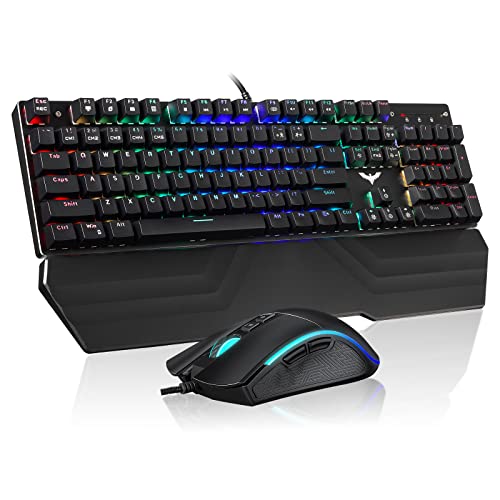
- Best for: New players who want real mechanical switches in their very first set.
- Keyboard: 104 keys, blue mechanical switches, 50 million keystroke life
- Keyboard: RGB backlit with 14 modes, aluminum panel, floating key design
- Keyboard: full anti-ghosting, detachable wrist rest included
- Mouse: 7 programmable buttons
New players who want real mechanical switches in their very first set.
Blue switches are loud, so think twice if the desk sits in a shared bedroom or living room.
Choose the Havit mechanical combo if you want your first set to skip the membrane stage entirely. The keyboard uses blue mechanical switches with a stated 50 million keystroke life, an aluminum panel with floating keys, and full anti-ghosting, so every press lands with a clear click and nothing drops out during crowded key combinations. A detachable wrist rest is in the box for longer sessions. The mouse is programmable, with seven buttons and six sensitivity steps topping out at 4800 DPI, and its light color changes with the selected step, so you always know which setting you are on without opening anything.
FELICON 65 Percent Mechanical Keyboard and Mouse Combo
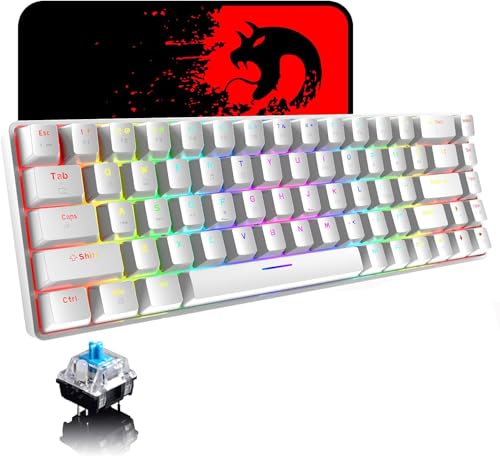
- Best for: Dorm rooms and compact desks where mouse space matters more than a number pad.
- Keyboard: 68 keys in a 65 percent layout, mechanical blue switches
- Keyboard: 18 RGB backlight modes, full-key anti-ghosting
- Mouse: lightweight honeycomb shell, six DPI levels
- Mouse: six RGB lighting modes
Dorm rooms and compact desks where mouse space matters more than a number pad.
There is no number pad or function row, so schoolwork and spreadsheets lean on Fn-layer shortcuts.
Small desks change the maths, and the FELICON set is built for exactly that problem. Its keyboard shrinks to a 68-key layout that keeps the arrow keys but drops the number pad and the function row, leaving wide open space for the sweeping mouse movements that shooters ask for. The switches are mechanical blues with 18 backlight modes, and every key registers without conflict during fast combinations. The mouse uses a lightweight honeycomb shell with six sensitivity steps and its own lighting modes, and a mouse pad is included in the box, so the whole playing surface is sorted in one purchase rather than three separate ones.
HAVIT LED Gaming Keyboard and Mouse Combo
- Best for: A shared or family PC that needs one set everyone in the house can use.
- Keyboard: 104 keys, full-size layout, LED backlit
- Mouse: 7 buttons with adjustable sensitivity levels
- Connection: wired USB
- Setup: plug and play, no drivers or software required
A shared or family PC that needs one set everyone in the house can use.
The backlighting is LED rather than per-key RGB, and there is no macro software layer to grow into.
The HAVIT LED combo is the set to pick when the PC is shared and the keyboard has to make sense to everyone who sits down at it. The board is a standard full-size 104-key layout with LED backlighting, the mouse carries seven buttons with adjustable sensitivity for switching between desktop work and games, and the pair runs over USB with no drivers and no software accounts to manage. It turns a household machine into a gaming-capable setup without converting a simple upgrade into a configuration project for whoever ends up maintaining the family computer.
Which One Fits Your Situation
Your very first gaming PC
Start with the Redragon S101. It is full-size, it needs no software, and the weight tuning set in the mouse box lets you experiment with how a gaming mouse should feel before you develop fixed habits. Everything about it is designed to get a brand-new desk playable in minutes, and nothing about it punishes you later for having started simple.
A first setup for a younger player
The HAVIT LED combo keeps things calm: a familiar full-size layout, no accounts, no pairing, and nothing delicate to configure. If the player is older and already asking about mechanical keyboards by name, the Havit mechanical combo is the step up, provided the click of blue switches will not disturb the rest of the house in the evening.
A small desk or a dorm room
Take the FELICON set. The 68-key board hands the saved width straight to your mouse hand, the included pad finishes the surface, and the whole kit travels easily between a dorm desk and home. Just be sure the missing number pad will not hurt during term time, because data-heavy coursework is where that absence gets felt first.
You plan to get serious within a year
Buy the headroom now. The Redragon S107 gives you a programmable mouse with a 10,000 DPI ceiling and fast polling to grow into, while the Havit mechanical combo gives you real switches and a wrist rest for longer sessions. Either way, you are buying the part you would otherwise replace first, and the keyboard half will keep up while your skills catch up.
Common Mistakes
- Choosing a wireless combo as a first set, then fighting pairing drops and flat batteries instead of learning the games.
- Chasing the largest DPI number on the box, when the adjustable steps in the middle of the range are what you will actually use.
- Ordering a full-size keyboard for a small desk and leaving the mouse no room to move.
- Assuming mechanical switches are automatically better, without considering how loud clicky keys are in a shared room.
- Buying a plain office set to save money, then discovering it drops simultaneous key presses in the middle of a game.
Frequently Asked Questions
Is a combo better than buying a keyboard and mouse separately?
For a first setup, usually yes. A combo arrives matched, in one box, with one decision to make, and it gets the desk working immediately. Buying separately makes sense later, when you know which half you want to upgrade and why. Most beginners replace the mouse first, and any combo here lets you do exactly that without touching the keyboard.
Do beginners need a mechanical keyboard?
No. Membrane boards like the S101 and S107 are quiet, forgiving and entirely capable while you learn. Mechanical switches change the feel and the sound of typing, not your skill level. Treat the Havit and FELICON sets as a preference for a firmer, clickier press, and only choose them if the noise fits the room the desk is in.
What mouse sensitivity should a beginner start with?
Start in the middle of the mouse’s range, around the 1600 to 2400 DPI steps on these sets, and play there for a week before changing anything. Lower steps make careful aiming easier, higher steps make menus and strategy games quicker. Every mouse in this roundup adjusts from a button on the body, so you can experiment in seconds without opening software.
Will these combos work with a laptop?
Yes, and they are a common way to give a laptop a proper desk setup. Each keyboard and mouse has its own wired USB connection, so the pair takes two USB ports, and a laptop short on ports may need a small hub. Check the listing for your operating system as well, since the FELICON set lists Mac support while the Redragon sets are aimed at Windows PCs.
Related guides
More from Amazon
Programs that pair well with the guide above. Offers and eligibility are set by Amazon and may change.
Free shipping on eligible items, Prime Video and more. Eligible new members can start with a free trial.
Start a Prime free trialAd-free music streaming. Eligible new subscribers can start with a free trial.
Try Music Unlimited freeA Prime membership for ages 18-24 with a trial period. Eligibility is set by Amazon.
See Prime for Young AdultsAudiobooks and podcasts to listen to on the go. Eligible new members can start with a free trial.
Try Audible freeAs an Amazon Associate we earn from qualifying purchases.









