
Our Short List of 3

- Best for: Competitive FPS players who want 800 DPI available on any PC with zero setup.
- Sensor: 3360 optical sensor
- DPI steps: 400 / 800 / 1600 / 3200, switched on the mouse with no software
- Polling rate: 125 / 500 / 1000 Hz, adjustable on the mouse
- Scroll wheel: 24-step
- Best for: Players who want 800 DPI as the out-of-box default, with simple up and down buttons instead of a cycle.
- Sensor: Pixart 3327 optical sensor, up to 6,200 DPI
- DPI presets: 800 (default) / 1600 / 2400 / 3200
- Buttons: 7 programmable buttons
- Switches: Omron, rated for 20 million clicks

- Best for: Palm grippers with medium to large hands who want the proven DeathAdder shape and an 800 stage.
- Sensor: True 6,400 DPI optical sensor
- DPI stages: 400 / 800 / 1600 (default) / 3200 / 6400, customizable in Razer Synapse
- Buttons: 5 programmable Hyperesponse buttons
- Switches: Razer mechanical switches, rated for up to 10 million clicks
All 5 Picks at a Glance
| Product | Specs | Action |
|---|---|---|
| BenQ Zowie EC2-C Ergonomic Gaming Mouse |
| Check price on Amazon |
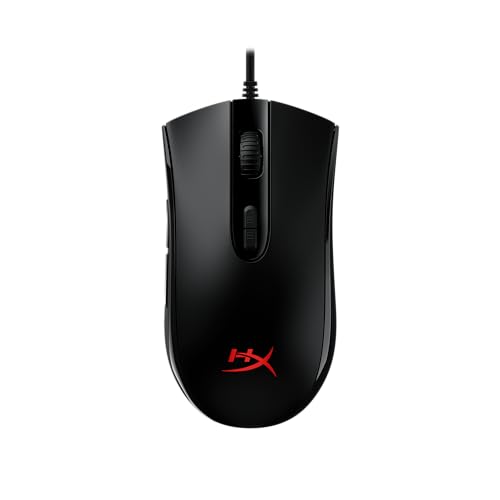
| HyperX Pulsefire Core RGB Gaming Mouse |
| Check price on Amazon |
| Razer DeathAdder Essential Gaming Mouse |
| Check price on Amazon |
 Cooler Master MM710 Gaming Mouse |
| Check price on Amazon |
 Glorious Model O- Gaming Mouse |
| Check price on Amazon |
The real decision here is not how high a sensor can go. It is whether 800 DPI is an actual, reachable step on the mouse in your hand, and how you get to it. Plenty of listings headline an enormous maximum DPI while the factory steps skip 800 entirely, or bury it inside software you may never open. If you aim with your arm in a tactical shooter, you need 800 sitting on the mouse itself, one press away, every single round.
This roundup is for players who already play at 800 and refuse to relearn their aim, for first-time buyers copying a proven setup, and for anyone replacing a mouse whose buttons never land on the right number. Every pick below was chosen from its Amazon listing: the printed DPI steps or presets had to include 800 exactly, and the sensor, button and cable details come from that same product page.
Our Top Picks
Top 3 picks at a glance
Quick Picks
As an Amazon Associate we earn from qualifying purchases
| Product | Best for | Key spec from title |
|---|---|---|
| BenQ Zowie EC2-C Ergonomic Gaming Mouse | Palm and claw players who want 800 with no software at all | 3360 sensor with 400/800/1600/3200 DPI steps |
| HyperX Pulsefire Core RGB Gaming Mouse | Players who want 800 as the factory default preset | Pixart 3327 sensor, 6,200 DPI, 87 g |
| Razer DeathAdder Essential Gaming Mouse | Bigger hands that fit the classic ergonomic shape | True 6,400 DPI optical sensor |
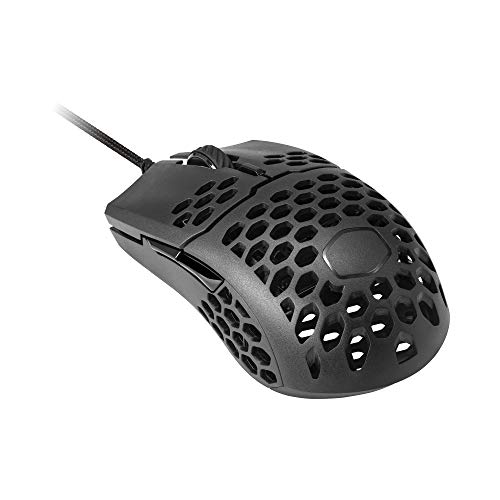
| Cooler Master MM710 Gaming Mouse | Fingertip players chasing the lowest possible weight | 53 g honeycomb shell, Pixart 3389 sensor |
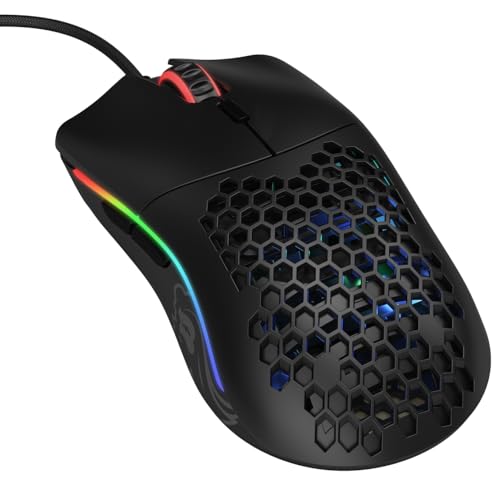
| Glorious Model O- Gaming Mouse | Small hands that still want a superlight shell | 58 g, Pixart 3360 sensor, 12,000 DPI |
How to Choose
Check That 800 Is a Real Step, Not Just Inside the Range
A sensor advertised as adjustable from 200 to 12,000 DPI can usually be set to 800 in software, but the button on the mouse might cycle through steps that never land there. That gap is where buyers get caught. Read the listing for printed steps or presets instead of the headline range. The Zowie EC2-C lists four fixed steps of 400, 800, 1600 and 3200, while the HyperX Pulsefire Core goes further and makes 800 its default preset. When the number is printed in the steps, it exists on the hardware. When only a range is printed, 800 depends on an app.
Decide How You Want to Switch
Where the DPI control lives changes how the mouse feels in a match. Zowie puts the switch on the underside, so it can never be knocked mid-round, but you also cannot change it mid-round. A top button, like the ones on the MM710 and Pulsefire Core, cycles quickly between games and roles. Software suites such as Razer Synapse let you delete the stages you never use, so one press takes you straight to 800 and one more takes you back. Pick the method that matches how often you actually change sensitivity.
Match the Shell to Low-Sensitivity Swiping
Playing at 800 DPI means moving your whole forearm, so shape and weight matter more than they do for wrist players. A heavier ergonomic shell like the DeathAdder Essential plants itself during long tracking fights, while a 53-gram honeycomb mouse like the MM710 starts and stops with almost no effort on flicks. Cable drag counts too: paracord-style cables on the Zowie and Glorious models pull far less across the pad. If your hand aches after long sessions at low sensitivity, the shell is the first thing to change, not the sensor.
Look Past the Maximum DPI Number
The biggest number on the box says almost nothing about how a mouse behaves at 800. What matters at low sensitivity is clean tracking with no hardware acceleration, a 1000 Hz polling rate so the cursor updates every millisecond, and switches that register the same way on the thousandth click as the first. The EC2-C tops out at only 3,200 DPI by design, yet its 3360 sensor is a long-running esports staple precisely because it tracks plainly. A 16,000 DPI ceiling buys you nothing at 800 if the steps skip your number.
The 5 Best Options
BenQ Zowie EC2-C Ergonomic Gaming Mouse
- Best for: Competitive FPS players who want 800 DPI available on any PC with zero setup.
- Sensor: 3360 optical sensor
- DPI steps: 400 / 800 / 1600 / 3200, switched on the mouse with no software
- Polling rate: 125 / 500 / 1000 Hz, adjustable on the mouse
- Scroll wheel: 24-step
Competitive FPS players who want 800 DPI available on any PC with zero setup.
The shape is right-handed only, the ceiling is 3,200 DPI by design, and the DPI switch sits underneath, so changing mid-match is not realistic.
If your rule is that 800 DPI should work on any computer, with nothing installed, this is the mouse built around that rule. The EC2-C carries four fixed steps on a switch underneath the shell, and 800 is the second one, shown by its own indicator color. The medium ergonomic shape suits palm and claw grips, the paracord cable barely pulls during wide swipes, and the 24-step scroll wheel gives weapon switching a firm, deliberate stop. There is no lighting and no app, which is exactly the point for tournament and shared PCs.
HyperX Pulsefire Core RGB Gaming Mouse
- Best for: Players who want 800 DPI as the out-of-box default, with simple up and down buttons instead of a cycle.
- Sensor: Pixart 3327 optical sensor, up to 6,200 DPI
- DPI presets: 800 (default) / 1600 / 2400 / 3200
- Buttons: 7 programmable buttons
- Switches: Omron, rated for 20 million clicks
Players who want 800 DPI as the out-of-box default, with simple up and down buttons instead of a cycle.
The preset ladder jumps from 800 straight to 1600, and remapping buttons or trimming presets requires the NGenuity software.
Most mice treat 800 as one stop among many; the Pulsefire Core treats it as home. Its first factory preset is 800 DPI, marked red, so the mouse arrives already set where a low-sensitivity player wants it, and the dedicated up and down buttons behind the wheel move through the remaining presets without cycling past your number. The symmetrical shell has textured sides for a secure grip, seven programmable buttons cover the essentials, and the Pixart 3327 sensor tracks cleanly up to 6,200 DPI for players who raise sensitivity in other genres.
Razer DeathAdder Essential Gaming Mouse
- Best for: Palm grippers with medium to large hands who want the proven DeathAdder shape and an 800 stage.
- Sensor: True 6,400 DPI optical sensor
- DPI stages: 400 / 800 / 1600 (default) / 3200 / 6400, customizable in Razer Synapse
- Buttons: 5 programmable Hyperesponse buttons
- Switches: Razer mechanical switches, rated for up to 10 million clicks
Palm grippers with medium to large hands who want the proven DeathAdder shape and an 800 stage.
Stage order and button mapping depend on Razer Synapse, and the lighting is a single green color rather than full RGB.
The DeathAdder shape has been the default recommendation for larger hands for years, and the Essential keeps that shell while trimming everything else back. Its true 6,400 DPI optical sensor runs through five stages, and 800 is the second stage, sitting one step below the 1600 default. You will want Razer Synapse installed to arrange those stages and remap the five Hyperesponse buttons, but once the stages are set the mouse holds them. Rubber side grips, mechanical switches and the familiar curved hump make it an easy landing spot for palm grippers.
Cooler Master MM710 Gaming Mouse
- Best for: Fingertip and claw players who want an 800 DPI step on the lightest wired mouse they can find.
- Sensor: Pixart PMW3389 optical sensor
- DPI levels: 7 levels, 400 / 800 / 1200 (default) / 1600 / 3200 / 6400 / 16000
- Maximum sensitivity: 16,000 DPI
- Tracking speed: 400 IPS
Fingertip and claw players who want an 800 DPI step on the lightest wired mouse they can find.
Seven levels make the cycle long if you overshoot 800, and the open honeycomb shell lets dust reach the inside.
At 53 grams, the MM710 is the mouse for players who feel every gram during a flick. The honeycomb shell and Ultraweave cable keep resistance close to zero, and the Pixart 3389 sensor underneath is a flagship-grade part. Its seven DPI levels include 800 as the second stop, reached with the small button behind the scroll wheel. The trade for that weight is a sparse feature set: no lighting to speak of, a symmetrical shape that gives your palm little to rest on, and a cycle of seven levels that takes a few presses to come back around.
Glorious Model O- Gaming Mouse
- Best for: Small to medium hands that want a superlight mouse with 800 as a clearly marked default preset.
- Sensor: Pixart 3360 optical sensor, up to 12,000 DPI
- Default DPI presets: 400 / 800 / 1600 / 3200 on the DPI button, with a color indicator
- Weight: 58 g
- Buttons: 6 buttons
Small to medium hands that want a superlight mouse with 800 as a clearly marked default preset.
The compact shell can feel cramped for palm grippers, and the customization software is Windows only.
The Model O- takes the same formula as the MM710 and shrinks it for smaller hands. Its DPI button carries four default presets, 400, 800, 1600 and 3200, with an indicator light underneath that shows which one is active by color, so 800 is easy to confirm at a glance. The Pixart 3360 sensor, PTFE skates and flexible Ascended cable make wide low-sensitivity sweeps feel almost frictionless, and at 58 grams the mouse disappears during fast target switches. Glorious software can add more levels later, but the four defaults already cover most FPS setups.
Which One Fits Your Situation
You Play on Shared or Tournament PCs
Take the EC2-C. Everything it does happens on the mouse itself, so your 800 step, your polling rate and your setup travel to any machine without accounts, drivers or cloud profiles. Plug it in, tap the underside switch to the 800 indicator, and the mouse behaves exactly as it does at home. Nothing else in this roundup is as indifferent to the computer it is plugged into.
This Is Your First Real Gaming Mouse
Start with the Pulsefire Core. It arrives already sitting on 800 DPI, the up and down buttons are impossible to misunderstand, and the symmetrical shape forgives almost any grip while you figure out which one is yours. If your hands are on the larger side and you prefer a sculpted right-handed shell, the DeathAdder Essential is the alternative, with the same job and a shape many players never move away from.
You Flick Hard and Hate Heavy Mice
Choose between the MM710 and the Model O- by hand size rather than by spec sheet. Both put 800 one or two presses away and both weigh under 60 grams. The MM710 has the stronger sensor and the lower weight, while the Model O- has the tidier four-step cycle and a color indicator that confirms your setting. Medium hands fit either; smaller hands should lean toward the Model O-.
You Change Sensitivity Between Games
The DeathAdder Essential and the MM710 both let software rearrange their stages. In Synapse you can cut the DeathAdder down to just 800 and one higher stage for desktop work, so the button becomes a simple toggle. The MM710 stores its levels on board after setup, which suits players who set two or three games once and then stop thinking about it. Either way, delete the stages you never use.
Common Mistakes
- Assuming every DPI button includes 800. Many mice cycle 400, 1000, 2000 and beyond without ever landing on it, so check the printed steps before buying.
- Copying a professional player’s 800 DPI without matching their in-game sensitivity. The combination of the two numbers is what controls your aim, not the DPI alone.
- Judging a mouse by its maximum DPI. A 26,000 DPI headline says nothing about tracking quality at 800, where almost all of your playing happens.
- Forgetting the polling rate after switching mice. A mouse left at 125 Hz feels delayed next to your old 1000 Hz setup even at the same DPI.
- Buying a mouse whose 800 step only exists in software, then playing somewhere the software cannot be installed.
Frequently Asked Questions
Why do so many FPS players use 800 DPI?
It sits in a comfortable middle ground. At 800, a full-arm swipe crosses a large angle in game while small hand movements still resolve into fine corrections, and the sensor delivers plenty of counts for smooth tracking. It is also high enough to keep menus and desktop work pleasant, so players can leave one setting in place for everything instead of switching constantly.
Is 800 DPI the same on every mouse?
Nearly, but not perfectly. DPI is a target the sensor aims for, and small tolerances mean one mouse’s 800 can feel a touch faster than another’s. The bigger variable is your in-game sensitivity: 800 DPI at 0.5 sensitivity turns half as far as 800 at 1.0. When you change mice, keep the pairing of DPI and in-game sensitivity together, and adjust in small steps if a new sensor feels off.
Can I set exactly 800 on a mouse that only lists a DPI range?
Usually yes, through the maker’s software, which typically allows steps of 50 or 100 across the whole range. The catch is convenience: if the onboard button cycles fixed steps that skip 800, you depend on that software and on onboard memory keeping your setting. For a mouse you carry between computers, a printed 800 step or preset, like the ones in this roundup, is the safer design.
Should I change DPI or in-game sensitivity to fine-tune my aim?
Keep the DPI fixed at 800 and tune with in-game sensitivity. Changing DPI alters how the cursor behaves everywhere, including menus and your desktop, while in-game sensitivity only affects turning speed where it matters. One stable DPI also means your muscle memory survives switching between titles, since each game starts from the same hardware baseline and only its own multiplier changes.
Related guides
More from Amazon
Programs that pair well with the guide above. Offers and eligibility are set by Amazon and may change.
Free shipping on eligible items, Prime Video and more. Eligible new members can start with a free trial.
Start a Prime free trialAd-free music streaming. Eligible new subscribers can start with a free trial.
Try Music Unlimited freeA Prime membership for ages 18-24 with a trial period. Eligibility is set by Amazon.
See Prime for Young AdultsAudiobooks and podcasts to listen to on the go. Eligible new members can start with a free trial.
Try Audible freeAs an Amazon Associate we earn from qualifying purchases.









