
Our Short List of 3
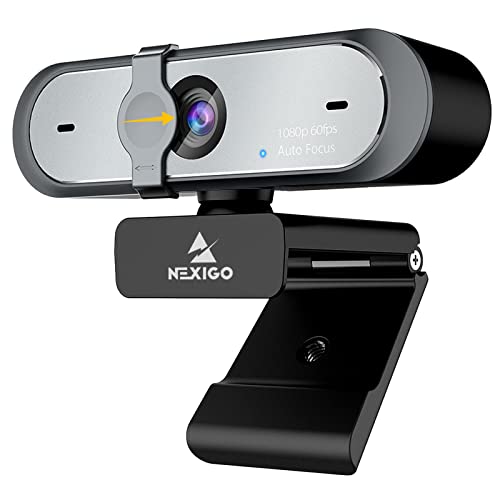
- Best for: Streamers and callers who want plain 1080p60 with software control
- Video resolution: 1920 x 1080 at 60fps
- Sensor: 1/2.9-inch CMOS
- Focus: autofocus
- Field of view: 78 degrees
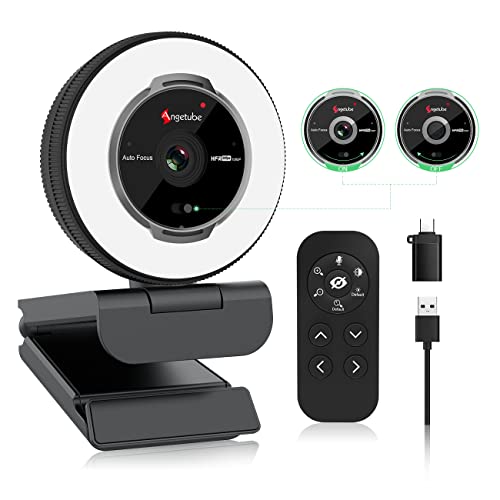
- Best for: Creators in fixed, dim rooms who want light and controls built in
- Video resolution: 1080p at 60fps
- Focus: autofocus
- Ring light: built-in, 3 colour temperatures, adjustable brightness
- Microphones: dual noise-canceling

- Best for: Desk recording that switches between detailed 4K clips and smooth 1080p60
- Video resolution: 4K at 30fps, 1080p at 60fps
- Focus: TOF autofocus
- Ring light: 3 colour temperatures, rotary brightness adjustment
- Microphones: dual noise-canceling
All 4 Picks at a Glance
| Product | Specs | Action |
|---|---|---|
| NexiGo N660P 1080P 60FPS Webcam |
| Check price on Amazon |
| Angetube 862 Pro Streaming Webcam |
| Check price on Amazon |
| Galyimage 4K Webcam with Ring Light |
| Check price on Amazon |
 NBPOWER 1080P 60FPS Streaming Webcam |
| Check price on Amazon |
The real decision with a budget 60fps webcam is not whether the box says 60fps. It is whether that frame rate holds at 1080p, in your room, with your lighting, because a small sensor pushed to sixty frames per second gets half the light per frame and can turn grainy fast. Shoppers in this price band are really choosing which compromise they can live with: a plain camera with honest autofocus, or one that spends part of the budget on a built-in light instead of a better lens.
This roundup is for new streamers matching a 60fps game feed, remote workers who gesture a lot on calls, and students or teachers recording lessons at a desk. Every camera below was picked from the name and specifications on its Amazon listing, and each one lists a 60fps mode while selling in the under-50 band at the time of checking. Frame rate, focus type and microphone setup come straight from those listings, not from brand blogs or box renders.
Our Top Picks
- 4K Webcam with Ring Light & Built-in Microphone3.40 inch3 x 2.71 x 3.4 inches0.36 poundsCheck on Amazon
- NBPOWER 1080P 60FPS Streaming Camera Webcam with Microphone3.34 x 1.77 x 1.96 inches0.5 poundsCheck on Amazon
Top 3 picks at a glance
Quick Picks
As an Amazon Associate we earn from qualifying purchases
| Product | Best for | Key spec from title |
|---|---|---|
| NexiGo N660P 1080P 60FPS Webcam | Plain 1080p60 streaming with software control | 1080p at 60fps |
| Angetube 862 Pro Streaming Webcam | Dim rooms, with light and remote built in | 1080p at 60fps |
| Galyimage 4K Webcam with Ring Light | Switching between 4K clips and 1080p60 | 4K at 30fps, 1080p at 60fps |
| NBPOWER 1080P 60FPS Streaming Webcam | Smallest budget with a fill light included | 1080p at 60fps |
How to Choose
Frame rate at the resolution you will use
Sixty frames per second only counts at the resolution you actually send. Some budget cameras reach 60fps at 1080p, while others get there only by dropping to 720p, which looks soft on a large monitor. Read the video modes in the listing line by line before anything else, and match them to your platform: a stream or call sent at 1080p needs the camera feeding 1080p at 60fps, not a lower resolution scaled up. If a listing hides the frame rate behind the top resolution and never pairs the two numbers, treat that as a warning sign and move on to a clearer listing.
Focus behaviour when you move
Autofocus decides how forgiving a cheap camera feels. A fixed-focus lens stays sharp at one desk distance and blurs when you lean in to show a product, a controller or a page of notes. Autofocus models adjust as you move, and the faster systems in this group use time-of-flight sensing to lock on quickly. Think about how still you sit: a caller who barely moves can save money with simpler focus, while a streamer who holds items up to the lens should put autofocus near the top of the list, ahead of lighting extras and zoom claims.
Light, the hidden cost of 60fps
Doubling the frame rate halves the light each frame receives, so a 60fps feed from a small sensor falls apart in a dim room sooner than a 30fps one. Two cameras in this roundup build a small ring or fill light into the body, which lifts a face at desk distance without extra gear on the desk. The others rely on your room lighting and automatic exposure. Check what your desk looks like at the hour you usually stream or call, because buying the plainer camera and using a lamp you already own often beats a weak built-in light.
Microphones, mounts and the privacy cover
Built-in microphones on budget webcams are a convenience, not a recording plan, but dual noise-reducing microphones still help when a keyboard or a fan sits nearby. Mounting matters just as much: a monitor clip suits a fixed desk, while a tripod thread lets you raise the camera to eye level on a small stand instead of staring up from a laptop bezel. A sliding privacy cover is worth having on any camera that points at a bedroom or a shared room, since it blocks the lens physically instead of relying on software to keep it off.
The 4 Best Options
NexiGo N660P 1080P 60FPS Webcam
- Best for: Streamers and callers who want plain 1080p60 with software control
- Video resolution: 1920 x 1080 at 60fps
- Sensor: 1/2.9-inch CMOS
- Focus: autofocus
- Field of view: 78 degrees
Streamers and callers who want plain 1080p60 with software control
It sits at the very top of this budget band, and 60fps still needs decent room light to stay clean
The N660P is the straightforward pick for a streamer or caller who wants 1080p at 60fps without lights or remotes in the box. Its 78-degree view frames one person at a desk without swallowing the whole room, autofocus tracks small movements, and the dual microphones carry noise reduction for keyboard-heavy desks. NexiGo also provides software control for exposure and framing adjustments, which gives it more tuning depth than most cameras in this band. A sliding privacy cover and a tripod thread round out a spec sheet that spends the budget on the video path itself.
Angetube 862 Pro Streaming Webcam
- Best for: Creators in fixed, dim rooms who want light and controls built in
- Video resolution: 1080p at 60fps
- Focus: autofocus
- Ring light: built-in, 3 colour temperatures, adjustable brightness
- Microphones: dual noise-canceling
Creators in fixed, dim rooms who want light and controls built in
Digital zoom crops the sensor image, so quality drops as you push in, and the ring light only helps at desk distance
The 862 Pro spends its budget on the streaming extras: a built-in ring light with three colour temperatures, an RF remote that handles zoom and framing from your chair, and a 5X digital zoom for pushing in on a product or a whiteboard. Underneath the extras it still lists the core spec this roundup is about, 1080p at 60fps with autofocus and dual noise-canceling microphones. It suits a creator recording in a room where the lighting cannot change, because the light, camera and controls arrive as one unit on a single USB lead.
Galyimage 4K Webcam with Ring Light
- Best for: Desk recording that switches between detailed 4K clips and smooth 1080p60
- Video resolution: 4K at 30fps, 1080p at 60fps
- Focus: TOF autofocus
- Ring light: 3 colour temperatures, rotary brightness adjustment
- Microphones: dual noise-canceling
Desk recording that switches between detailed 4K clips and smooth 1080p60
The 60fps mode only exists at 1080p, so the 4K setting will not give you smooth motion
This Galyimage camera is the resolution hedge of the group: it records 4K at 30fps for clips where detail matters, then drops to 1080p at 60fps when motion matters more. Its time-of-flight autofocus locks onto faces quickly, the ring light offers three colour temperatures with a rotary brightness control on the outer ring, and dual noise-canceling microphones handle call audio. A sliding privacy cover is built in. It fits a buyer who records lessons or product clips at a desk and wants one inexpensive camera to cover both sharp stills and smooth movement.
NBPOWER 1080P 60FPS Streaming Webcam
- Best for: First-time buyers and students who need 60fps and some light on the smallest budget
- Video resolution: 1080p, maximum frame rate 60fps
- Focus: autofocus
- Light: built-in RGB fill light
- Microphone: built-in with noise reduction
First-time buyers and students who need 60fps and some light on the smallest budget
The listing does not state a field of view, and the fill light is modest, so framing and brightness both have limits
The NBPOWER H782 is the cheapest route into this roundup, a 1080p camera listing a 60fps maximum frame rate, autofocus and an RGB fill light built into the body. The light is more fill than studio tool, but it lifts a face in a dark bedroom setup where the plainer cameras would struggle. You also get a noise-reduction microphone, automatic light correction, a privacy shutter and a tripod mount, on a braided cable long enough to reach a desktop tower under the desk. It is a sensible first webcam for a student or casual streamer.
Which One Fits Your Situation
You stream gameplay and want your facecam to match
Pick the NexiGo N660P. Your game already runs at sixty frames per second, so a 30fps facecam looks like it is stuttering next to it. The N660P feeds 1080p at 60fps, its autofocus copes with leaning and reacting, and the software controls let you lock exposure so a bright game scene does not keep shifting your face brightness mid-stream.
Your room is dim and you cannot add lamps
Look at the Angetube 862 Pro or the Galyimage 4K. Both build a ring light into the camera, which matters because 60fps video starves a small sensor of light. The Angetube adds a remote and digital zoom for creators who present standing back; the Galyimage adds a 4K mode for recorded clips. Either way, the light sits on the lens axis, aimed at your face.
You mostly take work calls but move around a lot
Choose the NexiGo N660P or the Galyimage 4K. Gesturing, standing and holding up documents all punish fixed focus, and both of these cameras autofocus, the Galyimage with fast time-of-flight sensing. Their dual microphones with noise reduction keep your voice usable in a shared room, and both include a privacy cover for the hours between meetings.
You need the lowest spend for classes or a first stream
Take the NBPOWER H782. It keeps the two specs that matter here, 1080p video at up to 60fps and autofocus, adds a small fill light and a privacy shutter, and leaves more of your budget for a headset or a desk lamp. The long braided cable also helps if your PC tower sits on the floor away from the monitor.
Common Mistakes
- Assuming every 60fps claim applies at 1080p, when some cameras only reach that frame rate at 720p.
- Running the camera through a crowded USB hub, which can starve it of bandwidth and drop the frame rate.
- Leaving the call app on its default settings, so it requests 30fps even though the camera can send 60fps.
- Judging a 60fps camera in a bright room at noon, then streaming at night when the small sensor turns grainy.
- Paying for a 4K badge and then discovering the smooth 60fps mode only exists at 1080p.
Frequently Asked Questions
Does 60fps matter for ordinary video calls?
For a seated caller who barely moves, 30fps looks fine and uses less light. The difference shows when you gesture, stand, turn your head or hold objects up to the camera, because motion stays smooth instead of smearing between frames. If your calls involve teaching, presenting or signing, 60fps earns its keep; for static meetings it is a nice extra rather than a necessity.
Why does my 60fps webcam look grainy at night?
At sixty frames per second each frame gets roughly half the exposure time of a 30fps frame, so the sensor gathers less light and raises its sensitivity, which adds grain. A small desk lamp aimed at your face, or a camera with a built-in fill light, fixes more of the problem than any software setting. Lowering back to 30fps also helps in very dark rooms.
Can these webcams send 60fps to Zoom, Teams and OBS?
OBS and similar recording software let you request 1080p at 60fps directly from the camera. Meeting apps are more restrictive and many cap incoming video at 30fps regardless of the camera, so the same webcam can look smoother in a recording than in a work call. Check the app’s video settings, and judge the camera in the software you will actually use most.
Is a 720p 60fps webcam a fair alternative in this budget?
It can be, if smooth motion matters more than fine detail and your audience watches on small screens. Text on a whiteboard, facial detail and crops all suffer at 720p, though, and every camera in this roundup reaches 60fps at 1080p instead. Only step down to a 720p 60fps model if the price gap is large enough to buy better lighting with the change.
Related guides
More from Amazon
Programs that pair well with the guide above. Offers and eligibility are set by Amazon and may change.
Free shipping on eligible items, Prime Video and more. Eligible new members can start with a free trial.
Start a Prime free trialAd-free music streaming. Eligible new subscribers can start with a free trial.
Try Music Unlimited freeA Prime membership for ages 18-24 with a trial period. Eligibility is set by Amazon.
See Prime for Young AdultsAudiobooks and podcasts to listen to on the go. Eligible new members can start with a free trial.
Try Audible freeAs an Amazon Associate we earn from qualifying purchases.









