The Samsung 990 Pro is the usual all-round pick for a 2TB gaming SSD in a PC, the WD Black SN850X (or the PS5-licensed SN850P) suits console owners and PC gamers who want a proven heatsink drive, and the Lexar NM790 or Crucial T500 are the value-minded alternatives. In practice, game load times between good PCIe 4.0 drives are close, so the decision comes down to the heatsink, endurance, cache design and how much you want to spend.
As an Amazon Associate we earn from qualifying purchases at no extra cost to you.


Our Top Picks


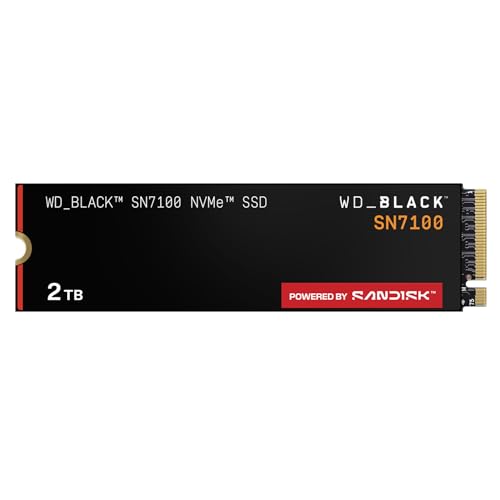

Top 3 picks at a glance
Why 2TB is the practical size
Modern game installs are large, and a 1TB drive fills quickly once the operating system, a handful of big titles and updates are on it. Reviewers frequently call 2TB the sweet spot for both PC and PS5 upgrades because it gives better capacity per unit cost than 1TB without the premium of 4TB. If you play several large titles at once or record gameplay, 2TB leaves comfortable room.
What to look for
- Interface: PCIe 4.0 x4 NVMe in the M.2 2280 format is the mainstream choice. PCIe 5.0 drives exist but run hotter and, per reviewers, game load times differ little from fast PCIe 4.0 drives.
- PS5 fit: the console needs a PCIe Gen4 drive rated at roughly 5,500MB/s or more, and a heatsink that fits its slot. Roundups note that drives sold without a heatsink need one added.
- DRAM or no DRAM: drives with a DRAM cache tend to hold up better in sustained writes. Several value drives, such as the NM790, use Host Memory Buffer instead.
- Endurance (TBW): higher terabytes-written ratings suggest more headroom for heavy write loads, though gaming is mostly reading.
- Warranty: most drives below carry five-year warranties according to the makers’ listings and retailer data.
At a glance
| Drive (2TB) | Best for | Stated speeds (read / write) | Notes |
|---|---|---|---|
| Samsung 990 Pro | Balanced PC pick; PS5 with heatsink version | 7,450 / 6,900 MB/s | PCIe 4.0; get the heatsink variant for PS5 |
| WD Black SN850X | PC and PS5 owners wanting a proven drive | Up to 7,300 MB/s read per reviewers | DRAM cache; heatsink version fits PS5 bay |
| WD Black SN850P | PS5 owners wanting an officially licensed drive | Up to 7,300 MB/s read | Heatsink built for the PS5 slot; not for PC-only value |
| Lexar NM790 | Value, laptops, PS5 with heatsink | 7,400 / 6,500 MB/s | 1,500 TBW, HMB instead of DRAM |
| Crucial T500 | PC builders wanting DRAM and endurance | 7,400 / 7,000 MB/s | 1,200 TBW, DRAM cache, TLC NAND |
| Kingston Fury Renegade | Endurance-focused buyers | 7,300 / 7,000 MB/s | 2,000 TBW, 2GB DRAM, Phison E18 |
Samsung 990 Pro: the balanced choice
Samsung lists the 990 Pro as a PCIe 4.0 NVMe M.2 drive with sequential speeds of up to 7,450MB/s read and 6,900MB/s write. Techsifted calls it the balanced option, fast and thermally stable for both PS5 and PC, and Atriarch’s roundup puts it first. For PS5 use, reviewers note it should be the version with a heatsink. Samsung also sells a variant with a heatsink for PC builders who want extra cooling.
It tends to sit at the upper end of cost among PCIe 4.0 drives, so budget buyers may prefer the options below.
WD Black SN850X and SN850P: the console favorites
Tom’s Hardware and PCBuildHelper list the SN850X with a heatsink as a leading PS5 choice, and Gaming PC Guru names it the best 2TB gaming SSD for most PC players. Roundups report read speeds up to 7,300MB/s, well above the console’s minimum, and a DRAM cache. The SN850P is the officially licensed PS5 variant, with a heatsink designed for the console’s slot and a stated read speed of up to 7,300MB/s for the 2TB model. One reviewer found it pricier than rivals, so if you only need compatibility, the SN850X with heatsink covers most of the same ground.
Lexar NM790: value pick
Lexar lists up to 7,400MB/s read and 6,500MB/s write for the 2TB drive, with a rating of 1,500TBW and a five-year warranty. It uses Host Memory Buffer 3.0 rather than dedicated DRAM. Tom’s Hardware has praised its pricing at this capacity, and a heatsink version exists for PS5. The trade-off is that sustained heavy writes can be less consistent than DRAM-equipped drives, which matters little for pure gaming.
Crucial T500: DRAM and endurance at mainstream tier
Crucial lists up to 7,400MB/s read and 7,000MB/s write, 1,200TBW, TLC NAND and a DRAM cache on a Phison E25 controller. It suits PC builders who want a conventional design. Some roundups prefer the heatsink version for PS5 when it is available at a competitive tier in your region.
Kingston Fury Renegade: highest endurance
Kingston lists the 2TB Renegade at 7,300MB/s read and 7,000MB/s write with a rating of 2,000TBW, 2GB of DRAM and a five-year warranty. Gaming PC Guru describes its endurance as the best among 2TB PCIe 4.0 drives. A heatsink version is sold with a PS5-ready label. Retail listings show slightly different TBW figures, so read the exact listing for your region.
Pick X if
| Pick this | If you |
|---|---|
| Samsung 990 Pro | want a polished all-rounder for a PC and may also use it in a PS5 |
| WD Black SN850X with heatsink | want a proven drive that drops into either a PC or a PS5 |
| WD Black SN850P | want the officially licensed console drive |
| Lexar NM790 | want strong stated speeds at a lower tier and accept no DRAM |
| Crucial T500 | want DRAM and a conventional TLC design for a PC |
| Kingston Fury Renegade | prioritize endurance figures above all |
Fit and compatibility notes
- Motherboard slot: check that you have a free M.2 2280 slot and, for the fastest speeds, one wired to PCIe 4.0 or higher.
- Motherboard heatsinks: many boards ship with their own M.2 heatsink. A drive with a built-in heatsink may not fit under it, so choose one or the other.
- PS5 bay: use a drive with a low-profile heatsink that fits the console’s slot, and follow Sony’s installation guide.
- Laptops and handhelds: some compact devices cannot take a drive with a heatsink. Choose the bare-drive version.
- Xbox: consoles use proprietary expansion cards, so these M.2 drives do not apply.
Alternatives
- Crucial P310: PCBuildHelper calls it the cheapest compliant 2TB option for PS5, using HMB rather than DRAM.
- Corsair MP600 PRO LPX: a slim PS5-targeted heatsink design with TLC and DRAM, according to roundups.
- PCIe 5.0 drives: useful for content creation, but for gaming alone reviewers see small load-time gains and higher heat.
Budget tiers
At the budget tier, the Crucial P310 and Lexar NM790 give the most capacity for the money, accepting HMB in place of DRAM. In the mid-range, the WD Black SN850X, Crucial T500 and Kingston Fury Renegade bring DRAM and strong endurance. At the premium tier, the Samsung 990 Pro adds polish and brand support. Because the speeds above are all within a narrow band, spending more will not change gameplay much.
Real-world expectations
Reviewers consistently report that the practical gap between good PCIe 4.0 drives is small in game loading, which is why Techsifted describes the SN850X and 990 Pro as within rounding error of each other. The headline sequential speeds on a box describe best-case transfers of large files, not the small random reads games rely on. Where the drives differ more is in sustained write behavior, thermal management and how long the warranty and endurance rating run. If you mostly play and rarely move huge files, any drive in the table is a reasonable fit, and the choice can follow heatsink fit, your motherboard layout and the tier you want to spend at.
Frequently Asked Questions
Is a heatsink required for a PS5 SSD?
Sony’s console needs the drive to be kept cool, and roundups consistently recommend a heatsink-equipped model or adding a compatible heatsink. Drives such as the WD Black SN850P come with one designed for the slot. Follow Sony’s guidance on height limits.
Is PCIe 5.0 worth it for gaming?
Reviewers generally report small differences in game loading between fast PCIe 4.0 and PCIe 5.0 drives, while PCIe 5.0 models run hotter. For gaming alone, a PCIe 4.0 drive covers most needs. PCIe 5.0 makes more sense for heavy file transfers.
Do DRAM-less SSDs work fine for games?
Yes, for typical gaming reads they perform well, and drives like the Lexar NM790 are popular for that reason. DRAM-equipped drives hold up better under sustained write loads. If you plan to move large video files often, favor DRAM.
Does TBW matter for a gaming drive?
Gaming is mostly reading data, so endurance ratings around 1,200TBW or higher are ample for most players. A higher figure only matters for heavy write workloads such as video editing.
Can I use the same drive in a PC and a PS5?
Yes, a PCIe 4.0 M.2 drive with a heatsink that fits the console works in both, but you would need to move it and reinstall or reformat. Many players buy one drive per device.
Which is better, 2TB or two 1TB drives?
One 2TB drive uses a single slot and often costs less per gigabyte, while two 1TB drives give separate volumes and use two slots. If your board has limited M.2 slots, 2TB is simpler.
Related guides
More from Amazon
Programs that pair well with the guide above. Offers and eligibility are set by Amazon and may change.
Free shipping on eligible items, Prime Video and more. Eligible new members can start with a free trial.
Start a Prime free trialAd-free music streaming. Eligible new subscribers can start with a free trial.
Try Music Unlimited freeA Prime membership for ages 18-24 with a trial period. Eligibility is set by Amazon.
See Prime for Young AdultsAudiobooks and podcasts to listen to on the go. Eligible new members can start with a free trial.
Try Audible freeAs an Amazon Associate we earn from qualifying purchases.