When you are setting up a modern living room or dedicated gaming space, every piece of technology you introduce acts as both a functional tool and a physical object in your home. A gaming headset is not just an audio accessory; it is an item that sits on your media console, hangs on a stand by your armchair, and rests on your head for hours at a time.
Unfortunately, many console owners make critical mistakes when figuring out what to look for in xbox series x headset. They get distracted by aggressive, neon-colored designs, flashy RGB lighting that drains battery life, or confusing compatibility claims on the packaging. The biggest mistake is buying a headset based solely on a high price tag or raw driver specifications, only to discover that it requires an annoying USB transmitter that clutters your media center, or that the physical clamp force is so tight it causes a headache after just thirty minutes of play. To build a clean, comfortable, and high-performing setup, you need to look past the marketing jargon and focus on the physical and technical realities of home audio gear.
As an Amazon Associate we earn from qualifying purchases at no extra cost to you.



Our Top Picks
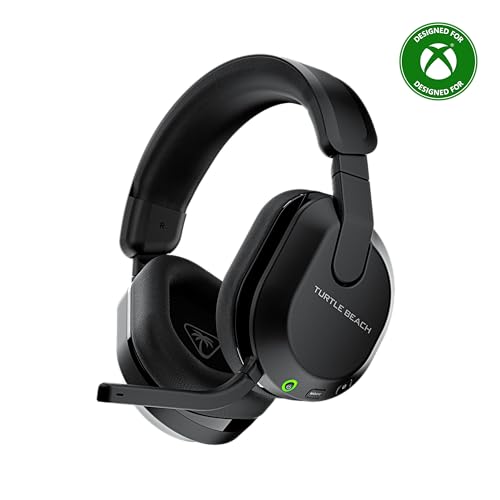 Turtle Beach Stealth 600 Wireless Gaming Headset forStandard8.58 x 7.81 x 3.74 Inches0.7 poundsCheck on Amazon
 Turtle Beach Recon 50 Wired Multiplatform Gaming Headset40mm5.75 x 2.76 x 7.5 Inches0.34 poundsCheck on Amazon


Top 3 picks at a glance
Decide These 3 Things First
Before you dive into technical spec sheets and frequency response curves, you must establish three baseline parameters for your home gaming environment. Making these decisions upfront will instantly filter out eighty percent of the market, saving you time and preventing buyer’s remorse.
- Wired vs. Wireless: Xbox consoles do not support standard Bluetooth audio. Therefore, you must decide if you want a wireless headset that uses Microsoft’s proprietary “Xbox Wireless” protocol (which connects directly to the console like a controller) or a USB dongle, or if you prefer a wired headset that plugs directly into the 3.5mm jack of your controller. Wired models, like the entry-level Turtle Beach Recon 50, require no charging and offer zero latency, but wireless models keep your living room free of cable clutter.
- Your Primary Seating Distance: If you play on a couch situated 8 to 12 feet away from your television and media console, a wireless headset is almost a necessity to prevent tripping hazards. However, if you play at a dedicated desk setup with a monitor where the console is within arm’s reach, a wired headset with a high-quality braided cable can save you money and eliminate battery anxiety.
- Acoustic Isolation Needs: Consider your household dynamic. If you play in a noisy living room where family members are watching television or talking, you need a closed-back headset with thick, sealing ear cups to isolate sound. If you play in a quiet, dedicated home office and need to remain aware of your surroundings (like a crying baby or a doorbell), look for breathable fabric ear pads that allow some ambient sound to pass through.
1. Size, Weight, and Clamp Force
The physical footprint of a headset dictates how long you can wear it before physical fatigue sets in. When analyzing physical dimensions, look closely at the weight, which is typically listed in grams or ounces. A heavy headset will compress the sensitive nerves on the top of your skull and strain your neck muscles over long sessions.
An ultra-lightweight headset weighs between 220 and 260 grams (such as the Razer BlackShark V2 X, which sits at approximately 240 grams). Mid-range wireless headsets, which must house internal batteries and receivers, generally weigh between 280 and 340 grams. Anything over 350 grams is considered heavy and requires a highly engineered suspension headband (often called a “ski-goggle” band) to distribute the weight evenly across your head rather than focusing it on a single pressure point.
Clamp force—the inward pressure the ear cups exert against the sides of your head—is equally critical. While you cannot always find a numerical rating for clamp force on a retail box, look for headbands made of flexible spring steel or reinforced aluminum. These materials can be gently stretched over a stack of books overnight to reduce the clamp force if they feel too tight out of the box, whereas cheap, rigid plastic headbands will simply snap under the same tension.
2. Ear Cup Materials and Thermal Comfort
The material resting against your skin affects both the acoustic seal of the headset and the temperature of your ears. There are three primary materials used in modern gaming headsets, each offering a distinct trade-off between sound isolation and thermal comfort:
- Protein Leather (PU Leatherette): This synthetic leather is highly effective at blocking external noise and trapping low-frequency bass notes inside the ear cup. However, it acts as a thermal insulator. Within 45 minutes of use, the temperature inside a protein leather cup can rise by 4 to 6 degrees Fahrenheit, leading to sweaty ears.
- Athletic Mesh Fabric: Made from woven polyester fibers, this material allows air to circulate freely. While it keeps your ears cool during multi-hour sessions, it offers poor passive noise isolation. Low-frequency bass response is also reduced because the porous fabric allows air pressure to escape.
- Hybrid Cushions: Premium headsets often feature hybrid designs with fabric on the surface that touches your skin (for cooling) and leatherette on the outer ring (to seal in the sound). Some high-end models also incorporate cooling gel layers inside the memory foam padding to actively pull heat away from your temples.
3. Driver Construction and Acoustic Design
The driver is the miniature speaker inside each ear cup that creates the soundwaves you hear. When evaluating drivers, look at the diameter and the magnet material. Most gaming headsets use either 40mm or 50mm dynamic drivers made with Neodymium magnets.
A 50mm driver has a larger surface area than a 40mm driver, allowing it to move more air. This extra movement translates to deeper, cleaner bass reproduction without distorting the mid-range frequencies where vital game details, like footsteps or dialogue, reside. However, driver tuning is more important than raw size; a well-engineered 40mm driver will easily outperform a cheap, muddy 50mm driver.
Look for a frequency response range that covers at least 20 Hz to 20,000 Hz, which matches the limits of human hearing. More premium headsets may offer an extended range of 10 Hz to 40,000 Hz. While you cannot hear these extreme frequencies directly, the extended range ensures that the drivers operate effortlessly within the audible spectrum, reducing harmonic distortion to less than 1% even at high volumes.
4. Connection Protocols and Wireless Range
How a headset communicates with your Xbox Series X determines the stability of your audio connection and the cleanliness of your home theater setup. If you choose a wireless model, you must understand the difference between the available connection types:
Direct Xbox Wireless: This protocol operates on a 2.4 GHz or 5 GHz band directly to the console, utilizing the same transmitter technology as your Xbox controller. The setup is incredibly clean—you simply press the sync button on the console and the headset, with no USB dongles sticking out of the front of your machine. The Xbox Wireless Gaming Headset utilizes this technology, offering a clean aesthetic for modern living rooms.
USB Dongle (RF Wireless): Many third-party wireless headsets, such as the Turtle Beach Stealth 600, utilize a dedicated USB-A or USB-C transmitter that plugs into the console. While this takes up a physical port, these proprietary 2.4 GHz connections are often highly resistant to interference from home Wi-Fi routers and smart home devices. Look for a wireless range of at least 30 feet if you want to walk to the kitchen for a drink without losing audio connection.
5. Price Tiers and Budget Realities
The gaming headset market is highly saturated, but it cleanly divides into three distinct price tiers. Understanding what your money actually buys at each level prevents you from overpaying for features you do not need, or underestimating the longevity of budget gear.
In the entry-level tier ($25 to $50), you are looking at wired analog headsets. These devices, such as the Turtle Beach Recon 50 (around $27) or the Razer BlackShark V2 X (around $39), rely on simple 3.5mm connections. You are paying purely for basic stereo sound, a physical volume wheel, and a microphone. There are no batteries to charge, no software suites to configure, and very little plastic to break.
The mid-range tier ($50 to $130) is where you find robust wireless options and advanced virtual spatial audio integration. Headsets in this range, like the official Xbox Wireless Headset (around $110), introduce features like dual-source audio mixing (allowing you to connect to your console via Xbox Wireless and your phone via Bluetooth simultaneously), onboard equalizer profiles, and native support for spatial audio formats like Dolby Atmos and DTS Headphone:X. Plastics are generally reinforced with metal bands in this tier.
The premium tier ($130 to $350+) introduces luxury materials, active noise cancellation (ANC), hot-swappable dual-battery systems, and premium audio drivers (such as planar magnetic drivers). In 2026, we are seeing these premium models integrate more seamlessly into home decor, featuring matte aluminum accents, genuine leather headbands, and sleek charging base stations that look like high-end home audio equipment rather than aggressive gaming toys.
6. Durability, Warranty, and Lifespan
A headset is a mechanical device subjected to constant physical stress. It is stretched, twisted, dropped on the floor, and tossed onto coffee tables daily. Therefore, the structural design of the hinges and adjustment sliders is paramount.
Avoid headsets where the ear cups attach to the headband via thin, unreinforced plastic forks. These are the most common failure points. Look for steel-reinforced headbands and aluminum yokes that can handle twisting forces. Furthermore, check if the manufacturer sells replacement ear cushions. Protein leather cushions naturally degrade, crack, and flake after 18 to 24 months of exposure to skin oils; being able to swap them out for a $15 replacement set can easily double the lifespan of your headset.
Most reputable brands offer a standard 1-year limited warranty covering manufacturer defects, though some premium European and American brands offer a 2-year warranty. Always retain your digital receipt, as warranty claims for wireless connectivity drops or microphone failures almost always require proof of purchase from an authorized retailer.
Spec Checklist
Use this quick reference table to compare what features and specifications you should expect at different price points when shopping for your Xbox Series X headset.
| Feature / Spec | Budget Tier ($25 – $50) | Mid-Range Tier ($50 – $130) | Premium Tier ($130 – $350+) |
|---|---|---|---|
| Connection Type | Wired (3.5mm Analog Jack) | Wireless (Xbox Wireless or 2.4GHz Dongle) | Wireless + Simultaneous Bluetooth + Wired Option |
| Weight Range | 220g – 260g (Very Light) | 280g – 340g (Average) | 320g – 380g (Heavier, premium materials) |
| Driver Size & Type | 40mm Dynamic Drivers | 40mm – 50mm Neodymium Drivers | 50mm Neodymium or Planar Magnetic Drivers |
| Battery Life | N/A (No battery required) | 15 – 20 Hours | 30 – 60+ Hours (or hot-swappable dual batteries) |
| Headband Material | Basic Plastic / Thin Foam | Reinforced Steel / Memory Foam | Suspension Band / Aluminum / Premium Leather |
| Spatial Audio Support | Basic Stereo (Software-driven Atmos) | Dolby Atmos / DTS:X / Windows Sonic | Hardware-tuned Spatial Audio with Custom EQ |
Red Flags
When shopping for an Xbox Series X headset, watch out for these deceptive marketing tactics and design flaws:
- “Works with Xbox*” (With an Asterisk): If you see a wireless headset that boasts compatibility with “PC, PS5, Switch, and Xbox*,” read the fine print. Often, the wireless connection only works on PC and PlayStation, while the Xbox compatibility requires you to plug a 3.5mm cable from the headset into your controller. If you want a wireless experience on Xbox, the box must explicitly state “Designed for Xbox” or have the green Xbox logo.
- Non-Detachable, Rigid Microphones: If you plan to use your headset to watch movies or play single-player games in your living room, a giant, non-detachable boom microphone sticking out of your face is highly annoying. Look for microphones that are fully detachable, retractable into the ear cup, or feature a clean “flip-to-mute” design that folds flush with the headband.
- Proprietary Micro-USB Charging Ports: In modern home setups, everything should run on USB-C. Avoid any wireless headset that still relies on outdated Micro-USB charging ports, which are fragile, slower to charge, and force you to keep extra cables lying around your media console.
FAQ
Can I use a standard Bluetooth headset with my Xbox Series X?
No, the Xbox Series X does not have native Bluetooth audio support. To connect a wireless headset, it must use the proprietary Xbox Wireless protocol or come with a compatible USB wireless dongle designed specifically for the Xbox console security chip.
Do I need to pay extra for a Dolby Atmos licensed headset?
No. Any stereo headset connected to an Xbox Series X (whether via a 3.5mm controller jack or wireless receiver) can output Dolby Atmos for Headphones. The spatial audio processing is done entirely on the console side. You only need to purchase the Dolby Access app license on the Xbox store, though some mid-range and premium headsets bundle a free lifetime license code in the box.
How long does a wireless Xbox headset battery typically last?
A standard mid-range wireless headset should provide between 15 and 20 hours of continuous playback on a single charge. Premium models often reach 30 to 50 hours of battery life, or feature dual-battery systems where one battery charges inside a base station while you use the other in the headset.
What is the difference between open-back and closed-back headsets?
Closed-back headsets have solid outer ear cups that trap sound inside, offering great bass and blocking out living room noise. Open-back headsets have perforated or mesh outer cups that let air and sound pass through freely, creating a wider, more natural soundstage but leaking sound to those sitting nearby in your home.