Our Short List of 3

- Best for: Console and PC players who want Adaptive QoS and a gaming port doing the sorting automatically.
- Brand: ASUS
- Model: RT-AX86U PRO
- Wireless standard: WiFi 6, dual-band
- Data transfer rate: 5700 megabits per second
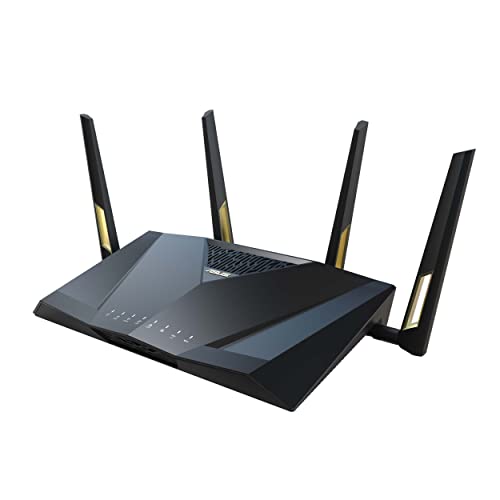
- Best for: Players with several wired devices who still want automatic game prioritization on top.
- Brand: ASUS
- Model: RT-AX88U PRO
- Wireless class: AX6000 dual-band WiFi 6
- Combined speed from listing: up to 6000 Mbps, 1148 Mbps on 2.4 GHz and 4804 Mbps on 5 GHz

- Best for: Gamers with WiFi 6E devices who want a quieter band plus QoS for the rest of the home.
- Brand: TP-Link
- Model: Archer AXE75
- Wireless standard: 802.11ax WiFi 6E, tri-band
- Data transfer rate: 5400 megabits per second
All 5 Picks at a Glance
| Product | Specs | Action |
|---|---|---|
| ASUS RT-AX86U Pro (AX5700) Dual Band WiFi 6 Gaming Router |
| Check price on Amazon |
| ASUS RT-AX88U Pro AX6000 Dual Band WiFi 6 Router |
| Check price on Amazon |
| TP-Link Archer AXE75 AXE5400 Tri-Band WiFi 6E Router |
| Check price on Amazon |
 GL.iNet GL-MT6000 (Flint 2) WiFi 6 Router |
| Check price on Amazon |
 TP-Link Archer AX73 AX5400 WiFi 6 Router |
| Check price on Amazon |
Buying a router for gaming is really a decision about what happens when your connection gets busy. Raw speed ratings do not stop a housemate’s download or a cloud backup from pushing your ping upward mid-match. Quality of Service is the feature that decides which traffic goes first, so the real choice is which style of prioritization fits your home: automatic game-aware queues, per-device rules you set yourself, or queue management that trims a little speed to keep latency flat.
This guide is for players whose matches share a connection with streaming, downloads and video calls, and who want that decision handled inside the router. The picks below are the ASUS RT-AX86U Pro and RT-AX88U Pro with Adaptive QoS, the TP-Link Archer AXE75 and Archer AX73 with QoS in their listed features, and the GL.iNet Flint 2, whose listing pairs QoS with dual 2.5G ports and OpenWrt-based control.
Our Top Picks
- TP-Link AXE5400 Tri-Band WiFi 6E RouterWiFi 6E, Tri-Band AXE540012.91 x 10.43 x 4.72 inches1.5 poundsCheck on Amazon
Top 3 picks at a glance
Quick Picks
As an Amazon Associate we earn from qualifying purchases
| Product | Best for | Key spec from title |
|---|---|---|
| ASUS RT-AX86U Pro (AX5700) Dual Band WiFi 6 Gaming Router | Console and PC players who want automatic game priority | 2.5G port and dedicated gaming port |
| ASUS RT-AX88U Pro AX6000 Dual Band WiFi 6 Router | Wired-heavy gaming setups | Dual 2.5G ports with Adaptive QoS |
| TP-Link Archer AXE75 AXE5400 Tri-Band WiFi 6E Router | Homes adding 6 GHz devices | New 6 GHz band with 160 MHz channels |
| GL.iNet GL-MT6000 (Flint 2) WiFi 6 Router | Tinkerers who want deep queue control | 2 x 2.5G Ethernet ports |
| TP-Link Archer AX73 AX5400 WiFi 6 Router | Busy dual-band streaming households | AX5400 speeds with QoS in listed features |
How to Choose
Pick the QoS Style That Matches Your Patience
Routers sell very different tools under the same QoS label. Adaptive systems classify traffic by application and push game packets forward automatically, which suits households that never want to open a settings page. Traditional QoS lets you rank devices or services by hand, giving control in exchange for setup time. Smart Queue Management takes a third route, capping throughput slightly below your line rate so queues never build up. Decide honestly how much configuring you will actually do, because an elaborate system left switched off helps nobody, while a simple automatic mode that stays on protects every session.
Match the QoS Ceiling to Your Internet Plan
Prioritization only matters at the point where your connection saturates, and that point depends on your plan. On a fast gigabit line, congestion is rare, so QoS mainly guards the slower upload direction during streams and backups. On a slower plan, the queue forms constantly and queue management earns its keep every evening. Check that the router’s processor can handle its QoS features at your line speed, because heavy inspection on an underpowered chip becomes the bottleneck. Listings that name quad-core processors and multi-gig ports are signalling headroom for exactly this workload.
Count Bands Before You Count Speed
The combined speed printed on the box adds every band together, which no single device can use. What matters for gaming is how much uncongested airtime your console or PC gets. A dual-band router with a clear 5 GHz band often beats a crowded tri-band setup, while a 6 GHz band gives WiFi 6E devices a lane that older hardware cannot touch. If your gaming device sits far from the router, antenna design and beamforming in the listing matter more than the headline class. Match the band plan to the devices you actually own today.
Check Wired Ports and Expansion Options
The most reliable gaming connection is still a cable, so read the port list before the wireless claims. A 2.5G port suits multi-gig internet plans and fast local transfers, and a dedicated gaming port on some models prioritizes whatever is plugged into it. Households that may add mesh nodes later should confirm compatibility in the listing, such as AiMesh or OneMesh support, so the router can become a node instead of spare parts. USB ports, VPN support and guest networks round out the picture for homes that share the router with work and visitors.
The 5 Best Options
ASUS RT-AX86U Pro (AX5700) Dual Band WiFi 6 Gaming Router
- Best for: Console and PC players who want Adaptive QoS and a gaming port doing the sorting automatically.
- Brand: ASUS
- Model: RT-AX86U PRO
- Wireless standard: WiFi 6, dual-band
- Data transfer rate: 5700 megabits per second
Console and PC players who want Adaptive QoS and a gaming port doing the sorting automatically.
It is dual-band only, so there is no 6 GHz lane for WiFi 6E devices.
The RT-AX86U Pro is built for players who want game traffic handled without manual rules. Its listing names QoS among the special features, pairs it with a dedicated gaming port, and adds Mobile Game Mode for phone players on the same network. A 2.5G port covers fast wired backhaul or a multi-gig plan, while AiMesh support lets the router join a wider ASUS mesh later instead of being replaced. Subscription-free AiProtection Pro security is also in the title, which matters for households that dislike ongoing fees for basic protection on a busy gaming network.
ASUS RT-AX88U Pro AX6000 Dual Band WiFi 6 Router
- Best for: Players with several wired devices who still want automatic game prioritization on top.
- Brand: ASUS
- Model: RT-AX88U PRO
- Wireless class: AX6000 dual-band WiFi 6
- Combined speed from listing: up to 6000 Mbps, 1148 Mbps on 2.4 GHz and 4804 Mbps on 5 GHz
Players with several wired devices who still want automatic game prioritization on top.
Like its smaller sibling it stays on WiFi 6 dual-band, so 6 GHz clients fall back to 5 GHz.
The RT-AX88U Pro takes the same ASUS approach and scales it toward wired-heavy rooms. Adaptive QoS is named in the listing title, alongside WAN aggregation and port forwarding, and the router carries two dual-function 2.5 Gbps WAN and LAN ports for flexible cabling. That makes it a sensible centre for a desk with a PC, a console and a network drive that all want fast local paths. The listing describes dual-band speeds up to 6000 Mbps, split between the 2.4 GHz and 5 GHz bands, with AiMesh support for later expansion across a larger home.
TP-Link Archer AXE75 AXE5400 Tri-Band WiFi 6E Router
- Best for: Gamers with WiFi 6E devices who want a quieter band plus QoS for the rest of the home.
- Brand: TP-Link
- Model: Archer AXE75
- Wireless standard: 802.11ax WiFi 6E, tri-band
- Data transfer rate: 5400 megabits per second
Gamers with WiFi 6E devices who want a quieter band plus QoS for the rest of the home.
Only 6E-capable devices can use the 6 GHz band; older hardware stays on the lower bands.
The Archer AXE75 is the pick for households whose gaming devices are moving to WiFi 6E. Its listing puts QoS in the special features, and the headline addition is a new 6 GHz band that sits apart from crowded 2.4 GHz and 5 GHz airspace, giving compatible laptops and handhelds a cleaner lane. Tri-band AXE5400 throughput, 160 MHz channels and OneMesh support cover the rest of the house, while the Tether app handles setup and the HomeShield service groups security, parental controls and QoS in one place. A modem is still required for most internet providers.
GL.iNet GL-MT6000 (Flint 2) WiFi 6 Router
- Best for: Advanced users who want OpenWrt-style control over queues, VPN and network-wide filtering.
- Brand: GL.iNet
- Model: GL-MT6000, Flint 2
- Special features listed: QoS, access point mode, guest mode, internet security
- Frequency band class: Dual-band
Advanced users who want OpenWrt-style control over queues, VPN and network-wide filtering.
The deeper controls reward setup time; buyers wanting one-tap presets may prefer the ASUS models.
The Flint 2 suits players who would rather shape the queue themselves than trust a preset. Its listing names QoS among the special features, and the router runs GL.iNet’s OpenWrt-based firmware, which is the draw for anyone planning Smart Queue Management rules to fight bufferbloat. Hardware is generous for the class: two 2.5G Ethernet ports for a fibre modem and a wired PC, 1 GB of DDR4 memory and 8 GB of storage for plugins. The listing also quotes WireGuard speeds up to 900 Mbps, useful when the same box doubles as the household VPN endpoint.
TP-Link Archer AX73 AX5400 WiFi 6 Router
- Best for: Families that game and stream on a gigabit-or-slower plan and want simple app-based priority.
- Brand: TP-Link
- Model: Archer AX73
- Wireless standards: 802.11ac, 802.11ax, 802.11b, 802.11g, 802.11n
- Frequency band class: Dual-band
Families that game and stream on a gigabit-or-slower plan and want simple app-based priority.
All wired ports are gigabit, so multi-gig internet plans cannot pass their full speed through.
The Archer AX73 covers the straightforward case: a dual-band household where games compete with several simultaneous streams. QoS appears in its listed special features, and TP-Link’s HomeShield service is where the prioritization lives, grouping QoS with network protection and parental controls. Six antennas, beamforming and a 4T4R structure are named in the listing description for coverage across a multi-room home, and OneMesh support leaves a path to whole-home expansion later. With AX5400 dual-band throughput and full gigabit ports, it fits homes on cable or fibre plans that do not need multi-gig hardware yet.
Which One Fits Your Situation
You Play Competitively While Family Streams
Your problem is contention, not coverage, so start with a router whose QoS works automatically. The RT-AX86U Pro fits here because its Adaptive QoS and gaming port sort game traffic without a rule list to maintain, and the 2.5G port keeps a wired console fed. Set it up once, plug the gaming machine into the priority port, and let the router arbitrate when someone else starts a large download or a 4K stream during your ranked session.
You Stream Your Own Gameplay
Broadcasting adds a heavy, constant upload on top of the game itself, so the queue has to protect both directions at once. The RT-AX88U Pro suits this setup, with Adaptive QoS named in its title, dual 2.5G ports for the streaming PC, and WAN aggregation for homes running two lines. Prioritize the gaming PC as a whole device rather than the game alone, since the broadcast software and voice chat leave from the same machine and need steady upload too.
Your Apartment Airspace Is Crowded
When neighbouring networks fill the 5 GHz band, queue settings cannot fix interference, but a cleaner band can. The Archer AXE75 gives WiFi 6E devices a 6 GHz lane that older routers do not use, while its listed QoS keeps the remaining bands orderly for everyone else. Checking your own devices matters most here: a 6 GHz band only helps the machines that can connect to it, so confirm your laptop or handheld supports WiFi 6E first.
You Want to Tune Everything Yourself
If you enjoy reading your own traffic graphs and adjusting queue rules, the Flint 2 is the natural home. Its OpenWrt-based firmware and listed QoS support let you run Smart Queue Management tuned to your measured line rate, which is the most direct attack on bufferbloat. The trade is time: expect an evening of setup and measurement rather than a wizard. The Archer AX73 remains the fallback for housemates who share the network but not the hobby.
Common Mistakes
- Turning QoS on but never entering your real plan speeds, so the router shapes traffic against the wrong ceiling.
- Prioritizing every device in the house, which leaves the priority queue as crowded as the normal one.
- Judging routers by the combined box speed instead of the bands and ports your own devices can use.
- Placing the router in a cabinet or behind the TV, then blaming QoS for what is really weak signal.
- Forgetting the upload direction, even though streams, calls and cloud backups saturate it long before downloads.
Frequently Asked Questions
Does QoS actually lower ping in games?
QoS does not make an idle connection faster; it protects an active one. When nothing else is using the line, your ping stays exactly as the provider delivers it. When downloads, streams or uploads compete, prioritization keeps game packets from waiting behind bulk traffic, which is when players notice steadier response. The busier and slower the connection, the more visible the difference becomes during evening peaks.
Should I prioritize by device or by application?
Application-based modes are easier because the router recognizes game traffic wherever it comes from, while device rules are simpler to reason about and cover voice chat and launchers on the same machine. Many households end up prioritizing the gaming PC or console as a device, then letting automatic modes handle everything else. Either approach works when only a small share of traffic sits in the top tier.
Is a wired connection still better than QoS over WiFi?
Yes. A cable removes interference, retries and roaming from the equation entirely, and no queue setting can do that for a wireless link. QoS and cabling solve different problems: the cable stabilizes your own path to the router, and QoS decides what the router forwards first when the internet line itself is busy. Competitive players usually combine both, wiring the main machine and letting QoS guard the shared uplink.
Can QoS slow down the rest of the house?
It can if the priority rules are greedy or the shaped rate is set far below the real line speed. QoS only borrows capacity at moments of contention and returns it the instant the game goes quiet. Problems usually trace back to a wrong speed entry or too many devices marked high priority. Start with the game device alone and widen the rules only if a real conflict appears.
Related guides
More from Amazon
Programs that pair well with the guide above. Offers and eligibility are set by Amazon and may change.
Free shipping on eligible items, Prime Video and more. Eligible new members can start with a free trial.
Start a Prime free trialAd-free music streaming. Eligible new subscribers can start with a free trial.
Try Music Unlimited freeA Prime membership for ages 18-24 with a trial period. Eligibility is set by Amazon.
See Prime for Young AdultsAudiobooks and podcasts to listen to on the go. Eligible new members can start with a free trial.
Try Audible freeAs an Amazon Associate we earn from qualifying purchases.