Our Short List of 3

- Best for: MMO and MOBA players who want thumbpad movement plus a deep macro grid.
- 32 fully programmable keys
- Razer Mecha-Membrane key switches
- 8-way directional thumbpad and 3-way scroll wheel
- Chroma RGB backlighting with 16.8 million colour options

- Best for: Players who want analogue input depth and two actions on a single key.
- 32 fully programmable keys
- Razer Analog Optical key switches
- Adjustable actuation from 1.5 to 3.6 millimetres
- Dual-function keys with rapid trigger reset
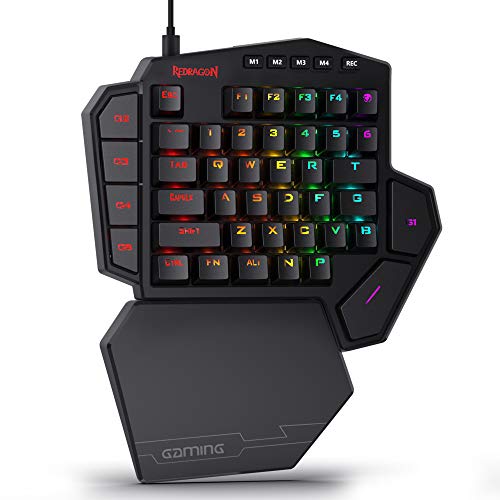
- Best for: Keyboard traditionalists who want a mechanical feel and an F-row within reach.
- 42 keys in a one-handed layout
- Mechanical switches in upgraded hot-swappable sockets
- 7 onboard macro keys
- Wired Type-C connection with detachable cable
All 5 Picks at a Glance
| Product | Specs | Action |
|---|---|---|
| Razer Tartarus V2 Gaming Keypad |
| Check price on Amazon |
| Razer Tartarus Pro Gaming Keypad |
| Check price on Amazon |
| Redragon K585 DITI Wired One-Handed Gaming Keyboard |
| Check price on Amazon |
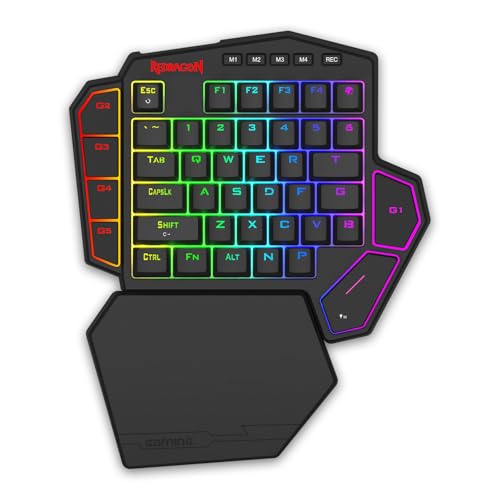 Redragon K585 HE Rapid Trigger Gaming Keyboard |
| Check price on Amazon |
 Koolertron One Handed Mechanical Gaming Keyboard with 24 Macro Keys |
| Check price on Amazon |
A one handed keyboard only earns its desk space if it puts movement, abilities and macros under one hand without forcing you to relearn your whole setup. The real decision is the switch and control style: a thumb D-pad or scroll wheel for movement, analog or magnetic switches for adjustable actuation, or a plain grid of mechanical keys with deep macro support. Key count, wrist rest design and whether profiles live in software or onboard memory decide how the pad fits your games.
This guide is for MMO and MOBA players stacking ability keys, FPS players chasing faster strafing inputs, and anyone short on desk space who wants the mouse hand free. The picks come from Amazon listing names and specifications: the Razer Tartarus V2 and Tartarus Pro with 32 programmable keys each, the Redragon K585 DITI and K585 HE with 42 keys, and a 45-key Koolertron pad built around macro layers.
Our Top Picks
Top 3 picks at a glance
Quick Picks
As an Amazon Associate we earn from qualifying purchases
| Product | Best for | Key spec from title |
|---|---|---|
| Razer Tartarus V2 Gaming Keypad | MMO players who want a thumb D-pad | 32 programmable mecha-membrane keys |
| Razer Tartarus Pro Gaming Keypad | Analog control with dual-function keys | Analog optical switches with adjustable actuation |
| Redragon K585 DITI | Mechanical feel and swappable switches | 42 keys with 7 onboard macro keys |
| Redragon K585 HE | Fast FPS inputs with rapid trigger | UltraMag magnetic switches and 8K polling |
| Koolertron One Handed Mechanical Gaming Keyboard | Macro layers that travel between PCs | 45 programmable keys with 24 macro buttons |
How to Choose
Switch type and actuation behaviour
The switch decides how a keypad feels and how much control you get over each press. Mecha-membrane keys, like those on the Tartarus V2, give a soft, quiet bottom-out at one fixed actuation point. Analog optical switches on the Tartarus Pro register how far a key travels, so actuation can be set between 1.5 and 3.6 millimetres and one key can carry two functions. Magnetic Hall switches on the K585 HE add rapid trigger resets for repeated strafing. Standard mechanical switches on the K585 DITI and the Koolertron pad are simpler, but they are hot-swappable or easy to replace when a key wears out.
Thumb controls for movement
Movement is where a keypad differs most from a cut-down keyboard. The Tartarus V2 and Tartarus Pro put an 8-way directional thumbpad under your thumb, plus a scroll wheel, so strafing and camera or item cycling stay off your fingers. The Redragon and Koolertron pads skip the thumbpad and use a conventional WASD-style cluster instead, which feels familiar on day one but loads more work onto the fingers. If your games need analogue-style movement or frequent direction changes, a thumbpad model suits better. If you already move well on WASD, a grid layout avoids a learning curve.
Key count, macros and profiles
Count the commands your main game actually needs before chasing the biggest number. The Tartarus models offer 32 programmable keys with up to eight keymaps per profile through Razer Synapse, and macros of unlimited length. The K585 DITI carries 42 keys with 7 onboard macro keys, so everyday binds sit closer to a normal keyboard layout. The Koolertron pad goes furthest for macro users: all 45 keys are programmable, 24 are macro function buttons, and four configuration layers are stored in the pad itself. Software profiles are easier to edit, while onboard storage keeps your layout when you change computers.
Ergonomics, wrist rests and desk fit
A keypad locks your hand in one position for hours, so the rest matters as much as the keys. The Tartarus V2 and Pro use an adjustable palm rest with two positions, while both Redragon K585 models include a detachable wrist rest that comes off when desk space is tight. The Koolertron pad is a flat slab with no rest, so plan on adding your own if you play long sessions. Also check the footprint: the K585 body measures about 11 by 9 inches with its rest attached, which is generous for a one handed device.
The 5 Best Options
Razer Tartarus V2 Gaming Keypad
- Best for: MMO and MOBA players who want thumbpad movement plus a deep macro grid.
- 32 fully programmable keys
- Razer Mecha-Membrane key switches
- 8-way directional thumbpad and 3-way scroll wheel
- Chroma RGB backlighting with 16.8 million colour options
MMO and MOBA players who want thumbpad movement plus a deep macro grid.
Mecha-membrane keys are not mechanical, and full configuration depends on Razer Synapse software.
The Tartarus V2 is the default starting point for players who want a thumbpad layout without paying for analog switches. Its 32 fully programmable keys combine a mecha-membrane switch feel with an 8-way directional thumbpad and a 3-way scroll wheel, so movement, abilities and item cycling all sit under one hand. Razer Synapse handles rebinding, macros and profile storage, and the adjustable palm rest shifts between two positions to match different hand sizes. Chroma RGB backlighting can be set per key. For MMO and MOBA rotations where the thumbpad covers movement, it remains the most balanced package in this group.
Razer Tartarus Pro Gaming Keypad
- Best for: Players who want analogue input depth and two actions on a single key.
- 32 fully programmable keys
- Razer Analog Optical key switches
- Adjustable actuation from 1.5 to 3.6 millimetres
- Dual-function keys with rapid trigger reset
Players who want analogue input depth and two actions on a single key.
The dual-function system takes practice, and some games feel harder before they feel easier.
The Tartarus Pro keeps the same 32-key thumbpad layout as the V2 but swaps in Razer Analog Optical switches, which measure how far each key is pressed. Actuation adjusts from 1.5 to 3.6 millimetres, keys reset the moment they start rising, and each key can hold two functions, one on a partial press and one on a full press. That makes it the pick for players who want analogue-style movement control or layered abilities without adding more keys. Eight profiles can be toggled on the fly, and Chroma backlighting is set per key through Synapse. It is a premium step up aimed at demanding MMO and hybrid genre players.
Redragon K585 DITI Wired One-Handed Gaming Keyboard
- Best for: Keyboard traditionalists who want a mechanical feel and an F-row within reach.
- 42 keys in a one-handed layout
- Mechanical switches in upgraded hot-swappable sockets
- 7 onboard macro keys
- Wired Type-C connection with detachable cable
Keyboard traditionalists who want a mechanical feel and an F-row within reach.
There is no thumbpad or thumbstick, so movement stays on the WASD cluster.
The K585 DITI takes the opposite approach to the Razer pads: a familiar 42-key mechanical layout, including a function row, instead of a thumbpad. The switches sit in upgraded hot-swappable sockets, so changing switch feel later needs no soldering, and the listing version pairs them with a detachable Type-C cable. Seven onboard macro keys handle rotations and combo strings, RGB backlighting is built in, and the detachable wrist rest supports longer sessions. For players moving from a full keyboard who want the transition to feel natural, the DITI keeps the most familiar key positions while cutting the board down to one hand.
Redragon K585 HE Rapid Trigger Gaming Keyboard
- Best for: Competitive FPS players who value fast key resets and fine actuation control.
- 42 keys in a one-handed layout
- UltraMag magnetic switches, one hundred percent POM construction
- Rapid trigger with actuation adjustable from 0.1 to 3.4 millimetres
- 8000 hertz wired hyper-polling
Competitive FPS players who value fast key resets and fine actuation control.
Actuation tuning lives in Redragon software, so expect setup time before the pad feels right.
The K585 HE rebuilds the DITI formula around speed. Its UltraMag magnetic switches are full POM Hall effect units, and rapid trigger lets each key reset and re-register dynamically, with actuation adjustable from 0.1 to 3.4 millimetres through software. The wired connection polls at 8000 hertz, which Redragon positions for competitive FPS play where repeated counter-strafing inputs matter. The 42-key layout, 7 programmable macro keys and detachable wrist rest carry over from the DITI, and a dual-module floating switch structure is used to reduce wobble. For shooter players who found membrane and standard mechanical pads slow to reset, this is the responsive option.
Koolertron One Handed Mechanical Gaming Keyboard with 24 Macro Keys
- Best for: Macro-heavy players and shortcut users who switch between computers.
- 45 keys, all fully programmable
- 24 macro function buttons: 12 advanced and 12 quick macros
- Macros support up to 792 chained key commands
- Programmable rotary knob for volume, tracks or scrolling
Macro-heavy players and shortcut users who switch between computers.
No thumbpad, no wrist rest, and the configuration software is a separate download.
The Koolertron pad is built for people who think in macros rather than game movement. All 45 keys are programmable, including 24 macro function buttons split between 12 advanced macros and 12 quick macros, and macros can be chained to support up to 792 key commands. A programmable knob handles volume, track changes, brightness or page scrolling, and four configuration layers are stored in the pad’s own memory, so the layout survives a move to another computer with no software reinstall. It lacks a thumbpad and wrist rest, which keeps it a tool for WASD movers, streamers and shortcut-heavy players rather than thumbpad converts.
Which One Fits Your Situation
You play MMOs with long ability rotations
Choose between the two Razer pads. The Tartarus V2 covers a full rotation with 32 programmable keys, unlimited macro lengths and thumbpad movement at the simpler end of the range. Step up to the Tartarus Pro if your rotation benefits from dual-function keys, where a shallow press and a full press trigger different abilities on the same key.
You play competitive shooters and strafe constantly
The Redragon K585 HE fits this job. Rapid trigger resets each key the moment it starts to rise, actuation can be set as shallow as 0.1 millimetres, and the 8000 hertz polling rate keeps wired input latency low. The familiar WASD cluster also means your existing movement habits carry straight over from a full keyboard.
You are switching from a full keyboard and want minimal relearning
The Redragon K585 DITI keeps the layout closest to what you already know, with 42 keys, a function row and standard key spacing, just cut down to the left hand. Hot-swappable sockets let you tune the switch feel later, and the detachable wrist rest helps during the first long sessions while your hand adapts.
You use one layout across gaming and work apps
The Koolertron pad stores four configuration layers in its own memory, so a gaming layer, an editing layer and a streaming layer all travel with the device. Its 24 macro buttons and programmable knob suit shortcut-driven work in creative software as much as games, and no software needs to be installed on the second machine.
Common Mistakes
- Buying a thumbpad model for a game you play with WASD out of habit, then never adapting to thumb movement.
- Counting total keys instead of reachable keys, since the far rows on a 42 or 45 key pad still need a stretch.
- Ignoring where profiles are stored, then losing your layout when you change PCs or skip the software install.
- Setting rapid trigger or analog actuation to the most sensitive value and blaming the pad for accidental inputs.
- Forgetting that a one handed pad has no full typing layout, so chat-heavy games still need a regular keyboard nearby.
Frequently Asked Questions
Can a one handed keyboard replace a full keyboard for gaming?
For most action, MMO and shooter play, yes, because movement and ability keys all sit in the pad. You still need a regular keyboard for typing chat, entering passwords and using menus that expect a full layout. Most players run the pad beside a compact keyboard rather than instead of one entirely.
Is a thumbpad better than WASD on a one handed keyboard?
A thumbpad frees all four fingers for abilities and can give analogue-style movement, which suits MMO players and games with heavy skill bars. WASD clusters feel familiar immediately and work better for players with years of keyboard movement habits. Neither is objectively better; the right choice depends on whether you value extra finger keys or a short learning curve.
What does rapid trigger actually change in games?
Rapid trigger lets a key deactivate as soon as it starts rising instead of at a fixed reset point, so repeated taps and counter-strafing inputs register faster and with less travel. On the K585 HE the actuation range runs from 0.1 to 3.4 millimetres, letting you tune how shallow each press can be for your play style.
Do these keypads work on Mac or Linux?
Support varies by model. The Redragon K585 DITI lists Win, Mac, Linux and Unix compatibility, while the Razer Tartarus line is primarily built around Windows, with an older Synapse version for Mac. Basic key input usually works anywhere, but remapping software is the limiting factor, so check the listing for your operating system before ordering.
Related guides
More from Amazon
Programs that pair well with the guide above. Offers and eligibility are set by Amazon and may change.
Free shipping on eligible items, Prime Video and more. Eligible new members can start with a free trial.
Start a Prime free trialAd-free music streaming. Eligible new subscribers can start with a free trial.
Try Music Unlimited freeA Prime membership for ages 18-24 with a trial period. Eligibility is set by Amazon.
See Prime for Young AdultsAudiobooks and podcasts to listen to on the go. Eligible new members can start with a free trial.
Try Audible freeAs an Amazon Associate we earn from qualifying purchases.