
The Z170 chipset comes from 2015, yet it still has a place in gaming builds, because it pairs with affordable Skylake and Kaby Lake processors and unlocks overclocking that cheaper chipsets block. A good Z170 board turns a used Core i7-6700K into a capable gaming machine, and the platform’s DDR4 memory, M.2 storage, and multi-GPU support still hold up for 1080p play. The catch is supply: these boards left production years ago, so finding a new listing takes patience, luck, and a careful eye on the seller.

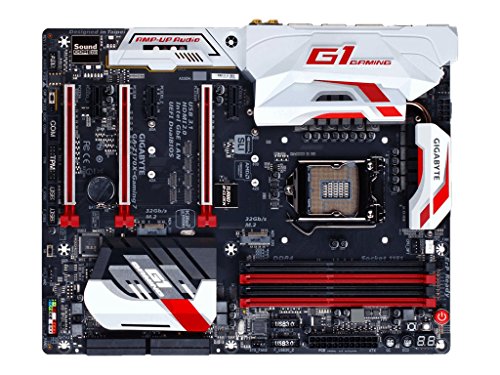
This guide covers three Z170 motherboards for gaming that remain worth hunting down in 2026, from a dependable all-rounder to a feature-packed flagship. Every board below was chosen from the name and specifications shown on its Amazon page, with socket support, power delivery, memory, and connectivity weighed against what a Skylake gaming build actually needs. If you are reviving an older rig or building around a 6th or 7th generation Intel processor, one of these three will anchor it well.
Quick Picks
As an Amazon Associate we earn from qualifying purchases
| Product | Best for | Key spec from title |
|---|---|---|
| ASUS Z170-A | Dependable all-round builds | LGA1151 socket with DDR4 |
| ASUS ROG Maximus VIII Hero | Overclocking and premium audio | ROG SupremeFX audio onboard |
| Gigabyte GA-Z170X-Gaming 7 | Maximum connectivity | Dual LAN and Thunderbolt 3 |
How to Choose
Socket and CPU Support
Every Z170 board uses the LGA1151 socket, which accepts 6th generation Skylake processors out of the box and 7th generation Kaby Lake chips after a BIOS update. That distinction matters, because a board with an old BIOS will not boot with a Kaby Lake processor until the firmware is updated using a Skylake chip. Before you buy, confirm which processor you own and whether the board ships with a recent BIOS. If you already have a 6700K or 6600K, any Z170 board will work immediately, and that simplicity is part of the platform’s appeal for budget builders. Check the manufacturer’s CPU support list for the exact board revision before you order.
Overclocking and Power Delivery
Overclocking is the main reason to choose Z170 over cheaper chipsets, so power delivery deserves a close look. Boards with more power phases and larger heatsinks hold higher voltages steady, which keeps an overclocked processor stable under load. The Z170-A handles moderate overclocks well, while the Maximus VIII Hero adds stronger power stages for pushing further. Check the VRM heatsink size and the number of fan headers, since cooling the power circuitry matters as much as cooling the processor itself. A board that runs cool at stock speeds will usually overclock further with less trouble. Case airflow over the VRM heatsinks matters too, since still air lets power stages overheat during long sessions.
Memory and Storage
Z170 boards take DDR4 memory in four slots, usually up to 64GB, and faster memory helps gaming performance more than many builders expect. Look for boards that support DDR4 speeds above 3000MHz through XMP profiles, since the extra bandwidth shows up in frame rates. For storage, an M.2 slot with full 32Gb/s bandwidth keeps NVMe drives fast, and six SATA ports cover hard drives and older SSDs. Check the M.2 slot placement as well, because a slot tucked under the graphics card can trap heat. Memory speed and storage bandwidth are the two upgrades that cost little and help everywhere. Populate memory slots in matched pairs for dual-channel mode, which doubles available bandwidth.
Safe Installation and Handling
Installing a Z170 board demands the same care as any motherboard, and the age of these boards makes caution more important. Ground yourself before touching the board to avoid static discharge, and install standoffs in the case before mounting so nothing shorts against the tray. Never install or remove components while the power supply is switched on, and check the CPU socket for bent pins before seating the processor, since a used board may carry hidden damage. Keep the manual nearby during the build, and test the board outside the case first if you have any doubts. Keep the anti-static bag and manual with the board, since both help if you troubleshoot it later.
The 3 Best Options
ASUS Z170-A
The ASUS Z170-A is the dependable all-rounder of the Z170 family, and it remains the easiest board to recommend for a Skylake gaming build. Its LGA1151 socket takes 6th generation processors immediately and without fuss, and four DDR4 slots support up to 64GB of memory for gaming and multitasking. An M.2 slot with 32Gb/s bandwidth keeps NVMe storage fast, while SLI and CrossFire support leave room for a second graphics card. Fan Xpert 3 controls keep the system quiet under load, and the white and silver design suits most cases. For a straightforward build that simply works without drama, this is the board to find.
Specs
- LGA1151 socket with Intel Z170 chipset
- ATX form factor
- 4 DDR4 slots supporting up to 64GB
- M.2 slot with 32Gb/s bandwidth
- SLI and CrossFire multi-GPU support
Best for: Builders who want a reliable, no-drama Z170 board for a Skylake gaming rig.
Watch out for: New listings are scarce, so verify the seller and the listing condition before ordering.
ASUS ROG Maximus VIII Hero
The ASUS ROG Maximus VIII Hero is the premium overclocking board in this group, built for gamers who want to push a 6700K further than stock speeds. Its stronger power delivery and larger heatsinks hold voltage steady under load, and the ROG SupremeFX audio delivers cleaner sound than basic onboard codecs. Aura RGB lighting adds a red glow to the build, and the M.2 slot plus USB 3.1 keep storage and peripherals fast. Fan controls and diagnostic LEDs make tuning simpler and safer, and the board’s spacious layout leaves room for large coolers. If overclocking is the point of your build, this is the board that supports it best.
Specs
- LGA1151 socket with Intel Z170 chipset
- ATX form factor with ROG SupremeFX audio
- 4 DDR4 slots supporting up to 64GB
- M.2 slot with 32Gb/s bandwidth
- Aura RGB lighting and USB 3.1
Best for: Overclockers and gamers who want premium audio and tuning features in a Z170 build.
Watch out for: Check the BIOS version before pairing it with a Kaby Lake processor, since older firmware needs an update first.
Gigabyte GA-Z170X-Gaming 7
The Gigabyte GA-Z170X-Gaming 7 is the connectivity king of this group, packing dual LAN, Thunderbolt 3, and Creative Sound Core3D audio into a single board for demanding setups. The dual network setup pairs an Intel Gigabit controller with a Killer E2400 chip, which helps prioritize game traffic on busy home networks. Thunderbolt 3 opens the door to high-speed external storage and displays, a genuinely rare feature on boards from this era. Four DDR4 slots support up to 64GB of memory, and the M.2 slot keeps NVMe drives fast. If your build needs every port and feature the Z170 platform can offer, this board delivers them all.
Specs
- LGA1151 socket with Intel Z170 chipset
- ATX form factor
- 4 DDR4 slots supporting up to 64GB
- Dual LAN with Intel GbE and Killer E2400
- Thunderbolt 3 and Creative Sound Core3D audio
Best for: Builders who want the widest connectivity and the most features from a Z170 board.
Watch out for: Thunderbolt 3 needs compatible cables and devices, so confirm your peripherals support it before counting on it.
Which One Fits Your Situation
Reviving a Skylake Build
Choose the ASUS Z170-A when you are bringing a Skylake system back to life, because its straightforward layout and broad compatibility make the rebuild simple. Drop in your 6700K or 6600K, add DDR4 memory and an M.2 drive, and the machine is gaming again. Keep the BIOS updated and the board will serve for years of 1080p play without fuss. Fresh drivers and a clean install will make the revived machine feel new again.
Overclockers
Pick the ASUS ROG Maximus VIII Hero when overclocking is the goal, since its power delivery and cooling support higher voltages than the other boards here. Increase the multiplier in small steps, watch temperatures closely, and let the diagnostic LEDs guide troubleshooting. A good air cooler or liquid cooler is essential, because the processor will run hot at higher clocks. Stress-test the overclock for an hour before trusting it, since errors often appear only under sustained load.
Feature-Rich Builds
Take the Gigabyte GA-Z170X-Gaming 7 when you want every feature the platform offers, from dual LAN to Thunderbolt 3. It suits builders who connect many peripherals and want the fastest external storage available on Z170. Set up the Killer network software to prioritize games, and enjoy the Creative audio for movies and music as well as play. The extra ports also help streamers and creators who connect capture cards, audio interfaces, and external drives at once.
First-Time Z170 Buyers
Start with the Z170-A if this is your first Z170 board, because its manual and layout are the most forgiving. Read the manual before mounting, test the board outside the case, and install components one at a time. The experience will teach you the platform, and the board will forgive small mistakes better than a flagship with denser circuitry. Label every cable as you connect it, since a tidy build is easier to upgrade later.
Common Mistakes
- Buying a Z170 board for a Kaby Lake processor without checking whether the installed BIOS supports it at all.
- Assuming a used board is new, then discovering bent socket pins, a missing I/O shield, or a dead memory slot after delivery.
- Pairing a Z170 board with slow DDR4 memory and leaving free performance unused on the table every day.
- Skipping the M.2 slot and bottlenecking a fast NVMe drive on a much slower SATA connection instead, needlessly.
- Overclocking aggressively without monitoring temperatures, which risks instability, crashes, and a much shorter life for the processor over time.
Frequently Asked Questions
Do Z170 motherboards support 7th generation Intel processors?
Yes, Z170 boards support 7th generation Kaby Lake processors after a BIOS update, though they work with 6th generation Skylake chips immediately. A board with older firmware will not boot with a Kaby Lake processor until updated, and the update itself needs a Skylake chip installed. Check the BIOS version before buying, or choose a Skylake processor to avoid the issue.
Is a Z170 board still good for gaming in 2026?
Yes, for 1080p gaming a Z170 board with a 6700K and a modern graphics card still plays most titles well. The platform supports DDR4 memory, NVMe storage, and overclocking, which cover the essentials. It lacks newer features like PCIe 4.0 and DDR5, so it suits budget builds and revived rigs rather than cutting-edge systems. Match your expectations to the hardware.
What memory speed should I use with Z170?
DDR4 memory at 3000MHz or higher through XMP profiles works well, since faster memory helps gaming frame rates on this platform. Four slots support up to 64GB, though 16GB covers most gaming needs. Check the board’s qualified vendor list if you want guaranteed compatibility, and enable XMP in the BIOS after installing the memory so it runs at its rated speed.
Should I buy a new or used Z170 motherboard?
New listings are rare because production ended years ago, so most boards on the market are used or open-box. A used board can serve well if the seller is reputable and the pins are undamaged. Ask for photos of the socket and I/O shield, and test the board promptly. If the listing claims to be new, verify the packaging carefully.
Related guides
More from Amazon
Programs that pair well with the guide above. Offers and eligibility are set by Amazon and may change.
Free shipping on eligible items, Prime Video and more. Eligible new members can start with a free trial.
Start a Prime free trialAd-free music streaming. Eligible new subscribers can start with a free trial.
Try Music Unlimited freeA Prime membership for ages 18-24 with a trial period. Eligibility is set by Amazon.
See Prime for Young AdultsAudiobooks and podcasts to listen to on the go. Eligible new members can start with a free trial.
Try Audible freeAs an Amazon Associate we earn from qualifying purchases.









