
Our Short List of 3

- Best for: Players who want the most capable integrated graphics and the largest SSD available in this budget band.
- Display: 14-inch Full HD (1920 x 1080) IPS touchscreen
- Processor: Intel Core i5-1335U (13th Generation)
- Graphics: Intel Iris Xe Graphics
- Memory: 8GB DDR4 RAM

- Best for: Mixed-use buyers who want Wi-Fi 6, a fingerprint reader and a sharp FHD panel for lighter gaming libraries.
- Display: 14-inch FHD (1920 x 1080) IPS touchscreen with narrow bezels
- Processor: Intel Core i5-1035G1 (10th Generation)
- Graphics: Intel UHD Graphics
- Memory: 8GB DDR4 onboard RAM
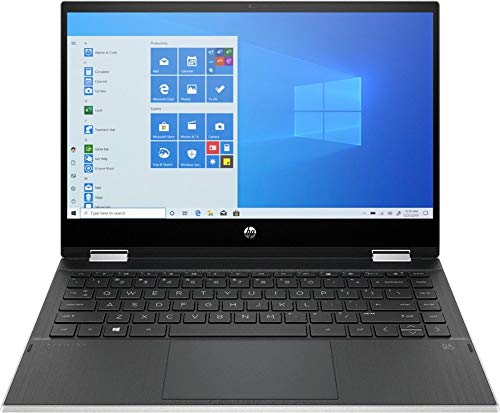
- Best for: Buyers who want the cheapest true 360-degree convertible here for very light gaming, video and everyday tasks.
- Display: 14-inch HD touchscreen
- Processor: Intel Core i3-1115G4 (11th Generation)
- Graphics: Intel UHD Graphics
- Memory: 8GB RAM
All 3 Picks at a Glance
| Product | Specs | Action |
|---|---|---|
| HP Pavilion x360 14-ek1655nr |
| Check price on Amazon |
| Lenovo IdeaPad Flex 5 14 |
| Check price on Amazon |
| HP Pavilion x360 14m-dw1013dx |
| Check price on Amazon |
A foldable laptop purchase at this budget is really a decision about integrated graphics. Every convertible in this price band plays games on the processor’s built-in GPU, so the gap between a machine that runs your library smoothly at modest settings and one that stutters through the menu screen comes down to which graphics silicon the listing names, how much memory feeds it, and whether the SSD leaves room for more than two or three installed titles.
This roundup is for students, casual players and second-laptop buyers who want one device that flips into tablet or tent mode for video and reading, then opens back up for indie games, older AAA releases and esports titles at reduced settings. Each pick below was chosen from its Amazon listing name and specification table: a true 360-degree hinge, a Windows gaming path, and hardware that fits the budget named in the keyword.
Our Top Picks
Top 3 picks at a glance
Quick Picks
As an Amazon Associate we earn from qualifying purchases
| Product | Best for | Key spec from title |
|---|---|---|
| HP Pavilion x360 14-ek1655nr | The strongest light-gaming pick in this budget band | Intel Core i5-1335U with Intel Iris Xe Graphics |
| Lenovo IdeaPad Flex 5 14 | Buyers who want Wi-Fi 6 and a fingerprint reader | Intel Core i5-1035G1 with 14-inch FHD IPS touch display |
| HP Pavilion x360 14m-dw1013dx | The lowest-spend route into a foldable laptop | Intel Core i3-1115G4 with 128GB PCIe NVMe SSD |
How to Choose
Start with the integrated graphics, not the processor badge
On a foldable laptop in this class there is no separate graphics card, so the integrated GPU printed in the listing decides your frame rates more than the CPU tier does. Intel Iris Xe silicon, like the graphics paired with the Core i5-1335U in the Pavilion x360 ek1655nr below, handles esports titles and older AAA games at 1080p low settings far more comfortably than the basic Intel UHD graphics found beside the i5-1035G1 and i3-1115G4. When two listings look similar, pick the one whose title or spec table names Iris Xe, and treat plain UHD graphics as a signal to plan around indie games, emulation and reduced resolutions.
Memory is shared, so 8GB is the floor rather than a luxury
Integrated graphics borrow their video memory from system RAM, which means an 8GB machine is really splitting that pool between Windows, the game and the GPU at the same time. All three laptops here ship with 8GB, and that is workable for light gaming if you close browser tabs and launchers before you play. What you should check on the listing is whether the memory is described as onboard, because soldered RAM on these thin convertibles cannot be upgraded later. If your library leans toward newer releases, the honest move inside this budget is lowering settings, not hunting for a 16GB foldable that the listings in this band rarely offer.
Storage fills faster than you expect
A 128GB SSD sounds adequate until Windows, two launchers and one modern game install consume most of it, so storage is the quiet compromise in this roundup. The Pavilion x360 ek1655nr carries a 512GB PCIe NVMe drive, which is the comfortable option for a mixed library of indies and a couple of large titles. The Flex 5 and the Pavilion x360 dw1013dx both list 128GB drives, and owners of either will end up rotating installs or leaning on cloud saves and external storage. Read the listing’s drive line carefully before ordering, because sellers sometimes advertise a bundle accessory card in the title while the internal SSD stays small.
The hinge and screen decide how much you use the folding part
A convertible earns its keep when the 360-degree hinge feels sturdy and the display stays readable in tent and tablet modes. Look for an IPS panel in the specification table, since IPS keeps colours stable when the screen is propped at odd angles for video or a controller session on a tray table. Full HD resolution matters for text sharpness in laptop mode, and it is also the resolution you will drop below for gaming headroom, so an FHD panel gives you room to scale down gracefully. The HD panel on the cheapest pick here is its clearest compromise, trading sharpness for the lowest entry point in the group.
The 3 Best Options
HP Pavilion x360 14-ek1655nr
- Best for: Players who want the most capable integrated graphics and the largest SSD available in this budget band.
- Display: 14-inch Full HD (1920 x 1080) IPS touchscreen
- Processor: Intel Core i5-1335U (13th Generation)
- Graphics: Intel Iris Xe Graphics
- Memory: 8GB DDR4 RAM
Players who want the most capable integrated graphics and the largest SSD available in this budget band.
The 8GB of memory is shared with the graphics, so keep background apps closed during play, and confirm the exact configuration on the listing before ordering.
This is the foldable to pick when gaming matters most within the cap. The Core i5-1335U brings Intel Iris Xe graphics, the strongest integrated option in this group, and the listing pairs it with a 512GB PCIe NVMe SSD that finally gives a budget convertible room for a real game library. The 14-inch Full HD IPS touchscreen suits tent-mode video and handheld-style play with a controller, and the silver chassis keeps the standard Pavilion portability. For a student or casual player who wants one machine for coursework, streaming and a steady diet of esports and indie titles, this configuration asks for the fewest compromises.
Lenovo IdeaPad Flex 5 14
- Best for: Mixed-use buyers who want Wi-Fi 6, a fingerprint reader and a sharp FHD panel for lighter gaming libraries.
- Display: 14-inch FHD (1920 x 1080) IPS touchscreen with narrow bezels
- Processor: Intel Core i5-1035G1 (10th Generation)
- Graphics: Intel UHD Graphics
- Memory: 8GB DDR4 onboard RAM
Mixed-use buyers who want Wi-Fi 6, a fingerprint reader and a sharp FHD panel for lighter gaming libraries.
The 128GB SSD fills quickly with modern installs, and the listing ships Windows 10, so plan for the upgrade path and external storage.
Lenovo’s Flex 5 is the sensible middle path for buyers who split their time between games and everything else. Its Core i5-1035G1 and Intel UHD graphics target lighter fare, older releases and indie libraries rather than new AAA launches, while the 14-inch FHD IPS touchscreen is sharper than the cheapest pick here. The listing adds practical touches the others skip: Wi-Fi 6, a fingerprint reader, a physical webcam privacy shutter and a 4-in-1 card reader. Shipped with Windows 10 in Graphite Grey, it suits a buyer who values connectivity and security touches, and who plays with a controller in tent mode as often as at a desk.
HP Pavilion x360 14m-dw1013dx
- Best for: Buyers who want the cheapest true 360-degree convertible here for very light gaming, video and everyday tasks.
- Display: 14-inch HD touchscreen
- Processor: Intel Core i3-1115G4 (11th Generation)
- Graphics: Intel UHD Graphics
- Memory: 8GB RAM
Buyers who want the cheapest true 360-degree convertible here for very light gaming, video and everyday tasks.
The HD panel is noticeably softer than the FHD screens above, and the 128GB drive plus UHD graphics limit this machine to the lightest end of a game library.
This Pavilion is the entry point for anyone whose first priority is simply getting a genuine foldable laptop for as little as possible while staying in budget. The Core i3-1115G4 with Intel UHD graphics is a light-duty pairing, happiest with browser games, retro titles, emulation and indie releases at modest settings, and the 14-inch HD touchscreen still folds through laptop, tent and tablet positions for video and reading. You give up resolution and storage headroom against the other two picks, and Wi-Fi 5 replaces the newer standard, yet the 360-degree experience itself remains intact. As a second device or a starter convertible for a younger player, it covers the brief.
Which One Fits Your Situation
You play esports and indie games most nights
Choose the HP Pavilion x360 14-ek1655nr. Its Iris Xe graphics are the deciding factor for titles like competitive shooters and racers at reduced settings, and the 512GB SSD means your regular rotation stays installed instead of being shuffled on and off the drive. Fold it into tent mode with a controller and it doubles as a compact second screen for streams between matches.
You split the week between classes, work and short sessions
The Lenovo IdeaPad Flex 5 14 fits a mixed routine. Wi-Fi 6 keeps campus and home connections current, the fingerprint reader and camera shutter suit shared spaces, and the FHD IPS panel reads documents comfortably. Your gaming will lean toward indies and older favourites, so treat it as a productivity convertible that plays, rather than a gaming machine that folds.
You want a first foldable for a child or a spare room
The HP Pavilion x360 14m-dw1013dx keeps the spend lowest while still delivering the full convertible experience. It handles browser games, retro collections and video in tablet mode without fuss, and its simpler specification is easier to hand down or repurpose later. Just budget a little patience for its HD screen and small drive, and keep expectations at the light end of the library.
You mostly watch and read, with occasional game nights
Any of the three folds flat for reading and props up for video, so let the screen guide you. The two FHD models, the Pavilion ek1655nr and the Flex 5, look crisper for films and text, while the dw1013dx covers casual viewing for less. If game nights involve anything beyond the lightest titles, step up to the Iris Xe Pavilion rather than saving the difference.
Common Mistakes
- Expecting discrete-GPU performance from integrated graphics, then blaming the laptop when a new AAA release needs settings far below its defaults.
- Ignoring the SSD size in the listing and discovering that a 128GB drive leaves room for only one or two modern game installs.
- Forgetting that integrated graphics share system memory, so 8GB disappears quickly when launchers and browsers stay open during play.
- Choosing an HD panel to save money, then finding text and video softer than expected in tablet and tent modes.
- Comparing listings by processor badge alone, when the graphics line in the spec table is what actually separates these machines.
Frequently Asked Questions
Can a foldable laptop under this budget really play games?
Yes, within clear limits. Integrated graphics in this band run esports titles, indie games, emulation and older AAA releases at reduced settings and resolutions. The Iris Xe machine in this roundup stretches furthest. Brand-new AAA games at native resolution are beyond what any listing here promises, so match the laptop to the library you actually own.
Why do these listings show 8GB of RAM instead of 16GB?
Thin convertibles at this price point are built around soldered 8GB configurations, and sellers in this band rarely list a 16GB foldable that stays inside the cap. Because the graphics share that memory, closing background apps before launching a game is the practical workaround, and it makes a visible difference on all three machines.
Does the 360-degree hinge hold up for gaming in tent mode?
Tent mode works well for controller play and for watching, since the keyboard folds away and the screen sits close. The listings describe standard 360-degree convertible hinges rather than reinforced designs, so support the base on a flat surface during long sessions and avoid forcing the hinge past its stop in either direction.
Should I pick the FHD models over the cheaper HD one?
For most buyers, yes. A Full HD IPS panel stays sharper for reading, video and game menus, and it gives you room to lower the rendering resolution for performance while the display itself remains crisp. The HD Pavilion still makes sense when the budget is the hard limit and the games are light, but the screen is the compromise you will notice daily.
Related guides
More from Amazon
Programs that pair well with the guide above. Offers and eligibility are set by Amazon and may change.
Free shipping on eligible items, Prime Video and more. Eligible new members can start with a free trial.
Start a Prime free trialAd-free music streaming. Eligible new subscribers can start with a free trial.
Try Music Unlimited freeA Prime membership for ages 18-24 with a trial period. Eligibility is set by Amazon.
See Prime for Young AdultsAudiobooks and podcasts to listen to on the go. Eligible new members can start with a free trial.
Try Audible freeAs an Amazon Associate we earn from qualifying purchases.









