
Our Short List of 3
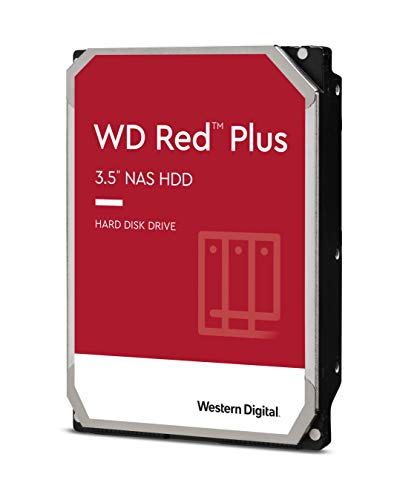
- Best for: Home NAS owners who want a current, CMR drive built for always-on arrays.
- Capacity: 3TB
- Model: WD30EFPX
- Form factor: 3.5 inch
- Interface: SATA 6 Gb/s

- Best for: Multi-bay NAS users matching an existing IronWolf set or wanting the quicker spindle.
- Capacity: 3TB
- Model: ST3000VN007
- Form factor: 3.5 inch
- Interface: SATA 6 Gb/s

- Best for: Desktop builders adding quiet bulk storage for games, media, and backups.
- Capacity: 3TB
- Model: WD30EZRZ
- Form factor: 3.5 inch
- Interface: SATA 6 Gb/s
All 4 Picks at a Glance
| Product | Specs | Action |
|---|---|---|
| Western Digital 3TB WD Red Plus NAS Internal Hard Drive |
| Check price on Amazon |
| Seagate IronWolf 3TB NAS Internal Hard Drive |
| Check price on Amazon |
| Western Digital 3TB WD Blue PC Internal Hard Drive |
| Check price on Amazon |
 Western Digital 3TB WD Purple Surveillance Internal Hard Drive |
| Check price on Amazon |
Buying a 3TB hard drive in 2026 is less about capacity than about not getting the wrong drive. The size itself is fading: most product lines now jump straight from 2TB to 4TB, so the 3TB listings that remain mix current models with old stock, renewed units, and near-identical variants that differ in cache or recording technology. The real decision is which duty class fits your machine, because a desktop drive, a NAS drive, and a surveillance drive of the same capacity behave very differently once installed.
This roundup is for desktop builders adding bulk storage, home NAS owners replacing or expanding an array, and anyone feeding a camera DVR or NVR. Every pick below is an internal 3.5-inch SATA drive whose Amazon listing title states exactly 3TB, chosen from the names and specifications on those listings rather than from roundups of sizes that no longer ship.
Our Top Picks
Top 3 picks at a glance
Quick Picks
As an Amazon Associate we earn from qualifying purchases
| Product | Best for | Key spec from title |
|---|---|---|
| Western Digital 3TB WD Red Plus NAS Internal Hard Drive | Home NAS arrays that run around the clock | CMR recording, 256 MB cache |
| Seagate IronWolf 3TB NAS Internal Hard Drive | Multi-bay NAS boxes needing a faster spindle | 5900 RPM, 64 MB cache |
| Western Digital 3TB WD Blue PC Internal Hard Drive | Everyday desktop storage and game libraries | 5400 RPM, 64 MB cache |
| Western Digital 3TB WD Purple Surveillance Internal Hard Drive | DVR and NVR camera recording | 5400 RPM class, surveillance firmware |
How to Choose
Recording technology: CMR versus SMR
The single most consequential line on a 3TB listing is whether the drive records with CMR or SMR. CMR writes tracks side by side and sustains its speed during long copies and RAID rebuilds. SMR overlaps tracks like shingles, which keeps the drive cheap but can slow large writes dramatically once the cache fills. Desktop lines have shipped in both technologies under similar names, so never assume. The NAS models in this roundup state CMR in the title; if a listing stays silent on recording technology, treat that silence as your answer and keep looking.
Duty class and firmware tuning
A desktop drive expects an eight-hour day and long sleeps. A NAS drive expects to never sleep at all, sitting in a multi-bay box where vibration from neighbouring drives is constant, and its firmware is tuned to return errors quickly so a RAID controller stays in charge. Surveillance firmware goes further in the other direction: it prioritises steady sequential writes from many camera streams and tolerates read errors that would bother a file system. Matching the class to the workload matters more than any benchmark, because the wrong class usually fails socially, through timeouts and dropped arrays, rather than dramatically.
Spin speed and cache, in perspective
Listings in this size class run at 5400 RPM, 5900 RPM, or an older 7200 RPM, and the gap between them is smaller than the marketing suggests. A 5900 RPM NAS drive feels a touch keener on random access than a 5400 RPM desktop model, yet both are bulk storage: your operating system and open games belong on an SSD regardless. Cache sizes of 64 MB or 256 MB appear across these listings, and the larger figure looks decisive on paper. In practice it smooths bursts rather than transforming the drive, so let recording technology and duty class outrank cache when you compare two candidates.
Check the exact variant before ordering
Three traps repeat across 3TB listings. First, packaging variants: the same drive appears as a retail box and as frustration-free packaging under different ASINs, and one can be in stock while the other is not. Second, generation drift: an older version of a model can linger beside its replacement, sometimes flagged in the title and sometimes not. Third, condition: renewed and recertified units sit one click away from new ones with similar titles. Before ordering, confirm the model number in the title matches the drive you researched, the capacity reads exactly 3TB rather than a neighbouring size, and the condition is the one you intended to buy.
The 4 Best Options
Western Digital 3TB WD Red Plus NAS Internal Hard Drive
- Best for: Home NAS owners who want a current, CMR drive built for always-on arrays.
- Capacity: 3TB
- Model: WD30EFPX
- Form factor: 3.5 inch
- Interface: SATA 6 Gb/s
Home NAS owners who want a current, CMR drive built for always-on arrays.
An earlier Red Plus 3TB generation shipped with a smaller cache under a similar name, so confirm the model number WD30EFPX on the listing before ordering.
The Red Plus is the straightforward answer for a home or small-office NAS that stays on permanently. It is built for enclosures of up to eight bays, records with CMR so RAID rebuilds keep their pace, and carries NASware firmware that plays well with controllers. For a gaming household it suits the box that stores the media library, PC backups, and recorded streams nobody wants on the main rig. Of the drives here it is also the most current design, which makes it the easiest 3TB to recommend without caveats about ageing stock.
Seagate IronWolf 3TB NAS Internal Hard Drive
- Best for: Multi-bay NAS users matching an existing IronWolf set or wanting the quicker spindle.
- Capacity: 3TB
- Model: ST3000VN007
- Form factor: 3.5 inch
- Interface: SATA 6 Gb/s
Multi-bay NAS users matching an existing IronWolf set or wanting the quicker spindle.
This model also sells in frustration-free packaging under a separate ASIN that shows unavailable in some records, so order through the retail listing linked here and re-check the offer.
Seagate’s IronWolf is the other NAS-native option at this capacity, aimed at multi-user enclosures of up to eight bays. Its 5900 RPM spindle gives it a small responsiveness edge over 5400 RPM rivals when several people pull files at once, and the listing pairs the drive with a one million hour MTBF figure that reflects its always-on brief. It records with CMR, which keeps rebuild behaviour predictable. Choose it if your NAS is Seagate-based already, if matching an existing IronWolf array, or if the slightly faster spindle appeals for a busy shared media server.
Western Digital 3TB WD Blue PC Internal Hard Drive
- Best for: Desktop builders adding quiet bulk storage for games, media, and backups.
- Capacity: 3TB
- Model: WD30EZRZ
- Form factor: 3.5 inch
- Interface: SATA 6 Gb/s
Desktop builders adding quiet bulk storage for games, media, and backups.
WD replaced this model with a newer generation, so remaining stock often comes from third-party sellers; check the seller and the condition on the listing before ordering.
WD Blue is the plain desktop drive of the group, and for a single-PC storage bay that is exactly the point. It spins at 5400 RPM with a 64 MB cache, asks for no NAS or surveillance compromises, and suits the jobs desktop drives actually get: a Steam library overflow, photo and video archives, and a local backup target that sleeps when the PC does. It lacks the vibration tolerance and always-on tuning of the NAS models above, so keep it out of multi-bay enclosures. As a one-drive upgrade for an ageing tower, though, it remains the honest, uncomplicated pick.
Western Digital 3TB WD Purple Surveillance Internal Hard Drive
- Best for: DVR and NVR owners who need a drive tuned for nonstop camera recording.
- Capacity: 3TB
- Model: WD30PURX
- Form factor: 3.5 inch
- Interface: SATA 6 Gb/s
DVR and NVR owners who need a drive tuned for nonstop camera recording.
The listing is the older version of this model and current offers come from third-party sellers, so verify the seller, condition, and model number WD30PURX before ordering.
The Purple exists for one job: swallowing camera footage all day, every day. Its firmware favours continuous sequential writes from many simultaneous HD streams, and the drive is designed for 24/7 operation inside DVRs and NVRs that never get a quiet moment. That specialisation cuts both ways. It will store files in a desktop if asked, but its error-handling priorities are set for video, not for a file system you care about. Buy it for a recorder, where its tuning is an asset, and leave the desktop and NAS roles to the drives above it in this list.
Which One Fits Your Situation
Your two-bay NAS never sleeps
Take the WD Red Plus. It is the current-generation CMR drive here, tuned for always-on arrays and small enclosures, so it handles the nightly backup jobs, media serving, and occasional RAID rebuild without the slowdowns that plague SMR models. If your enclosure already runs IronWolf drives, match them with the Seagate instead of mixing firmware families in one array.
Your gaming PC needs room more than speed
Take the WD Blue. A desktop that powers down at night plays to its strengths: quiet 5400 RPM operation, simple installation, and no firmware behaviour designed for hardware you do not own. Move the games you are actively playing back onto your SSD, let the Blue hold the backlog and the recordings, and the arrangement will feel faster than the spec sheet suggests.
Your cameras record around the clock
Take the WD Purple. A recorder writes small streams continuously and reads them back rarely, which is the opposite of desktop use and exactly what this firmware expects. The NAS drives would work, but you would be paying for RAID manners a standalone DVR cannot use, while missing the stream-handling tuning the Purple was built around.
You are replacing a dead 3TB in an older array
Match the class of the set you already have. A NAS array built on CMR drives should get another CMR drive, meaning the Red Plus or the IronWolf, and ideally the same model as its neighbours. Resist the temptation to drop in a cheap desktop drive: mismatched error-recovery timing is a common reason an otherwise healthy rebuild ejects the new disk halfway through.
Common Mistakes
- Buying a 2TB or 4TB drive because the 3TB listing looked similar, then discovering the array or recorder needed the exact capacity.
- Putting a desktop drive into a multi-bay NAS, where vibration and always-on duty wear it out early.
- Assuming every drive with NAS in the title uses CMR, when some smaller models quietly shipped with SMR.
- Ordering a renewed or recertified unit by mistake because its title sat beside the new one.
- Using a surveillance drive as a primary desktop disk and trusting it with the only copy of important files.
Frequently Asked Questions
Is 3TB still a sensible size to buy?
For a replacement or a matched array, yes: the right 3TB drive keeps an existing setup balanced. For a brand-new build with no constraints, most lines now offer better availability at 4TB, so 3TB makes the most sense when something you already own, a NAS bay, a recorder, or an older PC, specifically calls for it.
Can I use a NAS drive like the Red Plus in a normal desktop?
Yes, it will mount, format, and behave like any SATA drive. You simply pay for vibration tolerance and always-on firmware that a single desktop bay cannot exploit, and its quick error recovery is designed for RAID controllers rather than a lone PC. It is a safe choice, just not the economical one for that job.
Why do Red Plus 3TB listings show different cache sizes?
Because two generations share the name. The earlier 3TB Red Plus shipped with a smaller cache, while the current WD30EFPX listing specifies 256 MB. The model number is the reliable identifier, so compare that rather than the headline, and treat any listing that hides its model number as one to skip.
Will a surveillance drive work for storing games?
It will store them, and loading will feel like any 5400 RPM drive. The concern is firmware behaviour: surveillance drives prioritise uninterrupted video writes and are relaxed about read errors that a game installation or save folder would not forgive. For a library you value, the desktop or NAS drives above are the safer home.
Related guides
More from Amazon
Programs that pair well with the guide above. Offers and eligibility are set by Amazon and may change.
Free shipping on eligible items, Prime Video and more. Eligible new members can start with a free trial.
Start a Prime free trialAd-free music streaming. Eligible new subscribers can start with a free trial.
Try Music Unlimited freeA Prime membership for ages 18-24 with a trial period. Eligibility is set by Amazon.
See Prime for Young AdultsAudiobooks and podcasts to listen to on the go. Eligible new members can start with a free trial.
Try Audible freeAs an Amazon Associate we earn from qualifying purchases.









