
Our Short List of 3
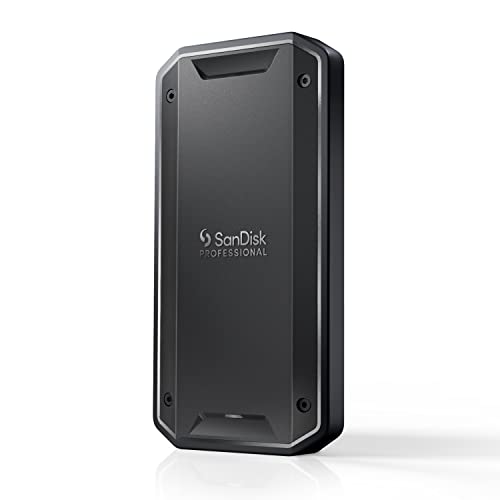
- Best for: Creative work that moves between Thunderbolt and USB computers.
- Capacity: 2TB
- Model number: SDPS31H-002T-GBCND
- Interface: Thunderbolt 3 (40Gbps), USB-C (10Gbps)
- Read speed: up to 2700MB/s

- Best for: One drive that must work on almost any modern computer.
- Capacity: 2TB
- Model number: OWCTB3ENVPFX02
- Interface: Thunderbolt (40Gb/s), USB-C (10Gb/s)
- Transfer speed: up to 2800MB/s
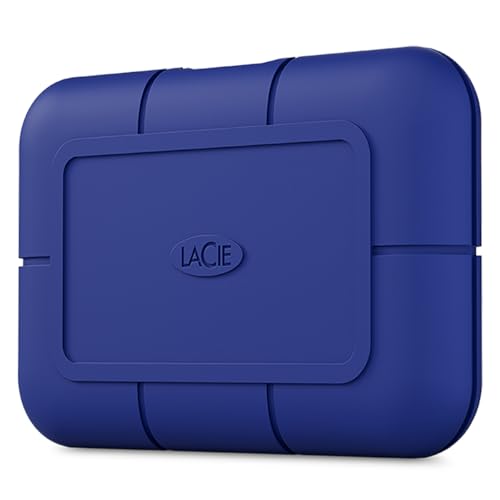
- Best for: Thunderbolt 5 workstations moving very large project folders daily.
- Capacity: 4TB
- Model number: STNA4000400
- Interface: Thunderbolt 5
- Read speed: up to 6700MB/s
All 3 Picks at a Glance
| Product | Specs | Action |
|---|---|---|
| SanDisk Professional PRO-G40 2TB |
| Check price on Amazon |
| OWC Envoy Pro FX 2TB |
| Check price on Amazon |
| LaCie Rugged SSD Pro5 4TB |
| Check price on Amazon |
Buying a Thunderbolt drive is really a decision about the port on your computer, not the badge on the box. A drive built for Thunderbolt 3, 4 or 5 only reaches its rated speed on a matching host, and the same USB-C plug shape also carries plain USB drives that run far slower. The listings below were chosen because each one states Thunderbolt in its interface specification, and each speed figure quoted here comes from that product’s own Amazon listing title and details.
This roundup is for video editors moving footage between machines, gamers who keep a library on external storage, and laptop owners whose internal drive filled up long ago. One honest note up front: every portable Thunderbolt drive sold today is solid state. Spinning Thunderbolt hard drives survive mainly in desktop RAID enclosures, so this list compares the SSD models that carry a genuine Thunderbolt interface on the listing.
Our Top Picks
Top 3 picks at a glance
Quick Picks
As an Amazon Associate we earn from qualifying purchases.
| Product | Best for | Key spec from title |
|---|---|---|
| SanDisk Professional PRO-G40 2TB | Editors who work across Mac and PC | Thunderbolt 3 (40Gbps), up to 2700MB/s |
| OWC Envoy Pro FX 2TB | Buyers who need one drive for Thunderbolt and USB hosts | Thunderbolt 40Gb/s plus USB-C 10Gb/s |
| LaCie Rugged SSD Pro5 4TB | Thunderbolt 5 owners moving very large projects | Thunderbolt 5, up to 6700MB/s read |
How to Choose
Match the Thunderbolt generation to your computer
Thunderbolt 3 and 4 both move data at up to 40Gbps, while Thunderbolt 5 raises the ceiling to 80Gbps in one direction. A Thunderbolt 5 drive plugged into a Thunderbolt 3 laptop still works, but it falls back to the older host’s limit, so the extra speed only exists on paper. Check the port specification of your own machine before paying for a faster drive generation. If your laptop is older, a proven Thunderbolt 3 model is usually the smarter spend, because the bottleneck sits in the computer rather than the drive.
Separate the interface speed from the drive speed
A 40Gbps connection does not guarantee 40Gbps of real transfers. The flash inside the enclosure sets its own ceiling, which is why two Thunderbolt 3 drives in this list quote different figures, 2700MB/s and 2800MB/s. Read the transfer speed printed in the listing title rather than the port speed alone, and treat the port figure as the maximum the cable could carry with a faster drive attached. Sustained writes on large files also matter more than a short burst number when you copy full project folders.
Decide whether you also need plain USB support
Some Thunderbolt drives work only on Thunderbolt hosts, while dual-mode models also speak USB-C at 10Gbps for older machines, game consoles and office computers. The PRO-G40 and the Envoy Pro FX both list a USB mode alongside Thunderbolt, which makes them safer picks if the drive will visit several computers. A Thunderbolt-only drive is fine for a single workstation, but it can refuse to mount on a USB-only laptop, and that limitation is easy to miss until the drive is already on your desk.
Weigh the rugged rating against your routine
Two drives here carry IP68 sealing and one carries IP67, and those ratings describe resistance to dust and water immersion under test conditions, not immunity to damage. If the drive lives in a camera bag or travels between locations, a sealed metal enclosure is worth having. If it never leaves a desk, the rating matters less than capacity and speed. Either way, check what the listing says about drop and crush protection, because a sealed drive can still fail from a hard fall onto concrete.
The 3 Best Options
SanDisk Professional PRO-G40 2TB
- Best for: Creative work that moves between Thunderbolt and USB computers.
- Capacity: 2TB
- Model number: SDPS31H-002T-GBCND
- Interface: Thunderbolt 3 (40Gbps), USB-C (10Gbps)
- Read speed: up to 2700MB/s
Creative work that moves between Thunderbolt and USB computers.
The USB mode runs at 10Gbps, so transfers on non-Thunderbolt machines are far slower than the headline figure.
The PRO-G40 suits editors and photographers who hand files between a Thunderbolt workstation and other machines all week. Its listing states up to 2700MB/s over Thunderbolt 3 and a slower USB-C mode at 10Gbps, so the same drive still works on a computer without Thunderbolt, just at reduced speed. The IP68 rating is the strongest sealing in this group, and the exFAT formatting means it arrives ready for both Windows and macOS. Capacity sits in the middle of the range at 2TB, which holds a working project library without reaching the cost of the 4TB class.
OWC Envoy Pro FX 2TB
- Best for: One drive that must work on almost any modern computer.
- Capacity: 2TB
- Model number: OWCTB3ENVPFX02
- Interface: Thunderbolt (40Gb/s), USB-C (10Gb/s)
- Transfer speed: up to 2800MB/s
One drive that must work on almost any modern computer.
Speed drops sharply on USB-only hosts, and the 2TB capacity is the configuration verified here, so check the capacity selector carefully.
The Envoy Pro FX is the flexible option in this list, built for owners who plug into whatever computer is in front of them. Its listing quotes up to 2800MB/s, the fastest Thunderbolt 3 figure here, and the drive speaks both Thunderbolt at 40Gb/s and USB-C at 10Gb/s. The aluminium enclosure carries an IP67 rating for dust and water resistance, and OWC lists it for Mac and PC alike. For a gamer keeping a VR library on external storage or a student sharing files between a dorm desktop and a laptop, that dual personality removes the guesswork about which ports a host machine has.
LaCie Rugged SSD Pro5 4TB
- Best for: Thunderbolt 5 workstations moving very large project folders daily.
- Capacity: 4TB
- Model number: STNA4000400
- Interface: Thunderbolt 5
- Read speed: up to 6700MB/s
Thunderbolt 5 workstations moving very large project folders daily.
The speed advantage only appears on a Thunderbolt 5 host; confirm your port generation before buying.
The Rugged SSD Pro5 is aimed at the smaller group of buyers whose computers already carry Thunderbolt 5 ports. Its listing quotes read speeds up to 6700MB/s and writes up to 5300MB/s, roughly double the Thunderbolt 3 models, and it doubles their capacity at 4TB. That combination fits archival ingest stations and editors who copy full shooting days in one pass. Everyone else should read the generation requirement carefully: on a Thunderbolt 3 or 4 machine this drive cannot use its headline speed, and the older models above will feel identical while costing less.
Which One Fits Your Situation
You edit video on a Mac and a Windows PC
Choose the SanDisk Professional PRO-G40. It arrives formatted exFAT, so both systems read and write it without reformatting, and its dual-mode interface covers a Windows machine that may only offer USB-C. The IP68 sealing also suits a drive that rides in a kit bag between the two desks rather than living on one of them.
You keep a game library on external storage
The OWC Envoy Pro FX fits this job well. Load times benefit from its 2800MB/s ceiling when the host has Thunderbolt, and the USB mode keeps the same library usable on a second machine or a console-side PC. Its metal shell and IP67 rating handle being moved between rooms and setups far better than a bare desktop drive.
Your new laptop has Thunderbolt 5 ports
The LaCie Rugged SSD Pro5 is the only pick here that can use them. If your workflow copies tens of gigabytes several times a day, the doubled throughput shortens every transfer, and the 4TB capacity delays the day you need a second drive. Verify the exact port specification in your laptop’s documentation first, because some machines mix Thunderbolt 4 and 5 ports.
You are upgrading from a USB external drive
Any of the three will feel dramatically faster on a Thunderbolt host, but the PRO-G40 is the gentlest step up. It keeps a USB mode for your older hardware, carries the strongest water and dust rating, and its 2TB capacity matches the size most people are upgrading from, so the migration is a single copy rather than a reorganisation.
Common Mistakes
- Assuming every USB-C drive is a Thunderbolt drive; the plug shape is shared, and only listings that state Thunderbolt carry the faster protocol.
- Paying for a Thunderbolt 5 drive to use with a Thunderbolt 3 laptop, where the host port caps the speed anyway.
- Comparing port speed instead of the transfer speed printed in the drive’s own listing title.
- Forgetting that a Thunderbolt-only drive may not mount on USB-only computers, consoles or older laptops.
- Buying capacity for today’s library only, then splitting projects across two drives a year later.
Frequently Asked Questions
Is a Thunderbolt drive faster than a USB drive?
On a matching host, yes, by a wide margin. The Thunderbolt 3 models here quote up to 2700MB/s and 2800MB/s, while their own USB modes run at 10Gbps, which works out far slower in practice. The catch is that the computer needs a Thunderbolt port; plugged into a USB-only port, a dual-mode drive falls back to its USB speed.
Can I use a Thunderbolt 5 drive on a Thunderbolt 3 computer?
Yes, the connection is backward compatible, and the LaCie Rugged SSD Pro5 will work on older Thunderbolt hosts. It will not reach its listed 6700MB/s read speed there, because the older port becomes the limit. Buy the Thunderbolt 5 model when you already own, or firmly plan to own, a Thunderbolt 5 machine.
Why are there no spinning hard drives in this list?
Portable Thunderbolt storage has moved entirely to solid state, because flash is what uses the bandwidth the interface offers. Spinning Thunderbolt drives remain in desktop RAID enclosures, which are a different product type with their own listings. For a portable drive that travels, the SSD models above are also far more tolerant of drops and vibration.
Does the IP rating mean I can drop the drive in water?
IP68 and IP67 describe surviving immersion under controlled test conditions, not everyday waterproofing. The ratings are useful insurance against rain, spills and dusty locations, and the sealed enclosures genuinely help. They do not protect against a cracked connector or a fall onto a hard edge, so handle a rugged drive like any other storage that holds your only copy.
Related guides
More from Amazon
Programs that pair well with the guide above. Offers and eligibility are set by Amazon and may change.
Free shipping on eligible items, Prime Video and more. Eligible new members can start with a free trial.
Start a Prime free trialAd-free music streaming. Eligible new subscribers can start with a free trial.
Try Music Unlimited freeA Prime membership for ages 18-24 with a trial period. Eligibility is set by Amazon.
See Prime for Young AdultsAudiobooks and podcasts to listen to on the go. Eligible new members can start with a free trial.
Try Audible freeAs an Amazon Associate we earn from qualifying purchases.









