Our Short List of 3


All 4 Picks at a Glance
| Product | Specs | Action |
|---|---|---|
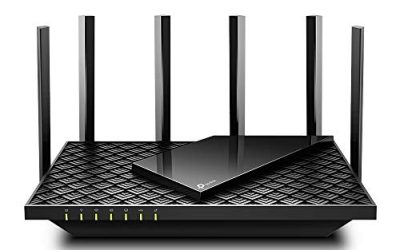
| 1. TP-Link Deco XE75 AXE5400 Tri-Band Wi-Fi 6E Mesh System (3-Pack) — Best Overall | Check price on Amazon | |
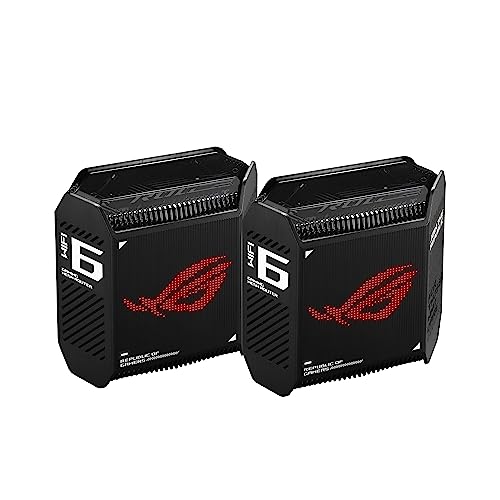
| 2. ASUS ROG Rapture GT6 AX10000 Tri-Band Wi-Fi 6 Gaming Mesh System (2-Pack) — Best for Gaming | Check price on Amazon | |
| 3. NETGEAR Orbi RBK752 AX4200 Tri-Band Wi-Fi 6 Mesh System — Best Proven Tri-Band System | Check price on Amazon | |
 4. Amazon eero Pro 6E AX5400 Tri-Band Wi-Fi 6E Mesh System (3-Pack) — Best Simple Smart Home Mesh | Check price on Amazon |
The best mesh network routers replace a single struggling router with a team of connected nodes that blanket your home in one seamless Wi-Fi network. Instead of watching your signal drop every time you walk to the far bedroom, a mesh system hands your phone, laptop, or console from one node to the next without dropping the connection. For gamers, that means fewer lag spikes, fewer disconnects in the middle of a ranked match, and a setup that keeps up when everyone in the house is streaming, downloading, and playing at the same time.
A mesh system is different from a router paired with a range extender. Extenders create a second network name and often cut your speed in half, while mesh nodes share one network name and manage traffic intelligently. That is why mesh has become the default recommendation for multi-floor homes, long apartments, and houses with thick walls that eat Wi-Fi signals.
This guide explains what to look for in a mesh system, then compares four systems that cover different needs: a strong all-rounder, a gaming-focused mesh, a proven tri-band workhorse, and a simple set-and-forget option for smart homes. Every pick below is a mesh Wi-Fi system sold as a multi-node kit on Amazon, so you can start with the pack size that matches your home and add nodes later if your coverage needs grow.
Our Top Picks
- TP-Link Deco XE75 AXE5400 Tri-Band WiFi 6E System3 Pack4.13 x 4.13 x 6.65 inches3.5 poundsCheck on Amazon
Top 3 picks at a glance
How to Choose a Mesh Network Router
Start with coverage, not speed claims
Manufacturers quote coverage in square feet, and those numbers assume open floor plans with few walls. Subtract a third from the coverage number if your home has thick walls or multiple floors. A two-node kit suits most apartments and small houses, while a three-node kit is the safer choice for homes over 2,500 square feet or with two or more floors.
Count your dead zones before you count megabits. Walk through your home with your phone and note where the signal drops. The rooms where you game, work, or stream in 4K are the rooms that need a node nearby. A node placed halfway between your main router and a dead zone works far better than a node stuffed into the dead zone itself, because the node still needs a decent signal from the main unit to pass along.
Wi-Fi 6, Wi-Fi 6E, and Wi-Fi 7
Wi-Fi 6 is the current baseline and handles dozens of connected devices far better than older Wi-Fi 5 gear. It is plenty for most homes, including homes with a gaming PC, a console, and several phones and smart devices. Wi-Fi 6E adds a 6 GHz band, which is less crowded than the 2.4 GHz and 5 GHz bands and gives compatible devices a cleaner, faster lane. Wi-Fi 7 is the newest standard, with wider channels and multi-link operation, but you only benefit if your devices support it.
For gaming, the Wi-Fi generation matters less than stability and latency. A Wi-Fi 6 mesh system with a dedicated backhaul band often beats a newer system with a weak backhaul, because the backhaul is the private link the nodes use to talk to each other. Tri-band systems reserve one band for backhaul traffic, which is why they are popular for gaming households.
Backhaul, ports, and wired gaming
Every mesh node sends data back to the main unit, and how it does that shapes real-world speed. A dedicated backhaul band keeps node-to-node traffic off the bands your devices use, while a shared backhaul means your devices and the nodes compete for the same airtime. Wired backhaul is the best option of all: if your home has Ethernet wiring, connecting nodes with cables frees the wireless bands entirely and gives you near-wired speeds at every node.
Wireless is convenient, but a wired connection still wins for competitive gaming. Check how many Ethernet ports each node has, since some nodes have only one or two ports, which fills up fast once you connect a PC, a console, and a TV. A node with a 2.5 Gbps port is useful if your internet plan exceeds gigabit speeds or if you move large game downloads around your local network.
Gaming features and subscriptions
Gaming-focused mesh systems add features that general-purpose systems skip. Device prioritization lets you tell the network that your gaming PC or console comes first when bandwidth gets tight. Game packet prioritization tags gaming traffic so it jumps the queue ahead of background downloads. These features do not make a slow connection fast, but they do protect your latency when someone else starts a big download mid-match.
Many mesh systems include basic security for free but charge a subscription for advanced parental controls, detailed reports, and VPN features. Check what is free and what is paid before you buy, because a yearly subscription changes the real cost of the system. If you run a smart home, built-in support for Zigbee, Thread, and Matter lets the mesh nodes double as a smart home hub, which saves you from buying a separate hub.
Top Picks
1. TP-Link Deco XE75 AXE5400 Tri-Band Wi-Fi 6E Mesh System (3-Pack) — Best Overall
The Deco XE75 is the system we recommend first for most homes because it balances modern Wi-Fi 6E, a dedicated 6 GHz band, and a sensible three-node kit that covers large homes without demanding a flagship budget. The three-pack is rated to cover up to 7,200 square feet, which is enough for most multi-floor houses, and each node is a compact cylinder that blends into a room.
The tri-band design is the key strength here. The 6 GHz band gives Wi-Fi 6E devices a fast, uncrowded lane, while the 5 GHz and 2.4 GHz bands serve older devices. The system uses AI-driven mesh technology to learn your home’s layout and steer devices to the best node and band automatically.
For gaming, the Deco XE75 covers the essentials. It supports up to 200 connected devices, so a house full of phones, consoles, smart TVs, and smart home gear will not overwhelm it. The 6 GHz band is particularly useful for a gaming laptop or a Wi-Fi 6E phone in the same room as a node, where it delivers low-latency throughput with little interference from neighbours. Each node also has Ethernet ports, so you can wire a gaming PC or console directly to the nearest node. TP-Link’s HomeShield adds basic network security and parental controls, with more advanced features available as an optional upgrade.
The main trade-off is the lack of a 2.5 Gbps port, which matters only if your internet plan is faster than gigabit. For the great majority of homes, the XE75 is the right mix of coverage, modern wireless, and easy management.
Check the TP-Link Deco XE75 3-Pack on Amazon
2. ASUS ROG Rapture GT6 AX10000 Tri-Band Wi-Fi 6 Gaming Mesh System (2-Pack) — Best for Gaming
The ROG Rapture GT6 is the only pick here built from the ground up for gamers, and it shows in every design choice. This is a two-node tri-band Wi-Fi 6 system rated for combined speeds up to 10,000 Mbps, with coverage up to 5,800 square feet. The angular black units with ASUS Aura RGB lighting look like gaming hardware rather than home appliances, and they are meant to sit next to a gaming desk.
The gaming features are the reason to choose the GT6. Triple-level game acceleration works in three stages: it prioritizes your gaming device, then prioritizes gaming packets, then routes your traffic to the fastest available game server. A dedicated gaming port on each node automatically prioritizes whatever is plugged into it, so your PC or console gets first call on bandwidth without any configuration. RangeBoost Plus and a nine-antenna array aim the signal toward your devices instead of broadcasting it evenly in all directions, which helps in rooms with awkward layouts.
The GT6 also includes a 2.5 Gbps WAN port, so it can handle multi-gigabit internet plans, and it supports a 5.9 GHz band for compatible devices, which is a slice of spectrum reserved for low-latency use. ASUS includes lifetime network security at no extra subscription cost, which is a genuine saving compared with systems that charge yearly for the same protection. AiMesh lets you add other ASUS routers as nodes later if your home grows.
Check the ASUS ROG Rapture GT6 2-Pack on Amazon
3. NETGEAR Orbi RBK752 AX4200 Tri-Band Wi-Fi 6 Mesh System — Best Proven Tri-Band System
The Orbi RBK752 has been one of the most recommended mesh systems for years, and it earns its place here on proven reliability. The kit includes one router and one satellite, covers up to 5,000 square feet, and supports up to 40 devices. Its tri-band Wi-Fi 6 design reserves a dedicated 5 GHz band for backhaul, so node-to-node traffic never competes with your devices, which is exactly the design choice that keeps speeds high at the far node.
The Orbi’s strength is consistency. The dedicated backhaul means a console connected to the satellite gets close to the same throughput as a device connected to the main router, which is not true of every mesh system. The router supports internet speeds up to 2 Gbps through link aggregation, and the satellite includes Ethernet ports for wired gaming. Setup runs through the Orbi app, which is straightforward and includes a placement test.
NETGEAR Armor provides security features, and the system includes basic parental controls, with more advanced controls available through a subscription. The RBK752 is a good fit for households that want a set-and-forget system: install it, place the satellite halfway to the far rooms, and leave it alone. The trade-offs are worth knowing: advanced parental controls and some security features require a paid subscription, and the RBK752 is a Wi-Fi 6 system rather than Wi-Fi 6E or Wi-Fi 7, so it lacks a 6 GHz band.
Check the NETGEAR Orbi RBK752 on Amazon
4. Amazon eero Pro 6E AX5400 Tri-Band Wi-Fi 6E Mesh System (3-Pack) — Best Simple Smart Home Mesh
The eero Pro 6E is the easiest mesh system in this guide to live with. The three-pack covers up to 6,000 square feet, connects more than 100 devices, and supports internet plans up to 2.5 Gbps. The small white nodes are unobtrusive, setup takes about ten minutes in the eero app, and the system updates itself automatically, so you rarely need to think about it after installation.
The Pro 6E is a tri-band Wi-Fi 6E system with access to the 6 GHz band, which gives compatible devices a clean, low-interference connection. It also includes a built-in Zigbee smart home hub and support for Thread and Matter, so it can control smart lights, locks, and sensors without a separate hub. For a household that already uses Alexa, the integration is seamless: you can manage the network with voice commands and see connected devices in the Alexa app.
For gaming, the eero Pro 6E is a solid general-purpose choice rather than a gaming specialist. It lacks the dedicated gaming acceleration of the ROG GT6, but its 6 GHz band and tri-band design keep latency low in typical use, and each node has Ethernet ports for wiring a console or PC. The eero app includes a speed test, device profiles, and the ability to pause the internet per device. Advanced security and parental controls come through an optional eero Plus subscription. Choose the eero Pro 6E if you want the simplest setup, a tidy look, and smart home hub features built in.
Check the Amazon eero Pro 6E 3-Pack on Amazon
Comparison Table
| System | Wi-Fi Standard | Bands | Coverage | Devices | Best For |
|---|---|---|---|---|---|
| TP-Link Deco XE75 (3-pack) | Wi-Fi 6E | Tri-band | Up to 7,200 sq ft | Up to 200 | Best overall value |
| ASUS ROG Rapture GT6 (2-pack) | Wi-Fi 6 | Tri-band | Up to 5,800 sq ft | Up to 100+ | Gaming and low latency |
| NETGEAR Orbi RBK752 | Wi-Fi 6 | Tri-band | Up to 5,000 sq ft | Up to 40 | Proven dedicated backhaul |
| Amazon eero Pro 6E (3-pack) | Wi-Fi 6E | Tri-band | Up to 6,000 sq ft | 100+ | Simple smart home mesh |
Placement Tips for the Best Gaming Connection
Place the main node near the centre of your home and close to your modem, not in a corner or a basement. Elevate nodes on a shelf or a table rather than on the floor, and keep them away from thick metal objects, mirrors, and aquariums, all of which reflect or absorb Wi-Fi signals. Place nodes 30 to 40 feet apart with no more than two walls between them, and keep them out in the open rather than inside a cabinet or behind a TV. More nodes are not always better: nodes placed too close together interfere with each other and can make performance worse.
Wire your gaming devices whenever you can. A short Ethernet cable from your PC or console to the nearest node removes wireless interference from the equation entirely and gives you the lowest, most consistent latency. If wiring is not possible, put your gaming device in the same room as a node and use the 5 GHz or 6 GHz band, which are faster and less crowded than 2.4 GHz at short range. Finally, test after you install: run a speed test in each room where you game, and check the app to see which node each device is connected to.
FAQ
Do mesh network routers reduce lag for gaming?
A mesh system can reduce lag if your current problem is weak Wi-Fi in the room where you game. By placing a node near your gaming setup, you get a stronger signal and a shorter wireless hop, which lowers latency and packet loss. A mesh system cannot fix a slow internet plan, and a wired Ethernet connection to a node still beats wireless for competitive play.
Is Wi-Fi 6E worth it over Wi-Fi 6 in a mesh system?
Wi-Fi 6E is worth it if you own Wi-Fi 6E devices and live in a crowded area with many neighbouring networks, because the 6 GHz band is far less congested. If your devices are mostly Wi-Fi 6 or older, a Wi-Fi 6 mesh system with a dedicated backhaul will serve you just as well.
How is a mesh system different from a Wi-Fi extender?
A mesh system uses multiple nodes that share one network name and manage traffic as a team, handing your devices between nodes without dropping the connection. An extender creates a separate network and usually halves your speed, because it uses the same radio to talk to your router and to your device. Mesh is the better choice for whole-home coverage, while an extender is a cheap fix for a single dead spot.
Can I mix mesh nodes from different brands?
In general, no. Mesh systems are designed to work within one brand’s ecosystem, and nodes from different brands will not form a single mesh network. Some brands let you mix models within their own line, such as adding a cheaper node from the same family, but a TP-Link node will not mesh with an ASUS or NETGEAR system. Choose one ecosystem and expand within it.
Do I still need a modem with a mesh router system?
Yes, in most cases. A mesh system replaces your router, not your modem. You still need a modem, or a gateway device from your internet provider, to bring the internet into your home. The main mesh node connects to the modem with an Ethernet cable, and the other nodes connect to the main node wirelessly or through Ethernet.
Conclusion
The best mesh network routers turn a home full of dead zones into one fast, stable network, and the right choice depends on how you use your connection. The TP-Link Deco XE75 is the best all-rounder, with Wi-Fi 6E, a three-node kit, and coverage for large homes. The ASUS ROG Rapture GT6 is the pick for gamers who want built-in latency protection and a 2.5 Gbps port. The NETGEAR Orbi RBK752 remains a proven tri-band system with a dedicated backhaul that keeps speeds high at the far node. The Amazon eero Pro 6E is the simplest option, with smart home hub features built in and setup that takes minutes.
Before you buy, map your dead zones, count your devices, and check whether your home has Ethernet wiring for backhaul. Place the nodes with care, wire your gaming rig to the nearest node, and test every room after setup.
Disclosure: As an Amazon Associate, we earn from qualifying purchases.
Related guides
More from Amazon
Programs that pair well with the guide above. Offers and eligibility are set by Amazon and may change.
Free shipping on eligible items, Prime Video and more. Eligible new members can start with a free trial.
Start a Prime free trialAd-free music streaming. Eligible new subscribers can start with a free trial.
Try Music Unlimited freeA Prime membership for ages 18-24 with a trial period. Eligibility is set by Amazon.
See Prime for Young AdultsAudiobooks and podcasts to listen to on the go. Eligible new members can start with a free trial.
Try Audible freeAs an Amazon Associate we earn from qualifying purchases.