Our Short List of 3

- Best for: Gamers and everyday computer users who want a light, stylish, do-everything headset.

- Best for: Marathon users who want the longest battery life and the plushest comfort.

- Best for: Users who want the lightest headset and easy switching between computer and phone.
All 3 Picks at a Glance
| Product | Specs | Action |
|---|---|---|
| 1. Logitech G733 Lightspeed — Best All-Rounder |
| Check price on Amazon |
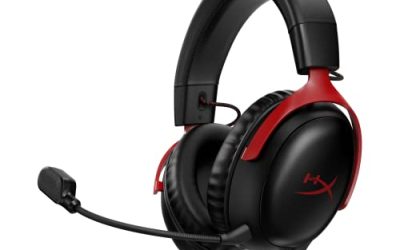
| 3. HyperX Cloud III Wireless — Best Battery Life and Comfort |
| Check price on Amazon |
| 4. Razer Barracuda X — Best Lightweight and Versatile Pick |
| Check price on Amazon |
The best wireless headsets for computer use free you from the cable without giving up the sound quality and microphone clarity that a desktop setup demands. Whether you spend your evenings in competitive matches, your workdays on video calls, or your weekends lost in music and movies, a good wireless headset turns your computer into a far more comfortable place to sit. The challenge is that not every wireless headset is built for a computer at all. Some are tuned for phones, some for consoles, and some are little more than fashion accessories with a Bluetooth chip inside.
This guide focuses on wireless headsets that genuinely work well with a computer. Every pick below connects to a PC through a dedicated low-latency 2.4 GHz wireless dongle, which matters far more than most shoppers realise. Bluetooth alone can introduce noticeable audio delay and often forces the headset into a low-quality hands-free mode the moment the microphone switches on. A 2.4 GHz connection keeps game audio crisp and voice chat clear at the same time.
We compared battery life, comfort over long sessions, microphone quality, driver size, weight, and range, and narrowed the field to four headsets that cover different needs. One is the best all-rounder, one is built for marathon comfort, one is the lightest option, and one is the most versatile pick for anyone who jumps between a computer, a console, and a phone.
Top 3 picks at a glance
How to Choose a Wireless Headset for Your Computer
Connection Type Matters Most
The single most important decision is how the headset connects. A dedicated 2.4 GHz USB dongle gives you the lowest latency and the best sound quality while the microphone is active. Bluetooth is convenient for phones and tablets, but on a computer it can cause audio lag in games and a sharp drop in sound quality during calls. Some headsets offer both, which is ideal: use the dongle at your desk and Bluetooth when you step away with your phone.
Check which USB port the dongle needs. Most use USB-A, while newer headsets ship with a USB-C dongle and include a USB-A adapter in the box. If your computer only has USB-C ports, or only USB-A, make sure the headset in question comes with the right adapter so you are not stuck ordering one separately.
Battery Life and Charging
Battery life varies enormously between wireless headsets, from around 20 hours to well over 100 hours on a single charge. If you use your headset for a full workday plus evening gaming, anything under 30 hours will have you reaching for the charging cable every couple of days. Headsets with 50 hours or more are far more forgiving, and the longest-lasting models can go weeks between charges.
Charging speed matters too. A headset that gains several hours of listening from a short 15-minute charge is much easier to live with than one that needs a full overnight charge after every long session. USB-C charging is now standard on good headsets and is worth insisting on.
Comfort for Long Sessions
A headset that sounds wonderful but hurts after an hour is a bad headset. Weight is the first thing to check: anything under 300 grams is light, while headsets above 350 grams can start to feel heavy during long sessions. The headband design matters just as much. Suspension-style headbands spread the weight across the top of your head, while traditional padded bands concentrate it in one spot.
Ear cushions deserve attention too. Memory foam cushions wrapped in leatherette seal well and block outside noise, but they can get warm. Fabric or mesh cushions breathe better during long sessions, though they let in a little more room noise. If you wear glasses, look for softer cushions that do not press the arms of your glasses into your head.
Microphone Quality
If you play multiplayer games, join video calls, or stream, the microphone is half the product. A detachable or retractable boom microphone positioned close to your mouth will always sound clearer than a microphone built into the earcup. Look for a microphone with noise cancelling or noise suppression, which filters out keyboard clicks, fan noise, and other background sounds so your teammates and colleagues hear your voice, not your room.
A physical mute button or a flip-to-mute boom is a small feature that makes a big difference in daily use. Being able to mute yourself instantly, without fumbling through software, is something you will appreciate every single day.
Sound Quality and Drivers
Driver size is a useful rough guide: most good wireless computer headsets use 40 mm to 53 mm drivers. Larger drivers generally produce fuller bass and a wider soundstage, which helps in games where hearing footsteps matters. But driver size is not everything. Tuning matters more, and some headsets with smaller drivers sound better than larger ones because the manufacturer tuned them carefully.
Surround sound is worth understanding before you pay extra for it. Virtual surround sound, such as DTS Headphone:X or similar processing, can help you place sounds in a game world, but it is software processing rather than extra physical speakers. It is a nice bonus, not a reason to choose one headset over another on its own.
Compatibility
All four headsets in this guide work with Windows PCs, and most also work with Mac, PlayStation consoles, Nintendo Switch, and mobile devices through the same dongle or Bluetooth. If you also play on Xbox, be aware that most wireless headsets do not work wirelessly with Xbox consoles, which use a proprietary wireless protocol. Check compatibility with every device you own before buying, especially if you plan to use one headset for everything.
Top Picks
1. Logitech G733 Lightspeed — Best All-Rounder
- Best for: Gamers and everyday computer users who want a light, stylish, do-everything headset.
Gamers and everyday computer users who want a light, stylish, do-everything headset.
The Logitech G733 Lightspeed is our top overall pick because it does everything well and looks great doing it. It connects to your computer through Logitech’s Lightspeed 2.4 GHz wireless technology, with a range of up to 20 metres, so you can walk to the kitchen mid-match without losing audio. Battery life is rated at up to 29 hours, which covers several days of typical use before you need to plug in the USB-C charging cable.
Sound comes from 40 mm PRO-G drivers with DTS Headphone:X 2.0 surround sound, and the result is a lively, detailed sound that works well for games, music, and movies alike. The detachable Blue VO!CE microphone is one of the best in this price range, with built-in filters that clean up your voice for teammates and callers. At only 278 grams, the G733 is genuinely light, and the suspension headband distributes that weight so well that it almost disappears during long sessions.
Logitech G733 Lightspeed Wireless Gaming Headset on Amazon
Key specs: 2.4 GHz Lightspeed wireless, up to 29-hour battery life, 20-metre range, 40 mm PRO-G drivers, DTS Headphone:X 2.0, detachable Blue VO!CE microphone, 278 grams, USB-C charging.
2. SteelSeries Arctis 7+ — Best for Multi-Device Use
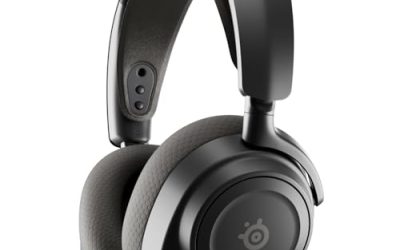
The SteelSeries Arctis 7+ is the pick for anyone whose computer is one of several devices. It connects through a compact USB-C dongle that works with PC, Mac, PlayStation 5 and 4, Nintendo Switch, and Android devices, so one headset genuinely covers your whole setup. The lossless 2.4 GHz wireless connection keeps latency low, and battery life is rated at up to 30 hours, with USB-C fast charging that adds hours of listening from a short top-up.
SteelSeries’ signature ski-goggle suspension headband is one of the most comfortable designs in this guide, spreading the headset’s weight evenly and making it easy to wear for hours. The retractable ClearCast microphone slides away into the earcup when you are not using it, which keeps the headset looking clean and makes it easy to take on the go. When extended, the microphone uses bidirectional noise cancelling to focus on your voice and cut out background noise.
Sound is handled by custom-tuned drivers with Sonar 7.1 virtual surround sound through SteelSeries GG software, which also lets you fine-tune the equaliser and microphone settings. The Arctis 7+ is a strong choice if you want a headset that moves between your computer, your console, and your phone without a second thought.
SteelSeries Arctis 7+ Wireless Gaming Headset on Amazon
Best for: People who use one headset across a computer, a console, and mobile devices.
Key specs: Lossless 2.4 GHz wireless, up to 30-hour battery life, USB-C dongle and fast charging, Sonar 7.1 virtual surround sound, retractable ClearCast noise-cancelling microphone, ski-goggle suspension headband.
3. HyperX Cloud III Wireless — Best Battery Life and Comfort
- Best for: Marathon users who want the longest battery life and the plushest comfort.
Marathon users who want the longest battery life and the plushest comfort.
If you hate charging things, the HyperX Cloud III Wireless is the headset for you. Its headline feature is a battery rated at up to 120 hours on a single charge, which is several times longer than most competitors. In practice that means charging roughly once a month with normal use, and the headset recharges quickly when you finally do plug it in. For anyone who uses a headset all day for work and all evening for games, that freedom from the charger is genuinely life-changing.
Comfort is the other reason the Cloud III Wireless earns its place here. HyperX’s signature memory foam ear cushions and padded headband are famously plush, and the durable aluminium and steel frame feels solid without being heavy at 339 grams. The 53 mm angled drivers are the largest in this guide, tuned by HyperX engineers for a warm, detailed sound that suits both games and music, with DTS spatial audio support for a wider soundstage.
The detachable 10 mm microphone is one of the best in its class, with clear voice pickup and an LED mute indicator so you always know whether you are live. The 2.4 GHz wireless connection reaches up to 20 metres, and the dongle works with PC, PlayStation 5 and 4, and Nintendo Switch. The only real trade-off is the lack of Bluetooth, so this is a headset for your desk rather than for your phone. For pure computer use, that is rarely a problem.
HyperX Cloud III Wireless Gaming Headset on Amazon
Key specs: Up to 120-hour battery life, 2.4 GHz wireless with 20-metre range, 53 mm angled drivers, DTS spatial audio, detachable 10 mm microphone with LED mute indicator, memory foam ear cushions, 339 grams.
4. Razer Barracuda X — Best Lightweight and Versatile Pick
- Best for: Users who want the lightest headset and easy switching between computer and phone.
Users who want the lightest headset and easy switching between computer and phone.
The Razer Barracuda X is the lightest headset in this guide at just 250 grams, and you feel that difference the moment you put it on. It is built for people who find most gaming headsets too heavy or too bulky, and the slim, understated design works just as well on a video call as it does in a game. Despite the light weight, it packs a 40 mm driver set with a balanced sound that handles games, music, and calls without favouring one over the others.
What sets the Barracuda X apart is its dual wireless system. The 2022 refresh reviewed here pairs a 2.4 GHz HyperSpeed wireless dongle with Bluetooth, and Razer’s SmartSwitch lets you jump between the two with a single button press. That means you can be in a game on your computer through the dongle and take a phone call over Bluetooth without touching a cable or swapping headsets. Battery life is rated at up to 50 hours, which is more than enough for a full week of regular use.
The detachable HyperClear cardioid microphone focuses on your voice and rejects sound from the sides and rear, keeping your calls and team chat clear. The USB-C dongle works with PC, PlayStation, Nintendo Switch, and Android devices, making the Barracuda X one of the most flexible headsets in this guide. If you want a light, versatile headset that does a bit of everything, this is the one to beat.
Razer Barracuda X Wireless Gaming Headset on Amazon
Key specs: 2.4 GHz HyperSpeed wireless plus Bluetooth with SmartSwitch, up to 50-hour battery life, 40 mm drivers, detachable HyperClear cardioid microphone, 250 grams, USB-C dongle.
Comparison Table
| Headset | Connection | Battery Life | Drivers | Weight | Microphone |
|---|---|---|---|---|---|
| Logitech G733 Lightspeed | 2.4 GHz dongle | Up to 29 hours | 40 mm PRO-G | 278 g | Detachable Blue VO!CE |
| SteelSeries Arctis 7+ | 2.4 GHz USB-C dongle | Up to 30 hours | Custom-tuned | Not specified | Retractable ClearCast |
| HyperX Cloud III Wireless | 2.4 GHz dongle | Up to 120 hours | 53 mm angled | 339 g | Detachable 10 mm |
| Razer Barracuda X | 2.4 GHz dongle plus Bluetooth | Up to 50 hours | 40 mm | 250 g | Detachable HyperClear |
Frequently Asked Questions
Are wireless headsets good for computer gaming?
Yes, modern wireless headsets with a dedicated 2.4 GHz dongle are excellent for computer gaming. The dongle connection has low enough latency that you will not notice any delay between what happens on screen and what you hear, and it keeps full sound quality active while the microphone is in use. Bluetooth-only headsets are a different story: they can introduce noticeable lag and often drop to low-quality audio during voice chat, so a 2.4 GHz connection is the feature to look for.
How long should a wireless computer headset battery last?
For regular daily use, a battery rated at 30 hours or more is a good baseline, since it means charging roughly once a week. Headsets rated at 50 hours or more are more forgiving, and the longest-lasting models reach 120 hours, which can mean charging only once a month. Remember that manufacturer battery ratings are measured at moderate volume, so your real-world battery life may be somewhat shorter if you listen loudly or use surround sound processing.
Do wireless headsets work with both Windows and Mac?
All four headsets in this guide work with Windows PCs, and they also work with Mac computers through the same USB dongle. Some features, such as custom equaliser settings and surround sound processing, depend on companion software that may only be available on Windows, so Mac users should check whether the manufacturer’s software supports macOS before buying if those features matter to them.
Can I use a wireless gaming headset for work calls and video meetings?
Absolutely. A good wireless gaming headset is often better for calls than a basic office headset because the boom microphone sits close to your mouth and usually includes noise cancelling. The ability to walk away from your desk during a long call, thanks to the wireless range, is a real advantage. Just make sure the headset you choose has a clear mute control, since muting quickly is essential in meetings.
Is Bluetooth enough, or do I need a 2.4 GHz dongle?
For a computer, a 2.4 GHz dongle is strongly recommended. It delivers lower latency and better audio quality while the microphone is active, which matters for gaming and calls. Bluetooth is useful as a second connection for your phone, and headsets that offer both give you the best of both worlds. If a headset only offers Bluetooth, it can still work for music and casual use, but it is not the best choice for gaming or frequent voice chat.
Conclusion
The best wireless headsets for computer use are the ones that match how you actually spend time at your desk. The Logitech G733 Lightspeed is our top all-rounder, combining light weight, strong sound, a great microphone, and a stylish design that works for gaming, calls, and music alike. The SteelSeries Arctis 7+ is the best choice if one headset needs to cover your computer, console, and mobile devices. The HyperX Cloud III Wireless wins on battery life and comfort, with up to 120 hours per charge and the plushest ear cushions in this guide. And the Razer Barracuda X is the lightest and most versatile pick, with dual wireless and easy switching between your computer and your phone.
Before you buy, double-check the connection type, the battery life, and the compatibility with your devices. A headset that fits your head, lasts through your longest sessions, and connects cleanly to your computer will serve you far better than one chosen on specifications alone. Whichever of these four you choose, you are getting a wireless headset that was built for a computer first, and that is the difference that matters.
Disclosure: As an Amazon Associate, we earn from qualifying purchases.
Related guides
More from Amazon
Programs that pair well with the guide above. Offers and eligibility are set by Amazon and may change.
Free shipping on eligible items, Prime Video and more. Eligible new members can start with a free trial.
Start a Prime free trialAd-free music streaming. Eligible new subscribers can start with a free trial.
Try Music Unlimited freeA Prime membership for ages 18-24 with a trial period. Eligibility is set by Amazon.
See Prime for Young AdultsAudiobooks and podcasts to listen to on the go. Eligible new members can start with a free trial.
Try Audible freeAs an Amazon Associate we earn from qualifying purchases.