
Our Short List of 3

- Best for: Everyday carry with encryption and a slim metal enclosure.
- 2TB capacity, portable HDD
- USB-C connection, USB 3.0 compatible
- Password-activated hardware encryption
- 2-year limited warranty with 2 years of Rescue Data Recovery Services

- Best for: Mac-ready backup with no reformatting step.
- 2TB capacity, portable HDD
- USB 3.1 and USB 3.0 compatible, USB-C ready
- Formatted for Mac, Time Machine compatible
- Password protection with 256-bit AES hardware encryption

- Best for: Fast photo and video editing on the move.
- 1TB capacity, portable SSD
- Up to 2000MB/s read and up to 1700MB/s write
- USB 3.2 Gen 2×2 interface, USB-C
- IP65 water and dust resistance
All 4 Picks at a Glance
| Product | Specs | Action |
|---|---|---|
| Seagate One Touch 2TB |
| Check price on Amazon |
| WD My Passport for Mac 2TB |
| Check price on Amazon |
| SanDisk Extreme Portable SSD 1TB |
| Check price on Amazon |
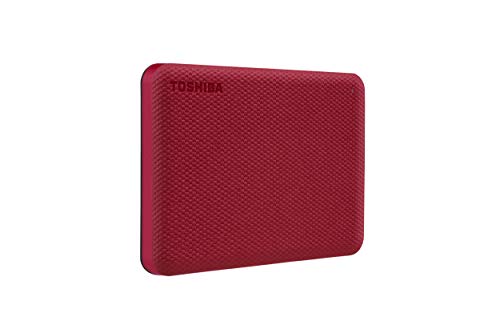 Toshiba Canvio Advance 2TB |
| Check price on Amazon |
A MacBook fills up faster than most owners expect, and a portable external drive is the simplest way to carry photos, video projects, and backups without paying for a larger internal SSD. The right drive plugs in, shows up on the desktop, and keeps working across Macs without reformatting or extra software. The wrong one needs a reformat before it accepts a single file, or it crawls when you edit video straight from the disk.
This guide is for Mac owners who want pocket-sized storage for backups, photo libraries, and everyday files. Every product below was chosen from the name and specifications shown on its Amazon page, with capacity, connection, and Mac formatting compared so you can pick a drive that works the moment you plug it in.
Our Top Picks
Top 3 picks at a glance
Quick Picks
As an Amazon Associate we earn from qualifying purchases
| Product | Best for | Key spec from title |
|---|---|---|
| Seagate One Touch 2TB | Everyday carry with encryption | 2TB, USB-C, hardware encryption |
| WD My Passport for Mac 2TB | Mac-ready backup out of the box | 2TB, formatted for Mac |
| SanDisk Extreme Portable SSD 1TB | Fast editing on the move | 1TB, up to 2000MB/s read |
| Toshiba Canvio Advance 2TB | Simple drag-and-drop storage | 2TB, USB 3.0, password protection |
How to Choose
Capacity and drive type
Capacity decides how much of your life the drive can hold, and the drive type decides how fast it moves that data. A 2TB hard drive holds a large photo library and years of documents at a modest cost per terabyte, while a 1TB SSD holds less but moves files several times faster. Video editors and photographers who work directly from the drive should lean toward an SSD, since scrubbing footage from a spinning disk feels slow. Casual backup and archiving suit a hard drive. Pick the capacity for the library you have today plus the files you will add over the next two years.
Mac formatting and Time Machine
A drive formatted for Mac works with Time Machine straight out of the box, while a Windows-formatted drive needs a reformat before macOS will write to it. Check the listing for the words formatted for Mac or Time Machine compatible, since those two phrases save a setup step and a possible data loss mistake. Some drives ship with backup software for Mac, and some ship with tools that only run on Windows, so read the software notes before assuming the bundle helps you. If you already own a drive, reformatting it for Mac is possible, but it erases everything on the disk first.
Connection and cable
The cable in the box decides whether the drive plugs straight into a modern MacBook or needs an adapter. USB-C cables suit current MacBooks with Thunderbolt ports, while older USB-A cables need a dongle. Speed claims also depend on the connection: a USB 3.2 Gen 2×2 SSD only reaches its top speed on a port rated for that standard, and a slower port caps the link at roughly half. Check the interface on the listing and the ports on your Mac, then confirm the included cable matches. A drive that ships with both USB-C and USB-A cables removes the guesswork entirely.
Size, weight, and toughness
A portable drive lives in a bag, so size and weight matter every day you carry it. The lightest hard drives weigh around 0.33 pounds and measure under half an inch thick, while rugged SSDs add a rubber shell and a carabiner loop for outdoor use. Drop protection and dust and water resistance ratings help if the drive travels to shoots, sites, or school. A slim metal enclosure slips into a laptop sleeve, while a chunky rugged case needs its own pocket. Choose the build for the roughest day the drive will face, not the calmest one.
The 4 Best Options
Seagate One Touch 2TB
- Best for: Everyday carry with encryption and a slim metal enclosure.
- 2TB capacity, portable HDD
- USB-C connection, USB 3.0 compatible
- Password-activated hardware encryption
- 2-year limited warranty with 2 years of Rescue Data Recovery Services
Everyday carry with encryption and a slim metal enclosure.
Needs reformatting before Time Machine will use it.
The Seagate One Touch 2TB is a slim portable hard drive for Mac owners who want capacity, encryption, and a clean design in one pocket-sized package. Its USB-C connection and hardware encryption protect files on the move, and the two-year limited warranty comes with two years of Rescue Data Recovery Services. The listing notes that reformatting may be required for use with Time Machine, so Mac owners should plan that one-time step. A one-year MylioCreate subscription and four months of the Adobe Creative Cloud Photography Plan come with the drive.
WD My Passport for Mac 2TB
- Best for: Mac-ready backup with no reformatting step.
- 2TB capacity, portable HDD
- USB 3.1 and USB 3.0 compatible, USB-C ready
- Formatted for Mac, Time Machine compatible
- Password protection with 256-bit AES hardware encryption
Mac-ready backup with no reformatting step.
A spinning hard drive, so large video files transfer slower than on an SSD.
The WD My Passport for Mac 2TB is the most Mac-ready drive in this group, formatted for macOS and compatible with Time Machine straight out of the box. Its USB-C connection works with current MacBooks, and the included backup software with password protection adds 256-bit AES hardware encryption. At 4.2 ounces and 4.22 by 2.95 by 0.44 inches, it slips into a laptop sleeve without adding bulk. The drive suits owners who want a backup disk that works the moment it is plugged in, with no setup step in between.
SanDisk Extreme Portable SSD 1TB
- Best for: Fast photo and video editing on the move.
- 1TB capacity, portable SSD
- Up to 2000MB/s read and up to 1700MB/s write
- USB 3.2 Gen 2×2 interface, USB-C
- IP65 water and dust resistance
Fast photo and video editing on the move.
1TB holds less than the 2TB hard drives, so heavy libraries may outgrow it.
The SanDisk Extreme Portable SSD 1TB is the fast option for Mac owners who edit photos and video directly from the drive. Its USB 3.2 Gen 2×2 interface reaches up to 2000MB/s read and up to 1700MB/s write speeds, which keeps scrubbing and exporting quick. An IP65 rating seals it against dust and splashes, and the listing claims up to 3-meter drop protection, so it survives rough days in a bag. A carabiner loop secures it to a strap, and 256-bit AES encryption with password protection keeps files private.
Toshiba Canvio Advance 2TB
- Best for: Simple drag-and-drop storage for Mac and PC.
- 2TB capacity, portable HDD
- USB 3.0 connection, USB 2.0 compatible
- 2.5-inch form factor, portable design
- 2-year manufacturer limited warranty
Simple drag-and-drop storage for Mac and PC.
Bundled backup and password tools are Windows-only, and Mac use may need reformatting.
The Toshiba Canvio Advance 2TB is a straightforward portable hard drive for Mac owners who want simple drag-and-drop storage at a friendly size. Its USB 3.0 connection needs no external power, and the textured finish comes in several colors that are easy to spot in a bag. The listing notes that the bundled backup and password tools are Windows-only, so Mac owners should treat it as plain storage rather than a software bundle. At 5.28 ounces it is light enough for daily carry, and the two-year manufacturer warranty covers the drive.
Which One Fits Your Situation
Daily backup for a MacBook
The WD My Passport for Mac fits a daily backup routine because it arrives formatted for Mac and works with Time Machine immediately. Plug it in, point Time Machine at it, and the backup runs without a reformat or a software install. The encryption protects the backup if the drive is lost. Choose it when the goal is a set-and-forget backup disk rather than a working drive for editing.
Editing photos and video on the go
The SanDisk Extreme Portable SSD suits photographers and video editors who open files straight from the drive. Its read and write speeds keep scrubbing smooth, and the IP65 sealing and drop protection handle field work. The carabiner loop clips to a camera bag, and the compact size fits a jacket pocket. Pick it when speed and toughness matter more than raw capacity, and when the library fits inside a single terabyte.
Carrying a large library everywhere
The Seagate One Touch 2TB fits owners with a large photo or document library who want capacity in a slim package. Its 2TB holds years of files, the hardware encryption guards them, and the USB-C connection suits modern MacBooks. Plan the one-time reformat for Time Machine if you want it as a backup disk. Choose it when the library is large, the budget favors a hard drive, and encryption matters.
Plain storage for any computer
The Toshiba Canvio Advance 2TB suits owners who move files between Mac and PC and want a simple drive without software complications. Its USB 3.0 connection works on both platforms, and the textured case is easy to find in a bag. Remember that its backup tools are Windows-only, so treat it as storage rather than a backup suite. Pick it when the job is carrying files, not running a backup program.
Common Mistakes
- Choosing a Windows-formatted disk and learning it must be wiped and reformatted before Time Machine will use it.
- Choosing a hard drive for video editing and then waiting through slow scrubbing and exports.
- Assuming a fast SSD reaches its top speed on any USB port, when the port itself caps the link.
- Ignoring the bundled software notes and expecting Windows-only backup tools to run on a Mac.
- Picking 1TB for a library that already fills a terabyte and outgrowing the drive within months.
Frequently Asked Questions
Do portable hard drives work with Macs out of the box?
It depends on the formatting. Drives labeled formatted for Mac work with Time Machine immediately, while Windows-formatted drives need a reformat before macOS can write to them. Reformatting erases everything on the drive, so check the listing before buying. Drives that list Mac compatibility and a USB-C cable suit current MacBooks best.
Is an SSD or a hard drive better for a Mac?
An SSD moves files much faster and survives drops better, which suits photo and video editing directly from the drive. A hard drive holds more capacity for the same money and suits backups and archiving. For a backup disk or a media library, a hard drive gives more room for less money.
Can I use a portable drive with Time Machine?
Yes, if the drive is formatted for Mac or reformatted to a Mac format first. Time Machine needs a Mac-formatted volume, and a Windows-formatted drive will not accept backups until it is reformatted. Once formatted, point Time Machine at the drive and it handles backups automatically. Keep the drive connected regularly so backups stay current.
How much capacity do I need for a Mac backup?
A backup drive should hold at least as much as the Mac it backs up, and more is better since Time Machine keeps older versions of files. A 2TB drive suits most MacBooks with 512GB or 1TB of internal storage. If the Mac holds a large photo or video library, a larger drive leaves room for history.
Related guides
More from Amazon
Programs that pair well with the guide above. Offers and eligibility are set by Amazon and may change.
Free shipping on eligible items, Prime Video and more. Eligible new members can start with a free trial.
Start a Prime free trialAd-free music streaming. Eligible new subscribers can start with a free trial.
Try Music Unlimited freeA Prime membership for ages 18-24 with a trial period. Eligibility is set by Amazon.
See Prime for Young AdultsAudiobooks and podcasts to listen to on the go. Eligible new members can start with a free trial.
Try Audible freeAs an Amazon Associate we earn from qualifying purchases.









