
Our Short List of 3

- Best for: Households moving to WiFi 7 devices on an internet plan faster than gigabit.
- WiFi standard: WiFi 7, tri-band BE9300
- Band rates: 5,760 Mbps on 6 GHz, 2,880 Mbps on 5 GHz, 574 Mbps on 2.4 GHz
- WiFi 7 features: Multi-Link Operation, 4K-QAM, 320 MHz channels
- Ports: one 2.5G WAN and four 2.5G LAN

- Best for: Gamers on gigabit plans who want a 6 GHz lane and traffic prioritisation without stepping up to WiFi 7.
- WiFi standard: WiFi 6E, tri-band AXE6600
- Speeds: up to 6,600 Mbps combined across the 2.4, 5 and 6 GHz bands
- Design: 8-stream with MU-MIMO
- Processor: 1.8 GHz quad-core
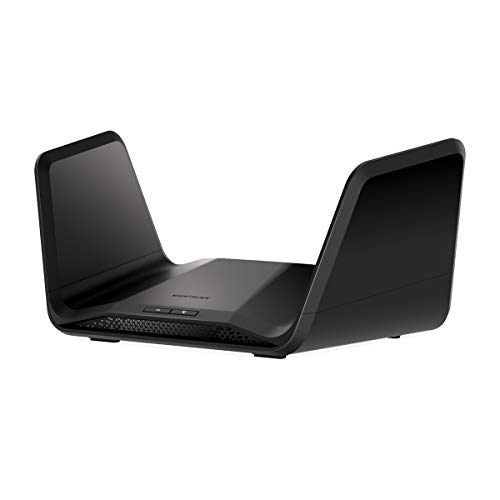
- Best for: Larger homes where every phone, console and headset is still WiFi 5 or WiFi 6.
- WiFi standard: WiFi 6, tri-band AX6600 with 2.4 GHz plus two 5 GHz bands
- Speeds: up to 6.6 Gbps combined across all bands
- Design: 8-stream
- Coverage: up to 2,500 sq ft
All 3 Picks at a Glance
| Product | Specs | Action |
|---|---|---|
| TP-Link Archer BE550 |
| Check price on Amazon |
| MSI RadiX AXE6600 |
| Check price on Amazon |
| NETGEAR Nighthawk RAX70 |
| Check price on Amazon |
Buying a tri-band router is a decision about what the third radio should do. One flavour adds a 6 GHz band that only WiFi 6E and WiFi 7 devices can see, while the other adds a second 5 GHz band serving the hardware you already own. Pick wrong and you pay for a lane nothing in your house can use. For gaming and VR households the stakes are concrete: that third band gives a wireless headset or console a clean channel away from everyone else’s traffic.
The three routers below split along exactly that line. Households moving to WiFi 7 on a fast internet plan should start with the TP-Link Archer BE550, gamers wanting 6 GHz and traffic prioritisation on WiFi 6E fit the MSI RadiX AXE6600, and homes where every device is still WiFi 5 or WiFi 6 match the NETGEAR Nighthawk RAX70 better. Each was chosen from its Amazon listing name and stated specifications, and each takes a different position on generation, ports and coverage.
Our Top Picks
Top 3 picks at a glance
Quick Picks
As an Amazon Associate we earn from qualifying purchases.
| Product | Best for | Key spec |
|---|---|---|
| TP-Link Archer BE550 | Homes upgrading to WiFi 7 on a multi-gig plan | Tri-band WiFi 7 BE9300 with 6 GHz band and 2.5G ports throughout |
| MSI RadiX AXE6600 | Gamers who want 6 GHz and QoS on WiFi 6E | WiFi 6E AXE6600 with AI QoS and a 1.8 GHz quad-core processor |
| NETGEAR Nighthawk RAX70 | Larger homes with only WiFi 5 and WiFi 6 devices | WiFi 6 AX6600 with a second 5 GHz band and 2,500 sq ft coverage |
How to Choose
Decide what your third band should be
Tri-band means two different things in this roundup, and the distinction decides whether the router helps you at all. A 6 GHz third band, as on the BE550 and the RadiX AXE6600, is a wide, lightly used lane reserved for WiFi 6E and WiFi 7 clients, which makes it ideal for a wireless PCVR headset or a new gaming laptop. A second 5 GHz band, as on the RAX70, instead splits your existing WiFi 5 and WiFi 6 devices across two lanes so older hardware stops queuing behind newer hardware. Inventory your devices before choosing the flavour.
Match the WiFi generation to your devices
A router cannot hand a device a band the device does not support, so generation matching matters more than the headline class. WiFi 7 brings Multi-Link Operation and 320 MHz channels on the BE550, but only WiFi 7 clients use those features fully. WiFi 6E on the RadiX AXE6600 opens the same 6 GHz band to 6E laptops, phones and headsets. One caveat applies to every speed figure in this article: class numbers such as BE9300 and AX6600 are the summed theoretical rates of all bands combined, not the speed any single device will ever see on its own connection.
Check the wired ports against your internet plan
Wireless figures get the attention, yet the Ethernet ports cap what the router can pass through. The BE550 carries one 2.5G WAN port and four 2.5G LAN ports, so a multi-gig internet plan and a wired gaming PC both get full speed without a bottleneck at the router. The RadiX AXE6600 and the RAX70 use gigabit ports, which suit gigabit-or-slower plans perfectly but would clip anything faster. If your provider already sells tiers above a gigabit in your street, the port layout is a future-proofing decision, not a detail to skim past.
Weigh coverage, capacity and the extras
Router listings state coverage and device figures that map to real household shapes. The RAX70 claims up to 2,500 sq ft and 40 devices, suiting a larger house full of smart-home hardware, while the BE550 claims up to 2,000 sq ft and adds EasyMesh support, so a compatible satellite can extend it later rather than replacing it. Extras also differ in kind: the BE550 lists VPN support and HomeShield, the RAX70 lists NETGEAR Armor security, and the RadiX leans on AI QoS instead. Buy the extras your household will genuinely switch on.
The 3 Best Options
TP-Link Archer BE550
- Best for: Households moving to WiFi 7 devices on an internet plan faster than gigabit.
- WiFi standard: WiFi 7, tri-band BE9300
- Band rates: 5,760 Mbps on 6 GHz, 2,880 Mbps on 5 GHz, 574 Mbps on 2.4 GHz
- WiFi 7 features: Multi-Link Operation, 4K-QAM, 320 MHz channels
- Ports: one 2.5G WAN and four 2.5G LAN
Households moving to WiFi 7 devices on an internet plan faster than gigabit.
Confirm you are on the new listing for this exact model before ordering, because a Renewed version and a step-up BE550 Pro with a 10G port sell under separate listings, and only this one carries the all-2.5G port layout described here.
The BE550 is the pick for households ready to build around WiFi 7 rather than wait for it. Its 6 GHz band runs at 5,760 Mbps with 320 MHz channels, and Multi-Link Operation lets WiFi 7 clients combine bands for a steadier link, which is exactly the profile a wireless PCVR headset wants. Unusually at this tier, every wired port is 2.5G, so a multi-gig plan, a wired gaming rig and a NAS can all run without one choking another. EasyMesh expansion and HomeShield round out a listing aimed at homes that keep adding devices.
MSI RadiX AXE6600
- Best for: Gamers on gigabit plans who want a 6 GHz lane and traffic prioritisation without stepping up to WiFi 7.
- WiFi standard: WiFi 6E, tri-band AXE6600
- Speeds: up to 6,600 Mbps combined across the 2.4, 5 and 6 GHz bands
- Design: 8-stream with MU-MIMO
- Processor: 1.8 GHz quad-core
Gamers on gigabit plans who want a 6 GHz lane and traffic prioritisation without stepping up to WiFi 7.
Check the listing title says AXE6600 with the E before ordering, since the plainer RadiX AX6600 is a WiFi 6 model whose third band is a second 5 GHz radio rather than the 6 GHz band this pick is chosen for.
The RadiX AXE6600 is the gaming-led WiFi 6E option, built for players whose plan is gigabit-class but whose headset and laptop already speak 6 GHz. MSI’s listing leads with AI QoS that prioritises gaming traffic, backed by a 1.8 GHz quad-core processor and an 8-stream design, so the router has headroom to sort competing streams when the house is busy. The 6 GHz band gives wireless VR and game downloads a lane away from the crowded 5 GHz band, while gigabit ports match the plan most gamers actually have. RGB lighting marks it as a desk-piece router rather than a cupboard one.
NETGEAR Nighthawk RAX70
- Best for: Larger homes where every phone, console and headset is still WiFi 5 or WiFi 6.
- WiFi standard: WiFi 6, tri-band AX6600 with 2.4 GHz plus two 5 GHz bands
- Speeds: up to 6.6 Gbps combined across all bands
- Design: 8-stream
- Coverage: up to 2,500 sq ft
Larger homes where every phone, console and headset is still WiFi 5 or WiFi 6.
Stock on this listing runs thin, so confirm a live featured offer for ASIN B08KTWXCZT before ordering, and check that the offer is for a new unit rather than a refurbished variant sold under a similar name.
The RAX70 takes the other tri-band route: instead of a 6 GHz radio, it runs two 5 GHz bands alongside 2.4 GHz, suited to homes where nothing yet supports 6E or WiFi 7. That second 5 GHz lane lets you park older, slower devices on one band and keep the other for gaming and streaming, and its listing figures fit a bigger household: coverage up to 2,500 sq ft and up to 40 devices. NETGEAR Armor adds a security layer, and setup runs through the Nighthawk app rather than a browser panel. It is the pragmatic pick for WiFi 6 households not upgrading devices soon.
Which One Fits Your Situation
You stream PCVR wirelessly to a headset
A wireless VR headset is the device that gains most from a 6 GHz band, because that lane is wide and, for now, rarely shared with neighbours. Choose the BE550 if your headset and PC are WiFi 7 ready, or the RadiX AXE6600 if they are WiFi 6E; either way the headset gets a channel away from the household’s 5 GHz congestion. The RAX70 cannot offer this, since none of its three bands is 6 GHz.
Your internet plan runs faster than gigabit
Only one pick here can actually pass a multi-gig connection through to your devices. The BE550’s 2.5G WAN port accepts the faster feed and its four 2.5G LAN ports keep a wired gaming PC or a fast NAS at full speed. On the RadiX or the RAX70, gigabit ports would cap the plan at the router no matter how strong the wireless side is, so faster-plan households should treat the BE550 as the default choice.
Every device you own is WiFi 5 or WiFi 6
If no phone, laptop or headset in the house supports 6 GHz, a 6E or WiFi 7 router’s third band sits idle, and your money works harder elsewhere. The RAX70’s second 5 GHz band directly relieves the congestion you actually have, separating older gadgets from gaming traffic, and its 2,500 sq ft coverage suits a larger home. Revisit the 6 GHz picks when your next laptop or headset upgrade brings a compatible radio with it.
The house games, streams and works at the same time
Competing evening traffic is a sorting problem as much as a speed problem. The RadiX AXE6600 answers with AI QoS that prioritises gaming traffic on a gigabit plan, while the BE550 answers with raw headroom: three bands, Multi-Link Operation and 2.5G ports for the wired machines. Pick the RadiX if your plan is gigabit and your devices are 6E; pick the BE550 if device upgrades to WiFi 7 are already on your list.
Common Mistakes
- Buying a 6 GHz router when no device in the house supports WiFi 6E or WiFi 7, leaving the third band permanently empty.
- Reading class figures such as BE9300 or AX6600 as the speed a single laptop or headset will get, when they are summed theoretical rates across every band.
- Confusing a tri-band single router with a mesh system, then wondering why one unit does not cover a large or awkwardly shaped house on its own.
- Mixing up similarly named models, such as the RadiX AXE6600 and the non-E AX6600, and ending up with a second 5 GHz band instead of 6 GHz.
- Ordering a Renewed or refurbished variant listing by mistake when the intention was a new unit with the full port layout and feature set.
Frequently Asked Questions
What does the third band on a tri-band router actually do?
It gives the router an extra lane so devices stop competing for airtime. On WiFi 6E and WiFi 7 models that lane is the 6 GHz band, reserved for newer clients such as laptops and VR headsets. On WiFi 6 models like the RAX70 it is a second 5 GHz band, separating older and newer devices. Either way, the benefit is less congestion, not faster speeds for one device.
Can my WiFi 6 devices use the 6 GHz band on the BE550 or RadiX?
No. The 6 GHz band is visible only to WiFi 6E and WiFi 7 radios, so a WiFi 6 phone or console will connect over 5 GHz or 2.4 GHz instead and work fine there. That is why inventory matters: with no 6E or WiFi 7 hardware, a 6 GHz radio gains nothing today, and a second 5 GHz band may serve you better.
Is WiFi 7 worth choosing if my internet plan is only gigabit?
It can be, but for local reasons rather than internet speed. The BE550’s 6 GHz band and Multi-Link Operation improve traffic inside your home, where wireless VR streaming lives. Its 2.5G ports also spare you a replacement if you later upgrade the plan. If neither applies and your devices top out at WiFi 6E, the RadiX AXE6600 covers the same 6 GHz ground within a gigabit setup.
Will a tri-band router fix stutter in wireless VR streaming?
It can remove one common cause: congestion on the shared 5 GHz band. Moving the headset to a dedicated 6 GHz lane on the BE550 or RadiX AXE6600 avoids that queue. It will not fix stutter caused by distance, walls between router and play space, or a PC too slow to encode the stream, so treat it as one part of the chain, not a guaranteed cure.
Related guides
More from Amazon
Programs that pair well with the guide above. Offers and eligibility are set by Amazon and may change.
Free shipping on eligible items, Prime Video and more. Eligible new members can start with a free trial.
Start a Prime free trialAd-free music streaming. Eligible new subscribers can start with a free trial.
Try Music Unlimited freeA Prime membership for ages 18-24 with a trial period. Eligibility is set by Amazon.
See Prime for Young AdultsAudiobooks and podcasts to listen to on the go. Eligible new members can start with a free trial.
Try Audible freeAs an Amazon Associate we earn from qualifying purchases.









