
Our Short List of 3

- Best for: AM4 streamers who want both 2.5Gb wired networking and WiFi 6E on one board.
- Brand: ASUS
- Socket: AMD AM4, 3rd Gen Ryzen
- Chipset line: ROG Strix B550-F Gaming WiFi II
- Connectivity from title: PCIe 4.0, WiFi 6E, 2.5Gb LAN
- Best for: AM4 builders with a wired desk who want fast USB and flexible storage options.
- Brand: MSI
- Socket: AMD AM4, Ryzen 5000 series
- Memory: DDR4
- Expansion from title: PCIe 4.0, M.2, SATA 6Gb/s

- Best for: New AM5 streaming builds intended to stay in service through future processor upgrades.
- Brand: GIGABYTE
- Socket: AMD AM5
- Series: B650 AORUS Elite AX
- Memory: DDR5
All 4 Picks at a Glance
| Product | Specs | Action |
|---|---|---|
| ASUS ROG Strix B550-F Gaming WiFi II |
| Check price on Amazon |
| MSI MPG B550 Gaming Plus V1 |
| Check price on Amazon |
| GIGABYTE B650 AORUS Elite AX |
| Check price on Amazon |
 GIGABYTE B650M AORUS Elite AX |
| Check price on Amazon |
A motherboard for gaming and streaming has a different job from a board in a games-only PC. The real decision is whether the board can carry everything a stream adds — capture gear, a microphone interface, a camera, a second screen’s worth of devices — while the game is running, without forcing you into hubs and compromises. USB count and speed, networking quality and storage slots matter as much here as the chipset name, and the socket decides which processors and memory you can even consider.
This guide is for builders putting together a single PC that plays and broadcasts at once, streamers upgrading an older AM4 machine, and anyone starting a fresh AM5 build with streaming in mind from day one. The boards below were chosen from their Amazon product titles and listing details, and they split into two AM4 options for existing DDR4 parts and two AM5 options for a new DDR5 platform.
Our Top Picks
Top 3 picks at a glance
Quick Picks
As an Amazon Associate we earn from qualifying purchases.
| Product | Best for | Key spec from title |
|---|---|---|
| ASUS ROG Strix B550-F Gaming WiFi II | AM4 streamers who want WiFi 6E built in | PCIe 4.0, WiFi 6E and 2.5Gb LAN |
| MSI MPG B550 Gaming Plus V1 | AM4 builders who prefer wired streaming | PCIe 4.0 with USB 3.2 Gen 2 and M.2 |
| GIGABYTE B650 AORUS Elite AX | New AM5 builds meant to last for years | AM5 ATX board with DDR5 support |
| GIGABYTE B650M AORUS Elite AX | Compact AM5 streaming PCs | DDR5, PCIe 5.0 M.2 and WiFi 6E in mATX |
How to Choose
Count Your USB Devices Before Choosing a Board
A streaming desk accumulates connections quietly: keyboard, mouse, microphone or audio interface, camera, capture device, controller, stream deck and perhaps a phone for chat. List yours, then count the rear USB ports on any board you consider and note how many are faster USB 3.2 connections rather than basic ones, because cameras and capture devices care about bandwidth. The boards below all sit in a class with generous port counts, but the exact mix of Type-A and Type-C differs, and that mix decides whether your existing cables plug straight in.
Decide Between Wired Networking and Built-In WiFi
Streaming uploads punish weak networking. A wired Ethernet connection is still the calmest option for a fixed desk, and 2.5Gb LAN, listed on the ASUS board below, gives headroom beyond the connection most homes feed it. Built-in WiFi 6E, also on the ASUS and on the compact Gigabyte, matters if your desk cannot reach the router with a cable, and it doubles as a backup path. Decide which situation you are actually in; paying for wireless you will never use, or lacking it when the desk moves rooms, are both avoidable mistakes.
Pick the Socket That Matches Your Parts and Plans
Two boards here are AM4 and use DDR4; two are AM5 and use DDR5. That is not a detail to skim. An AM4 board suits a builder keeping an existing Ryzen processor and DDR4 memory, while an AM5 board starts a new platform with DDR5 and a longer upgrade path ahead of it. The B650M listing spells out support for Ryzen 9000, 8000 and 7000 series processors, which shows how current the AM5 side is. Never order a board until its socket matches the processor in your parts list exactly.
Think About Storage for Games and Recordings Together
A streaming PC stores two libraries: installed games and recorded footage, and recordings grow faster than most builders expect. Multiple M.2 slots let you separate a fast game drive from a recording drive so a long capture is not writing to the same device your game is loading from. The Gigabyte boards below list PCIe 5.0 M.2 support, and the MSI lists M.2 alongside SATA 6Gb/s for cheaper bulk drives. Match the slot count to how much footage you honestly keep, not how much you plan to delete.
The 4 Best Options
ASUS ROG Strix B550-F Gaming WiFi II
- Best for: AM4 streamers who want both 2.5Gb wired networking and WiFi 6E on one board.
- Brand: ASUS
- Socket: AMD AM4, 3rd Gen Ryzen
- Chipset line: ROG Strix B550-F Gaming WiFi II
- Connectivity from title: PCIe 4.0, WiFi 6E, 2.5Gb LAN
AM4 streamers who want both 2.5Gb wired networking and WiFi 6E on one board.
It is an AM4 DDR4 board, so it cannot take AM5 processors or DDR5 memory if you later change platform.
This is the most complete AM4 streaming board here. Its title lists PCIe 4.0, WiFi 6E, 2.5Gb LAN, BIOS FlashBack, HDMI 2.1 and Aura Sync on an AMD AM4 ATX board for Ryzen processors with DDR4 memory. For a streamer, the pairing of fast wired networking with modern wireless on one board covers both desk situations, and BIOS FlashBack is a practical comfort when a processor needs a firmware update before the board will boot. It suits an AM4 builder who wants the platform’s mature, well-equipped end rather than its entry level.
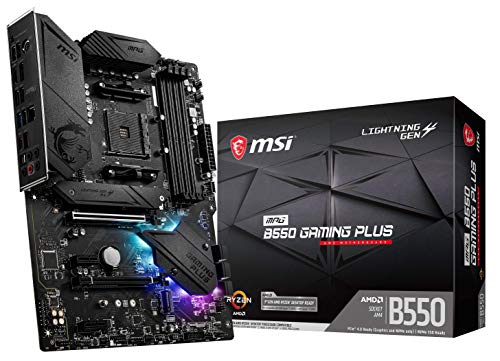
MSI MPG B550 Gaming Plus V1
- Best for: AM4 builders with a wired desk who want fast USB and flexible storage options.
- Brand: MSI
- Socket: AMD AM4, Ryzen 5000 series
- Memory: DDR4
- Expansion from title: PCIe 4.0, M.2, SATA 6Gb/s
AM4 builders with a wired desk who want fast USB and flexible storage options.
No WiFi is named in the product title, so a wireless setup would need a cable run or a separate adapter.
The MSI is the wired-first AM4 alternative. Its title lists an AMD AM4 ATX board with DDR4, PCIe 4.0, SATA 6Gb/s, M.2 storage, USB 3.2 Gen 2 and HDMI/DP display outputs, for Ryzen 5000 series processors. A streamer whose desk sits near the router and who plugs everything in can value that straightforward specification: fast USB for capture gear, an M.2 slot for the game library and SATA for inexpensive recording storage. Without built-in wireless in the title, it assumes a cabled setup, which for many dedicated streaming desks is exactly the plan.
GIGABYTE B650 AORUS Elite AX
- Best for: New AM5 streaming builds intended to stay in service through future processor upgrades.
- Brand: GIGABYTE
- Socket: AMD AM5
- Series: B650 AORUS Elite AX
- Memory: DDR5
New AM5 streaming builds intended to stay in service through future processor upgrades.
AM5 means buying DDR5 memory and an AM5 processor, so existing DDR4 parts cannot be carried over.
For a new build, this full-size AM5 board is the long-term platform choice. Listings describe an AMD AM5 ATX motherboard with DDR5 support, 2.5GbE LAN and WiFi 6E, aimed at Ryzen processors on the current socket. A streamer building today with years of use in mind gets the newer memory standard and the current processor generations in a standard ATX layout with room to expand. It is the board here for someone starting from an empty parts list rather than carrying components forward, and who wants the streaming PC to grow instead of being replaced.
GIGABYTE B650M AORUS Elite AX
- Best for: Compact AM5 streaming PCs that still need fast networking and current storage.
- Brand: GIGABYTE
- Socket: AMD AM5
- Series: B650M AORUS Elite AX
- Memory: DDR5
Compact AM5 streaming PCs that still need fast networking and current storage.
The micro-ATX layout has fewer expansion slots, so check any internal capture card plans against the board before buying.
The B650M brings the AM5 platform down to micro-ATX size without giving up the features a streamer leans on. Its title lists support for Ryzen 9000, 8000 and 7000 series processors, DDR5 memory, a 12+2+2 power phase design, PCIe 5.0 M.2 storage, USB-C 3.2 Gen 2, WiFi 6E and 2.5GbE networking. That makes it the pick for a compact streaming PC that sits beside a TV or under a desk in a smaller room. The trade-off of the smaller format is expansion room, so plan your capture hardware around USB devices rather than extra internal cards.
Which One Fits Your Situation
You Are Upgrading an AM4 PC to Stream From It
Choose the ASUS ROG Strix B550-F Gaming WiFi II. It keeps your DDR4 platform, adds WiFi 6E and 2.5Gb LAN for whichever way your desk connects, and its BIOS FlashBack softens the risk of pairing the board with a processor that needs newer firmware before it will start.
Your Streaming Desk Is Wired and Stays Put
Choose the MSI MPG B550 Gaming Plus V1. With fast USB 3.2 Gen 2 for capture equipment, M.2 plus SATA storage flexibility and no money spent on wireless you will not use, it matches a fixed, cabled AM4 setup cleanly and simply.
You Are Building a New PC to Game and Stream for Years
Choose the GIGABYTE B650 AORUS Elite AX. Starting on AM5 with DDR5 gives the build the longest runway, and the full ATX layout leaves the most room for the extra drives and devices a streaming setup tends to accumulate over time.
Your Streaming PC Has to Fit a Small Space
Choose the GIGABYTE B650M AORUS Elite AX. It keeps WiFi 6E, 2.5GbE and PCIe 5.0 M.2 storage in a micro-ATX board, so a compact case near the TV or under a small desk still gets a properly connected streaming machine.
Common Mistakes
- Ordering an AM5 board while owning DDR4 memory and an AM4 processor, or the reverse.
- Counting USB ports without checking how many are the faster USB 3.2 connections your camera needs.
- Planning to stream over WiFi on a board with no wireless, bought because the desk might move.
- Filling the only M.2 slot with a small drive, then having nowhere fast to record footage.
- Choosing micro-ATX and later discovering an internal capture card has no slot to live in.
Frequently Asked Questions
Is AM4 still a sensible choice for a streaming PC?
Yes, if you already own AM4 parts. The two B550 boards here support Ryzen 5000 series processors and DDR4, and they carry the networking and USB a stream needs. AM5 makes more sense when you are buying a processor and memory anyway.
Does a streaming PC need WiFi on the motherboard?
Only if the desk cannot be wired. A cable is the steadier choice for uploading a stream, so wired-only boards suit fixed desks. Built-in WiFi 6E, as on the ASUS and the compact Gigabyte, helps when the setup must sit away from the router.
How many M.2 slots does a game-and-stream PC want?
Two is comfortable: one for games and one for recordings, so captures are not written to the drive your game loads from. If a board has one M.2 slot, SATA drives can still hold footage, which is why the MSI’s SATA support remains useful.
What should I check first before ordering any of these boards?
Socket and memory, before features. Confirm the board’s socket matches your processor and that its memory standard, DDR4 or DDR5, matches the kit you own or plan to buy. A mismatch there makes every other specification on the listing irrelevant.
Related guides
More from Amazon
Programs that pair well with the guide above. Offers and eligibility are set by Amazon and may change.
Free shipping on eligible items, Prime Video and more. Eligible new members can start with a free trial.
Start a Prime free trialAd-free music streaming. Eligible new subscribers can start with a free trial.
Try Music Unlimited freeA Prime membership for ages 18-24 with a trial period. Eligibility is set by Amazon.
See Prime for Young AdultsAudiobooks and podcasts to listen to on the go. Eligible new members can start with a free trial.
Try Audible freeAs an Amazon Associate we earn from qualifying purchases.









