
Our Short List of 3
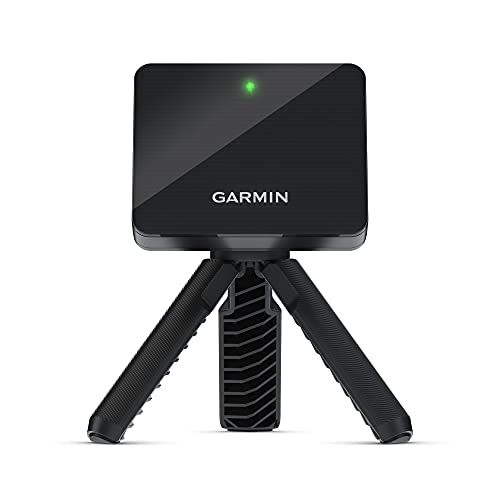
- Best for: Golfers who practice both at home and at the range and want one portable unit.
- Portable golf launch monitor for home, indoors or the driving range
- Battery life: up to 10 hours
- Model: 010-02356-00
- Tracked metrics and virtual courses through the Garmin Golf app

- Best for: Home practicers who want spin feedback and simulator play in one unit.
- Mobile launch monitor and golf simulator
- Indoor and outdoor use
- Measures spin rate and spin axis among 13 core golf metrics
- Color: Grey

- Best for: Data-focused golfers running a fixed home simulator bay.
- 20+ swing data parameters with Multicam
- 12 E6 Connect courses included
- 17 practice ranges and games
- Indoor and outdoor use
All 3 Picks at a Glance
| Product | Specs | Action |
|---|---|---|
| Garmin Approach R10 |
| Check price on Amazon |
| Rapsodo MLM2PRO Mobile Launch Monitor + Golf Simulator |
| Check price on Amazon |
| FlightScope Mevo+ GPS Launch Monitor and Golf Simulator |
| Check price on Amazon |
A launch monitor turns a hitting net, a garage mat or a bay at the driving range into practice you can measure, but the designs here ask for very different commitments. The real decision is how much shot data and simulation you will actually use: a compact unit that reports the core numbers anywhere you set it up, or a fuller simulator that maps every swing in detail and lets you play virtual courses without leaving home.
These picks serve three kinds of golfer. Range-first players who want portable feedback they can carry in the bag, home users building a small simulator setup around a net and a screen, and data-focused improvers who track spin and swing parameters session after session. Each pick was chosen from the tracking approach, the metrics and the simulator features named in its own product information.
Our Top Picks
Top 3 picks at a glance
Quick Picks
As an Amazon Associate we earn from qualifying purchases
| Product | Best for | Key spec |
|---|---|---|
| Garmin Approach R10 | Portable practice anywhere | Up to 10 hours of battery life |
| Rapsodo MLM2PRO Mobile Launch Monitor + Golf Simulator | Spin data and home simulation | 13 core golf metrics |
| FlightScope Mevo+ GPS Launch Monitor and Golf Simulator | Deep swing data at home | 20+ swing data parameters |
How to Choose
Start with how the unit tracks the ball
Every launch monitor reads the shot in its own way, and that shapes where you can use it. Units that sit behind the ball and track it downrange generally want clear space between the ball and the net, while compact portable designs trade some depth of data for a setup that works in a garage or a spare room. Before anything else, measure the space you actually have, check whether the unit is rated for indoor and outdoor use, and think about lighting and flooring, because a tracking method that suits the range may frustrate you at home.
Decide which metrics you will actually use
A short metric list is not a weakness if it covers the numbers you act on. Core figures such as ball speed, launch angle and carry distance tell most golfers whether a change worked. Spin rate and spin axis explain why the ball curved or climbed, and a long parameter list goes further into club and swing detail. Be honest about your practice habits: if you review two or three numbers after each shot, pay for accuracy in those, not for a dashboard of twenty figures you will open twice and then ignore.
Check the simulator and app side carefully
For many buyers the software matters as much as the sensor. Virtual courses, practice ranges and games are what turn a measuring tool into a home simulator you will use through winter. Look at what is included in the box, which app the unit works through, and whether it runs on the phone, tablet or computer you already own. Membership and subscription terms are not always stated clearly in listing text, so confirm the current terms for any unit you shortlist before you buy, rather than discovering ongoing costs after the hardware arrives.
Match portability and battery to your routine
Where you practice decides how much the hardware details matter. A golfer who splits time between a home net and the driving range needs a unit that packs small, sets up in minutes and lasts a full session on one charge; battery life figures like up to 10 hours remove range anxiety entirely. A permanent home bay cares less about the battery and more about stable placement and a screen setup that stays put. Buy for the routine you already have, not the one you imagine starting next season.
The 3 Best Options
Garmin Approach R10
- Best for: Golfers who practice both at home and at the range and want one portable unit.
- Portable golf launch monitor for home, indoors or the driving range
- Battery life: up to 10 hours
- Model: 010-02356-00
- Tracked metrics and virtual courses through the Garmin Golf app
Golfers who practice both at home and at the range and want one portable unit.
The listing does not spell out a full metric list, so check the app details if one specific number matters to you.
The Approach R10 is the take-anywhere option in this group: a portable launch monitor built for home practice, indoor nets and the driving range, with up to 10 hours of battery life so a long range session never ends on an empty unit. Through the Garmin Golf app it adds tracked metrics and virtual courses, which turns a simple mat-and-net corner into a structured practice setup. If your practice moves between the garage and the range and you want one compact unit that follows you from place to place, this is the natural starting point in this lineup.
Watch out for: The listing does not spell out a full metric list, so check the app details if one specific number matters to you.
Rapsodo MLM2PRO Mobile Launch Monitor + Golf Simulator
- Best for: Home practicers who want spin feedback and simulator play in one unit.
- Mobile launch monitor and golf simulator
- Indoor and outdoor use
- Measures spin rate and spin axis among 13 core golf metrics
- Color: Grey
Home practicers who want spin feedback and simulator play in one unit.
Membership and subscription terms are not stated in the listing text, so confirm the current terms before buying.
The MLM2PRO pairs a mobile launch monitor with a golf simulator in one unit designed for indoor and outdoor use. Its headline strength is spin: it measures spin rate and spin axis among 13 core golf metrics, the kind of numbers that explain why a shot curved or ballooned rather than simply how far it carried. For golfers who practice into a net at home but still want shot-shape feedback and simulator play from the same device, it sits between the purely portable pick above and the data-heavy FlightScope below it.
Watch out for: Membership and subscription terms are not stated in the listing text, so confirm the current terms before buying.
FlightScope Mevo+ GPS Launch Monitor and Golf Simulator
- Best for: Data-focused golfers running a fixed home simulator bay.
- 20+ swing data parameters with Multicam
- 12 E6 Connect courses included
- 17 practice ranges and games
- Indoor and outdoor use
Data-focused golfers running a fixed home simulator bay.
Sessions run through an iOS device or a PC, so plan your bay around a screen from the start.
The Mevo+ is the data-first pick here: more than 20 swing data parameters with Multicam support, plus a simulator package of 12 E6 Connect courses and 17 practice ranges and games, for indoor and outdoor use. It works with iOS and PC, so it suits a permanent home bay where a tablet or computer is already part of the setup. If your practice is built around reviewing detailed swing numbers after every session and playing virtual rounds at home, this is the deepest tool of the three.
Watch out for: Sessions run through an iOS device or a PC, so plan your bay around a screen from the start.
Which One Fits Your Situation
You practice mostly at the driving range
Portability and battery life decide everything for range work. You want a unit that comes out of the bag, sits behind the ball and is ready before your warm-up ends, then lasts the whole bucket without a cable. A compact monitor with long battery life and app-based results on your phone fits that routine best, because the range already gives you real ball flight to watch while the numbers confirm what your eyes are seeing.
You are building a home simulator corner
A net, a mat and a screen turn any of these units into a winter practice room, but the simulator side matters most here. Included courses, practice ranges and games decide whether the setup stays interesting after the first month. Check what runs on the devices you own, leave the floor space the tracking method needs, and treat the software package as part of the purchase rather than an afterthought you will sort out later.
You chase spin and swing numbers
If you already know your carry distances and want to understand shot shape, prioritize spin rate and spin axis, or go further into a long list of swing parameters. Those figures explain draws that become hooks and drives that climb and stall. Just be sure your practice routine has room to act on the data: a number only helps if it changes the next drill, the next club choice or the next lesson you book.
You split time between home and the range
A shared routine needs a unit rated for indoor and outdoor use that moves without a rebuild each time. Look for quick setup, a battery that covers range sessions and an app that keeps home and range data in one history, so your practice tells one story across both places. The middle options in a lineup usually serve this split best, balancing spin feedback and simulation against genuine portability.
Common Mistakes
- Buying the longest metric list when your practice only ever uses three or four numbers.
- Skipping the space check and discovering the unit needs more room behind the ball than your garage has.
- Assuming every course, range and feature is included forever without confirming the current membership terms.
- Comparing headline numbers across different tracking methods as if they were measured in exactly the same way.
- Forgetting the rest of the setup: a suitable net or screen, a mat that protects your wrists, and lighting the unit can work in.
Frequently Asked Questions
Can a launch monitor work both indoors and outdoors?
Yes, all three picks here are designed for indoor and outdoor use. Indoors you hit into a net or screen and the unit reports the shot from its tracking position, while outdoors at the range it can follow real ball flight. The practical limits are space, lighting and a stable setup position, so confirm the placement guidance for the specific unit you choose.
What is the difference between core metrics and full swing data?
Core metrics describe the ball: speed, launch angle, direction and carry distance, with spin figures on some units. Full swing data goes further into the delivery itself, with a long list of parameters covering the club and the swing. Most improving golfers act on ball data first; swing parameters help most when you work with a coach or a structured practice plan.
Do launch monitors need a subscription?
It depends on the unit and on which features you want to use. Some include courses and ranges in the purchase, while others tie parts of the app or simulator library to a membership. Listing text does not always state the terms, so check the current membership details for your shortlisted model before buying and count any ongoing cost as part of the real price.
How much space does a home setup need?
Enough for your full swing, the unit in its tracking position, and the ball’s short flight into a net or screen. A garage, basement or spare room usually works if the ceiling clears your driver swing. Measure before you buy, place the net far enough from walls to feel safe, and leave room to stand behind the setup with a tablet or computer in view.
Related guides
More from Amazon
Programs that pair well with the guide above. Offers and eligibility are set by Amazon and may change.
Free shipping on eligible items, Prime Video and more. Eligible new members can start with a free trial.
Start a Prime free trialAd-free music streaming. Eligible new subscribers can start with a free trial.
Try Music Unlimited freeA Prime membership for ages 18-24 with a trial period. Eligibility is set by Amazon.
See Prime for Young AdultsAudiobooks and podcasts to listen to on the go. Eligible new members can start with a free trial.
Try Audible freeAs an Amazon Associate we earn from qualifying purchases.









