Our Short List of 3

- Best for: 4K high-refresh gaming in a case that cannot take the largest flagship coolers.
- GPU: NVIDIA GeForce RTX 5080 (Blackwell architecture)
- Memory: 16GB GDDR7, 256-bit
- Core clock: 2670 MHz
- Interface: PCI Express 5.0 x16

- Best for: 1440p high-refresh gaming with 16GB of memory headroom.
- GPU: NVIDIA GeForce RTX 5070 Ti
- Memory: 16GB GDDR7, 256-bit
- Interface: PCI Express 5.0
- Cooling: WINDFORCE cooling system

- Best for: Raster-focused 1440p and 4K gaming on the AMD platform.
- GPU: AMD Radeon RX 9070 XT, RDNA 4 architecture
- Memory: 16GB GDDR6, 256-bit
- Boost clock: up to 2970 MHz
- Outputs: 2 x HDMI, 2 x DisplayPort
All 4 Picks at a Glance
| Product | Specs | Action |
|---|---|---|
| Gigabyte GeForce RTX 5080 WINDFORCE OC SFF 16G |
| Check price on Amazon |
| Gigabyte GeForce RTX 5070 Ti Eagle OC SFF 16G |
| Check price on Amazon |
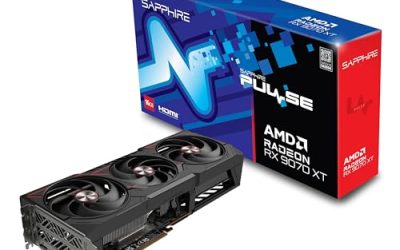
| Sapphire Pulse AMD Radeon RX 9070 XT |
| Check price on Amazon |
 ASUS Prime GeForce RTX 5070 OC Edition |
| Check price on Amazon |
Choosing a current-generation graphics card is really a decision about the resolution and refresh rate you will actually play at for the next few years. A card that feels fast at 1080p can run out of memory at 4K, and the gap between the current tiers is mostly about how much headroom you buy today. The other real decision is fit: this generation’s coolers are long and thick, and your case and power supply narrow the list before performance does.
This roundup serves three groups: players stepping up to 1440p high-refresh gaming, builders who want a card that holds up at 4K, and small-form-factor owners whose cases rule out the biggest coolers. Every card below is a current-generation model from the RTX 50 series or the Radeon RX 9000 series, and each one was picked from the names and specifications on its Amazon page, with stock checked before writing.
Our Top Picks
Top 3 picks at a glance
Quick Picks
As an Amazon Associate we earn from qualifying purchases.
| Product | Best for | Key spec from title |
|---|---|---|
| Gigabyte GeForce RTX 5080 WINDFORCE OC SFF 16G | 4K high-refresh gaming | 16GB GDDR7, 2670 MHz core clock |
| Gigabyte GeForce RTX 5070 Ti Eagle OC SFF 16G | 1440p high refresh with headroom | 16GB GDDR7, PCIe 5.0 |
| Sapphire Pulse AMD Radeon RX 9070 XT | Raster-focused gaming on AMD | 16GB GDDR6, boost up to 2970 MHz |
| ASUS Prime GeForce RTX 5070 OC Edition | Compact small-form-factor builds | 12GB GDDR7, 2.5-slot design |
How to Choose
Start With Your Monitor, Not the Card
Your display sets the tier you need. A 1080p 144Hz panel is satisfied by the lower current cards, while 1440p high-refresh gaming is where the middle of this generation earns its keep, especially in newer titles with heavy texture loads. At 4K, memory capacity and bandwidth matter as much as raw speed, because upscaling quality settings still lean on the frame buffer. Decide the resolution and frame rate you will not compromise on, then buy the lowest tier that clears that bar with room to spare.
Memory Capacity Decides How Long the Card Lasts
This generation splits cleanly at 12GB and 16GB. Twelve gigabytes still runs today’s games well at 1440p, but texture packs and frame generation both consume buffer, and several recent releases already push past that figure at higher settings. Sixteen gigabytes is the safer long-term choice for 4K and for anyone who keeps a card through two upgrade cycles. Also check the memory type in the listing title: GDDR7 cards move data faster per pin than GDDR6 cards, which partly offsets a narrower bus.
Check the Cooler Against Your Case
Current coolers are the most common reason a card goes back. Measure the empty length from the rear bracket to the front fan or radiator, then compare it with the card length in the listing, and count the slot thickness honestly: a 2.5-slot card usually blocks the slot beneath it. SFF-Ready models follow a published size envelope, which helps in compact cases, but even they need the power connector’s bend room above or beside the card. Leave clearance for airflow rather than wedging the card against a panel.
Power Supply and Connectors
Read the listing for the connector type before assuming your power supply works. Most cards here use the 16-pin connector, often with an adapter in the box for older supplies, while the Sapphire card below uses two familiar 8-pin plugs. Wattage headroom matters because these cards spike above their average draw in bursts. If your supply is older or close to its limit, treat a replacement as part of the upgrade, and never run a 16-pin adapter through a sharp bend at the plug.
The 4 Best Options
Gigabyte GeForce RTX 5080 WINDFORCE OC SFF 16G
- Best for: 4K high-refresh gaming in a case that cannot take the largest flagship coolers.
- GPU: NVIDIA GeForce RTX 5080 (Blackwell architecture)
- Memory: 16GB GDDR7, 256-bit
- Core clock: 2670 MHz
- Interface: PCI Express 5.0 x16
4K high-refresh gaming in a case that cannot take the largest flagship coolers.
Availability was limited at the last check and the seller was not confirmed, so confirm the seller and the V2 model code on the listing before ordering.
The Windforce OC SFF is the strongest card in this roundup and the one aimed squarely at 4K. Its 16GB of GDDR7 and 2670 MHz core clock give it the headroom for high-refresh 4K with ray tracing on, and DLSS 4 frame generation stretches that further in supported games. Despite the performance, Gigabyte built it to the SFF-Ready envelope at 2.5 slots, so it fits cases that reject the oversized flagship coolers from other brands. It suits builders who want one card to carry a premium monitor for years.
Watch out for: Availability was limited at the last check and the seller was not confirmed, so confirm the seller and the V2 model code on the listing before ordering.
Gigabyte GeForce RTX 5070 Ti Eagle OC SFF 16G
- Best for: 1440p high-refresh gaming with 16GB of memory headroom.
- GPU: NVIDIA GeForce RTX 5070 Ti
- Memory: 16GB GDDR7, 256-bit
- Interface: PCI Express 5.0
- Cooling: WINDFORCE cooling system
1440p high-refresh gaming with 16GB of memory headroom.
The Eagle is the compact line, so check the card length against your case, and confirm the listing is the OC SFF 16G version before ordering.
The Eagle OC SFF is the step many 1440p players should look at first. It carries the same 16GB of GDDR7 as the 5080, which matters more for longevity than the modest clock differences between partner models, and it holds up at 4K when you lean on DLSS upscaling. Gigabyte’s Eagle line skips the cosmetic extras of its Aorus range, so the money goes into the cooler and the board. Pick it if you play at 1440p high refresh today and want memory headroom for tomorrow’s texture loads.
Watch out for: The Eagle is the compact line, so check the card length against your case, and confirm the listing is the OC SFF 16G version before ordering.
Sapphire Pulse AMD Radeon RX 9070 XT
- Best for: Raster-focused 1440p and 4K gaming on the AMD platform.
- GPU: AMD Radeon RX 9070 XT, RDNA 4 architecture
- Memory: 16GB GDDR6, 256-bit
- Boost clock: up to 2970 MHz
- Outputs: 2 x HDMI, 2 x DisplayPort
Raster-focused 1440p and 4K gaming on the AMD platform.
The cooler is long and three slots thick, so measure your case first; Sapphire lists a 750W power supply as the minimum for this card.
The Pulse is the Radeon option for players who care about raw raster performance per tier rather than the GeForce software stack. Its 16GB of GDDR6 matches the memory capacity of the two cards above, and the boost clock runs up to 2970 MHz under Sapphire’s Tri-X cooling. You give up DLSS in exchange for FSR upscaling and a simpler ownership picture: two standard 8-pin power plugs and no adapter. It fits players whose games lean on raster rendering and who prefer AMD’s driver features.
Watch out for: The cooler is long and three slots thick, so measure your case first; Sapphire lists a 750W power supply as the minimum for this card.
ASUS Prime GeForce RTX 5070 OC Edition
- Best for: Small-form-factor builds that still want current-generation performance at 1440p.
- GPU: NVIDIA GeForce RTX 5070 (Blackwell architecture)
- Memory: 12GB GDDR7
- Interface: PCIe 5.0
- Outputs: HDMI 2.1, DisplayPort 2.1
Small-form-factor builds that still want current-generation performance at 1440p.
The 12GB frame buffer is the tightest here for 4K texture packs, and this OC Edition shares its listing family with a non-OC Prime, so confirm the model code PRIME-RTX5070-O12G.
The Prime OC Edition is the compact pick. ASUS built it to the SFF-Ready guidance at 2.5 slots with three Axial-tech fans, so it drops into small cases that shut out most of this generation, and the dual BIOS lets you choose a quieter fan curve after installation. The compromise is memory: 12GB of GDDR7 is comfortable at 1440p today, but it is the first specification on this page that future texture-heavy games will squeeze. Choose it when case size, not resolution, is your binding constraint.
Watch out for: The 12GB frame buffer is the tightest here for 4K texture packs, and this OC Edition shares its listing family with a non-OC Prime, so confirm the model code PRIME-RTX5070-O12G.
Which One Fits Your Situation
You Play at 4K on a High-Refresh Monitor
Take the RTX 5080 Windforce OC SFF. It has the clock speed and memory bandwidth to drive a 4K panel at high settings without leaning entirely on upscaling, and its SFF-Ready body still fits mid-size cases. The 5070 Ti can reach 4K with DLSS doing more of the work, but the 5080 is the card you buy when the monitor is the centerpiece of the desk.
You Play at 1440p and Keep Cards for Years
Choose between the RTX 5070 Ti Eagle OC SFF and the Sapphire Pulse RX 9070 XT. Both carry 16GB of memory, which is the specification that decides how gracefully a card ages at 1440p. Pick the Eagle if your games use DLSS or ray tracing heavily; pick the Pulse if your library is raster-first and you prefer standard 8-pin power cables.
Your Case Is Small or Already Crowded
The ASUS Prime RTX 5070 OC Edition was designed for this problem. Its 2.5-slot SFF-Ready body and triple-fan cooler fit compact cases that reject most current cards, and the dual BIOS quiet mode suits a PC that sits beside the monitor. Check the 12GB memory against your resolution target before committing, because that is the trade you are making for the fit.
You Are Upgrading an Older Power Supply Too
If the supply is being replaced anyway, any card here works, but the Sapphire Pulse keeps the wiring simplest with two 8-pin connectors and a published 750W minimum. The three GeForce cards use the 16-pin connector, so budget for a modern supply with that cable included rather than relying on adapters bundled in the box.
Common Mistakes
- Buying the tier for the monitor you might get someday instead of the one on your desk today.
- Checking card length but forgetting slot thickness, then losing the motherboard slot below the card.
- Assuming a 16-pin adapter in the box makes an old, undersized power supply safe to keep.
- Mixing up partner model codes at checkout and ordering the non-OC or non-SFF version of the same card.
- Ignoring memory capacity because two cards share a GPU name, when the 12GB and 16GB versions age very differently.
Frequently Asked Questions
Is 12GB of memory enough for current games?
At 1080p and 1440p, yes for the great majority of current titles at sensible settings. The pressure appears at 4K, with maximum texture packs, or when frame generation adds its own memory cost on top. If you plan to keep the card for several years or move to a 4K monitor, the 16GB cards in this roundup are the safer buy.
Does the motherboard need a PCIe 5.0 slot for these cards?
No. All four cards use a PCIe 5.0 interface but run in older slots as well, and the bandwidth difference at x16 width is small for gaming. What matters more is that the slot is a full-length x16 slot with room beneath it for the cooler, and that your case leaves the fans enough air to breathe.
Which of these cards is quietest?
None of the listings promise a noise figure, so judge by the hardware: larger coolers with three fans generally spin slower for the same temperature. The ASUS Prime adds a dual BIOS with a quiet mode, which is the most concrete noise feature any card here lists. Case airflow will still decide the final result more than the choice between these coolers.
Should I wait for the next generation instead?
Only if your current card still plays your games at settings you accept. This generation is established, partner models are widely listed, and the performance steps between tiers are clear, which makes choosing easier than during a launch window. Waiting buys you uncertainty about both timing and what the next launch does to the tiers you are comparing today.
Related guides
More from Amazon
Programs that pair well with the guide above. Offers and eligibility are set by Amazon and may change.
Free shipping on eligible items, Prime Video and more. Eligible new members can start with a free trial.
Start a Prime free trialAd-free music streaming. Eligible new subscribers can start with a free trial.
Try Music Unlimited freeA Prime membership for ages 18-24 with a trial period. Eligibility is set by Amazon.
See Prime for Young AdultsAudiobooks and podcasts to listen to on the go. Eligible new members can start with a free trial.
Try Audible freeAs an Amazon Associate we earn from qualifying purchases.