Handheld play on a Nintendo Switch asks a real question of every owner: do the slim Joy-Con controllers still feel good after an hour of play, or do cramped hands and tiny sticks get in the way of the game? The HORI Split Pad Pro answers that question by replacing both Joy-Con halves with full-size grips that slide onto the same rails, turning the console into something closer to a traditional gamepad while it stays in handheld mode. That trade is the heart of this assessment, because the comfort gains are large and the missing features are just as real.
This guide is written for handheld-first players who spend most of their time away from the dock, for action and shooter fans who want steadier aim, and for anyone whose hands ache after long sessions with the standard controllers. It walks through what the Split Pad Pro changes about the feel of the console, which features it adds, which ones it leaves behind, and who should buy it instead of living with the Joy-Con pair that came in the box.
Quick Picks
As an Amazon Associate we earn from qualifying purchases
The short version is simple: if handheld comfort matters more to you than motion controls and rumble, this is the grip to look at first.
| Product | Best for | Key spec from title |
|---|---|---|
| HORI Split Pad Pro (Black) | Handheld players who want full-size controls | Full-size analog sticks and precision D-pad |
How to Choose
Grip Size and Hand Comfort
The first thing to judge in any handheld grip is how it fills your hands, because a controller that looks fine on a shelf can still leave your fingers curled and your palms aching after a long session. The Split Pad Pro uses a much larger grip than the Joy-Con pair, with room for all four fingers to wrap around each side and a shape that keeps your wrists closer to a neutral angle. That matters most in games that demand constant movement, where a cramped grip slowly turns into fatigue and then into sloppy inputs. Players with larger hands notice the difference within minutes, while players with smaller hands should still try to picture the added bulk, since the console becomes wider and heavier in the hands. Check how you hold the console during boss fights and long exploration stretches, and ask whether your pinky fingers currently dangle with nothing to rest on. If they do, a full-size grip is the single biggest comfort upgrade available for handheld play.
Analog Sticks and D-Pad Quality
Sticks and the D-pad decide how precisely your character moves, so they deserve more attention than any other part of a handheld controller. The Split Pad Pro carries full-size analog sticks with a longer throw than the Joy-Con sticks, which gives aiming and movement a steadier, more deliberate feel and makes small corrections easier to land. The D-pad is a single cross-shaped pad rather than four separate buttons, so diagonal inputs register cleanly and menu navigation feels direct instead of mushy. That difference shows up clearly in fighting games, platformers, and any title where a wrong diagonal can send you off a ledge. Before settling on any grip, think about the games you play most: shooters and action titles reward the longer stick travel, while puzzle and retro titles reward the true D-pad. A controller that nails both is rare in the handheld space, and that combination is the core strength of this design.
Rear Buttons and Turbo Functions
Extra inputs on the back of a controller sound like a small detail until you use them in a game that asks for jumps, dodges, and item use at the same time. The Split Pad Pro adds one assignable rear button to each half, letting you move a command off the face buttons and keep your thumbs on the sticks during the moments that matter most. The Turbo function holds a button down in rapid repeated presses for you, which helps in games built around repeated taps and in grinding stretches where mashing the same button wears out your thumb. These are the features that separate a comfort grip from a performance grip, and they are worth mapping to your own habits: a player who struggles with claw grips gains the most from rear buttons, while a player who mostly explores open worlds may rarely touch them. Either way, the functions are there without any software to install, and they work the moment the pads are attached to the console.
What You Give Up
Every handheld grip makes a trade, and the honest way to judge the Split Pad Pro is to weigh what it removes alongside what it adds. The pads contain no motion controls, no HD Rumble, no NFC reader for amiibo, and no infrared camera, so games that rely on gyro aiming, vibration feedback, or amiibo scanning will feel incomplete or will ask you to swap back to the Joy-Con pair. The pads also work only while attached to the console in handheld mode, with no wireless mode and no detached play, so they cannot replace a wireless controller for docked sessions or tabletop multiplayer. Finally, the Split Pad Pro does not work with the Nintendo Switch 2, which matters for anyone planning to move to the newer console. None of these limits makes the product a poor choice, but each one rules out a type of buyer, and knowing them before you buy beats discovering them during your first session.
The Best Option
HORI Split Pad Pro (Black)
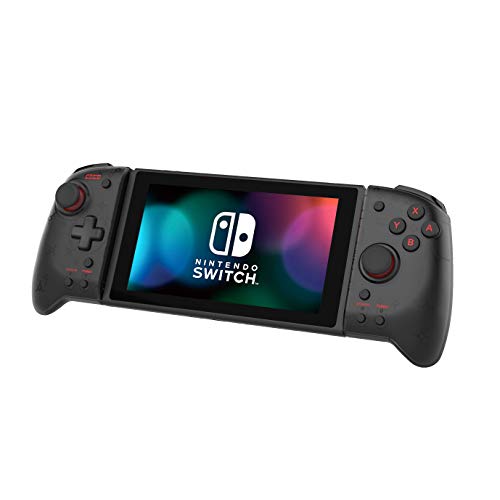
The HORI Split Pad Pro in translucent black is the standard version of the product and the one most handheld players should look at first, because it delivers the full comfort upgrade without any themed markup or special-edition hunting. Its full-size sticks and precision D-pad change the feel of the console immediately, the larger grips keep hands relaxed through marathon sessions, and the assignable rear triggers plus Turbo add genuine utility for action-heavy games. It slides onto the console rails just like the Joy-Con pair, draws its power from the console itself, and stays attached when the console goes into the dock, so there is no battery to charge and no pairing step to forget. The translucent black shell matches the look of a standard Pro-style controller closely enough that the whole setup feels deliberate rather than cobbled together. For anyone who plays mostly in handheld mode and wants a steadier, more comfortable grip, this is the version to buy, and the missing features are the only real reason to pause.
Specs
- Full-size analog sticks for handheld mode
- Precision D-pad
- Large shoulder buttons
- Larger grip, buttons, triggers, analog sticks, and D-pad
- Assignable rear triggers on the left and right sides
- Turbo functionality
- Translucent Black design
- Officially Licensed by Nintendo
- Fits into the Nintendo Switch Dock while attached
- Model number NSW-298U
- Dimensions 6.69 x 6.22 x 2.17 inches
- Item weight 8 ounces
- Does not include Motion Controls, HD Rumble, NFC, or IR camera
Best for: Handheld-first players who want full-size controls and longer comfortable sessions.
Watch out for: It has no motion controls, no rumble, no NFC, and no wireless mode, and it does not work with the Nintendo Switch 2, so confirm those limits fit how you play before buying.
Which One Fits Your Situation
You Play Long Sessions in Handheld Mode
If your typical session runs past the hour mark and your hands are the first thing to complain, the Split Pad Pro is the right call. The larger grips spread the work across your whole hand instead of pinching it between two slim rails, and the full-size sticks keep your thumbs from sliding into awkward angles as the session wears on. Pick the black version, attach both halves, and give yourself one full evening with it before judging, since the added width feels unusual for the first few minutes and then fades into the background. Players who travel with the console or play in bed gain the most here, because those are the sessions where comfort decides whether you keep playing or put the console down early.
You Play Action Games and Shooters
Fast games punish small sticks and cramped buttons, and that is exactly where the Split Pad Pro earns its place. The longer stick travel makes aiming steadier, the true D-pad keeps movement inputs clean, and the rear triggers let you jump or dodge without lifting a thumb off the right stick. Map the action you use most under pressure to a rear button, turn on Turbo for the repeated-tap weapons and tools, and the controller begins to feel like it was built around your loadout. This is the situation where the missing motion controls hurt least, since most competitive handheld play relies on sticks rather than gyro aiming anyway.
Your Hands Cramp With the Standard Controllers
Cramping is a clear signal that the shape of the controller does not match the shape of your hands, and no amount of practice fixes a grip that is simply too small. The Split Pad Pro solves the shape problem directly by giving each hand a full grip to hold, with the buttons spaced the way they are on a home console controller. If you have ever paused a game to stretch your fingers or shake out your palms, this is the fix to try before anything else. The console becomes wider and a little heavier, but the weight sits evenly across both hands, and most players find that trade easy to accept once the cramping stops.
You Mostly Play Docked or on the TV
Docked players should skip this product entirely, because it only works while attached to the console and brings nothing to a TV session. If the console spends its life in the dock and you play with a wireless controller from the couch, the Split Pad Pro would sit unused, and its missing wireless mode and missing rumble would be pure downside. In that situation, keep the Joy-Con pair for handheld trips and put your attention toward a proper wireless controller for the living room instead. The Split Pad Pro is a handheld specialist, and buying a specialist for a job you never do is the fastest way to regret a purchase.
Common Mistakes
- Buying the Split Pad Pro for docked or TV play, where it cannot work at all because it has no wireless mode and only functions while attached to the console.
- Expecting motion controls or rumble in games that rely on them, then discovering mid-game that gyro aiming and vibration feedback are simply absent.
- Assuming it works with the Nintendo Switch 2, when the pads are built for the original Switch rails and do not fit the newer console.
- Picking a themed edition for the artwork without checking that the standard black version is the same hardware underneath, and then paying extra for a paint job.
- Forgetting to detach the pads before trying tabletop multiplayer, since the two halves cannot act as separate wireless controllers for a second player.
- Skipping the rear-button setup and Turbo assignment, which leaves the two most useful extra features unused for the entire life of the controller.
Frequently Asked Questions
Does the HORI Split Pad Pro work in docked mode?
No, the pads only work while attached to the console in handheld mode, and they have no wireless mode for docked or tabletop play. The good news is that the console still fits into the dock with the pads attached, so you can leave them on between sessions without removing them each time. For TV play you need a separate wireless controller, and the Joy-Con pair remains the right tool for tabletop multiplayer with a second player.
Can I use the Split Pad Pro with the Nintendo Switch OLED model?
Yes, the pads slide onto the same rails as the Joy-Con pair and work with the OLED model as well as the standard Switch, and the console still fits its dock while the pads are attached. The OLED screen changes nothing about how the pads connect or how the controls behave, so owners of either model get the same comfort upgrade. The one console it does not work with is the Nintendo Switch 2, which uses different rails and a different form factor.
What features are missing compared with the Joy-Con pair?
The Split Pad Pro has no motion controls, no HD Rumble, no NFC reader for amiibo, and no infrared camera, so any game feature built on those sensors will not work while the pads are attached. That trade is the core decision in this assessment: you gain full-size sticks, a true D-pad, larger grips, rear triggers, and Turbo, and you give up the sensors. If a game you love depends on gyro aiming or vibration cues, keep the Joy-Con pair nearby and swap back for those sessions.
Do the rear triggers and Turbo need any software or setup?
No extra software is required, because the rear triggers and Turbo are built into the hardware and configured with button combinations on the pads themselves. You hold a rear button and press the face button you want it to copy, and the assignment is stored until you change it. Turbo works the same way, letting a single hold produce repeated presses for the assigned button. The whole setup takes under a minute, and nothing needs to be installed on the console.
Related guides
More from Amazon
Programs that pair well with the guide above. Offers and eligibility are set by Amazon and may change.
Free shipping on eligible items, Prime Video and more. Eligible new members can start with a free trial.
Start a Prime free trialAd-free music streaming. Eligible new subscribers can start with a free trial.
Try Music Unlimited freeA Prime membership for ages 18-24 with a trial period. Eligibility is set by Amazon.
See Prime for Young AdultsAudiobooks and podcasts to listen to on the go. Eligible new members can start with a free trial.
Try Audible freeAs an Amazon Associate we earn from qualifying purchases.