Our Short List of 3

- Best for: Long coding sessions at a fixed desk with lots of editor shortcuts.
- HERO 25K sensor, up to 25,600 DPI
- 11 programmable buttons
- Dual-mode hyper-fast scroll wheel
- Five 3.6g tuning weights included

- Best for: Coders who want a thumb rest and an ergonomic shape for all-day comfort.
- Focus+ 26K DPI optical sensor
- 11 programmable buttons
- HyperScroll tilt wheel
- Chroma RGB lighting, 11 zones

- Best for: Coders who want the most macros on one mouse, such as IDE power users.
- Optical sensor, up to 8,200 DPI
- 20 programmable buttons, including a 12-button thumb panel
- G-Shift button doubles the actions on every button
- RGB backlit lighting
All 4 Picks at a Glance
| Product | Specs | Action |
|---|---|---|
| Logitech G502 HERO |
| Check price on Amazon |
| Razer Basilisk V3 |
| Check price on Amazon |
| Logitech G600 MMO |
| Check price on Amazon |
 Logitech G502 Lightspeed |
| Check price on Amazon |
A coder’s mouse earns its keep in the quiet hours: thousands of small movements between editor, terminal, and browser, repeated across a full workday. The real decision is not which mouse has the highest sensor numbers on the box, but which shape keeps your hand relaxed at hour six and which buttons carry the shortcuts you reach for a hundred times a day. A gaming mouse earns a place on a programmer’s desk when its extra buttons map to build, run, debug, and refactor commands, and when its sensor tracks cleanly across a wide monitor without jitter.
This guide is for developers who code for hours at a stretch, programmers who switch between an editor and a game after work, and anyone who wants a single mouse that handles both. The four mice below were chosen from the names and specifications on their Amazon listings, covering a wired classic with tunable weight, an ergonomic thumb-rest design, a macro-heavy MMO mouse, and a wireless pick for a tidy desk.
Our Top Picks

Top 3 picks at a glance
Quick Picks
As an Amazon Associate, we earn from qualifying purchases.
| Product | Best for | Key spec from title |
|---|---|---|
| Logitech G502 HERO | Long coding sessions with lots of shortcuts | HERO 25K sensor, 25,600 DPI, 11 buttons |
| Razer Basilisk V3 | Ergonomic comfort with a thumb rest | Focus+ 26K DPI sensor, 11 programmable buttons |
| Logitech G600 MMO | Maximum macros under the thumb | 20 programmable buttons, RGB backlit |
| Logitech G502 Lightspeed | Wireless freedom at the desk | HERO 25K sensor, PowerPlay compatible |
How to Choose
Count the buttons you will actually use
A mouse with eleven or twenty programmable buttons only helps if the buttons sit where your thumb can find them without looking. Before choosing, list the commands you repeat most: build and run, step over and step into in the debugger, find and replace, switching between editor tabs, and jumping to a definition. A thumb panel with two rows of six works well when each button has a distinct shape or position you can learn by touch, while a mouse with three thumb buttons suits coders who only want copy, paste, and a couple of macros. More buttons also mean more software setup, so check that the mouse stores profiles on board if you move between machines.
Pick a shape that survives a full workday
Comfort decides whether a mouse works for coding, because the same hand that writes code all day is the hand that holds the mouse. A larger palm grip with a thumb rest spreads the hand out and keeps the wrist in a neutral line, which matters more over eight hours than a few grams of weight. Smaller mice suit fingertip grips and quick movements, but they can leave the palm unsupported during long typing breaks. If your whole palm rests on the mouse, choose a full-size ergonomic shell; fingertip grips suit a shorter, lighter shape. A mouse that feels fine for an hour of gaming can still ache by late afternoon, so shape comes before sensor numbers.
Decide wired or wireless for your desk
A wired mouse never needs charging and never drops its connection mid-compile, which is why many developers keep one on the desk. The cable is the trade-off: it can drag across the desk and catch on a notebook or a monitor arm, so a mouse bungee or a tidy cable route helps. A wireless mouse clears the desk and travels well between home and office, and wireless links hold a steady connection through a full workday. The catch is the battery: some wireless mice run for weeks on a charge, while others need a cable every few days. If you hate thinking about charging, choose wired; if you move the mouse between machines or rooms, wireless is worth the habit.
Check the software and the sensor range
Gaming mice ship with software that assigns macros, adjusts sensitivity and saves profiles, which matters as much as the hardware. Check that the software runs on your operating system and lets you bind keys, record a macro, and switch profiles per application, so your editor shortcuts load when the editor opens and your game profile loads in-game. On the sensor side, a range of 200 to 25,600 DPI looks large on the box, but most coders settle between 800 and 2,400 DPI for precise text selection on a monitor. What matters more is tracking at low speeds and a sensor that does not accelerate or skip when you move slowly across a line of code.
The 4 Best Options
Logitech G502 HERO
- Best for: Long coding sessions at a fixed desk with lots of editor shortcuts.
- HERO 25K sensor, up to 25,600 DPI
- 11 programmable buttons
- Dual-mode hyper-fast scroll wheel
- Five 3.6g tuning weights included
Long coding sessions at a fixed desk with lots of editor shortcuts.
The 121-gram base weight is heavy for a mouse, and the stiff cable can drag unless routed neatly.
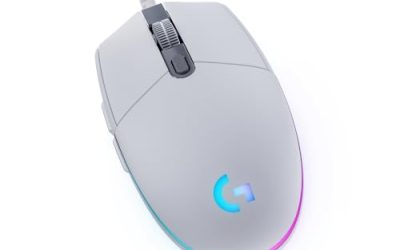
The G502 HERO is the wired classic in this guide, and its shape is the reason it fits long coding days. The palm grip is full and sculpted, with a thumb rest that keeps the hand open instead of curled, and the eleven programmable buttons put build, run, and debug commands under the thumb and index finger. A dual-mode scroll wheel flips between a notched step for precise scrolling and a free spin for flying through long files, and the five tuning weights let you set the heft to your taste. It is a large mouse, so small hands may find the far thumb buttons a stretch.
Watch out for: The 121-gram base weight is heavy for a mouse, and the stiff cable can drag unless routed neatly.
Razer Basilisk V3
- Best for: Coders who want a thumb rest and an ergonomic shape for all-day comfort.
- Focus+ 26K DPI optical sensor
- 11 programmable buttons
- HyperScroll tilt wheel
- Chroma RGB lighting, 11 zones
Coders who want a thumb rest and an ergonomic shape for all-day comfort.
This is the wired Basilisk V3, not the wireless V3 X HyperSpeed or the V3 Pro, so check the model number on the listing.
The Basilisk V3 is the ergonomic pick, built around a thumb rest and a shape that fills the palm without forcing the fingers wide. Its eleven programmable buttons include a multi-function trigger under the thumb, and the HyperScroll tilt wheel switches between tactile steps and free spin, which suits both precise code navigation and fast scrolling through logs. The Focus+ 26K optical sensor tracks cleanly at the low sensitivity many coders prefer, and the Chroma lighting can mark which profile is active. The companion software takes a few minutes to set up, so plan for that before the first workday.
Watch out for: This is the wired Basilisk V3, not the wireless V3 X HyperSpeed or the V3 Pro, so check the model number on the listing.
Logitech G600 MMO
- Best for: Coders who want the most macros on one mouse, such as IDE power users.
- Optical sensor, up to 8,200 DPI
- 20 programmable buttons, including a 12-button thumb panel
- G-Shift button doubles the actions on every button
- RGB backlit lighting
Coders who want the most macros on one mouse, such as IDE power users.
The thumb panel takes time to learn by touch, and the mouse is large and right-handed only.
The G600 is the macro-heavy option, the pick for coders who want the most commands under one thumb. Twenty programmable buttons include a twelve-button panel arranged in two rows of six, and the G-Shift button doubles the action on every other button, so a single thumb can carry build, test, debug, and navigation commands. The sculpted right-handed shape supports a palm grip through long sessions, and the RGB lighting can show which profile is active. It is an older design and a heavy one at 133 grams, and the thumb panel takes a week or two to learn by touch, so patience is part of the package.
Watch out for: The thumb panel takes time to learn by touch, and the mouse is large and right-handed only.
Logitech G502 Lightspeed
- Best for: Coders who want the G502 shape without a cable, moving between rooms and machines.
- HERO 25K sensor
- LIGHTSPEED wireless connection
- PowerPlay wireless charging compatible
- Tunable weights
Coders who want the G502 shape without a cable, moving between rooms and machines.
This is the original G502 Lightspeed, not the newer G502 X Lightspeed, so check the model on the listing.
The G502 Lightspeed takes the same familiar G502 shape and cuts the cord, which makes it the pick for coders who move between a desk, a couch, and a meeting room. The HERO 25K sensor and the tunable weight system carry over from the wired HERO, so the feel is familiar, and the programmable buttons map to the same editor shortcuts. LIGHTSPEED wireless holds a steady link through a workday, and the mouse works with PowerPlay charging mats if you want to stop thinking about batteries. Battery life is the thing to watch: keep the cable nearby for the days you forget to charge.
Watch out for: This is the original G502 Lightspeed, not the newer G502 X Lightspeed, so check the model on the listing.
Which One Fits Your Situation
You code for eight hours straight
Pick the Razer Basilisk V3. The thumb rest and the full palm shape keep the hand open through a long day, and the HyperScroll wheel makes moving through long files and logs less tiring. Set the eleven buttons to the commands you repeat most, such as build, run, and find, and let the lighting show which profile is active. The wired connection means there is nothing to charge at the end of the day.
You live in keyboard shortcuts and macros
Pick the Logitech G600. Twenty buttons under one thumb is more than any other mouse in this guide, and the G-Shift button doubles them, so an entire workflow can live on the mouse. The twelve-button panel takes a week to learn by touch, but once the layout sticks, common commands stop needing the keyboard at all. It is the right pick if your editor is set up around macros and you want the mouse to match.
You want one mouse for work and play
Pick the Logitech G502 HERO. It is the most balanced mouse here: eleven buttons for editor shortcuts, a sensor that tracks cleanly for gaming after work, and a weight system that lets you tune the feel. The dual-mode wheel flips between precise steps for code and free spin for long documents. If you only want one mouse on the desk and it has to cover both jobs, this is the one to start with.
You hate cables and move around a lot
Pick the Logitech G502 Lightspeed. The wireless link frees the desk from cable drag, and the familiar G502 shape means no new grip to learn. It suits coders who pair the mouse with a laptop, carry it to meetings, or switch between a desk and a couch during the day. Just keep the charging cable in the bag, and check the battery level before a long session without a plug nearby.
Common Mistakes
- Buying the mouse with the most buttons and never programming them, so the extra controls go unused.
- Choosing a tiny, light mouse for a palm grip and ending up with an aching hand by afternoon.
- Setting the sensitivity far too high, then fighting the pointer when selecting exact lines of text.
- Ignoring the software: a mouse with strong hardware and weak macro software wastes the buttons.
- Picking a wireless mouse and forgetting to charge it, then losing the pointer during a deadline push.
Frequently Asked Questions
Do gaming mice work well for coding?
Yes. A gaming mouse brings a precise sensor, extra programmable buttons, and a comfortable shape to a desk, and those traits suit coding as much as gaming. The buttons map to editor commands such as build, run, and find, while the sensor tracks cleanly at the low sensitivity used for selecting text. The only trade-off is the styling: RGB lighting and angular shapes look less plain than an office mouse.
How many buttons do I need on a coding mouse?
Five to eleven programmable buttons serve most coders: two thumb buttons for back and forward, plus a few more for build, run, debug, and switching tabs. More buttons help only if you map them to commands you use daily and learn their positions by touch. A twenty-button thumb panel suits heavy macro users, but it takes longer to learn and can slow you down until the layout becomes habit.
Is a wired or wireless mouse better for programming?
Wired is the simpler pick: it never needs charging, never drops its link, and usually weighs less than its wireless twin. A wireless mouse suits coders who move between machines or rooms, and modern wireless links hold steady through a workday. The deciding factor is habit: if you will charge the mouse every week without thinking, wireless is fine; if charging feels like a chore, wired removes the worry entirely.
What DPI should I use for coding?
Most coders settle between 800 and 2,400 DPI on a large monitor, which gives precise text selection without big arm movements. Higher settings suit fast games, not careful editing. Try 1,200 DPI as a starting point, then adjust in small steps until selecting a single line of code feels natural. The exact number matters less than a setting you can control without thinking.
Related guides
More from Amazon
Programs that pair well with the guide above. Offers and eligibility are set by Amazon and may change.
Free shipping on eligible items, Prime Video and more. Eligible new members can start with a free trial.
Start a Prime free trialAd-free music streaming. Eligible new subscribers can start with a free trial.
Try Music Unlimited freeA Prime membership for ages 18-24 with a trial period. Eligibility is set by Amazon.
See Prime for Young AdultsAudiobooks and podcasts to listen to on the go. Eligible new members can start with a free trial.
Try Audible freeAs an Amazon Associate we earn from qualifying purchases.