Our Short List of 3
All 5 Picks at a Glance
| Product | Specs | Action |
|---|---|---|
 Logitech G203 LIGHTSYNC | Check price on Amazon | |
 Razer DeathAdder Essential | Check price on Amazon | |
 Redragon M602 RGB Griffin | Check price on Amazon | |
 Redragon M711 Cobra | Check price on Amazon | |
 Redragon M601 RGB Centrophorus | Check price on Amazon |
A wired gaming mouse is one of the simplest upgrades a PC gamer can make on a tight budget. A cable removes batteries and charging from the equation, keeps latency low, and usually costs less than a wireless equivalent with the same sensor. The catch is that the cheapest mice on the shelf are often office mice with a gaming label, so the sensor, the switches, and the cable matter more than the lighting. This guide compares five wired gaming mice that sit in the lowest budget tier, using the details from each listing to show where each one fits.
As an Amazon Associate, we earn from qualifying purchases.
Top 3 picks at a glance
Quick Answer
For most players, the Logitech G203 LIGHTSYNC is the safest choice, with an 8,000 DPI sensor, six programmable buttons, and lighting that can be tuned or switched off. The Razer DeathAdder Essential suits larger right hands, while the Redragon M602 RGB Griffin is the pick for extra programmable buttons.
How to Choose
Sensor first. Every mouse here lists an optical sensor, and the headline number is its maximum DPI. A higher ceiling does not make a mouse better on its own, because most players settle somewhere in the low thousands for everyday play and only raise sensitivity for specific games. What matters more is that the sensor tracks cleanly at the DPI you actually use and that the steps between settings are small enough to fine-tune. Look for on-the-fly DPI buttons if you switch sensitivity between games, and treat very large maximum numbers as headroom rather than a reason to buy.
Shape second. A mouse that fights your hand will cost you more accuracy than any sensor ever saves. Palm-grip players with larger hands usually suit taller, right-handed ergonomic shells such as the DeathAdder Essential, while claw and fingertip players often prefer the smaller, symmetrical body of the G203. If you can, compare the length and width in the listing against a mouse you already own. A shape that matches your grip and hand size is worth more than extra buttons you will never reach.
Buttons third. Six buttons cover left click, right click, scroll click, two side buttons, and a DPI switch, which is enough for most shooters and everyday play. Extra programmable buttons help in games with many abilities, but only if they sit where your thumb can reach them without shifting your grip. The Redragon mice here pack in more buttons than the big-brand options, which is their main advantage.
Cable fourth. A wired mouse lives or dies by its cable, because a stiff cord drags across the desk and changes how the mouse feels in fast movements. Braided cables resist tangling and fraying better than plain rubber ones, and a longer cable gives more freedom if the PC sits on the floor. All five mice here connect over USB, so no batteries or receivers are involved.
Lighting and software last. RGB lighting is cosmetic, and on a tight budget it is the first thing to compromise on. All five mice here carry some lighting, and most of it can be dimmed or switched off. Software matters more: Logitech G HUB and Razer Synapse let you remap buttons and store profiles, while Redragon’s software covers macros and lighting with a simpler toolset. If you play on a shared computer, a mouse that remembers its settings on board is a real advantage.
Logitech G203 LIGHTSYNC
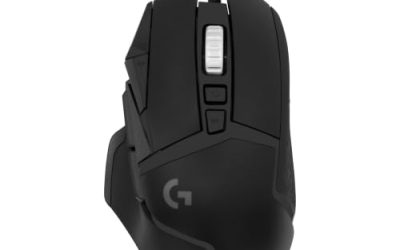
The G203 LIGHTSYNC is the most proven mouse in this group, and the one most players should start with. Logitech’s gaming-grade optical sensor reaches 8,000 DPI in steps that can be adjusted through G HUB software, and the tracking stays clean at the sensitivities most players actually use. The shape is a compact, symmetrical egg that suits small to medium hands and works well for claw and fingertip grips, while palm players with larger hands may find it a touch small. Six programmable buttons cover the essentials, and onboard memory stores your settings so the mouse keeps its setup when it moves between computers. LIGHTSYNC RGB runs in three zones around the rear of the shell and can be tuned to match the rest of a setup or switched off entirely. The rubber cable is the weakest part of the package, since it is less flexible than a braided cord and can drag on a bare desk, so a smooth pad helps. Build quality is solid for the tier, with a two-year warranty listed on the product page, and the white colorway keeps the same specification as the other colors. For a first gaming mouse, or a dependable spare, it is hard to fault.
Razer DeathAdder Essential
The DeathAdder Essential brings Razer’s most famous shape down to the lowest budget tier. The right-handed ergonomic shell is long and tall, with a flared thumb rest that supports the hand through long sessions, which makes it the natural pick for palm-grip players with medium to large hands. The optical sensor tops out at 6,400 DPI, lower than the numbers on the Redragon mice here, but it is a true optical sensor with a 1,000 Hz polling rate, and the tracking is steady at everyday sensitivities. Five programmable buttons keep the layout simple: two main clicks, a scroll click, and two side buttons, all driven by mechanical switches that Razer rates for 10 million clicks. Lighting is limited to a single green glow on the scroll wheel and logo, which some players will see as a limitation and others as a relief. The cable is a plain rubber cord rather than a braided one, so it benefits from a clear desk and a little slack. One honest note: the listing’s item-weight field reads 0.13 kilograms, while Razer’s own specification lists the mouse at 96 grams, so the heavier figure appears to include packaging. For comfort-first players, the shape alone justifies the pick.
Redragon M602 RGB Griffin
The M602 RGB Griffin is the button-heavy option in this group, built for players who want more controls under the thumb without leaving the budget tier. The ergonomic right-handed shell carries seven programmable buttons, eight in total once the scroll click is counted, along with five memory profiles that can each be tied to a different lighting color. The sensor adjusts through 800, 1200, 1600, 2400, and 7200 DPI, and the listing pairs that range with 10G acceleration, which is plenty for fast flicks in shooters and quick camera turns in open-world games. A built-in weight-tuning system lets the balance be adjusted to taste, and the Teflon feet keep the glide smooth on cloth pads. The braided six-foot cable with a gold-plated connector is a step up from the plain rubber cords on the big-brand mice here, and it resists tangling far better. One honest note: some reproductions of the listing describe nine programmable buttons, while the listing’s own feature bullets count seven programmable buttons and eight in total, so the lower figure is the one to trust. For MMO and ability-heavy games, the extra buttons are the main reason to choose it.
Redragon M711 Cobra
The M711 Cobra pairs the highest DPI ceiling in this group with a light, nimble feel. Its PixArt 3325 optical sensor adjusts from 100 DPI up to 10,000 DPI in steps as small as 100, so sensitivity can be tuned precisely, and the 1,000 Hz polling rate keeps the response consistent. Seven programmable buttons cover the usual layout, and the software allows macros and remapping for players who want more. RGB lighting runs through seven effects with millions of color options, and the ergonomic shell suits right-handed palm and claw grips. At 114 grams it sits between the featherweight esports mice and the heavier MMO-style shells, which makes it a comfortable middle ground for players who lift the mouse often but still want some heft. The 1.8-meter braided cable is flexible enough to stay out of the way, and the Teflon feet help it glide. The main trade-off is brand support: Redragon’s software is functional but less polished than the tools from Logitech and Razer, and documentation is thinner. For players chasing the highest sensor ceiling at this tier, the Cobra is the pick.
Redragon M601 RGB Centrophorus
The M601 RGB Centrophorus is the veteran of this group, a mouse that has been selling in the budget tier for more than a decade, and it still earns its place on value alone. The ergonomic shell is a comfortable right-handed shape with a palm rest that fills the hand, and the eight-piece weight-tuning set lets the balance be adjusted to taste. The listing describes an adjustable sensor that runs from 800 DPI up to 7200 DPI with 4,000 FPS tracking, which covers every sensitivity most players will ever use, and the 11 lighting effects can be disabled entirely for players who prefer a plain desk. Six programmable buttons plus two side buttons bring the total to seven, and three memory profiles store macros for different games. The six-foot braided cable and Teflon feet are better than the price tier usually offers. One honest note: this is the oldest design here, and earlier versions of the Centrophorus were sold with a lower DPI ceiling, so the current listing’s 7200 DPI figure belongs to the updated M601-3 version. Availability can also vary, so check that the listing shows a live buying option before ordering. For players who want the most features for the least money, it remains a strong choice.
Who Should Skip It
Skip this tier entirely if you play at a competitive level where sensor latency and switch consistency decide rounds, because the mice here trade a little precision for a much lower cost. Players with very large hands should also be cautious: the G203 and the Redragon shells are compact, and only the DeathAdder Essential is genuinely shaped for a large palm grip. Anyone who needs wireless freedom should look elsewhere, since every mouse here is wired and none of them offers a wireless mode. If you play on a laptop away from a desk, a short cable and a small shape can also be a drawback. Finally, players who want deep software ecosystems, cloud profiles, and long warranties should consider saving for the next tier, where those extras are standard. For everyone else, the mice in this guide cover the fundamentals well, and the money saved can go toward a better mousepad, which improves tracking more than a fancier sensor.
FAQ
Do wired gaming mice still make sense in 2026?
Yes. A cable removes charging and battery management, keeps the connection simple, and usually costs less than a wireless mouse with a comparable sensor. The only real drawback is cable drag, which a braided cord and a clear desk mostly solve. For a desk-bound setup, wired remains the best value.
How much DPI do I actually need?
Most players settle between 400 and 3,200 DPI for everyday play, with higher settings reserved for fast camera work or high-resolution displays. Every mouse here covers that range comfortably, so the maximum figure matters less than clean tracking at the setting you use. On-the-fly DPI buttons are more useful than a bigger ceiling.
Can these mice handle MMO and strategy games?
Yes, with a caveat. The Redragon M602 RGB Griffin and M601 Centrophorus carry the most programmable buttons, which suits ability-heavy games. The G203 and DeathAdder Essential have fewer buttons, so they suit shooters and simpler layouts better. Check the button layout against the games you play most.
Will these mice work on Mac and Linux?
The G203 and DeathAdder Essential list macOS compatibility, and the Redragon mice work as standard USB pointing devices on most systems. Advanced features such as macros and lighting profiles need Windows software, so on other systems the mice run with default settings. Basic pointing, clicking, and scrolling work everywhere.
Final Verdict
The Logitech G203 LIGHTSYNC is the pick for most players, because it pairs a reliable sensor with a proven shape and software that actually works. Players with larger hands should take the Razer DeathAdder Essential instead, since its ergonomic shell is the most comfortable here. The Redragon M602 RGB Griffin is the right choice for ability-heavy games, with the most programmable buttons in the group, while the M711 Cobra suits players who want the highest DPI ceiling and a light, quick feel. The M601 Centrophorus rounds out the list as the value pick, provided the listing shows a live buying option when you check. Whichever one fits your hand and your games, all five prove the same point: a tight budget is no reason to settle for an office mouse.
Product and ASIN Reference
| Product | ASIN |
|---|---|
| Logitech G203 LIGHTSYNC | B07YN73XN6 |
| Razer DeathAdder Essential | B094PS5RZQ |
| Redragon M602 RGB Griffin | B011HMDZ0Q |
| Redragon M711 Cobra | B0751D11BL |
| Redragon M601 RGB Centrophorus | B00HTK1NCS |
Related guides
More from Amazon
Programs that pair well with the guide above. Offers and eligibility are set by Amazon and may change.
Free shipping on eligible items, Prime Video and more. Eligible new members can start with a free trial.
Start a Prime free trialAd-free music streaming. Eligible new subscribers can start with a free trial.
Try Music Unlimited freeA Prime membership for ages 18-24 with a trial period. Eligibility is set by Amazon.
See Prime for Young AdultsAudiobooks and podcasts to listen to on the go. Eligible new members can start with a free trial.
Try Audible freeAs an Amazon Associate we earn from qualifying purchases.