Our Short List of 3
All 5 Picks at a Glance
| Product | Specs | Action |
|---|---|---|
 Redragon S101-3 PRO Gaming Keyboard and Mouse Combo | Check price on Amazon | |
 Redragon Updated S107 Gaming Keyboard and Mouse Combo | Check price on Amazon | |
 Redragon S101M-KS Wireless Gaming Keyboard and Mouse Combo | Check price on Amazon | |
 RedThunder K10 Wireless Gaming Keyboard and Mouse Combo | Check price on Amazon | |
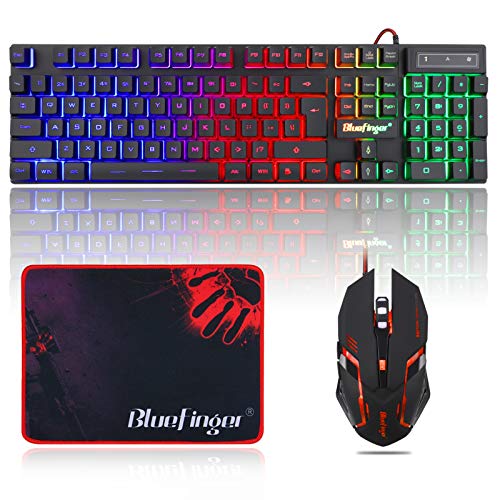 BlueFinger RGB Gaming Keyboard and Backlit Mouse Combo | Check price on Amazon |
A first gaming setup does not need expensive peripherals to feel right. A good keyboard and mouse combo covers the basics in one box: keys that respond cleanly, a mouse that tracks smoothly, and lighting that makes a plain desk look like a gaming station. Buying the two parts together removes the guesswork of matching them, and it usually costs less than buying each part on its own. The five combos below are all sold as a keyboard and a mouse together, with the focus on value rather than flagship features. Read the short guide first, then pick the set that matches your games and your desk.
As an Amazon Associate, we earn from qualifying purchases.
Top 3 picks at a glance
Quick Answer
The Redragon S101-3 PRO is the best cheap gaming keyboard and mouse combo for most new setups, with a full-size RGB keyboard, macro keys, a wrist rest and a mouse that adjusts up to 7200 DPI. If you want a higher-DPI mouse, pick the Redragon S107. For a cable-free desk, the Redragon S101M-KS is the wireless pick.
How to Choose
Start with the connection. A wired combo plugs in with USB cables and never needs charging, which suits a fixed desk where the keyboard and mouse stay in one place. A wireless combo uses a receiver or Bluetooth and keeps the desk clear, but the keyboard and mouse need recharging, so check how the set handles charging before you buy. Either style works for gaming, so the choice comes down to how tidy you want the desk to look.
Next, think about feel. Most cheap gaming combos use membrane keys with a mechanical feel rather than true mechanical switches. The keys press smoothly and quietly, and they suit long sessions of typing and gaming alike. Look for anti-ghosting, which lets the keyboard register several keys pressed at once, because that matters in games where you move, jump and use abilities at the same time. A wrist rest helps during long sessions, and media keys let you change volume without leaving the game.
The mouse matters just as much. Adjustable DPI lets you change how far the pointer moves for a given hand movement, so a low setting gives steady aim and a high setting lets you cross the screen fast. Extra side buttons help in games with many commands, and a comfortable shape matters more than a long spec list, because the mouse sits in your hand for hours. Check the button count and the DPI range on the listing, and match them to the games you play most.
Finally, check size and what is in the box. A full-size keyboard includes a number pad, which is handy for games with many hotkeys, but it takes up more desk space, so measure before ordering and leave room for the mouse to travel. A true combo ships the keyboard and the mouse together under one listing, and the listing should name both parts. Some listings that look like combos add a headset or a mousepad instead, so read the title and the included-items list carefully, and confirm the set works with your operating system.
Redragon S101-3 PRO Gaming Keyboard and Mouse Combo
The Redragon S101-3 PRO is the safest starting point in this guide, and it earns that spot by covering every basic well rather than chasing one headline feature. The box holds a full-size RGB keyboard and a matching wired mouse, so a new setup is complete the moment both USB plugs are in. The keyboard uses membrane keys with a quiet press, and it adds five macro keys on the left side plus a wrist rest, a rare combination at this end of the market. The mouse adjusts from 800 to 7200 DPI, which gives a wide range for different games, and it is programmable through the same Redragon software as the keyboard.
Six backlight modes on the keyboard and ten lighting effects on the mouse give the desk a lively look without needing any extra gear. One honest note: the S101 family has several revisions, and listings for the S101-3, S101-4 and S101-5 look similar at a glance. The pick here is the black S101-3 PRO listing, so confirm the model name on the listing before ordering. The keyboard is full-size, so it needs a desk with room for a number pad and a wrist rest, but for a first setup, few combos give this much control and comfort in one box.
Redragon Updated S107 Gaming Keyboard and Mouse Combo
The Redragon Updated S107 is the pick for players who want the highest mouse sensitivity in this guide. Its mouse reaches up to 10000 DPI through software, which is far beyond what most beginners need, but the headroom means the mouse can be tuned precisely to a fast or slow style. The listing gives the model number as S107-RGB-BA, and the mouse runs at a 1K Hz polling rate, so movements reach the screen quickly. The keyboard brings 25-key anti-ghosting, which keeps multi-key presses registering during busy fights, and the RGB backlighting covers the full board.
This is a wired combo, with the keyboard and the mouse both connecting by USB, so there is nothing to charge and nothing to pair. Setup is plug and play on a PC or laptop, and the software unlocks the higher DPI steps and lighting options for players who want to tune the set. The keys have a mechanical feel without true mechanical switches, which keeps the typing sound soft and the press light. The keyboard layout is full-size, so check desk space before ordering, and remember that the useful part of the high DPI ceiling is the tuning range below it.
Redragon S101M-KS Wireless Gaming Keyboard and Mouse Combo
The Redragon S101M-KS is the wireless pick, and it removes both cables from the desk. It runs in three modes: wired over USB-C, a 2.4G wireless receiver, and Bluetooth, so it can move between a gaming PC and a laptop without re-pairing everything each time. The receiver is a 2-in-1 design, which means one small dongle controls both the keyboard and the mouse, leaving a second USB port free. That single-receiver setup is the detail that makes this combo practical rather than merely wireless.
The keyboard is full-size with RGB backlighting and eight backlight patterns, and it carries ten independent multimedia keys for volume, playback and lighting control. The mouse reaches up to 4800 DPI, which covers everyday gaming well, and it shares the same RGB lighting style as the keyboard. Both parts are rechargeable, so the trade-off for a clear desk is remembering to charge them, and the wired mode covers sessions where the battery runs low mid-game. For a first wireless setup, the S101M-KS keeps the feature list close to its wired siblings while cutting the cords.
RedThunder K10 Wireless Gaming Keyboard and Mouse Combo
The RedThunder K10 Wireless brings a different look to this guide, with pudding keycaps that let the RGB light shine through the sides of the keys. The effect is brighter and more even than a standard backlit board, and it gives the desk a bold style that stands out in photos and streams. The keyboard has a mechanical feel with anti-ghosting, and the mouse is a 7D design that reaches 3200 DPI, which is enough for most games when paired with in-game sensitivity settings. A 3800mAh rechargeable battery powers the keyboard, so the set is built for cable-free play.
The pick here is the black version with pudding keycaps, and the listing pairs the keyboard with a matching wireless mouse under one listing. Both parts connect through a shared wireless receiver, which keeps the setup simple and the desk clear. One honest note: the K10 comes in several colors and finishes, and the listings for the black, white and pink versions carry different model details, so confirm the color and keycap style on the listing before ordering. The 3200 DPI ceiling is lower than the Redragon picks, so players who like very high sensitivity should weigh that against the look and the wireless design.
BlueFinger RGB Gaming Keyboard and Backlit Mouse Combo
The BlueFinger RGB Gaming Keyboard and Backlit Mouse Combo is the simplest entry in this guide. It is a wired set, with a USB keyboard and a USB mouse that plug in and work without software, drivers or charging. The keyboard carries RGB backlighting across a full-size layout, and the mouse is backlit to match, so the pair looks like a set rather than two random parts. For a first setup, a tight budget, or a second PC that needs peripherals fast, that simplicity is the whole appeal.
There is little to configure here, and that is a strength for buyers who want to skip software entirely. The keys have a mechanical feel, the mouse is a straightforward ergonomic shape, and both parts work with laptops and desktop PCs. One honest note: BlueFinger sells a similar-looking kit that adds a headset and a mousepad under a different listing, so confirm that the listing you open is the keyboard and mouse combo on its own. The pick here is the keyboard and mouse set only, with no headset in the box, and the feature list is shorter than the Redragon sets, with no macro keys and no tuning software.
Who Should Skip It
A keyboard and mouse combo is not the right buy for every player, and knowing that before ordering saves a return. Competitive players who already know they want true mechanical switches should skip these sets and buy a mechanical keyboard on its own, because membrane keys with a mechanical feel do not give the same crisp press or the same switch choices. The same goes for players who main fast shooters at a high level and want a lightweight mouse with a top-tier sensor, since a standalone mouse offers shapes and sensors that a budget combo cannot match.
Players who need many programmable mouse buttons should also look elsewhere. MMO and strategy players often want a mouse with a grid of side buttons, and none of the combos here are built for that. Desk space is another reason to pause: most of the combos here use full-size keyboards with number pads, and a full-size board plus a mouse needs a wide desk. Finally, Mac-only users should check compatibility carefully, because these listings are written with Windows PCs in mind, and the software for macros and lighting is aimed at Windows.
FAQ
Do I need a combo or a separate keyboard and mouse?
A combo is the better buy for a first setup, because the keyboard and mouse arrive together, match in style, and cost less than buying each part alone. Separate parts make sense later, once you know which switch feel, mouse shape and DPI range suit your hand and your games.
Are membrane keyboards good enough for gaming?
Yes, for most players. Membrane keyboards with a mechanical feel press smoothly, stay quiet, and handle multi-key presses well when the listing names anti-ghosting. True mechanical switches give a crisper press and more choice, but they cost more and are louder, so membrane is a sensible start.
What mouse DPI should a beginner use?
Start in the middle of the range, around 1600 DPI, and adjust from there. Lower settings give steadier aim in shooters, while higher settings move the pointer faster across the screen. Use the in-game sensitivity slider alongside the DPI button to fine-tune the feel.
Can I use these combos on a console or a laptop?
Most of these combos connect by USB and work as basic keyboards and mice on laptops and many consoles, but the listings are written for Windows PCs. Software features such as macros and lighting control may not work outside Windows, so check the listing for your system before ordering.
Final Verdict
The best cheap gaming keyboard and mouse combo for most new setups is the Redragon S101-3 PRO. It pairs a full-size RGB keyboard with macro keys and a wrist rest with a mouse that adjusts up to 7200 DPI, and it does all of that in one wired box with no charging to think about. It is the set to buy when you want the most features and the fewest compromises in a first setup.
The other four picks each win a narrower contest. The Redragon S107 is the choice for players who want the highest mouse DPI and fast polling, while the Redragon S101M-KS is the pick for a cable-free desk, with tri-mode wireless and one receiver for both parts. The RedThunder K10 suits players who want a bold look, with pudding keycaps and a rechargeable wireless design, and the BlueFinger combo is the pick for the lowest spend and the simplest setup. Match the set to your desk, your games and your budget, confirm the exact model on the listing, and any of the five will get a new setup playing.
Product and ASIN Reference
| Product | ASIN |
|---|---|
| Redragon S101-3 PRO Gaming Keyboard and Mouse Combo | B00NLZUM36 |
| Redragon Updated S107 Gaming Keyboard and Mouse Combo | B0DWMQRK3M |
| Redragon S101M-KS Wireless Gaming Keyboard and Mouse Combo | B0DXTV9BGJ |
| RedThunder K10 Wireless Gaming Keyboard and Mouse Combo | B0BTT2VCRR |
| BlueFinger RGB Gaming Keyboard and Backlit Mouse Combo | B07WCLZ1PL |
Related guides
More from Amazon
Programs that pair well with the guide above. Offers and eligibility are set by Amazon and may change.
Free shipping on eligible items, Prime Video and more. Eligible new members can start with a free trial.
Start a Prime free trialAd-free music streaming. Eligible new subscribers can start with a free trial.
Try Music Unlimited freeA Prime membership for ages 18-24 with a trial period. Eligibility is set by Amazon.
See Prime for Young AdultsAudiobooks and podcasts to listen to on the go. Eligible new members can start with a free trial.
Try Audible freeAs an Amazon Associate we earn from qualifying purchases.