Buying a keyboard and mouse for a PS5 is not the same as buying them for a PC, because the console only hands those controls to games that choose to support them. A combo can feel perfect in the system menus and in one shooter, then do nothing at all in the next title on your home screen. So the real decision is not just wired or wireless, full-size or compact. It is whether the set connects the way your room needs, and whether the games you actually play will accept it once it is plugged in.
This guide is for PS5 owners who play keyboard-and-mouse titles such as shooters, strategy games, and MMOs, and who want one matched set instead of hunting down separate devices. Every pick below is a genuine keyboard-and-mouse combo sold as a single listing, and each one was chosen from its Amazon listing title and specifications, with console compatibility checked against the listing or the brand’s own material.
Top 3 picks at a glance


Quick Picks
As an Amazon Associate we earn from qualifying purchases
| Product | Best for | Key spec from title |
|---|---|---|
| CHONCHOW G220 Wireless Gaming Keyboard and Mouse Combo | Couch play on one receiver | Rechargeable 2500mAh battery, 7D mouse |
| CHONCHOW M102-C 87-Key TKL Gaming Keyboard and Mouse Combo | Small desks and spare mouse room | 87 keys, mouse adjustable 800-3200 DPI |
| Redragon S101-3 PRO Gaming Keyboard and Mouse | Full-size wired control with macros | Programmable keys, independent macro record keys |
| RedThunder K62 60% Gaming Keyboard and Mouse Combo | Wide, fast mouse sweeps | 61 keys, 7200 DPI honeycomb optical mouse |
| BlueFinger Wireless Gaming Keyboard and Mouse Combo | Long wireless sessions, full-size layout | 3200mAh battery keyboard, for Xbox PS4 PS5 PC |
How to Choose
Check Game Support Before Connection Type
The PS5 itself accepts keyboards and mice over USB and Bluetooth, but that system-level support is only half the story. Each game decides for itself whether keyboard and mouse input works inside gameplay, and many controller-first titles ignore both devices completely once a match starts. Before choosing any combo, check the games at the top of your library: competitive shooters and MMOs are the most likely to support this setup, while most single-player action games will not. If your favourite title is not on a support list, no combo in this guide will change that, however good its hardware is.
Pick Wired or 2.4GHz for Your Room
A wired combo is the simplest route on PS5: plug in, and the console sees both devices with no pairing, no charging, and no receiver to lose. The trade-off is cable reach, which matters if your console sits beside a television across the room. A 2.4GHz wireless set solves the distance problem because both devices share one USB receiver, so a single front port handles the whole setup from the couch. Bluetooth pairing is also possible on PS5, but the combos here lean on wired USB or a shared 2.4GHz receiver, which keeps setup to one step and avoids juggling two separate pairings.
Match the Layout to Your Desk and Play Style
Layout decides how much room your mouse hand gets. A full-size 104-key board keeps the number pad, which suits strategy games, MMO keybinds, and anyone who also types chat messages or codes on the same desk. A tenkeyless 87-key board drops that pad and buys back several inches of mouse space without losing the function row. A 60% board with 61 or 62 keys goes further still, leaving the widest area for low-sensitivity aiming, but it pushes arrows and function keys onto a modifier layer. Choose the smallest layout whose missing keys you will not miss mid-match.
Read the Mouse Specs, Not Just the Keyboard
In most combos the keyboard gets the headline, yet the mouse decides how aiming actually feels. Look at the DPI steps the mouse offers and whether you can switch them with a button on the mouse itself, because the PS5 has no companion software for fine tuning. A range that starts near 800 and climbs in a few clear steps is easier to dial in than one giant maximum number. Button count matters too: two side buttons are genuinely useful for melee or push-to-talk binds. Weight also shapes control, so a light honeycomb shell and a heavier standard shell will suit different hands.
The 5 Best Options
CHONCHOW G220 Wireless Gaming Keyboard and Mouse Combo
This is the set to look at first if your PS5 lives under a television and your seat is a couch rather than a desk chair. Both devices share a single USB adapter, so one port on the console connects the whole combo, and the 10 metre wireless range covers a normal living room without stretching anything. The full-size board keeps a number pad for chat and menus, while the rechargeable batteries mean you are not swapping cells between sessions. It suits relaxed, mixed use: supported shooters, browsing, and typing messages to friends.
Specs
- Brand: CHONCHOW, model G220
- Connectivity: 2.4GHz wireless, shared USB adapter stored in the mouse
- Keyboard: 104 keys, rainbow LED backlight, 19 anti-ghosting keys, 12 multimedia keys
- Batteries: 2500mAh keyboard, 500mAh mouse, Type-C charging cable included
- Mouse: 3 adjustable DPI levels, 1600, 2400, and 3200
- Compatibility listed: PC, laptop, PS3, PS4, PS5, Xbox, and Mac, plug and play
Best for: Couch setups that need one receiver and no cables across the floor.
Watch out for: The single adapter lives in the back of the mouse, so keep track of it when you travel with the set.
ASIN: B0D99WMLQV
CHONCHOW M102-C 87-Key TKL Gaming Keyboard and Mouse Combo
If your PS5 shares a small desk with a monitor, this tenkeyless set is the tidier fit. Removing the number pad leaves a board just 13.5 inches wide, which gives your mouse hand noticeably more travel on the right side, and the box even includes a small cloth mouse pad to complete the surface. The wired connection keeps things foolproof: two USB plugs, no charging routine, and nothing to pair. It makes sense for a first keyboard-and-mouse setup at a desk, especially in a bedroom or shared room where space is tight and you want the console recognised instantly every time.
Specs
- Brand: CHONCHOW, model M102-C
- Connectivity: USB wired, plug and play, no drivers required
- Keyboard: 87 keys, 13.5 x 5.5 x 1.2 inches, rainbow LED backlight with 2 modes and 3 brightness levels
- Keyboard extras: 19 anti-ghosting keys, 12 multimedia keys, swappable WASD and arrow keys
- Mouse: 4 DPI levels, 800, 1600, 2400, and 3200, 6 buttons including 2 side buttons
- Included: mouse pad measuring 10.12 x 8.16 inches
- Compatibility listed: PC, laptop, PS3, PS4, PS5, Xbox, and Mac
Best for: Compact desks where a full-size board would crowd the mouse.
Watch out for: There is no number pad, so heavy spreadsheet or keybind use will feel the gap.
ASIN: B07YHSTNJP
Redragon S101-3 PRO Gaming Keyboard and Mouse
Choose this one if you want the most full-featured wired board in the group and you play at a proper desk. It is a full-size keyboard with a built-in wrist rest, dedicated macro record keys, and separate media keys, so common actions sit under your fingers instead of behind a function shortcut. The mouse reaches the highest sensitivity ceiling here, which helps on large, high-resolution monitors. Because everything is wired and the settings save to the hardware, the set behaves the same way every time you sit down. It fits players who like tinkering with lighting and macros on a PC, then bringing the same set to the console.
Specs
- Brand: Redragon, model S101-3
- Connectivity: USB wired
- Keyboard: 114 keys, RGB backlit, ergonomic wrist rest, programmable buttons
- Keyboard extras: 5 independent macro record keys and 4 independent media keys
- Lighting: 6 keyboard backlight modes and 10 mouse lighting effects, adjustable through software
- Mouse: optical, adjustable from 800 to 7200 DPI with a dedicated button
- Compatibility basis: standard wired USB input for PS5, in games that support keyboard and mouse
Best for: Desk players who want macros, media keys, and a wrist rest in one wired set.
Watch out for: The customisation software runs on a computer, so set lighting and macros there before moving the combo to the console.
ASIN: B00NLZUM36
RedThunder K62 60% Gaming Keyboard and Mouse Combo
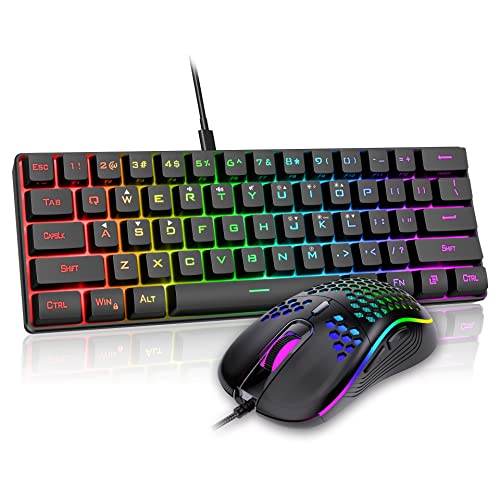
This is the pick for players who aim with their whole forearm and keep mouse sensitivity low. The 61-key board is barely wider than a paperback book, which frees almost the entire desk for sweeping mouse movement, and the wired link keeps input direct with no battery to manage mid-session. The bundled honeycomb mouse is strikingly light at about 65 grams, so quick flicks and stops take less effort than with a standard shell. It is a focused, competitive-style set: you give up the number pad, the function row, and dedicated arrows, and in return you get the most mouse room of any combo here.
Specs
- Brand: RedThunder, model K62
- Connectivity: wired USB, keyboard uses a detachable Type-C cable
- Keyboard: 61 keys, 60% layout, RGB backlit, about 11.5 x 4 x 1.5 inches, 365g
- Mouse: honeycomb shell, about 65g, optical sensor up to 7200 DPI
- Mouse detail: 12000 FPS scan rate, 40G acceleration, 400 IPS tracking speed, 6 keys
- Brand-listed console compatibility: PS4, PS5, Xbox Series X/S, and Xbox One, plug and play
Best for: Low-sensitivity shooter players who want maximum mouse space.
Watch out for: Arrows and function keys sit on a modifier layer, which slows down menu-heavy and typing-heavy games.
ASIN: B096FV2HND
BlueFinger Wireless Gaming Keyboard and Mouse Combo

Here is the wireless option for people who still want a full-size board. The keyboard carries a large rechargeable battery and the mouse has its own smaller cell, and both run from one shared USB receiver, so the console end of the setup stays as simple as the wired sets. The mouse offers four clear sensitivity steps and forward and back buttons, which cover the binds most console players actually use. With a foldable stand and stepped, U-shaped keycaps, it is also the most typing-friendly set in this guide, which suits a PS5 that shares a desk with homework, work messages, and general browsing.
Specs
- Brand: BlueFinger, model Wireless-02
- Connectivity: 2.4GHz wireless, shared USB receiver stored in the bottom of the mouse, 10 metre range
- Keyboard: 104 keys, RGB backlit with 3 brightness levels, foldable tilt stand
- Batteries: 3200mAh keyboard, 800mAh mouse, automatic sleep mode
- Mouse: 7 buttons, 4 DPI levels, 800, 1200, 1600, and 2400, 6-colour cyclic lighting
- Durability listed: keystrokes tested over 10 million times, two-colour injection moulded keycaps
- Compatibility listed in the title: Xbox, PS4, PS5, PC, and laptop
Best for: Full-size wireless comfort for longer, mixed gaming and typing sessions.
Watch out for: The mouse tops out at 2400 DPI, the lowest ceiling in this guide, so very high-sensitivity players should look at the wired picks.
ASIN: B0C9GKYVG5
Which One Fits Your Situation
Your PS5 Is in the Living Room, Far From the Screen
Distance rules out every wired set here, because a cable run across the floor is both ugly and a trip hazard. Take the CHONCHOW G220 instead: its shared receiver plugs into one console port, the 10 metre range reaches a couch easily, and the full-size board is comfortable on a lap desk. The BlueFinger combo is the alternative if you prefer its larger keyboard battery and four-step mouse, but the G220 is the simpler living-room answer.
You Play Shooters at a Desk and Aim With Big Swings
Your priority is mouse travel, not extra keys. The RedThunder K62 gives you the smallest keyboard footprint and the lightest mouse in this guide, a pairing built for low sensitivity and wide arcs. If the layered arrows bother you in menus, step up to the CHONCHOW M102-C: its tenkeyless board keeps a normal function row while still freeing far more desk than a full-size model, and its included pad suits a compact battlestation.
You Want One Set for the Console and a Computer
A combo that moves between machines should carry its manners with it. The Redragon S101-3 PRO stores its lighting and sensitivity settings on the hardware, and its macro and media keys are most useful on the computer side of your week. The BlueFinger wireless set is the other strong traveller, since one receiver moves between console and laptop in seconds. Expect the console to use the set only in supported games, while the computer accepts it everywhere.
This Is Your First Keyboard and Mouse for PS5
Start simple and spend your attention on game support rather than features. The CHONCHOW M102-C is wired, compact, and includes its own mouse pad, so the whole setup works the moment both plugs are in. Learn which of your games respond to keyboard and mouse, get comfortable with the DPI button, and only then decide whether you want wireless freedom or a macro-heavy board. A basic set that you understand beats a complicated one you never configure.
Common Mistakes
- Assuming every PS5 game supports keyboard and mouse, when support is decided game by game and many titles ignore both devices in gameplay.
- Buying a wireless combo and losing the shared USB receiver, which is often stored in a compartment in the bottom of the mouse.
- Choosing a full-size board for a small desk, then blaming the mouse when the real problem is a lack of room to move it.
- Setting mouse sensitivity by the biggest DPI number on the box instead of testing the actual steps the mouse offers in your game.
- Expecting PC companion software, macros, or lighting profiles to be adjustable on the console itself, rather than setting them on a computer first.
Frequently Asked Questions
Does the PS5 support any USB keyboard and mouse?
The console recognises standard USB and Bluetooth keyboards and mice for menus, text entry, and supported games, and a 2.4GHz receiver is treated like a wired USB device. Recognition is not the same as gameplay support, though. Each game chooses whether to accept these controls, so a set can work in one title and not at all in another. Always check your specific game before buying a combo for it.
Can I play every shooter on PS5 with a keyboard and mouse?
No. Several well-known shooters and battle royale games do support keyboard and mouse on PS5, but support is each developer’s decision, and it can be limited to certain modes or matchmaking pools. Some games allow the devices only for menus or chat. The safest approach is to search for your exact title plus keyboard and mouse support, and treat any combo as an accessory for games that confirm it.
Is wired or wireless better for PS5 keyboard and mouse play?
Wired is the most foolproof: no charging, no pairing, and no receiver to misplace, at the cost of cable reach. A 2.4GHz wireless combo with one shared receiver is nearly as simple to set up and far better for a couch or a console across the room. For the distances and games here, either connection is responsive enough; choose based on your room first, and battery habits second.
Why does my keyboard work in menus but not in my game?
That pattern usually means the game does not support keyboard and mouse gameplay, even though the PS5 system software does. The keyboard still handles text fields and navigation, which is why menus respond. Try a title known to support these controls, check for a control setting in the game, and make sure cables are fully seated. If a supported game responds, your hardware is fine.
Related guides
More from Amazon
Programs that pair well with the guide above. Offers and eligibility are set by Amazon and may change.
Free shipping on eligible items, Prime Video and more. Eligible new members can start with a free trial.
Start a Prime free trialAd-free music streaming. Eligible new subscribers can start with a free trial.
Try Music Unlimited freeA Prime membership for ages 18-24 with a trial period. Eligibility is set by Amazon.
See Prime for Young AdultsAudiobooks and podcasts to listen to on the go. Eligible new members can start with a free trial.
Try Audible freeAs an Amazon Associate we earn from qualifying purchases.