The best PS5 wall mount and console stand setup for most owners is the HIDEit Mounts PS5 Wall Mount, a heavy-duty steel mount kit made for the original console and the Pro, because it puts the console flat against the wall with open airflow around the vents and stands out for its rigid metal construction. Budget-minded owners who still want a sturdy steel bracket should look at the VIVO MOUNT-PS5B, and anyone who would rather keep the console on a shelf should look at the OIVO horizontal stand with support rods. One piece of advice applies before any purchase: a wall mount holds a console weighing roughly 3 to 4.5 kilograms depending on the model, so the quality of your wall and fasteners matters as much as the bracket itself. Read this guide to see what each of the ten products is best at, how to mount safely, and when a simple stand is the smarter choice.
Our Top Picks




Top 3 picks at a glance
Top 3 Picks
Best Overall: HIDEit Mounts PS5 Wall Mount
The HIDEit mount is described as a heavy-duty steel kit for protection and cooling, covering the Pro and the original console. Steel construction and a focus on airflow are exactly the qualities you want from something that holds an expensive console on a wall.
Best Value Pick: VIVO Black Wall Mount Bracket (MOUNT-PS5B)
VIVO is a familiar name in mounting hardware, and this bracket is described as sturdy steel with a vertical display and an open design. It is a simple, no-frills way to get the console off the shelf.
Best Stand: OIVO PS5 Horizontal Stand with Support Rods
If you do not want to drill, the OIVO horizontal stand is a straightforward way to give the console a stable, elevated base. Its listing mentions upgraded support rods at the bottom and a scalable design that adjusts to console size.
Quick Comparison
| Product | Best for | Key specs |
|---|---|---|
| Console Holder Wall Mount for PS5/Slim/Pro (Black) | Simple vertical wall hanging | Wall holder for disc and digital editions, black finish |
| TotalMount for All PS5 Models | Premium level mounting | Fits all PS5 models, cooling and leveling features listed, vibration reduction claimed |
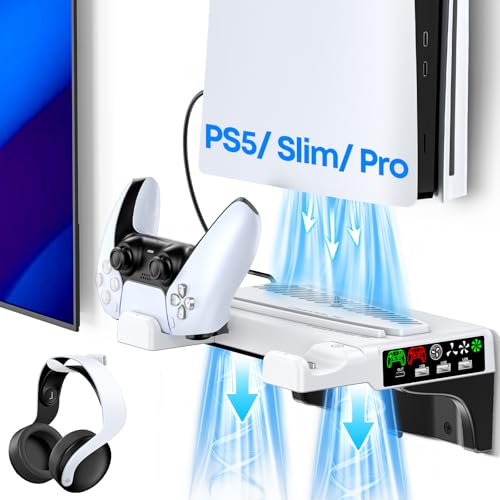
| PS5 Wall Mount Kit with Cooling Fan and Charging Station | All-in-one floating shelf mount | Shelf-style mount, cooling fan, charging station, disc and digital |
| HIDEit Mounts PS5 Wall Mount | Heavy-duty, long-term mounting | Steel mount kit, Pro and original, protection and cooling focus |
| VIVO Wall Mount Bracket MOUNT-PS5B | Straightforward steel bracket | Sturdy steel, vertical display, open design |
| Monzlteck Wall Mount Holder with Controller Holder | Mount plus controller storage | All-metal vertical mount, power button access, controller holder |
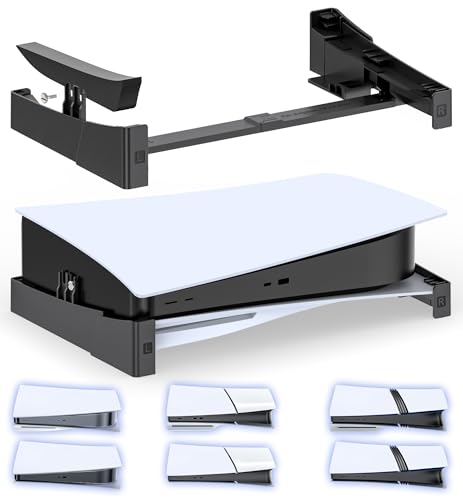
| OIVO Horizontal Stand (Support Rods) | Shelf placement without drilling | Horizontal stand, upgraded bottom rods, scalable design |
| Horizontal Stand with Cooling Fan and Charger | Stand with cooling and charging | Fan, controller charging for original and Edge pads, EVA foam, scalable |
| OIVO Horizontal Stand (second listing) | Same idea, alternate listing | Horizontal stand, support rods, scalable design |
| XBERSTAR Horizontal Bracket Stand | Small footprint, Slim and Pro | Cooling feet style bracket, horizontal placement, disc edition |
How We Chose
This guide is research-based. We read each listing, noted what the title says about materials, console compatibility and extras, and checked those claims against well-established facts about the console, including its weight, dimensions and ventilation layout. We weighed six criteria. First, structural confidence: metal construction and hardware that suits studs. Second, airflow: whether the console’s vents are left open. Third, compatibility with the original, Slim and Pro, and with disc and digital editions. Fourth, installation difficulty and the likely need for drilling. Fifth, extras like cooling fans, charging stations and controller holders. Sixth, how clearly the listing describes the product. We do not claim any weight ratings that a listing does not state, and we tell you to confirm load limits and hardware on the product page.
1. Console Holder Wall Mount for PS5/PS5 Slim/Pro Digital Disc Edition, Black – Best for Simple Vertical Mounting
As an Amazon Associate we earn from qualifying purchases at no extra cost to you.

This is a wall-mounted holder for the PS5, Slim and Pro in both disc and digital editions, in black. It suits owners who want to lift the console off a crowded shelf and fix it flat to a wall, with minimal visual presence. The listing name is short, so treat it as a plain wall holder and verify the details.
- Wall mount holder for PS5, Slim and Pro, disc and digital editions.
- Black finish.
- Material, load rating and hardware are not in the name; confirm on the product page.
- Check whether it includes screws for studs and anchors for drywall, and whether the console sits flush or on spacers.
Mount choice starts with the wall. The strongest installation uses wood studs, which you can locate with a stud finder and typically find about 16 inches apart in many US homes, though spacing varies. Drywall anchors can hold light loads, but a console is heavy enough that most installers prefer studs, and the instructions that come with the mount should be followed. If you rent, read your lease before drilling, and consider that screw holes can be patched but are still holes.
The console should leave its vents open. The PS5 draws air in through its sides and exhausts it out the back, so a mount must not block those paths. A holder that grips the console only along its edges, leaving the wide flat panels exposed, is a sound design. Avoid placing the mount directly above a heat source such as an amplifier, and avoid enclosing it in a cabinet unless the cabinet is vented.
Think about cable access, too. A wall-mounted console still needs power, HDMI, and possibly Ethernet. Plan the cable path before you drill, and consider a cable cover that matches the wall. Check that the power button and disc slot, if you have a disc edition, remain accessible once the console is hung.
Before you buy any wall holder, take three measurements: the console’s width and depth for your model, the space on the wall between studs, and the clearance above and beside the planned spot. Cut a piece of cardboard to the console’s size and tape it to the wall for a day. Living with the cardboard shows you whether the position is reachable, whether it blocks a light switch, and whether cables will reach the nearest outlet. It is a cheap way to avoid drilling the wrong holes.
Pros
- Frees up shelf space and gets the console off the floor.
- Covers PS5, Slim and Pro in both editions.
- Simple black styling blends in.
Cons
- Few details in the listing name.
- Installation requires drilling.
- Load rating and hardware must be confirmed.
Compared with the VIVO bracket, this holder is the more generic one, while the VIVO names its steel construction and open design. Compared with the TotalMount, it is likely the simpler option with fewer features.
2. TotalMount for All PS5 Models – Best for Premium Level Mounting

The TotalMount is listed for all PS5 models and highlights a premium build, cooling, a level position and a claim that it stops vibration. It suits owners who care about how the console sits: perfectly level, held firmly, and without the rattle that can come from loose mounting. The wording describes a design aimed at perfectionists.
- Fits all PS5 models, per the listing name.
- Cooling-oriented design as described in the title.
- Level mounting; confirm whether this is a built-in leveling feature.
- Vibration reduction claimed in the title; treat as a manufacturer claim.
A level mount matters more than it sounds. A console that is tilted slightly can put uneven pressure on the disc drive and looks wrong on the wall. Look for slotted holes or a leveling mechanism that lets you adjust after the screws are in. Use a bubble level during installation, and mark the screw positions with a pencil before drilling.
Vibration claims are worth reading with care. The PS5 uses solid-state storage, so hard-drive vibration is not a concern, but a disc drive can produce noise and movement when it spins a disc. A rigid mount with a snug fit keeps the console from buzzing against the wall. If you play disc games often, a firm, well-supported mount is a sensible choice.
Because this model is aimed at the premium end, evaluate the quality signals: thick-gauge metal, clean welds or folds, powder-coat finish, and a clear installation guide. If the product images show a thin, flexible bracket, the premium positioning may not match reality. As always, make sure hardware matches your wall type.
Think about the finish and the way the mount will look from the side. A premium positioning suggests clean lines and a matching color, but a mount viewed from an angle can still show screws and gaps. If you plan to place the console in a living room where guests see it, spend a minute with the product images to judge the profile. A slim, flush design suits modern rooms, while chunkier brackets can look industrial.
If you want to test the vibration claim in your own home, a simple check is to place a hand on the mounted console while a disc spins and feel for buzzing against the wall. A good mount should transmit very little. If you do notice a rattle, a thin felt pad between the console and the contact points often removes it without changing the fit.
Pros
- Fits all PS5 models in the listing.
- Level and vibration-focused design.
- Cooling emphasis aligns with airflow needs.
Cons
- Claims such as vibration reduction are not independently verified.
- May involve a higher outlay than simple brackets.
- Installation requires drilling.
Compared with the HIDEit, the TotalMount stresses fine-tuned positioning, while the HIDEit stresses heavy-duty steel. Compared with the all-in-one shelf kit, it is the cleaner, more minimal choice.
3. PS5 Wall Mount Kit with Cooling Fan and Charging Station – Best All-in-One Floating Shelf
This kit is described as a wall mount with a cooling fan and charging station, in a shelf-style floating mount for the PS5, Slim and Pro, disc and digital. It suits owners who want the console on the wall and their controllers charging beside it. Compared with a plain bracket, it turns the wall into a small console station.
- Floating shelf-style wall mount, per the listing name.
- Cooling fan included.
- Controller charging station included.
- Check the power source, weight capacity and how the console sits on the shelf.
All-in-one designs have more to check. A fan and charging station require power, and a mounted console is often far from an outlet. Plan where the cable will run, and ensure that the console’s USB ports or an adapter can supply the stand. If the kit draws power from the console, think about charging while in rest mode and what happens to the fan when the console is off.
A shelf-style mount places weight a few centimeters from the wall, which increases leverage on the screws. Compared with a rear bracket that holds the console close to the wall, a floating shelf puts more stress on the fasteners. Use studs where possible, and follow the maker’s instructions on screw size and spacing. If the listing states a maximum load, stay well below it.
The console also needs breathing room. A shelf-style mount that leaves the sides and rear open allows the usual airflow, and a fan can supplement it. Avoid pushing the mount into a corner or beneath a cabinet that blocks upward heat movement.
Plan the cable route before you commit to this type of kit. A wall shelf with a fan and charger will have at least one power lead, and the console will have power, HDMI and possibly Ethernet cables. Raceways or cable covers painted to match the wall keep the result tidy. Leave a small service loop so you can pull the console forward for maintenance without unplugging everything, and label each cable so you can reconnect them correctly.
Keep the practical limits of a shelf-style kit in mind: it is designed for a console and a small number of accessories, not for stacking additional devices. Do not place a soundbar, router or game box on the same shelf unless the listing explicitly allows it, because extra weight and heat would work against the design.
Pros
- Combines mounting, cooling and charging.
- Keeps controllers and console together on the wall.
- Covers multiple console variants.
Cons
- More leverage on the wall fasteners than a flush bracket.
- Power and cable routing take planning.
- Complexity increases the number of points that can fail.
Compared with the Monzlteck mount, which stores a controller and lets you reach the power button, this kit adds a fan and charging. Compared with the plain VIVO bracket, it is a bigger project with more features and more things to check.
4. HIDEit Mounts PS5 Wall Mount – Best for Heavy-Duty Mounting

HIDEit Mounts markets this as a heavy-duty steel mount kit for the PS5 Pro and the original console, with protection and cooling in mind, and the brand describes itself as an American gaming mount pioneer. It suits owners who want a permanent installation that feels solid and who value brand focus on gaming consoles. If you plan to mount the console and leave it for years, this is the type of product to consider.
- Heavy-duty steel mount kit, as the listing states.
- Listed for the PS5 Pro and original console; confirm Slim compatibility on the product page.
- Protection and cooling emphasis in the title.
- Check hardware included, stud versus drywall instructions and any stated weight rating.
Steel is the right material for a load-bearing bracket because it resists bending and holds screws securely. A heavier-gauge steel bracket also dampens vibration from the disc drive. The title’s mention of protection suggests the design aims to shield the console from bumps and from the dust that settles on a horizontal shelf. Cooling emphasis implies that vents are left clear, which is the main requirement of a good console mount.
Installation quality depends on your wall. A bracket is only as strong as its anchors, so find studs, use the screws that come with the mount if they suit your wall, and avoid overtightening. If your wall is plaster or masonry, you may need different anchors than those supplied. When in doubt, ask a professional installer. A fallen console is an expensive and potentially dangerous failure.
Think about the finishing details too. A steel mount can have sharp edges before installation, so handle it with care and wear gloves if needed. After mounting, check the console is level, that it cannot slip out, and that cables are not stretched. Revisit the screws after a few weeks to make sure nothing has loosened.
Heavy-duty mounts are also a sensible choice if you live with young children or pets. A console on the wall is out of reach of crawling hands and wagging tails, but it can also become a pull point if a cable dangles. Keep cables short and secured along the wall, and place the mount high enough that a child cannot grab the console but low enough that you can see the power light without a step stool.
Pros
- Heavy-duty steel construction.
- Brand focused on gaming console mounts.
- Protection and cooling emphasis.
Cons
- Slim compatibility is not stated in the title.
- Installation requires drilling and careful anchoring.
- Likely higher outlay than basic brackets.
Compared with the VIVO bracket, the HIDEit is the more robust and more specialized product, while the VIVO is the simpler value choice. Compared with the Monzlteck, it is a pure mount without the controller holder.
5. VIVO Black Wall Mount Bracket MOUNT-PS5B – Best Straightforward Steel Bracket

VIVO is a well-known mounting hardware brand, and the MOUNT-PS5B is described as a sturdy steel wall mount bracket for the PS5 that holds the console vertically in an open design. It suits owners who want a clean, minimal display of the console on the wall without extra features. The open design means the console is held without a surrounding case, leaving vents exposed.
- Sturdy steel bracket, per the listing name.
- Vertical display of the console in an open design.
- Black finish and model number MOUNT-PS5B.
- Confirm which console variants it fits, including the Slim and Pro, and what hardware is included.
An open design is good for airflow. The PS5 draws air through its sides and exhausts it at the rear, so a bracket that leaves those areas clear suits it. Because the console is exposed, it can collect dust, so plan to wipe it down periodically. Do not use liquid cleaners near vents. A dry microfiber cloth is enough, and a soft brush can clear the intake slots.
Check compatibility carefully. Some mounts were designed for the original console, and the Slim and Pro have different dimensions. The listing’s title says it is designed for the PS5, so look at the product page for any note about the newer models. If you own a Slim or Pro, confirm that the bracket’s width and contact points match the console body before you drill.
VIVO brackets are generally simple. You attach the plate to the wall with screws, hang or slide the console on the arms, and secure it. Take your time with measurement: mark, level, drill, and test the fit with the console before finalizing. Keep the original console stand in a safe place in case you move the console back to a shelf.
One further advantage of an open-design bracket is visibility. You can see the status light and the ports without moving anything, and you can check for dust accumulation at a glance. If you display the console as part of a gaming wall with posters and shelves, this open look suits the aesthetic. If you prefer to hide it, choose a design that lets you place the console behind a television or inside a shallow recess.
Finally, plan how the console will come off the wall. If the bracket needs you to lift the console up and out, leave enough headroom above it, and avoid mounting directly beneath a shelf. A clear path means you can remove the console for travel or repair without removing the whole bracket.
Pros
- Steel build and open design for airflow.
- Established mounting brand.
- Simple, clean look.
Cons
- Variant compatibility needs checking.
- Exposed console collects dust.
- No built-in cable management or extras.
Compared with the HIDEit, the VIVO is the plainer, more budget-friendly steel bracket. Compared with the first generic holder, it gives more detail about construction and layout.
6. Monzlteck Wall Mount Holder with Controller Holder – Best for Mount Plus Controller Storage

The Monzlteck mount is an all-metal vertical wall hanging holder for the PS5 original, Slim and Pro, disc and digital, with a controller holder and access to the power button. It suits owners who want the console and a controller to live on the wall together and who still need to switch the console on easily. The power button access is a practical detail that many simple brackets overlook.
- All-metal vertical wall mount, per the listing name.
- Controller holder included.
- Power button accessible while mounted.
- Covers PS5 original, Slim and Pro, disc and digital.
Power button access sounds minor until you mount a console behind a television or into a corner. With a vertical mount, the power button sits along the edge of the console, and a bracket that covers it can force you to reach awkwardly or use the controller to power on. A mount that leaves the button exposed makes daily use easier and reduces the temptation to pull the console off the wall.
A controller holder on the wall keeps a pad ready and off the floor. Remember that a holder is meant for storage, not charging, unless the listing says otherwise. Do not hang a heavy controller by its cable, and keep it away from places where it can be knocked. If you have children, mount the holder at a height that avoids accidental pulls.
All-metal construction suggests rigidity. Check the thickness and finish in the product images, and look for rounded edges that will not scratch the console. Make sure the contact points are padded or smooth, since bare metal against glossy plastic can leave marks over time.
Because the listing names the original, Slim and Pro, it is worth checking how the holder accommodates their different thicknesses. A good design uses adjustable arms or padded inserts so that the console is gripped firmly without squeezing the case. Squeezing can distort plastic over time and cause rattles, so aim for a snug fit rather than a tight one. Test it by gently tapping the console after mounting to make sure nothing buzzes.
Controller storage on the wall also changes habits. When a pad has a home, it is more likely to be put back, which reduces the chance of it being left on the floor. If you own more than one pad, check whether the holder can take a second, or whether you will need a separate hook for it.
Pros
- Metal build and a controller holder.
- Power button access for daily use.
- Broad console compatibility in the listing.
Cons
- Controller holder is for storage, not charging.
- Pad quality at contact points is unclear.
- Installation requires drilling.
Compared with the all-in-one shelf kit, this mount is simpler and lighter on features, but it keeps the console closer to the wall. Compared with the VIVO, it adds the controller holder and the power button access.
7. OIVO PS5 Horizontal Stand with Upgraded Support Rods – Best Stand Without Drilling

OIVO’s horizontal stand is described as a stable base for disc and digital PS5, Slim and Pro, with upgraded support rods on the bottom and a scalable design. It suits renters, families and anyone who does not want to drill but still wants the console off the floor. A stand is the easiest fix for a console that wobbles or sits too low in a cabinet.
- Horizontal stand for PS5, Slim and Pro, disc and digital.
- Upgraded support rods on the bottom, per the listing name.
- Scalable design that adjusts to different console sizes.
- Check the height of the stand and the clearance it leaves under the console.
A horizontal stand raises the console slightly and gives it a stable base. That helps airflow by lifting the underside from a surface that might trap dust or heat. The scalable design lets you adjust the stand to fit the Slim or the Pro, which have different dimensions. Check the adjustment mechanism, because a stand that slips will let the console shift.
The support rods mentioned in the title suggest extra reinforcement at the bottom of the stand. That is a plus for stability, particularly if the console is occasionally bumped. Rubber feet or a non-slip underside help the stand grip the shelf. Place the stand on a level surface and test its stability before connecting cables.
If you only need a place for the console to rest, a stand is simpler and safer than a wall mount. There is no drilling, no risk to the wall and no need to find studs. The trade-off is that the console takes up shelf space, so measure the shelf before buying.
If your cabinet has a front lip or a tight opening, subtract the stand’s height from the available space before you decide. A few extra centimeters under the console can be the difference between fitting and not fitting beneath a television. Also consider the cable bend: HDMI and power cables leave the back of the console and need room to curve, so leave at least the length of your hand behind the stand.
A final point on materials: plastic stands are common at this level, and their rigidity depends on thickness and rib design. Look for photos showing the reinforcing ribs and the support rods. Press down lightly on the stand with the console in place, and listen for creaks. A stand that flexes or squeaks now will be more annoying after a year of use.
Pros
- No drilling required.
- Scalable design for different console sizes.
- Reinforced base with support rods.
Cons
- Uses shelf space.
- No cooling fan or charging in this listing.
- Stand height varies; check the product page.
Compared with the fan and charger stand, this one is simpler and quieter. Compared with a wall mount, it is easier to install but does not free up shelf space.
8. PS5 Horizontal Stand with Cooling Fan and Charger – Best for Cooling and Charging on a Shelf

This horizontal stand adds a cooling fan and a charger for the original and Edge controllers, with a scalable design and EVA foam. It suits owners who keep the console on a shelf lying flat and want a little extra airflow and a place to top up controllers. The mention of EVA foam suggests padding that protects the console surface from scratches.
- Horizontal stand for PS5, Slim and Pro, per the listing name.
- Cooling fan and controller charger included.
- Charging listed for original and Edge controllers.
- Scalable design with EVA foam padding; check how the foam sits against the console.
Adding a fan and a charger changes the stand from furniture into an electronic device. It needs power, probably through the console’s USB ports, and it should be used within the limits of those ports. A fan can add noise, so check whether it has speed control or a switch. Controller charging through a stand is usually slower than using a wall adapter, but it is convenient for keeping pads ready.
The Edge note is worth attention. The DualSense Edge differs from the standard pad in shape and attachments, and many docks do not fit it well. A listing that names the Edge suggests the charging cradles are wide enough, but confirm this before you rely on it. If you own both pads, test each one in the cradle on the first day.
EVA foam is a soft, closed-cell material used for padding. It can protect the console’s finish from scuffs and reduce vibration. Over time it can compress or attract dust, so wipe it periodically and replace it if it degrades. Keep the foam away from heat sources, and make sure it does not cover the console’s vents.
Cleaning is the hidden cost of a fan stand. Dust gathers on the fan grille and in the foam, so unplug the stand and wipe it down every month or two. A can of compressed air can clear the grille, but hold the fan blades still to avoid spinning them too fast. Keep the stand away from pet beds and carpets, which release fibers that clog fans quickly and reduce airflow over time.
Also consider the way the stand interacts with the original base that ships with the console. If you leave the base attached, the console may sit higher than intended, which affects the fit under a television or shelf. Read the assembly steps to learn whether the base should come off first.
Pros
- Cooling and charging on a stand.
- Edge controller support in the listing.
- Padding helps protect the console.
Cons
- Fan noise and power draw to consider.
- Charging speed depends on the power source.
- More parts to clean and maintain.
Compared with the plain OIVO stand, this one adds features and complexity. Compared with the wall kit that also includes a fan and charger, it is easier to install because it needs no drilling.
9. OIVO PS5 Horizontal Stand, Second Listing – Best Alternate Variant of the OIVO Base

This is a second OIVO listing for a PS5, Slim and Pro horizontal stand for disc and digital consoles, with upgraded support rods on the bottom and a scalable design. The title appears nearly identical to the other OIVO stand, so the difference may lie in color, packaging or variant. It suits buyers who find the first listing unavailable or prefer a particular option.
- Horizontal stand for PS5, Slim and Pro, disc and digital.
- Upgraded support rods on the bottom and a scalable design, per the listing name.
- Check color, size options and what is included, since the title does not explain how this listing differs.
- Confirm the stand’s height and the console variants it fits.
When two listings share a name, read the variant menu and the images. Sellers often create separate pages for different colors or packaging. Confirm that you are choosing the correct color and edition, and make sure the stand includes everything shown. A mismatch is the most common reason people return accessories like this.
The functional logic is the same as the first OIVO: a stable base, adjustable width, and bottom support rods. Use it on a level shelf, keep the console’s vents clear and avoid stacking items on top. If the stand has rubber feet, check that they are firmly attached, because loose feet can allow slipping. A stand that moves is a hazard when you pull a disc out or plug in a cable.
Consider how the stand sits with the console’s original base. The console ships with its own stand, and some third-party stands replace it while others work with it. Read the instructions to see whether you should remove the original base, and store the original in case you want to switch back or sell the console.
If you cannot tell the two OIVO listings apart, a good test is to check the product dimensions, the weight and the color options listed on each page. Differences in weight can indicate a different material or an additional part. Save the details before ordering, so that if the delivered item differs from what you expected, you have a clear basis for a return or exchange.
If the stand arrives with a slight wobble, check the adjustment locks and the rod positions first. Many wobble complaints come from an unseated rod rather than a defect, and reseating the parts on a flat surface often solves it.
Pros
- Same stable, no-drill concept as the first OIVO.
- Scalable design for multiple console sizes.
- Reinforced bottom rods.
Cons
- Nearly identical listing makes differences unclear.
- No cooling or charging extras.
- Height and fit require confirmation.
Compared with the first OIVO listing, expect the same core design and check the variant details. Compared with the XBERSTAR, it is a fuller base rather than a set of small feet.
10. XBERSTAR Horizontal Stand for PS5 Slim and Pro – Best Small-Footprint Bracket

The XBERSTAR product is described as a stand for the PS5 Slim, usable with the Pro, using cooling feet and a horizontal placement bracket holder for the disc edition. It suits owners who want a minimal footprint and a lifted console without a bulky base. The listing label Disc Edition-A indicates a specific variant, so confirm that it matches your console.
- Stand for PS5 Slim, with the Pro also mentioned in the listing.
- Cooling feet and a horizontal bracket holder design.
- Disc Edition-A variant, as the listing states.
- Confirm whether a digital edition version exists and how the feet attach to the console.
Cooling feet raise the console above the surface so that air can move beneath it. The effect is small but real: it keeps the underside away from carpet or cloth, and it gives dust less chance to settle. A bracket holder keeps the console from sliding while it lies flat. Because it is compact, it is easy to store and does not take much shelf space.
The key caution is fit. Slim consoles come in disc and digital versions with different dimensions and base shapes. A bracket designed for the disc edition may not fit the digital edition, and the Pro has its own shape. Follow the listing’s variant guidance and double check measurements. An ill-fitting bracket can allow the console to rock or slip.
Compact feet and brackets leave more of the console exposed. That is good for airflow but means the console can be knocked more easily. Place it on a stable shelf where pets and children will not bump it. Avoid placing it on an unstable surface such as the edge of a bookshelf or the arm of a sofa, where a nudge can send it falling.
Because the feet are small, they put more load on each contact point. A soft shelf surface such as a cloth runner can let the feet sink slightly and tilt the console, so use a hard, level surface. If you need to move the console often, the compact design makes that easy, but check that it clips into the feet each time. Treat the bracket as an accessory for a stable shelf, not as a replacement for a proper base on uneven furniture.
Pros
- Small footprint and minimal bulk.
- Lifts the console for airflow.
- Easy to store or move.
Cons
- Variant-specific fit for disc edition.
- Less stable than a full base.
- No cooling fan or charging.
Compared with the OIVO stands, the XBERSTAR is smaller but less supportive. Compared with the wall mounts, it is simple and renter-friendly but does not free up shelf space.
How to Choose a PS5 Wall Mount or Console Stand
Mount or stand?
Start by deciding whether you really need a wall mount. Mounts free up shelf space, keep the console away from spills and little hands, and can look tidy. Stands are quicker, reversible and safer for renters. If your main issue is clutter, a mount helps. If your main issue is wobble or low airflow, a stand is enough.
Worked example: loading the wall
Consider the original PS5 disc edition, which weighs about 4.5 kilograms, or roughly 9.9 pounds, and the Slim disc, which weighs about 3.2 kilograms. Add a controller or two on a holder at 0.28 kilograms each, and a cable bundle, and a realistic hanging load is about 5.5 kilograms, roughly 12 pounds. A mount held by two screws into one stud shares the load across the screws, and a sound installation will handle this many times over. But safety margins matter. If a mount lists a maximum load, stay well below it, and if it lists none, do not assume. Use the supplied hardware only if it suits your wall, and use studs rather than drywall alone. For a shelf-style mount that places the console away from the wall, the leverage increases the force on the top screws, so use both studs if the bracket spans them.
Understand the main mount styles
Flush brackets hold the console close to the wall, which looks tidy but leaves less room behind for cables and airflow. Shelf-style mounts hold the console a few centimeters away and often add a platform for accessories, at the cost of more leverage on the screws. Holder-style mounts clamp the console along its edges and are often all-metal. Each style has its own trade-off between neatness, airflow and load on the wall, so choose according to your wall, your cables and your tolerance for drilling.
Check airflow
The console takes in air at the sides and exhausts at the rear. A mount or stand must leave these areas open. Keep the rear several centimeters from the wall, avoid sealed cabinets, and do not place anything on top. If you wall-mount behind a television, make sure warm air can rise.
Match the console variant
The original, Slim and Pro have different dimensions, and disc and digital editions differ in thickness. Choose a product that names your variant, or one with an adjustable design. When in doubt, compare the console’s dimensions with the dimensions on the product page.
Decision matrix
| Your situation | Best pick | Why |
|---|---|---|
| Permanent wall setup, long-term | HIDEit Mounts | Heavy-duty steel |
| Budget steel bracket | VIVO MOUNT-PS5B | Simple, sturdy steel |
| Want the controller on the wall too | Monzlteck | Controller holder, power button access |
| Want a premium, level fit | TotalMount | Level and vibration focus |
| Want cooling and charging on the wall | Wall Mount Kit with Fan and Charging | All-in-one |
| Renting, no drilling | OIVO Horizontal Stand | No tools needed |
| Want charging on a shelf | Horizontal Stand with Fan and Charger | Fan and charger included |
| Minimal footprint | XBERSTAR | Small cooling feet bracket |
Think about heat sources and neighbors
A console on the wall is rarely alone. Receivers, soundbars and cable boxes often sit nearby, and each adds heat. Space the console away from other warm devices, and never mount it directly above an amplifier. If you mount it behind a television, check that the television’s own vents are clear and that the area is not a trap for warm air. A simple test is to put your hand near the console’s rear vent after an hour of play: warm air is normal, but hot air that lingers is a sign that the location needs more airflow.
Budget your hardware and time
A wall mount rarely needs expensive tools, but it does need the right ones. A stud finder, a level, a drill with the correct bit and a tape measure are the basics. Set aside an hour for a careful install, longer if you are routing cables. If the mount comes with screws that look too short or too thin for your wall, buy better ones rather than risking the console. For stands, the only time investment is a few minutes of adjustment, which is why they suit renters and anyone who is unsure about a long-term layout.
Plan for the future
Consoles change, and so do rooms. A mount that fits only one console variant can become useless when you upgrade. If you might switch from a Slim to a Pro, look for an adjustable design, and avoid drilling holes that tie you to one position. For renters, a stand is a safer investment because it moves with you. For owners, a mount with a proven build is worth the effort.
Installation safety
Locate studs with a stud finder, check for wires and pipes before drilling, and use the right drill bit for your fasteners. Mount the bracket first, check that it is level and secure, then place the console. Do not stand under a mounted console while installing it. If you are unsure about your wall, hire a professional. After installation, check the screws after a few weeks, and keep children away from the area.
Frequently Asked Questions
Is it safe to wall-mount a PS5?
It is safe when the mount is rated for the console, secured into studs or suitable anchors, and installed according to the instructions. Console weight is modest, but a poor installation can fail. If you are unsure, hire a professional.
Will wall mounting make the console overheat?
Not if the vents remain clear. The console needs open space at its sides and rear, and a mount in a sealed cabinet can trap heat. A mount on an open wall with a few centimeters of space is generally fine.
Do I need a stand if I have a mount?
No. A mount replaces the stand, though you should keep the original base in case you move the console back to a shelf.
Can I use a horizontal stand with a digital edition?
Many stands list both disc and digital editions, but dimensions differ. Check the product page for your edition before you buy.
Do cooling fans on stands help?
They can help in warm rooms or tight spaces, but the console has its own cooling system. Clear space around the console and clean vents matter more than a fan.
What tools do I need to mount a console?
Typically a drill, a level, a stud finder, a pencil and a screwdriver. Check the mount’s instructions for bit sizes and hardware.
Can I put a disc edition on a vertical wall mount?
Many mounts hold the console vertically, and disc editions can be mounted that way. Make sure the disc slot and ports remain accessible, and check that the mount supports the weight of the disc edition, which is heavier than the digital model.
Can I mount the console on drywall without studs?
It is possible with heavy-duty anchors rated for the load, but studs are the preferred option. Follow the mount maker’s guidance and do not exceed the rated load.
Our Recommendation by Situation
For a permanent wall setup, choose the HIDEit. For a budget bracket, pick the VIVO. If you want your controller on the wall too, consider the Monzlteck. If you rent or dislike drilling, the OIVO stand is the easy choice. Whatever you buy, keep the vents clear, use studs, and match the product to your console variant.