The best PS5 controller charging station for most players is the official PlayStation 5 DualSense Charging Station, because it is designed by the console maker, charges two DualSense controllers at once through metal contacts, and does not depend on a console USB port. Sony states a charge time of roughly three hours for one or two controllers from empty. If you want a licensed alternative from an accessory maker, the PowerA Twin Charging Station is the closest match, and the Nyko base adds an extra USB port to the same drop-and-charge idea. If you own the DualSense Edge or want faster-charging claims, the OIVO and OSTROGEAR docks name the Edge directly in their listings. The rest of this guide explains how each of the ten docks differs in design, what the charging claims really imply, and which safety habits keep your controller batteries healthy for years.
Our Top Picks


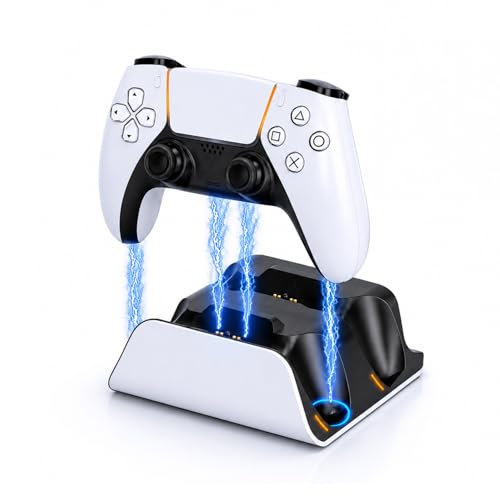


Top 3 picks at a glance
Top 3 Picks
Best Overall: PlayStation 5 DualSense Charging Station
The official dock is the safest default. It charges up to two DualSense or DualSense Edge controllers using contact pins, it ships with its own power adapter, and it stays within the console maker’s own power and temperature limits. Its look is simple and its behavior is predictable, which is what a charging dock should be.
Best Value Pick: PowerA Twin Charging Station for DualSense
PowerA’s licensed twin station keeps the familiar two-bay layout and adds the reassurance of an official license. It suits players who want a trustworthy second-party style dock without choosing a feature-heavy gadget.
Best for the DualSense Edge and Fast Charging: OIVO Dual PS5 Controller Charging Station
The OIVO listing names both the standard DualSense and the Edge, promises a two-hour fast charge, and includes two cable types. That mix of compatibility and flexibility makes it the strongest feature-led choice, though speed claims always deserve a cautious reading.
Quick Comparison
| Product | Best for | Key specs |
|---|---|---|
| PowerA Twin Charging Station | Licensed, simple two-controller dock | Officially licensed, charges two DualSense controllers, LED status indication per listing |
| PlayStation 5 DualSense Charging Station (Sony) | Reliability and peace of mind | Two bays, contact charging, about three hours stated, DualSense and Edge compatible |
| Click-in Dual Fast Charging Dock (no annoying lights) | Dark rooms and bedside setups | Click-in design, stated 90 percent in 50 minutes, lights kept off |
| Self-Aligning Dual Charging Dock with LED Indicator | Desk display and easy docking | Self-aligning contacts, LED indicator, desktop display stand |
| Mcbazel Dual Controller Charger (White) | White console setups | Dual bays, LED indicator, white finish |
| Generic Dual PS5 DualSense Charging Station | Basic charging on a tight budget | Dual charger for DualSense, details as listed |
| Nyko Drop and Charge Base | Players who want an extra USB port | Two bays, LED indicators, extra USB port |
| IINE Dual Charging Station with RGB Lights | Lit-up gaming desks | RGB lighting, LED battery indicators, charging cable included |
| OIVO Dual PS5 Controller Charging Station | DualSense Edge owners and fast charging | Stated two-hour fast charge, two cable types, DualSense and Edge |
| OSTROGEAR Charger Station for PS5 Edge | Compact Edge-focused dock | LED indicator, compact stand, Type-C charging |
How We Chose
This guide is research-based. We read each listing name and description, compared the claims with well-established facts about DualSense charging, and weighed the following criteria. First, charging method: contact pins in a dock versus cables that plug into the controller. Second, power source and safety: whether the dock uses a wall adapter, a console USB port, or a cable you supply. Third, compatibility with the standard DualSense and with the Edge, whose battery and port layout differ. Fourth, usability details such as status lights, alignment and whether the controllers click into place. Fifth, extras like extra ports, lighting or display stands. We treated bold speed claims cautiously, because charging time depends on the battery, the adapter and the dock together. Where a listing leaves a spec unclear, we describe the product class and ask you to confirm on the product page.
1. PowerA Twin Charging Station for DualSense – Best Licensed Value Dock
As an Amazon Associate we earn from qualifying purchases at no extra cost to you.

PowerA is an established accessory maker, and this twin station is described as an officially licensed charging dock for DualSense wireless controllers. It suits players who want two bays, a tidy shelf footprint and a recognizable brand without paying extra for lights or gimmicks. If you keep your controllers on a console shelf and just want them topped up when you are done playing, this is the type of dock that disappears into the background.
- Officially licensed for PlayStation, per the listing name.
- Two charging positions for DualSense controllers.
- Status LEDs are typical of this class; confirm the exact behavior on the product page.
- Power source and cable type vary by model, so check what is included and whether you need a separate USB adapter.
The value of a licensed dock is mostly peace of mind. Licensing signals that the design met the platform holder’s requirements for fit and safety, which matters when you are leaving lithium batteries to charge for hours. The twin design is an easy match for a household with two controllers, one for each player, and the compact shape keeps the cable clutter low. It will not offer fast charging claims or colorful lighting, and that restraint is part of its appeal.
Check how it connects. Many twin docks rely on a USB cable to a wall adapter or to the console, and a console USB port can be switched off in rest mode depending on your settings. If your console powers down its ports, the dock may stop charging overnight. A wall adapter with a stable five-volt output avoids that issue. If you use the console as a power source, enable the option that supplies power to USB ports in rest mode in the system menu, and be aware that rest mode itself uses a small amount of electricity.
One more consideration is how the dock handles guests. A twin station that sits in plain view encourages everyone in the house to return controllers to the same spot, which means fewer flat batteries before a game night. Because the design is simple, there is little to go wrong, and replacement adapters are easy to source if you lose the original.
Pros
- Official license and a familiar brand.
- Simple, uncluttered design.
- Two bays cover most households.
Cons
- No stated fast charging or lighting extras.
- Power setup can depend on your adapter or console settings.
- Edge compatibility is not stated in the listing name; confirm before you buy.
Against Sony’s own dock, the PowerA is the more value-minded licensed option, while Sony’s has the most predictable power setup because its adapter is part of the package. Against the Nyko base, the PowerA is simpler, and the Nyko is more useful if you need to charge a phone or a headset from the same spot.
2. PlayStation 5 DualSense Charging Station – Best Overall Reliability
Sony’s own station is the reference design for this category. It holds two controllers upright, and you charge simply by clicking them into place: no cable needs to be plugged into the controller, because the dock contacts the charging terminals directly. It suits anyone who wants to remove charging from their mental to-do list and who accepts that the design is functional rather than flashy.
- Charges up to two DualSense or DualSense Edge controllers at the same time, according to the maker.
- Approximately three hours to charge from empty, as the manufacturer states.
- Comes with its own AC adapter and power cord; controllers are sold separately.
- Light bar blinks slowly while charging and turns off when the controller is full, per the manual.
- Roughly 52 x 62 x 159 mm and about 180 g, so it is compact and easy to place.
- Rated operating temperature range of about 5 to 35 degrees Celsius.
Because the dock is powered by a wall adapter, it does not use a console USB port, so the console can stay off or even be unplugged without affecting charging. That is a practical advantage for households that fully power down the console or use rest mode sparingly. The charging time of around three hours is comparable with charging through the console, so you gain convenience rather than speed.
The trade-offs are the usual ones for an official accessory. It lacks lighting or display flair, it offers only two bays, and it has no extra ports. Its design relies on the controllers seating properly in the contacts, so a thick silicone cover or skin can interfere with charging. Remove thick cases if the light bar does not behave as described, and keep the metal contacts clean with a dry cloth.
If you want to get the most from it, place the station near an outlet you can reach without stretching the cord, and keep it off the console’s exhaust path so warm air does not blow across the controllers. The light bar behavior doubles as a status display, so you can tell at a glance when a controller has finished without checking the console menu.
Pros
- Official design with predictable fit and charging behavior.
- Own power adapter, so it is independent of the console.
- Works with both DualSense and DualSense Edge, per the maker.
- No cable needs to be attached to the controller.
Cons
- Three-hour charge is not faster than other methods.
- Bulky controller covers can block contact.
- Only two bays and no extras.
Compared with the PowerA, Sony’s dock comes with the adapter and the maker’s own name behind it; the PowerA is a simple alternative if you prefer its shape or its licensing. Compared with the OIVO, Sony’s station is slower on paper but easier to trust, because the speed claims on third-party docks are harder to verify.
3. Click-In Dual Fast Charging Dock (No Annoying Lights) – Best for Dark Rooms
This dock’s listing makes two promises: charging two controllers to 90 percent in 50 minutes, and doing it with no annoying lights. It is aimed at players who keep a console in a bedroom or media room and are tired of bright indicators glowing all night. The click-in design suggests the controllers are guided into place, which cuts down on the fiddly part of docking in the dark.
- Dual-controller dock with a click-in design, per the listing name.
- Fast-charging claim: two controllers to about 90 percent in 50 minutes, as the listing states.
- Indicator lights described as minimal or off during use; confirm on the product page how charge status is shown.
- Check the power input requirement, since fast charging often needs a stronger adapter than a basic dock.
Treat the speed claim with care. The standard DualSense battery is about 1,560 mAh, so reaching 90 percent in 50 minutes implies an average current of roughly 1.7 amps per controller, which is well above what the console itself supplies to a single controller. A dock that really does this must be paired with an adapter capable of delivering several amps at five volts, and heavy fast charging generates more heat. If your adapter is weak, charging will simply be slower. Pay attention to the temperature of the controllers, and stop using the dock if they feel hot.
The lack of lights is a genuine selling point for some buyers, but it comes with a trade-off: with no strong indicator you will have to check the controller itself, through the console’s battery display, to confirm charging is complete. If you want clear at-a-glance status, a dock with LED indicators may be better. If you just want the controllers ready in the morning, the quieter dock fits well.
If you decide to buy a dock like this, ask what the included power supply is rated for. A fast-charge claim without a matching adapter is a recipe for disappointment. A simple approach is to read the output rating on the supplied adapter and multiply volts by amps: a figure around fifteen watts or more gives a dock like this room to work.
There is a further benefit to keeping the lights quiet: sleep. Bright blue or white indicators can be surprisingly intrusive in a small room, and some players solve the problem with tape. A dock that avoids the issue by design saves you from that workaround, as long as you accept checking the battery level on screen.
Pros
- Minimal lighting suits bedrooms and dark rooms.
- Fast-charging claim is attractive if the supplied adapter supports it.
- Click-in design helps with easy docking.
Cons
- Speed claim depends on adapter and battery condition.
- Less obvious charge status than docks with indicators.
- Third-party design means less certainty about long-term support.
Compared with the OIVO fast charger, this dock stresses darkness and convenience rather than cable options. Compared with Sony’s station, it promises more speed but gives you fewer assurances about power safety, so buy it only if you will use a reputable wall adapter.
4. Self-Aligning Dual Charging Dock with LED Indicator – Best for Desk Display
This dock combines a self-aligning charging dock with an LED indicator and a desktop display stand for two controllers. It suits players who like to leave their controllers on show next to the monitor or console, and who want status lights so that a glance reveals whether a pad needs more time. The self-aligning idea is meant to guide each controller into the correct position without precise fiddling.
- Dual controller fast-charging dock per the listing name.
- Self-aligning contacts to simplify docking.
- LED indicator to show charging status; confirm colors and meanings on the product page.
- Desktop display stand shape, so the controllers sit upright and visible.
- Charging speed, input power and cable type should be confirmed from the product page.
Alignment is a more important feature than it sounds. A dock whose contacts do not line up precisely will sometimes fail to charge, and you only discover it the next morning when the battery is flat. Self-aligning guides, tapered cradles and a firm click reduce that risk. They also reduce wear on the controller’s charging terminals, because you are not jamming the pad into position. If you use a thin protective skin, test the fit when you first set the dock up and confirm that the indicator changes state as expected.
The display function matters mostly for tidiness. Controllers left on a sofa cushion tend to get lost or sat on, and a stand gives them a home. It also means the controllers sit within reach of your power strip and away from beverages, which is the more honest argument for a stand. Place the dock on a stable, level surface away from direct sunlight and heat sources, and avoid placing it under a monitor where airflow is limited.
If you are comparing display docks, look at the base weight and footprint. A light base can tip when you pull a controller out with one hand, and a wide base takes up desk space you may not have. Rubber feet or a non-slip underside make a bigger difference to everyday satisfaction than any lighting feature.
It is worth thinking about how a display dock fits your routine. If you put controllers back after every session, the stand becomes a habit that keeps batteries topped up and sticks free of dust. If you tend to leave controllers wherever you finish playing, the dock will sit empty and the benefit disappears. Place it where your hand naturally goes when you stand up from the sofa or chair.
Pros
- Self-aligning design reduces docking mistakes.
- LED indicator offers clear status at a glance.
- Display-style stand keeps controllers organized.
Cons
- Third-party design with details to verify.
- Indicator brightness may be unwelcome in dark rooms.
- Thick controller covers may interfere with alignment.
Compared with the click-in dock before it, this one offers visible status where the other offers darkness. Compared with the Mcbazel next, this dock’s strength is its display-oriented shape, while the Mcbazel is the plainer white option for matching a white console.
5. Mcbazel Dual Controller Charger for PS5 DualSense – Best for White Console Setups

The Mcbazel charger is a dual-controller dock with an LED indicator, offered in white to match the PlayStation 5 look. It suits players whose console sits in a visible spot such as a living room cabinet, where a black charger would look out of place. It is a straightforward two-bay dock rather than a showpiece.
- Dual-controller charging dock for DualSense, as the listing states.
- LED indicator for charging status.
- White finish chosen to match the console.
- Check the product page for input connector, cable length and stated charging time.
White gear shows dirt, so be realistic about maintenance. Controllers and docks that live on a coffee table pick up smudges and dust, and a quick wipe with a dry or slightly damp cloth, with the power disconnected, keeps both looking clean. Do not use cleaning sprays directly on the dock. The contacts matter more than the plastic: a thin layer of grime or skin oil on the pins can cause intermittent charging, and a dry cotton swab cleans them gently when the unit is unplugged.
As with other third-party docks, the main decision point is power. Docks like this often connect by a USB cable and rely on you to supply a decent power adapter. Using a quality adapter with a stable five-volt output is better than powering the dock from a laptop port that may supply less current, or from a console port that shuts down in rest mode. Avoid very long, thin cables, since they drop voltage and slow charging.
White accessories also tend to yellow slowly if they sit in direct sunlight, so place the dock away from windows. If you share a space with pets, check that the cable is routed where it cannot be chewed, since an exposed power lead is both a nuisance and a safety risk. A cable clip on the back of the cabinet keeps the setup neat and the cord out of reach.
Finally, consider the controller color too. A white dock pairs best with white or two-tone DualSense controllers, while a black or colored controller can look mismatched, which is a minor point that still matters to buyers who care about a coordinated shelf. Make sure the two bays accommodate the controllers with the triggers and grips unobstructed, so the pads sit straight rather than leaning.
Pros
- White color blends in with the console.
- LED indicator offers a clear charging signal.
- Uncomplicated two-bay layout.
Cons
- White surfaces show wear and smudges.
- Power adapter quality affects performance.
- Few extras beyond the indicator.
Compared with Sony’s station, the Mcbazel offers a similar footprint but relies on third-party engineering and an adapter you may need to supply. Compared with the RGB IINE dock, it is the calmer pick: no lighting show, just a clean white look and a status light.
6. Generic Dual PS5 DualSense Charging Station – Best for Basic Charging

This listing is titled simply as a PS5 controller charging station and DualSense charger, without brand-level detail in its name. It is the most basic entry here and suits buyers who need a simple way to keep two controllers topped up and are comfortable checking specifics on the product page. Because the name gives so little away, the best way to evaluate it is to focus on the fundamentals every charger should meet.
- PS5 DualSense compatibility, as the listing name states.
- Number of bays, input connector, cable included and indicator lights are not given in the name; confirm each of these before buying.
- Look for overcurrent, overheating and short-circuit protection mentioned in the description.
- Check whether the dock works with controllers wearing thin protective covers.
A basic dock can be perfectly serviceable, but low-information listings deserve extra caution. Look for a stated input rating such as five volts and a current figure, a clear description of how the controllers connect, and an indication of protective circuitry. Read the product page for a return policy and for any warranty. If safety certifications such as CE or FCC marks are mentioned, that is a modest positive signal, but it is not proof of quality.
Use sensible charging habits. Do not leave any lithium battery charging on a bed, sofa or other soft surface where heat can build up, and do not cover the dock. If a controller becomes hot to the touch, smells odd, shows swelling or fails to hold a charge, stop using it and contact the manufacturer. Always charge in a ventilated area, and use the cable and adapter that match the dock’s stated input.
When the listing name is this short, use the product page questions and answers, the included-items list and the manufacturer’s contact details to fill in the gaps. A seller who can state the input rating, the number of charging slots and the warranty length is giving you far more confidence than one who cannot. Write down the order date, because the return window is your main protection.
If the listing eventually shows clear specifications, compare them with the PowerA and Nyko docks before deciding. Those two name their brands and features, which makes them easier to evaluate, and the difference in cost may be smaller than the difference in assurance. A cheap charger that fails after a few months is poor value compared with a licensed one that lasts for years.
Pros
- Simple concept: dock the controller and charge.
- Likely to be compact and lightweight.
- Suitable for secondary rooms or spare controllers.
Cons
- Limited detail in the listing name.
- Safety and quality signals need checking.
- Few if any extras.
Compared with the PowerA and Sony docks, this generic option gives the least assurance, so choose it only for light use or as a second dock. Compared with the Mcbazel, which at least names a brand and an LED indicator, it is the less transparent purchase.
7. Nyko Drop and Charge Base – Best for an Extra USB Port

The Nyko base is a drop-and-charge dock for two PS5 controllers with LED indicators, and the listing highlights an extra USB port. It suits players who want a single charging hub next to the console, with a spare port for a headset dongle, phone or other small USB device. If your charging spot is also your device spot, the extra port gives it a second job.
- Drop-and-charge base for two PS5 controllers, per the listing name.
- LED indicators for charging status.
- An extra USB port, as the listing states; confirm its output rating and whether it is for charging only.
- Check the power source and cable included, and whether the extra port shares power with the controller bays.
The extra port deserves some thought. Sharing a limited power supply between two controllers and a connected device can slow charging, particularly if the device draws a lot of current. If you plan to use the port for a phone or a headset base, confirm the dock’s total power rating. A hub that supplies several amps in total can handle a controller pair and a small device, while a weaker supply will make everything charge slowly or inconsistently.
The drop-and-charge approach is easy for children and guests: put the pad in the dock and walk away. That lowers the chance of a flat controller when a friend visits. For tidy setups, run the cable behind the console cabinet and keep the base close to the outlet so that long cables do not hang in the way.
For a household, the extra port can be the deciding feature. You might plug in a headset dongle, a small fan for the console cabinet or a phone cable, so one outlet serves several jobs. Just keep the total load modest, and avoid plugging high-power devices into a port that was probably designed for small accessories.
Think about placement as well. A base with a USB port works best when the cable runs neatly to the side, since a cable plugged into the extra port can pull on the base if it is light. A shelf with a lip or a spot near the back of a desk keeps the dock stable and the connected device safe from spills.
Pros
- Extra USB port adds flexibility.
- LED indicators show status.
- Established accessory brand.
Cons
- Shared power may slow charging when the extra port is in use.
- Bulkier than a minimal dock.
- Edge compatibility is not stated in the name.
Compared with the PowerA Twin, the Nyko is the more versatile pick because of its extra port, and the PowerA is the simpler licensed one. Compared with Sony’s dock, the Nyko trades the maker’s own adapter for a more featured but less standard design.
8. IINE Dual Charging Station with RGB Lights – Best for Lit-Up Gaming Desks

The IINE dock is a PS5 controller charging dock stand with RGB lights, LED battery indicators and a charging cable included. It suits players who build their space around lighting: a desk or shelf with colored accents where the charger is part of the display. If your setup is mostly plain and you only want a charger, this is more dock than you need.
- Dual-controller charging dock stand, per the listing name.
- RGB lighting, plus LED battery indicators.
- Charging cable included, as the listing states.
- Check whether the lights can be switched off, how the indicators show a full charge, and what power input is required.
RGB lighting cuts both ways. On the plus side, a dock that glows makes controllers easy to find in a dim room and gives the setup a coherent look. On the downside, constant lighting uses a little power and can annoy you in a bedroom at night. Look for a light-off option or a mode that dims after charging. Battery indicators are the more valuable feature, since they show at a glance whether the controllers are done.
Because RGB docks often have more electronics inside, the build matters. Check that the dock feels stable when a controller is seated, that the base does not tip, and that the lights do not flicker. Keep vents, if any, clear, and avoid placing the dock inside tight cubbies where heat can accumulate around the controllers. If the cable provided is short, choose a spot close to the outlet rather than using a cheap extension cord.
If you plan to keep the dock in a living room shared with others, think about how the lighting looks from the sofa. Strong colors can reflect off a television screen and distract during movies, so choose a position where the glow falls on the wall or the desk rather than into your eyes. Many buyers also appreciate lighting that can be set to a single calm color.
The included charging cable is a useful detail, but check its length and connector so you know whether it reaches your outlet without an extension cord. Avoid chaining power strips behind lit docks, and keep the dock out of damp areas. If you ever notice flickering or a plastic smell from the base, unplug it and contact the seller.
Pros
- RGB and LED indicators make charging visible.
- Stand design keeps controllers organized.
- Cable is included in the listing.
Cons
- Lighting may be unwelcome in dark rooms.
- More electronics means more to verify.
- Edge compatibility is not stated in the name.
Compared with the Mcbazel white charger, the IINE is the louder choice, with the Mcbazel as the quieter one. Compared with the click-in dock with no lights, it is the opposite approach: this one wants to be seen, that one wants to disappear.
9. OIVO PS5 Controller Charging Station – Best for Fast Charging and the Edge

The OIVO listing describes a two-hour fast charger for the DualSense and the Edge, a dual controller dock that includes two cable types. It suits players with a mix of controllers, including an Edge, and anyone who wants flexibility in how the dock is powered. The mention of two cable types implies compatibility with both USB-C and USB-A power sources, which can make setup easier.
- Dual-controller charging dock for standard DualSense and Edge, per the listing.
- Two-hour fast charging claim.
- Two cable types included, as the listing states; confirm which connectors.
- Check the power input rating needed to hit the stated speed.
The Edge matters because its battery and layout differ from the standard pad. The standard DualSense battery is about 1,560 mAh, while the Edge carries a smaller battery of roughly 1,050 mAh, so the same dock can fill an Edge faster than a standard controller. A dock that claims Edge compatibility should be checked for fit with the Edge’s modular stick caps and back-button attachment. Some third-party docks fit the standard pad well and the Edge only if the stick modules are removed or swapped.
A two-hour claim is believable only with a strong power source. A stated two hours for 1,560 mAh implies an average of around 0.8 amps per controller, or about 1.6 amps for a pair, which is a realistic figure for a decent wall adapter. Using a weak USB port will slow charging. If your goal is fast turnaround before a gaming session, plug the dock into a wall adapter rather than a console port.
Before relying on the fast mode, run a simple check: dock a nearly empty controller, note the time, and see how long the indicator takes to confirm a full charge. If it is dramatically slower than the stated two hours, swap the adapter or cable before blaming the dock. Also keep spare cables, since cheap ones fail more often than the dock itself.
Keep expectations realistic about battery age too. An older controller whose battery has lost capacity will reach full charge faster than its original rating suggests, which can make a fast dock look better than it is. Compare dock performance using a controller of similar age, and judge by the days of play you get from a charge rather than the minutes on the box.
Pros
- Names both DualSense and Edge compatibility.
- Two cable types add setup flexibility.
- Realistic two-hour claim compared with more extreme promises.
Cons
- Fast charging depends on the power source.
- Third-party fit with Edge attachments needs checking.
- Not a licensed product.
Compared with Sony’s dock, the OIVO charges faster on paper and adds cable options, while Sony’s wins on assurance. Compared with the OSTROGEAR, the OIVO is the more complete package with its dual-cable approach, while the OSTROGEAR is the more compact dock.
10. OSTROGEAR Charger Station for PS5 Edge – Best Compact Edge-Focused Dock

OSTROGEAR describes this as a fast-charging dock for the PS5 Edge controller, with a compact stand, an LED indicator and Type-C charging. It suits Edge owners who want a small stand that holds their controller upright and charges over a modern connector. Smaller footprints are valuable on crowded desks and shelves, and a compact stand is easier to carry to a friend’s house.
- Fast-charging dock aimed at the DualSense Edge, per the listing name.
- Compact stand with an LED indicator.
- Type-C charging input, as the listing states.
- Confirm how many controllers it can charge at one time, since the name does not say dual.
Type-C input is convenient because many chargers and power banks use the connector, so you can run the dock from a wall adapter, a laptop port or a battery pack. As always, the power source determines the speed. A high-output USB-C wall adapter will charge faster than a low-power laptop port. If you intend to charge on the go, a power bank can work, but keep an eye on temperature and avoid leaving the setup charging in a closed bag.
The Edge has accessories, such as replaceable stick caps and back buttons, that can change how it sits in a dock. Before you rely on any dock, seat the Edge with the attachments you actually use and check that the indicator confirms contact. If the Edge wobbles in the cradle or the light flickers, adjust the fit or remove a bulky accessory. The dock’s compactness is a strength, but it also means less room for oversized add-ons.
Because the name focuses on the Edge, check what happens with a standard DualSense if you own both. Some docks fit the Edge snugly and leave a standard pad loose, which can cause charging dropouts. If you own several controllers, a dual dock with a broader cradle may serve you better than a compact single-controller stand, even if it takes more space.
A compact stand is also easy to pack. If you travel with an Edge for tournaments or visits, pairing the stand with a short Type-C cable and a small wall adapter gives you a reliable charging kit that fits in a small pouch, though you should still avoid charging in a closed bag.
Pros
- Compact stand suits small spaces.
- Type-C input fits modern power sources.
- Edge focus for owners of that controller.
Cons
- Capacity for multiple controllers is not clear from the name.
- Fast charging claim depends on the adapter.
- Third-party fit with Edge accessories needs checking.
Compared with the OIVO, the OSTROGEAR is smaller and more focused but offers less certainty about multi-controller use. Compared with Sony’s dock, which also supports the Edge, it is the lower-profile choice but with less assurance on power and safety.
How to Choose a PS5 Controller Charging Station
Start with the charging method
Docks fall into three families. Contact docks, like Sony’s, charge through metal pins that touch the controller’s charging terminals, so no cable is attached. Plug-in docks have a USB-C connector that goes into the controller’s port. Cable-driven stands simply hold the controller while a cable connects. Contact docks are easiest to use but rely on good alignment. Plug-in docks tend to be more secure but can strain the controller’s port if bumped. Choose according to how you handle your controllers, especially if children are involved.
Work out the charging time yourself
Charging time is battery capacity divided by average current, plus a taper at the end. A standard DualSense battery is about 1,560 mAh. At an average of 520 mA, a full charge takes about three hours, which matches the figure Sony states. At an average of 800 mA, the same battery fills in about two hours. At 1,700 mA, you would need only around 50 minutes to reach 90 percent, so claims of this kind require a strong adapter, a capable dock and a battery in good condition. For two controllers, double the current: 1.6 amps for the two-hour case and over 3 amps for the 50-minute case. If your adapter cannot supply that, the claim will not be met.
Check the power source
Wall adapters are the most reliable. Console USB ports may stop supplying power when the console is off, unless you enable power delivery in rest mode. Laptop ports often provide less current. Power banks are fine for travel but should be monitored. When in doubt, use the adapter the dock came with, or a quality adapter with a stable five-volt output.
Match the dock to your controllers
Most docks support the standard DualSense. If you own an Edge, the listing should say so explicitly, and you should check the fit with the stick caps and back-button attachments you use. If you use thick silicone covers, choose a dock with a wider cradle or remove the cover before docking.
Think about where the dock will live
The right dock depends on the room. A living room shelf benefits from a neat, mid-sized dock with a clear status light. A bedroom benefits from a dock with dim or no lights. A desk benefits from a compact stand that keeps controllers within reach but away from drinks. A shared family space benefits from a durable dock with a simple drop-in design that children cannot misalign. Consider cable routing too: a short cable that reaches the outlet without tension is safer than a long cable that dangles and gets tugged.
Consider the number of controllers
Most docks charge two controllers. If your household has three or four, buy two docks rather than relying on one, and rotate controllers so that each one is charged after play. A second dock in another room also solves the problem of controllers left behind. If you own only one controller, a compact single-controller stand takes less space, though a dual dock gives you room to grow.
Decision matrix
| Your situation | Best pick | Reason |
|---|---|---|
| Want the safest default | PlayStation 5 DualSense Charging Station | Maker design, own adapter |
| Want a licensed alternative | PowerA Twin Charging Station | Official license, two bays |
| Own a DualSense Edge | OIVO or OSTROGEAR | Edge named in the listing |
| Play in a dark bedroom | Click-in dock with no lights | Minimal indicator light |
| Need a spare USB port | Nyko Drop and Charge Base | Extra port in the listing |
| Care about display and color | IINE RGB or self-aligning display dock | Lighting and stand styling |
| White console, clean look | Mcbazel (White) | Matches console color |
| Basic secondary dock | Generic dual DualSense station | Simple use, light duty |
Protect the batteries
Lithium batteries last longest when they are not constantly held at full charge in hot conditions. Avoid charging on soft surfaces, keep the dock away from sunlight and heaters, and do not charge any controller that shows swelling, a hot casing or unusual smells. Use certified cables and adapters, and unplug the dock if it gets noticeably warm. A battery that loses capacity quickly may need replacement or service from the manufacturer, so ask before you open any controller yourself.
Frequently Asked Questions
How long does a PS5 controller take to charge in a dock?
Sony states about three hours for the official dock to charge one or two controllers from empty. Third-party docks may claim faster times, but the result depends on the adapter and battery condition.
Do charging docks work with the DualSense Edge?
Sony’s station supports the Edge according to the maker, and some third-party docks name it in the listing. Always confirm Edge compatibility on the product page, and check how the dock handles the controller’s attachments.
Can I charge through the console instead?
Yes, plugging a controller into a console USB port works and takes about the same time as the official dock. The main drawbacks are cable clutter and the fact that the console must be on, or configured to supply power in rest mode.
Is it safe to leave controllers charging overnight?
Quality docks include charge control, but it is still wise to use a dock from a reputable source, keep it on a hard surface and avoid covering it. If the dock or controller becomes hot, unplug it and stop using it.
Why does my controller not charge in the dock?
Dirty contacts, a thick cover, a loose connection or a weak power adapter are the usual causes. Clean the contacts with a dry cloth, remove the cover, reseat the controller and try a different adapter.
Can I use a charging dock with a controller cover on?
It depends on the dock and the cover. Contact docks need the pins to touch the controller’s terminals, so thick silicone covers may block charging. Remove the cover or choose a dock with a wider cradle if the indicator does not respond.
Are RGB docks worth it?
They are worth it if the lighting is part of your setup and can be turned off. For a bedroom or a minimal desk, a quieter dock with a simple indicator is often better.
Do third-party docks wear out the battery faster?
Not necessarily. Battery wear depends mainly on heat, charging habits and age. A well-built dock with a proper adapter should behave like any other charger, while a poorly built one may cause more heat.
Our Recommendation by Situation
Choose the official Sony dock if you want the safest option. Pick the PowerA Twin if you prefer a licensed alternative. Edge owners should shortlist the OIVO and OSTROGEAR docks, and everyone who plays in the dark should consider the no-lights dock. Treat speed claims as best-case figures, use a wall adapter, and keep your charging area cool and clear.