Keyboard and mouse on Nintendo Switch works, but not the way it works on PC, and the honest limits matter more than any product list. The Switch itself only recognises a standard USB keyboard and mouse for text entry and for the small number of games with built-in keyboard and mouse support. For everything else, players use a converter adapter: a small box that sits between the dock and your keyboard and mouse and translates their input into controller signals the console accepts. Both routes are covered here, with the connection steps and limits stated plainly so you know exactly what you are buying.
The setup rules apply to every pick. The console must be docked, because the adapters and receivers plug into the dock’s USB ports. Before using a converter, open System Settings, then Controllers and Sensors, and turn on Pro Controller Wired Communication; without that setting the console ignores the adapter. Switch Lite cannot dock, so it cannot use this gear in any practical way. And a converter makes the console see a controller, not a mouse, so aiming feels like a fast analogue stick rather than true PC mouse input. Within those limits, these are the products that do the job.
As an Amazon Associate, we earn from qualifying purchases.
Top 3 picks at a glance


Quick Picks
| Product | Best for | Key point |
|---|---|---|
| GameSir VX2 AimBox | Players who already own a good keyboard and mouse | A converter adapter for Switch, PlayStation and Xbox; bring your own gear |
| leadjoy VX2 Aimbox | Players who want the adapter plus headset audio | Converter with a 3.5 mm audio port and wide console support |
| Logitech MK270 Wireless Combo | Text entry, supported games and family use | One nano receiver in the dock covers keyboard and mouse, no converter needed |
| Redragon S101 Wired Combo | Natively supported games and a gaming look | A wired gaming keyboard and mouse set that plugs straight into the dock |
How to Choose
Decide which route you need first. If your games have built-in keyboard and mouse support, or you mainly want fast text entry for chat, codes and searching, a standard USB or wireless combo plugged into the dock is all you need, and the two combos in this guide cover it. If you want keyboard and mouse control in games that only support controllers, you need a converter adapter, and that is what the two AimBox units are. Buying the wrong route is the most common mistake in this category, so check your games’ support before you spend anything.
Understand what a converter can and cannot do. A converter maps your mouse movement onto the right analogue stick’s output. Good converters do this smoothly, with app-based sensitivity and mapping settings, but the ceiling is the stick’s behaviour: there is a maximum turn speed, and fine aim feels different from a PC. It is still a large step up from aiming with a thumbstick for many players. What a converter cannot do is add support the console forbids, work undocked, or guarantee a game will not feel odd with it.
Check the competitive rules before ranked play. Some games and platforms restrict converter use in competitive modes, because playing keyboard and mouse against controller players raises fairness questions. Rules differ by title and change over time. If your goal is ranked play, read the current rules for your specific game first; for single-player and casual play, converters are a long-established accessory category.
Bring your own keyboard and mouse to a converter. Adapters are just the translator; the feel comes from your gear. Both adapters here accept wired and wireless keyboards and mice through their USB ports, so an existing gaming set usually works. Budget buyers should note the total cost is adapter plus whatever you plug into it, which is why the adapter-only picks suit players who already own good peripherals.
Plan the desk, not just the dock. Keyboard and mouse play needs a flat surface in front of the TV or a monitor at the dock. Most Switch converter setups end up at a desk with the dock beside a monitor, and that is the arrangement to plan for: dock, adapter, keyboard and mouse all within a cable’s reach, plus the Pro Controller Wired Communication setting switched on before you troubleshoot anything else.
Best Options
GameSir VX2 AimBox

The VX2 AimBox is the established name in this category: a compact converter that connects your keyboard and mouse to Nintendo Switch, PlayStation and Xbox consoles and translates their input into controller signals. It offers three reversible USB 2.0 ports, so wired or wireless-dongle keyboards and mice both plug in, and its companion app handles key mapping and sensitivity adjustment so you can tune the translation to the game you are playing.
Setup follows the standard converter pattern: enable Pro Controller Wired Communication in the Switch settings, dock the console, connect the AimBox to the dock, and plug in your gear. The box itself is small and light, draws power from the console connection, and adds no meaningful clutter to a desk. What it does not include is a keyboard or mouse, and that is by design; it is the pick for players who already own peripherals they like and simply need the Switch to understand them.
Specs
- Keyboard and mouse converter adapter; compatible with Nintendo Switch, PS5, PS4, Xbox Series X/S and Xbox One; 3 reversible USB 2.0 ports for keyboard, mouse and controller connection; app-based key mapping and sensitivity adjustment; supports wired and wireless keyboard and mouse sets; powered through the console connection; compact unit, about 12.9 x 10.4 x 2.8 cm, 177 g. Adapter only, keyboard and mouse not included.
Best for: Switch players who already own a keyboard and mouse they like and want them working in controller-only games.
Watch out for: It is a translator, not true mouse input, so aim feels like a fast controller stick; and competitive rules in some games restrict converters.
leadjoy VX2 Aimbox
The leadjoy VX2 Aimbox covers the same converter job with one practical addition: a 3.5 mm audio port on the adapter, so a wired headset plugs into the converter instead of fighting the Switch’s limited audio routing. It supports Nintendo Switch, PS5, PS4, Xbox One and Xbox Series consoles, works with wired and wireless keyboards and mice, and is built around plug-and-play setup through the dock with app support for mapping and sensitivity.
For a Switch desk setup this is the tidier of the two adapters if you use a wired headset, because voice and game audio at a desk usually means a cable, and this box gives that cable a home. The same converter truths apply as with any adapter: docked play only, the wired-communication setting must be on, and the console sees controller input. If audio routing has been your annoyance with Switch desk play, this is the adapter designed around it.
Specs
- Keyboard and mouse converter adapter; compatible with Nintendo Switch, PS5, PS4, Xbox One and Xbox Series X/S; 3.5 mm audio port for a wired headset; plug-and-play through the dock; supports wired and wireless keyboards and mice; app-based mapping and sensitivity adjustment; powered from the console connection. Adapter only, keyboard and mouse not included.
Best for: Switch desk setups with a wired headset, and players who want one adapter across several consoles.
Watch out for: The same converter limits apply: docked mode only, controller-style aim, and per-game competitive rules to check.
Logitech MK270 Wireless Keyboard and Mouse Combo
The MK270 takes the native route. Its single 2.4 GHz nano receiver plugs into a USB port on the Switch dock, and both the full-size keyboard and the compact mouse work immediately for everything the Switch natively supports: typing in chat and search fields, entering codes, and the games that include their own keyboard and mouse support. No converter, no settings beyond the pairing the receiver handles itself, and no translation layer between you and the console.
For family and living-room use this is the most sensible product in the guide. The keyboard’s maker-rated battery life is up to 24 months and the mouse’s up to 12 months, the receiver stores in the mouse, and the set is spill-resistant everyday hardware rather than delicate gaming gear. The limits are the native route’s limits: it will not give you mouse aiming in controller-only games, and neither the keyboard nor the mouse is gaming-grade hardware for fast play. For text, menus and supported titles at a shared TV, it is exactly enough.
Specs
- Wireless keyboard and mouse combo; 2.4 GHz USB nano receiver, plug and play in the Switch dock; full-size keyboard with media keys; compact ambidextrous mouse with optical tracking; maker battery figures up to 24 months (keyboard) and 12 months (mouse); receiver stores inside the mouse; keyboard model family 920-008813; spill-resistant keyboard design.
Best for: Text entry, codes and chat, natively supported games, and family Switch setups at a shared TV or desk.
Watch out for: It cannot add keyboard and mouse control to controller-only games; for that you need one of the converter adapters above.
Redragon S101 Wired Gaming Keyboard and Mouse Combo

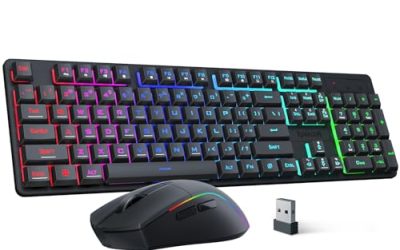
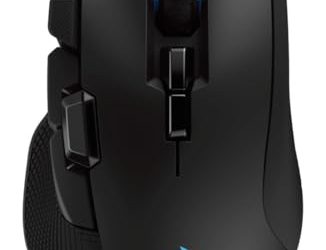
The S101 is the native route in gaming clothes: a wired 104-key RGB-backlit keyboard and a wired gaming mouse, each with its own USB cable for the dock’s ports. In games with built-in keyboard and mouse support, and for fast text entry, it gives a Switch desk setup the look and feel of a PC battlestation, with a proper gaming mouse whose sensitivity adjusts between 800 and 3200 DPI on a button press.
The keyboard brings multimedia keys and the solid membrane feel Redragon’s budget sets are known for, and the mouse is a contoured right-handed shape with adjustable weighting in feel if not in spec. Wired connections mean no batteries and no receiver to lose, at the cost of two cables across the desk and two of the dock’s USB ports occupied. Like the MK270, it cannot convert input for controller-only games; it is for supported titles and typing, bought by players who want their Switch corner to feel like a gaming setup rather than an office one.
Specs
- Wired keyboard and mouse combo; 104-key RGB-backlit keyboard with multimedia keys; gaming mouse with adjustable 800 to 3200 DPI; two USB connections, one per device, into the dock; wired, no batteries; keyboard and mouse set model S101; compatible with the Switch’s native keyboard and mouse support when docked.
Best for: Natively supported Switch games and text entry, for players who want a gaming-style wired set at the dock.
Watch out for: Uses two dock USB ports and two cables, and like every non-converter option it cannot enable mouse aiming in controller-only games.
Which One Fits
If you already own a keyboard and mouse you love and want them working across your Switch library, buy a converter: the GameSir VX2 AimBox for the established all-rounder, or the leadjoy VX2 Aimbox if you use a wired headset at your desk. If your needs are typing, codes and the games that support keyboard and mouse natively, skip converters entirely: the MK270 for a wireless family-friendly set, or the Redragon S101 if you want the gaming look and a wired connection at a desk.
Common Mistakes
Expecting PC-style mouse aim. A converter gives you controller input driven by a mouse. It is better than a thumbstick for many players, but it has a turn-speed ceiling and a different feel. Set expectations before you buy and you will be pleased; expect raw PC input and you will be disappointed.
Forgetting the wired communication setting. Pro Controller Wired Communication must be on for converters to work. Half of all “my adapter is broken” reports are this one toggle.
Trying to play undocked or on Switch Lite. The dock is not optional for this category. Adapters and receivers need the dock’s USB ports and power arrangement, and the Lite cannot dock at all.
Buying a combo when you needed a converter, or the reverse. Combos only serve natively supported uses. Converters only earn their money in controller-only games. Decide by the games you actually play.
Ignoring competitive rules. If ranked play matters to you, check your game’s current stance on converters first. Getting the setup working is easy; finding out afterwards that your mode of choice forbids it is not.
FAQ
Does the Nintendo Switch support keyboard and mouse natively?
Partly. A standard USB keyboard and mouse connected to the dock work for text entry across the system, and a limited number of games include built-in keyboard and mouse support. Most games do not, which is why converter adapters exist for players who want keyboard and mouse control in controller-only titles.
How do I connect a converter adapter to the Switch?
Dock the console, turn on Pro Controller Wired Communication under System Settings, Controllers and Sensors, connect the adapter to a USB port on the dock, then plug your keyboard and mouse into the adapter. Follow the adapter’s app or guide for mapping and sensitivity, and keep the console docked while you play.
Can I use keyboard and mouse on Switch Lite?
Not in any practical way. The Lite cannot dock, and this entire category depends on the dock’s USB ports. A standalone USB hub can power basic text entry in theory, but it is not a supported or sensible gaming setup, and converters are designed around docked consoles.
Will a converter get me banned?
Rules vary by game and can change. Converters are sold openly as console accessories and are uncontroversial for single-player and casual play, but some competitive titles restrict them. Check the current rules for the specific game and mode you care about before using one there.
Final Verdict
Keyboard and mouse on Switch is two different purchases wearing one name. For controller-only games, a converter adapter is the purchase, and the GameSir VX2 AimBox and leadjoy VX2 Aimbox are the two to choose between, separated mainly by the headset port. For typing and natively supported games, a simple combo is better and cheaper: the MK270 wireless set for most households, the Redragon S101 for a wired gaming feel. Know which job you are hiring for, remember the dock and the wired-communication setting, and the setup works exactly as advertised.
Related guides
More from Amazon
Programs that pair well with the guide above. Offers and eligibility are set by Amazon and may change.
Free shipping on eligible items, Prime Video and more. Eligible new members can start with a free trial.
Start a Prime free trialAd-free music streaming. Eligible new subscribers can start with a free trial.
Try Music Unlimited freeA Prime membership for ages 18-24 with a trial period. Eligibility is set by Amazon.
See Prime for Young AdultsAudiobooks and podcasts to listen to on the go. Eligible new members can start with a free trial.
Try Audible freeAs an Amazon Associate we earn from qualifying purchases.