
A Quest link cable has one job: carry a fast USB data connection from your PC to your head without tripping you on the way. These ten listings are 10, 16 and 20 foot USB 3.0 leads written for Quest 3, 3S and 2 owners who stream PC VR over a wire. The real differences are length, the PC-side plug, charging support and how clearly each title names your headset. For most living rooms, a 16 foot cable is the safe middle, and the notes below say when to go shorter or longer.
Our Top Picks
Top 3 picks at a glance
Quick picks
As an Amazon Associate we earn from qualifying purchases at no extra cost to you.

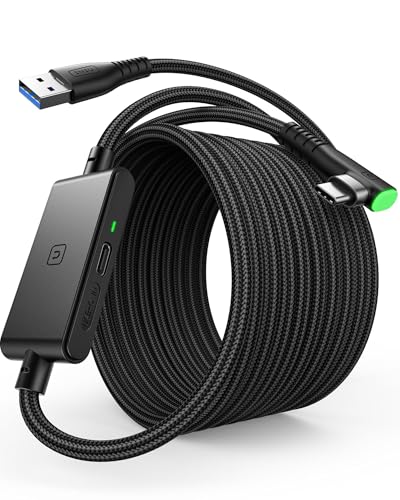


- Syntech L-shaped: plain 16 foot lead
- INIU separate port: Quest 3S charging
- AMVR braided: USB-A PCs
- Syntech with adapter: adapter plus charging
- VCNBAN: no-frills baseline
- YRXVW 10FT: tight spaces
- Syntech strap kit: tidy cabling
- INIU Upgraded: named Quest 3 and 2
- VakiReyy 10FT: short Quest 3 and 2
- Maxonar 20FT: very large rooms
All ten compared
| Model | Length | Title specs | Best for |
|---|---|---|---|
| Syntech L-shaped | 16 ft | 5Gbps, L-plug | Everyday Link |
| INIU separate port | 16 ft | charging port | Quest 3S |
| AMVR braided | 16 ft | 5Gbps, adapter | USB-A PCs |
| Syntech adapter | 16 ft | adapter, charging | Adapter users |
| VCNBAN | 16 ft | USB 3.0 | Baseline |
| YRXVW | 10 ft | L-plug, charging | Small rooms |
| Syntech strap kit | 16 ft | 3.2Gbps, 18W, strap | Tidy cabling |
| INIU Upgraded | 16 ft | USB 3.0, charging | Named support |
| VakiReyy | 10 ft | USB 3.0, charging | Compact setups |
| Maxonar | 20 ft | 5Gbps, charging | Large rooms |
The ten cables, one by one
Syntech 16FT USB 3.0 Link Cable with Reinforced L-Shaped Connector
This listing is a 16 foot USB 3.0 to USB cable named for Quest 3, 3S, 2 and Pico 4, with up to 5Gbps data transfer quoted for PCVR and SteamVR. The detail that sets it apart in the title is the reinforced L-shaped USB-C connector, a right-angle plug that sits against the headset instead of jutting out of the port. The title says nothing about charging, and it does not state which connector goes on the PC end, so treat it as a data cable first. The 5Gbps number is the seller’s claim and the nominal USB 3.0 ceiling, not a promise about your setup. Two more Syntech listings below overlap with it.
Pros
- 16 foot length suits most living-room play areas
- Right-angle headset plug named in the title
Cons
- No charging support mentioned in the title
- PC-side connector type is not stated
Who it’s for: Players who want a plain long data lead and already have a free USB 3 port.
Who should skip it: Anyone who wants to charge during sessions, or who needs to know the PC-end plug before buying.
INIU 16ft VR Link Cable with Separate Charging Port
INIU’s title advertises USB 3.0 to USB C, a 16 foot run and a separate charging port, plus the phrase “USB 3.0 High Speed & Charging”. The charging port is the headline feature: it points to a design where power comes in alongside data, though the title does not explain how it is wired, so read the listing photos and description. Compatibility is worded loosely. It names Meta Quest 3S, Quest Pro and Pico 4, with a general “virtual reality headset” line, and it leaves out Quest 3 and Quest 2 by name. Those headsets share a USB-C port, but a named match is safer than an assumption, and the seller may answer questions on the page.
Pros
- Charging port advertised in the title
- 16 foot length with USB 3.0 stated
Cons
- Quest 3 and Quest 2 are not named
- How the extra port works is unclear from the title
Who it’s for: Quest 3S or Quest Pro owners who want one cable for data and top-up power.
Who should skip it: Owners of Quest 3 or Quest 2 who want an explicit compatibility statement.
AMVR 16FT Nylon Braided Charging Link Cable with A-to-C Adapter
The AMVR listing is a 16 foot nylon braided cable with an A to C adapter, USB 3.0, a quoted 5Gbps rate and “play while charging” in the title. The adapter matters for PCs that offer USB-A ports but no USB-C. The title also carries a warning that stands out from the rest of the group: it needs an 18W-plus charger for charging to work as described. That is an honest line to find in a listing, and it means a weak phone brick will not do. Braiding is a seller feature; the title does not say how it holds up to repeated bending or foot traffic, and the listing gives no length tolerance for the adapter, so look at the photos.
Pros
- Adapter included for USB-A PC ports
- States the charger requirement up front
Cons
- Needs an 18W or stronger charger
- Braid durability is not stated beyond the word nylon
Who it’s for: Players whose PC has USB-A ports and who want to charge while playing.
Who should skip it: Buyers without a suitable charger, or anyone who wants the thinnest possible cord.
Syntech VR Link Cable 16FT with USB 3.0 Adapter for Quest 3/3S/2
This second Syntech entry is also 16 feet, but the title mentions a USB 3.0 adapter, fast data transfer and charging support, which the first Syntech listing does not. It names Quest 3, 3S and 2 and SteamVR, and drops Pico 4, which is only a concern for owners of that headset. In practice you are choosing between two same-length cables from the same brand with different title claims; if the adapter and charging line matter to you, this one covers them on paper. Treat the speed language as a seller claim: no figure is given here, unlike its siblings, so check the listing body for a stated data rate. Charging support is named, but there is no wattage or charger advice, so check the page.
Pros
- Adapter and charging support named in the title
- Covers Quest 3, 3S and 2
Cons
- No data-rate figure in the title
- Pico 4 not named
Who it’s for: Quest owners who want the Syntech name plus an adapter for their PC port.
Who should skip it: Pico 4 owners, and anyone who wants a stated bandwidth number.
VCNBAN 16 Feet Link Cable for Quest 3S, 3 and Quest 2
VCNBAN is the plain-spoken one: a 16 foot USB 3.0 to USB C cable for Quest 3S, Quest 3, Oculus Quest 2 and Pico 4, with high-speed data transfer and PC or SteamVR use mentioned. The title offers no braiding, angled plug, adapter or charging claim, so what you see is what the listing promises. That keeps the pitch simple and makes the other titles in this group easier to compare against, since you can see exactly which extras each rival adds. With few extras it is a reasonable baseline, though a lack of detail also means more reliance on the product page and buyer feedback. If your PC offers only USB-A ports, look for an adapter line first, since this title mentions none.
Pros
- Simple, clear compatibility line
- 16 foot length, four headsets named
Cons
- No charging, adapter or connector detail
- Little to separate it from other basic leads
Who it’s for: Shoppers who want a straightforward 16 foot cable without extras.
Who should skip it: People who need an adapter, a right-angle plug or confirmed charging.
YRXVW 10FT Link Cable with Stable L-Shaped Connector
YRXVW is one of two 10 foot options in the group. The title lists Quest 3S, 3, 2, Pro and Pico 4, USB 3.0 high-speed data transfer, charging support and a stable L-shaped connector. Ten feet is roughly three metres, which fits a compact setup where the PC sits near the play area; in a larger room it may pull tight when you turn. Shorter cords also mean less to trip over, and a short run suits a PC placed right beside the chair. This listing is the most complete short cable on paper, naming more headsets than the other 10 foot option. The PC-end plug is not stated, so check the product images if you need USB-A or USB-C.
Pros
- Short length suits compact play areas
- Names more headsets than the other 10 foot lead
Cons
- 10 feet may fall short in a larger room
- Charging support is stated without any detail
Who it’s for: Players with a desk-side PC and a small, defined play space.
Who should skip it: Anyone who walks across a big room or sits far from the PC.
Syntech 16FT Link Cable with 2-in-1 Adapter, Velcro Strap and 18W Charging
This is the busiest Syntech title: 16 feet, a USB 3.0 to C adapter, 18W fast charge, 3.2Gbps sync, a 2-in-1 USB-A/C adapter and a secure Velcro strap. The stated 3.2Gbps is lower than the 5Gbps quoted by other listings, so either the wording differs or the rate does; the title does not explain, which is worth checking before you assume a faster cable. The Velcro strap is a small practical extra for managing slack on a long run, which matters at this length for a cord that otherwise tangles. It names Quest 3S, 3 and 2, with no Pico 4. Of the three Syntech listings it is the accessory-rich one, so it suits buyers who value extras over a headline data figure.
Pros
- Adapter handles USB-A and USB-C PC ports
- Strap helps tame a 16 foot cord
Cons
- 3.2Gbps figure is lower than rival claims
- Pico 4 not named
Who it’s for: Owners who want charging, an adapter and tidy cable management in one box.
Who should skip it: Buyers who compare headline data rates first.
INIU Link Cable with Charging, 16ft, Upgraded Version
The second INIU listing is the broader of the pair: 16 feet, USB 3.0 data and charging, and a compatibility line that names Quest 3 and 3S, Quest 2 and Pro, and Pico 4 for PC VR. The words “Upgraded Version” are marketing; the title does not say what changed, so do not assume a proven improvement. If you were attracted to the INIU brand but need Quest 3 or Quest 2 to be named, this listing fixes the gap in the other INIU entry. Both INIU titles are 16 feet and both mention USB 3.0, so the choice comes down to the separate charging port versus the broader headset list. Neither title gives a data-rate figure, so check the listing body if bandwidth matters to you.
Pros
- Wide, explicit headset compatibility
- USB 3.0 data and charging both named
Cons
- “Upgraded” is not explained
- No data-rate figure in the title
Who it’s for: Quest 3 or Quest 2 owners who prefer the INIU name and named compatibility.
Who should skip it: Anyone who wants proof of the upgrade rather than the label.
VakiReyy 10FT Link Cable for Oculus Quest 3 and Quest 2
VakiReyy is a 10 foot cable with USB 3.0 to USB C, high-speed data transfer and charging, written for Quest 3 and Quest 2. The title reads older than the others: it says “Oculus Quest” and does not name Quest 3S, so owners of the newer headset should confirm the listing covers it. It is the other short option in the group, so the same rules apply as for the YRXVW: it fits a nearby PC and small space, and it may feel restrictive in a larger room. If you own a Quest 3S, the missing mention is the main reason to look at a rival listing first. The title also gives no data-rate figure, so the product page is where to confirm speed.
Pros
- Short cord reduces floor clutter
- Quest 3 and Quest 2 both named
Cons
- Quest 3S is not mentioned
- 10 feet limits where the PC can sit
Who it’s for: Quest 3 or Quest 2 owners with the PC beside the play area.
Who should skip it: Quest 3S owners who need an explicit match, and anyone in a large room.
Maxonar VR Charging Link Cable 20FT (Next-Gen Chip), White
Maxonar is the longest cable in this roundup at 20 feet, around six metres, with a quoted 5Gbps USB 3.0 to USB C connection and charging in the name. It names Quest 3S, 3 and 2, Pico 4, PC and SteamVR. The phrase “Next-Gen Chip” is a marketing label with no detail in the title, and a very long USB cable is where signal quality becomes a question, because longer passive runs leave less margin, so read what the listing says about it. White is the colour on offer. Choose length only if you need it, and work out your route from the PC to the middle of the play space before paying for the extra four feet over the common 16 foot cable.
Pros
- Longest run here for big rooms or far-away PCs
- Four headsets named plus charging
Cons
- “Next-Gen Chip” is unexplained
- A 20 foot cord is more to manage and snag
Who it’s for: Players with a large play area or a PC across the room.
Who should skip it: Anyone in a compact space, where the extra cord is just clutter.
How we picked these
We selected ten cables whose titles name a Quest or Pico headset, a USB 3.0 data claim and a length. Everything about a specific cable comes from its listing title, which means every speed figure is a seller claim. Where titles disagree, such as 3.2Gbps against 5Gbps, or where a headset is missing from the compatibility line, we say so. Nobody on the team used or measured these units. Our basis is published specifications, manufacturer documentation and buyer reviews, so use the listing details as the final word.
What to check before you buy a link cable
Match the length to your room, not to the biggest number
Ten feet is about 3 metres, sixteen about 4.9 and twenty about 6.1. Say the PC port is 2 metres from the middle of your play space at floor level, and your head will be around 1.7 metres up. The cable must climb to the headset, so you need roughly 2 plus 1.5, or 3.5 metres, before any slack for turning. That already beats a 10 foot cord. Add a metre of slack and a 16 foot cable fits.
| Your situation | Sensible length |
|---|---|
| PC beside a small, fixed play spot | 10 ft |
| Typical living room, PC along one wall | 16 ft |
| Large open room, PC in another corner | 20 ft, or a PC extension |
USB generation and the PC port
Check the port, not only the cable. A USB 3.0 cable plugged into a USB 2.0 port gives USB 2.0 speed, and the Link picture degrades. Use blue or SS-marked USB-A ports, or USB-C ports labelled as USB 3 or better, and prefer ports on the back of the motherboard. Avoid unpowered hubs, splitters and long front-panel leads, because each extra connection is another place for the signal to degrade. If Link reports a poor connection, try another port before blaming the cable. Our VR-ready PC specs guide covers the rest of the computer side.
Connector shape and strain relief
The headset end takes the strain. A right-angle plug, like the L-shaped ones in several titles here, keeps the cord from levering against the port when it drapes down your back. Straight plugs are fine if you route the cable carefully. Whatever the shape, avoid letting the cable pull sideways on the port; hang the weight from a ceiling hook or the strap, not the plug.
Charging while you play
Some listings claim charging and others stay silent. Where a title says charging, look for what it asks of you: AMVR names an 18W-plus charger, Syntech cites 18W. A cable that charges cannot create power the PC port or charger will not supply. If your sessions are short, charging matters less than data quality; for long ones, pick a listing that states its power requirements.
Routing, weight and tangles
Sixteen feet of cord is a lot to manage. Drape it over a shoulder or run it overhead, keep the slack behind you, and use a strap to gather excess instead of coiling it tightly, since tight coils are hard on any cable. Braided cords tangle less but can be stiffer and harder to coil; the titles do not say which feels better. A ceiling hook or a shoulder strap keeps the weight off your neck and the plug.
Check the headset line by name
Quest 3, 3S, 2, Pro and Pico 4 appear in these titles in different combinations. If your headset is not named, pick a listing that names it. Connection trouble after setup is common and mostly software; our link cable troubleshooting guide lists the checks.
The pre-order checklist, in the order that saves the most trouble:
- Length against your worked-out route, plus about a metre of slack
- PC-end plug: USB-A, USB-C, or an adapter that is included
- Your exact headset named in the title
- A stated USB 3.0 data rate, remembering it is a seller claim
- Charging requirements, if you want power during play
- Return window, in case the cable fails to connect
Mistakes that cost buyers time
The first mistake is buying on length alone. A 20 foot cable in a small room becomes a hazard. The second is trusting a speed claim without checking the PC port. The third is assuming every USB-C cable carries video-grade data; many are charge-only or USB 2.0. Fourth, buyers skip the compatibility line and discover too late that the cable names the wrong headset generation. Fifth, they forget that the cable is only one link: a wired connection does not fix a PC that is under the specification. Sixth, some people coil a spare 16 feet tightly beside the PC, which stresses the cord and invites kinks. Seventh, buyers read a ‘compatible with’ line as a guarantee, when it is the seller’s claim and may be copied across listings. If you are weighing wired against wireless, Link cable versus Air Link explains the trade-off.
Verdict
For a typical room, a 16 foot cable that names your headset and states a USB 3.0 data rate is the sensible buy. The AMVR and Syntech adapter listings suit PCs with USB-A ports, the INIU listing with a separate charging port suits Quest 3S owners who want power, and the short YRXVW or VakiReyy cables suit compact spaces. Choose the Maxonar only if the room demands 20 feet. Read the headset line first, then the length, and keep the return window in mind while you confirm the connection works with your PC.
Questions buyers ask
Does a Quest link cable need to be USB 3.0?
For a good picture, yes: aim for USB 3.0 or newer on both the cable and the PC port. A charge-only or USB 2.0 lead can connect but usually forces a lower-quality stream. All ten listings here claim USB 3.0, a seller claim worth confirming in the listing details before you pay.
Is 16 feet too long for a small room?
Usually not. Extra length is slack, and a cable that pulls tight is worse than one that loops on the floor. If your PC sits close to a small play area, a 10 foot cable is enough and leaves less cord to step on. Work out the route first, then decide.
Can the headset charge while you play over the cable?
Only if the listing says it supports charging, and then it depends on your charger. Several titles here mention charging, AMVR names an 18W-plus charger requirement, and one Syntech lists 18W. Check the listing and the charger you own first, since a weak adapter may not deliver the power described.
Link cable or Air Link: which suits a PCVR setup better?
A cable does not depend on your Wi-Fi router, at the cost of a cord you can trip over. Air Link removes the cord but needs a strong 5GHz network and a router close by. Our comparison page walks through the trade-off in detail if you are still undecided about your room.
Will these cables work with Quest 3S and Quest 2?
Most titles name Quest 3, 3S and 2, but not all: the INIU with a separate charging port skips Quest 3 and Quest 2, and the VakiReyy 10ft omits Quest 3S. Read the compatibility line for your exact headset, and ask the seller if the title leaves your model out.
Related guides
- Vr Facial Interfaces For Glasses Wearers
- Retro Gaming Controllers Nintendo Switch Pc
- Standalone Vr Headsets For Beginners


