If you want the short answer: for notes and drawing on a phone, the total wireless Motorola Moto g Stylus (128GB, Blue) is the best overall pick in this roundup, because it is the only item here that pairs a phone with a built-in, battery-free stylus and matching note software — that combination is what actually delivers palm rejection and usable inking. If you already own a phone and just want a pen that works on any touchscreen, the Acempire 2-in-1 stylus 7-pack is the best mid-range compromise, and the Abiarst universal stylus is the best single-pen budget buy. The ChaoQ 3-pack and the SLKIJDHFB 10-pack are the value picks when you want several pens scattered across a bag, desk and car. Everything below explains why those distinctions matter, and exactly where a cheap capacitive pen is good enough — and where it quietly is not.
Our Top Picks

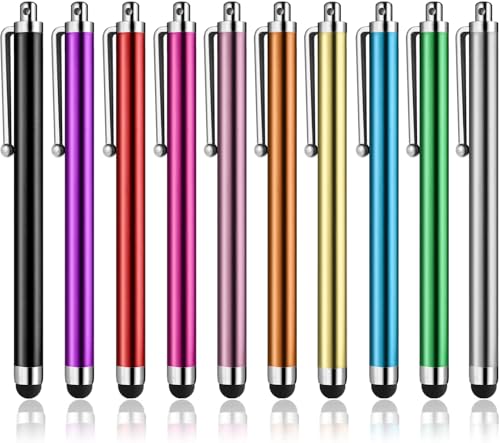

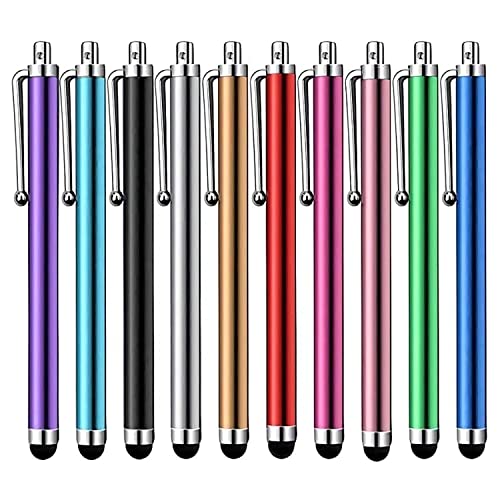

Top 3 picks at a glance
Quick Comparison
The table below covers every product in this roundup. Price tiers are relative to each other: “premium” here means it costs more than all the pens in this list combined, not that it is a flagship phone.
| Product | Best for | Key specs | Price tier |
|---|---|---|---|
| ChaoQ Stylus Pen for Touchscreen (3 pcs) | Cheap backup pens for a mixed iPhone/Android household | Passive capacitive pen; no battery, no pairing; 3 pens; soft mesh-fiber and/or rubber tips; clip on body; works on any capacitive touchscreen | Budget |
| Abiarst High Precision Universal Stylus | One everyday pen with a fine tip for handwriting and markup | Passive capacitive pen; disc-style precision tip (on 2-in-1 versions paired with a fiber tip); no battery, no pairing; universal fit for iPad, iPhone, tablets and Galaxy phones | Budget |
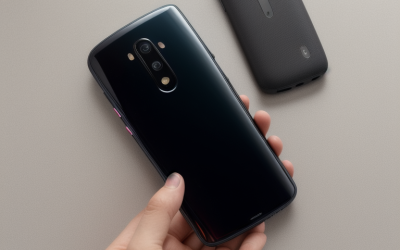
| total wireless Motorola Moto g Stylus, 128GB, Blue (Locked) | Built-in stylus note-taking and sketching on a single device | Prepaid Android phone; 128GB storage class; stylus silos inside the body; battery-free pen driven by a digitizer layer in the display; large display class; ~5,000 mAh battery class; carrier-locked to Total Wireless | Premium |
| SLKIJDHFB Stylus Pen (10 Pack) | Bulk supply for classrooms, teams, shared desks and family drawers | Passive capacitive pen; 10 pens; universal tip; no battery, no pairing; works on tablets, iPad mini/Pro/Air and Android phones | Budget |
| Acempire Stylus (7 Pcs), 2-in-1 | Tip versatility — fine tip and rounded tip in one pen — at a low cost per pen | Passive capacitive pen; 7 pens; 2-in-1 dual-tip design (precision tip one end, softer tip the other); high-precision, high-sensitivity tip claims; no battery, no pairing | Mid-range |
How We Chose
This roundup is built from listing specifications, published manufacturer documentation and well-established behaviour of two pen technologies: passive capacitive pens and digitizer-driven built-in styluses. We did not run our own laboratory measurements, and nothing here depends on a single reviewer’s anecdote.
Five criteria decided the picks. First, pen technology class, because that determines everything downstream: a passive capacitive pen is a conductive stick that impersonates a finger, while a built-in stylus talks to a digitizer layer under the display. Second, note-taking tools — whether the pen ships with or unlocks handwriting software, or whether it simply works inside whatever app you already use. Third, latency and pressure class, judged by what the hardware can physically support rather than by marketing wording. Fourth, battery and charging implications for both the pen and the phone. Fifth, software support and upgrade path: a pen lasts years and survives phone changes, while a stylus phone commits you to one device and one carrier. Price tier is relative to this list, and multi-pack economics matter — cost per usable pen is often the real number.
1. ChaoQ Stylus Pen for Touchscreen (3 pcs) – Best for Cheap Backup Pens
As an Amazon Associate we earn from qualifying purchases at no extra cost to you.

The ChaoQ three-pack is the pick for anyone who wants a pen in every bag, at every desk, and in the car, without thinking about it again. It is a passive capacitive stylus: the listing describes three pens for iPad, iPhone and Android touchscreens, with no battery, no Bluetooth and no pairing step. You take it out of the drawer and it works. That sounds unremarkable, but it is the entire value proposition of this category, and it is why these pens keep selling year after year.
Who it suits. Households with a mix of devices — an iPhone here, an Android phone there, a tablet someone else uses. Students who annotate lecture slides. Commuters who jot a shopping list in a notes app. Parents who hand a tablet to a child and would rather not hand over a $100 pen at the same time. Anyone who has lost a stylus behind a sofa cushion and does not want to repeat the experience.
Key specifications (by spec class).
- Type: passive capacitive stylus — no battery, no charging, no pairing, no firmware
- Quantity: three pens in the pack
- Tip: soft conductive tip, typically mesh-fibre and/or rubber dome depending on the variant
- Compatibility: any capacitive touchscreen — iPhone, iPad, Android phones and tablets, Samsung Galaxy devices, e-readers with touch
- Body: slim barrel with a pocket clip, sized to sit alongside a phone
- Pressure support: none — line width does not respond to how hard you press
- Palm rejection: none from the pen; any rejection has to come from the app
Strengths. The economics are the headline. Three pens means you stop treating a stylus as a possession to be protected and start treating it as a tool to be left wherever you need it. There is no charge state to manage, so it cannot be flat when you need it, and no pairing to redo when you switch devices. Soft tips are gentle on glass and on screen protectors, which matters if the device is shared or expensive. The universal compatibility is genuinely universal in a way that active pens are not: an Apple Pencil works with iPads and nothing else, and an S Pen works with the phone it was made for, but a capacitive pen works with all of them.
Limits worth knowing before you buy. Because the pen is a finger substitute, the phone treats it as a finger. There is no pressure curve, no tilt response, no hover, and no way for the phone to know your palm is resting on the screen while you write. Handwriting therefore has to be done with your hand floating or resting off the glass, which is the single biggest reason people find cheap styluses frustrating for long notes. Line quality is also limited by the touch controller’s sampling rate, not the pen — see the latency section further down for the numbers. Finally, soft tips wear: fibre tips fray, rubber domes develop a shine and start dragging, and both eventually need replacing. At this price, replacement is usually a new pack rather than a new tip.
Pros
- Extremely low cost per pen across a three-pack
- No battery, no pairing, no app, no setup
- Works across iPhone, iPad, Android phones and tablets with one pen
- Soft tips are safe for glass and screen protectors
- Ideal as a spare kept in a bag, glovebox or desk drawer
Cons
- No pressure sensitivity and no tilt support
- No palm rejection — long handwriting sessions get awkward
- Line weight is fixed; fine detail work is hard
- Tips wear out and are not always replaceable
- Latency is capped by the phone’s touch sampling, not the pen
How it compares with the nearest alternative here. The Abiarst universal stylus is the natural rival and costs about the same per pen. The difference is the tip: Abiarst’s disc-style precision tip gives a finer contact point and better accuracy for small handwriting and detail work, while the ChaoQ’s softer dome tip is more forgiving, quieter on glass and better for quick taps and navigation. If you mostly write short notes and tap around, buy the ChaoQ three-pack. If you write small and care about legibility, the Abiarst is the better single pen — and if you want quantity above all, the SLKIJDHFB ten-pack undercuts both on cost per pen.
2. Abiarst High Precision Universal Stylus – Best for Fine Handwriting

The Abiarst universal stylus is the budget pick for people whose main complaint about cheap pens is accuracy. Its listing emphasises high precision across iPad, iPhone, tablets and Samsung Galaxy devices, and that precision comes from the tip design rather than from any electronics — because there are none. This is still a passive capacitive pen, but it is the version of that idea aimed at handwriting rather than tapping.
Who it suits. Students taking fast handwritten notes in a notes app. Professionals marking up PDFs, contracts or drawings on a phone. Anyone with small handwriting who has tried a fat rubber-tipped pen and found the line too thick and the aim too vague. Also a good fit for people who want one good pen rather than a drawer full of mediocre ones.
Key specifications (by spec class).
- Type: passive capacitive stylus, battery-free and pairing-free
- Tip: disc-style precision tip on the precision variants, often paired with a fibre tip on the reverse end in 2-in-1 configurations
- Compatibility: universal — iPad, iPad mini, iPad Air, iPad Pro, iPhone, Android phones and tablets including Samsung Galaxy
- Pressure support: none; line width is set by the app’s pen setting, not by pressure
- Palm rejection: none from the hardware
- Body: slim metal-look barrel with clip, often with a cap over the disc tip
Strengths. A disc tip puts a small, flat, transparent contact patch against the glass. The practical result is that you can see exactly where the line will start, which is the difference between writing that reads back cleanly and writing that looks like it was done with a crayon. Disc tips also tend to produce thinner strokes than dome tips, so more words fit in the same screen area — useful when you are annotating a dense document on a 6-inch phone display. Because the tip glides on a low-friction surface, longer writing sessions are less tiring than with a rubber tip that drags. And like every pen in this roundup, it needs no charge and works with any capacitive screen, so it will still be useful after you change phones.
Where it falls short. Disc tips are the most fragile tip type in this category. The disc can catch on a raised screen protector edge, pop off, or bend if the pen is dropped at an angle, and once the disc is deformed the pen skips. Disc tips also want a fairly perpendicular hold: tilt the pen heavily and the contact patch lifts, breaking the stroke. Thick tempered-glass protectors with a pronounced edge are the classic failure case, and so are screens with a heavy oleophobic coating that has worn unevenly. And the core limitation is unchanged from the ChaoQ: no pressure, no tilt, no palm rejection. If you rest your hand on the glass while writing, the phone will register your palm as input and your strokes will jump. The workaround is to use an app with a “finger drawing disabled” or palm-shield setting, keep your hand off the screen, or use a drawing glove.
Pros
- Finer, more accurate line than dome-tipped pens
- You can see the contact point, which improves handwriting
- Low-friction glide suits longer note-taking sessions
- Universal compatibility across iOS and Android devices
- No battery, no pairing, no software to install
Cons
- Disc tips are fragile and can be damaged by a drop
- Requires a near-perpendicular grip to keep contact
- Can skip on thick or edge-raised screen protectors
- Still no pressure sensitivity, tilt or palm rejection
- One pen means one pen — lose it and you are back to square one
How it compares with the nearest alternative here. Against the ChaoQ three-pack, the Abiarst wins on precision and loses on redundancy: you get one good pen instead of three average ones, and a disc tip needs more care than a soft dome. Against the Acempire seven-piece 2-in-1 set, the Abiarst is the cheaper way to try a precision tip, while Acempire gives you seven pens and both tip styles in each one. If you are unsure whether a disc tip suits your grip, buy the single Abiarst first; if you already know you like the format, the Acempire set is the better long-run buy.
3. total wireless Motorola Moto g Stylus, 128GB, Blue (Locked) – Best for Built-in Stylus Note-Taking
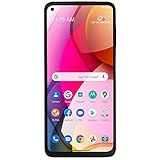
This is the only product in the roundup that is a phone rather than a pen, and it is the only one that changes what stylus input can do. The Motorola Moto g Stylus line is built around a pen that lives inside the phone body and works through a digitizer layer in the display. That single architectural difference is why it is the best overall pick for anyone whose priority is notes and drawing rather than price.
Who it suits. Someone who wants one device to carry, writes or sketches most days, and is tired of floating their hand above the glass. It also suits a buyer who wants a large-screen Android phone for media and general use and treats the stylus as a genuine bonus rather than a gimmick. It is a weaker fit for anyone who needs a premium camera system, top-tier gaming performance, or who will not use Total Wireless service — the listing is explicit that this handset is carrier-locked.
Key specifications (by spec class).
- Form: prepaid Android smartphone with a stylus that stores inside the chassis
- Storage: 128GB in this listing; the Moto g Stylus line has historically included a microSD slot on most generations
- Display: large-phone class, typically in the 6.5–6.8-inch range depending on generation, with high-refresh panels on recent models
- Battery: roughly 5,000 mAh class, USB-C charging
- Stylus: battery-free, no pairing, no charging; sensed by a digitizer layer in the display
- Stylus features: Motorola’s Moto Note app for handwriting and sketch notes, plus screenshot annotation and quick-capture shortcuts on recent generations
- Network: locked to Total Wireless prepaid service
Why the built-in stylus matters. A passive capacitive pen is electrically indistinguishable from a fingertip, which is why it cannot trigger palm rejection. A digitizer-driven stylus is distinguishable: the display can tell pen from palm, so you can rest your hand on the glass and write the way you would on paper. That is not a small convenience — it is the difference between a phone that is technically capable of notes and a phone you will actually take notes on. The pen also silos into the body, so it cannot be left at home, and it never needs charging, so it cannot be flat when you need it. Published reviews of the Moto g Stylus line consistently describe the pen as a plain, reliable writing tool rather than a feature showcase, which is exactly the right trade for note-taking.
Strengths. Palm rejection plus a stowed pen plus a large screen is the whole package, and no accessory in this list can replicate it. Writing in Moto Note or a third-party notes app is comfortable for long sessions because your hand rests naturally. The battery class — around 5,000 mAh — is generous for note-taking, which is a light workload compared with gaming or video. The 128GB storage figure is workable for a notes-and-media phone, and expansion via microSD on most generations softens that limit. And because the phone itself is the stylus device, there is nothing to lose, forget or replace.
Limits and honest caveats. The pen is not an S Pen. It has no Bluetooth radio, so there are no air gestures or remote shutter tricks, and pressure and tilt response are limited compared with an active pen that reports thousands of pressure levels — expect a consistent line weight unless the app adds simulated variation. The handset is carrier-locked to Total Wireless, which means it is tied to that prepaid service and its unlocking policy rather than being a free-agent device. The Moto g Stylus line sits in the value-to-midrange performance class, so it is a fine phone for notes, browsing and video and a modest one for demanding games. And unlike a $10 pen, it commits you to one device: when the phone is replaced, the stylus goes with it.
Pros
- Genuine palm rejection — write with your hand on the screen
- Stylus stores inside the phone and never needs charging
- Purpose-built note app with screenshot annotation
- Large display and ~5,000 mAh battery class suit long writing sessions
- One device instead of a phone plus a pen you can lose
Cons
- Carrier-locked to Total Wireless prepaid service
- No pressure sensitivity or tilt on the level of a flagship active pen
- No Bluetooth pen features such as air gestures
- Value-to-midrange performance class, not a gaming flagship
- The stylus cannot be used on any other device
How it compares with the nearest alternative here. The nearest alternative is not another phone — it is the Acempire seven-piece 2-in-1 set used on the phone you already own. That route costs a fraction as much and gives you a pen that works on every device in the house, but you give up palm rejection, the stowed pen and the built-in note software. If your notes are short and occasional, the accessory route is rational. If you write most days and want the experience to feel like paper, the Moto g Stylus is the only item in this list that delivers it, and that is why it takes the overall pick.
4. SLKIJDHFB Stylus Pen (10 Pack) – Best for Bulk and Shared Devices
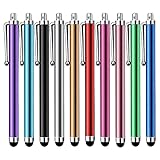
The SLKIJDHFB ten-pack is the quantity play. Its listing describes ten universal capacitive pens for tablets, iPad mini, iPad Pro, iPad Air and similar touch devices. If the ChaoQ three-pack is about having a pen in each bag, this is about having a pen in each room — and for a classroom, a shared office desk, a repair counter or a family with several children, that is the right unit of purchase.
Who it suits. Teachers handing out pens to a class. Team leads equipping a shared meeting-room tablet or a point-of-sale signature pad. Families where three people will claim the same pen. Anyone running a small fleet of tablets where the pens are expected to disappear, break or walk away, and where buying one premium pen per device makes no sense.
Key specifications (by spec class).
- Type: passive capacitive stylus, no battery, no pairing, no charging
- Quantity: ten pens in the pack
- Tip: universal soft conductive tip, generally mesh-fibre or rubber dome depending on the variant
- Compatibility: any capacitive touchscreen, including iPad, iPad mini, iPad Pro, iPad Air, Android tablets and phones
- Body: slim clip-on barrel, lightweight
- Pressure support: none
- Palm rejection: none
Strengths. The maths here is straightforward: ten usable pens for roughly the price of a couple of mid-range pens, which pushes the cost per pen low enough that replacement stops being a decision. That changes behaviour in a useful way. When a pen costs almost nothing, you stop policing it, and shared devices actually get used instead of sitting in a drawer because nobody can find the stylus. Every pen is identical, so there is no “good one” to fight over and no pairing to redo when someone picks up a different pen. They work on every capacitive device in the building, which matters in mixed environments where some tablets are iPad and some are Android. And because there is no battery, a pen that has sat unused for six months still works on the first stroke.
Where it falls short. These are basic pens, and the limitations are the category’s limitations. No pressure, no tilt, no palm rejection, and line width set entirely by the app. Bulk pens also tend to be the lightest and least refined barrels in this roundup — fine for tapping and short notes, less pleasant for an hour of handwriting. Tip quality varies more within a large pack than within a small one, so expect a couple of pens to feel different from the rest. And the obvious risk of a ten-pack: nine of them end up in a drawer and one gets used, which is fine, but it is worth being honest that quantity solves availability, not capability.
Pros
- Lowest cost per pen of anything in this roundup
- Ten identical pens — ideal for classrooms, teams and shared desks
- No battery, no pairing, no maintenance
- Universal compatibility across iPad and Android devices
- Losing or breaking a pen is no longer a problem to solve
Cons
- No pressure sensitivity, tilt or palm rejection
- Light, plain barrels that suit tapping better than long writing
- Quality can vary slightly between pens in a large pack
- Tips are not typically replaceable
- Ten pens is more than a single user needs — you are buying availability
How it compares with the nearest alternative here. The ChaoQ three-pack is the direct rival: same technology, same “no battery, no pairing” story, different pack size. Choose ChaoQ if you want one pen per bag for personal use and prefer a slightly smaller outlay; choose the SLKIJDHFB ten-pack if the pens are being shared, lent or handed to children, where the goal is having a pen available at the moment it is needed. Neither will match the Abiarst’s precision tip or the Acempire set’s dual-tip flexibility — this is the pack you buy for logistics, not for line quality.
5. Acempire Stylus (7 Pcs), 2-in-1 – Best for Tip Versatility
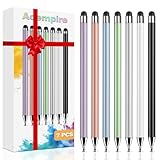
The Acempire seven-piece set is the mid-range pick, and “mid-range” here describes the price tier relative to the other pens in this list rather than any electronics inside. What you get is seven 2-in-1 styluses described as high precision and high sensitivity, suited to iPad, iPhone and similar touch devices. The 2-in-1 design is the reason to choose this over a single-tip pack: one pen, two tip behaviours, and seven chances to keep one within reach.
Who it suits. Note-takers who want a fine tip for text and a softer tip for highlighting, underlining and general navigation, without carrying two pens. Students who annotate on a phone and a tablet in the same session. People who have already decided they like passive styluses and want to buy once, in a quantity that covers home, work and bag. Also a sensible step up for anyone who tried a single budget pen, liked the idea, and wants a slightly better-feeling set.
Key specifications (by spec class).
- Type: passive capacitive stylus, no battery, no pairing, no charging
- Quantity: seven pens
- Tip design: 2-in-1 — a precision tip at one end and a softer general-purpose tip at the other, so one barrel covers fine work and broad strokes
- Tip material: typically a fine disc or narrow fibre tip paired with a rounded fibre or mesh tip
- Compatibility: universal capacitive touchscreens — iPad, iPhone, Android phones and tablets
- Pressure support: none; the app controls line width
- Palm rejection: none from the hardware
- Body: slim barrel with clip, often with caps over the tips
Strengths. The dual-tip layout is genuinely useful rather than a gimmick, because the two jobs are different. Precision tips give a thinner line and a visible contact point for handwriting and detail; softer tips feel better for scrolling, tapping small interface elements, dragging sliders and highlighting, where a fine disc is fiddly and skips. Having both on one barrel means you switch by flipping the pen rather than by finding a second one. The seven-pen count makes the cost per pen low enough that losing one is not a crisis, and it means you can leave a pen with the tablet, one in the phone case and one at the desk. As with every pen here, there is no battery to manage and no pairing to redo — a pen that has been in a bag for a year works immediately.
What to expect and what not to. “High precision and high sensitivity” in a listing describes the tip’s contact behaviour, not a pressure or tilt system. There is no pressure curve here, so a heavy hand and a light hand produce the same line unless the app simulates width from speed. There is no palm rejection, so resting your hand on the glass while writing will still register as input — use an app with finger-drawing disabled or keep your hand clear. The 2-in-1 format has one practical annoyance: caps. They come off, they get lost, and a pen without its cap is more likely to collect pocket lint on the tip. Disc-style fine tips in a set like this also need care when the pen is dropped, and they can skip on thick, edge-raised screen protectors, so a low-profile protector is a better match. Finally, seven pens is a lot for one person; the value only lands if you actually distribute them across the places you work.
Pros
- Two tip styles in one pen — fine for writing, soft for navigating
- Seven pens at a low cost per pen
- No battery, no charging, no pairing, no app required
- Universal fit across iPhone, iPad and Android devices
- A natural upgrade from a single basic pen without changing technology
Cons
- No pressure sensitivity, tilt or palm rejection
- Fine tips are fragile and need careful handling
- Loose caps are easy to lose
- Higher price than the pure budget packs for the same core technology
- Seven pens may be more than a single user will ever deploy
How it compares with the nearest alternative here. The Abiarst universal stylus is the closest competitor and the cheaper way to get a precision tip. Abiarst gives you one well-made precision pen; Acempire gives you seven pens and both tip styles in each, at a higher tier. If you write small and only need one pen, Abiarst is the efficient choice. If you want a fine tip and a soft tip on the same barrel — and you want spares — the Acempire set is the better buy. Against the ChaoQ and SLKIJDHFB packs, the Acempire set is the one that adds a second tip type rather than just more of the same tip, which is why it sits in the middle tier.
Built-in Stylus vs. Universal Capacitive Stylus: What Actually Changes
Every product above falls into one of two technology classes, and the differences between them are physical, not marketing. Understanding them is the fastest way to decide how much to spend.
Pen latency: the arithmetic that decides whether writing feels good
Latency is the delay between your pen tip moving and the ink appearing. For a passive capacitive pen, the pen contributes almost nothing to that delay — the phone does. The chain is: touch scan, touch processing, app rendering, then display refresh. Two of those stages are easy to put numbers on.
A display refreshing at 60 Hz shows a new frame every 1,000 ÷ 60 = 16.7 ms. At 90 Hz it is 1,000 ÷ 90 = 11.1 ms. At 120 Hz it is 1,000 ÷ 120 = 8.3 ms. A touchscreen scanning at 120 Hz samples your finger or pen every 1,000 ÷ 120 = 8.3 ms; at 240 Hz it samples every 4.2 ms; at 360 Hz, every 2.8 ms.
Take a mid-range phone with a 60 Hz display and a 120 Hz touch scan. The floor for input-to-photon delay is roughly 8.3 + 16.7 = 25 ms before app overhead, and 30–50 ms is a realistic range once the app’s ink engine is included. Move to a 120 Hz display with a 240 Hz touch scan and the floor drops to about 4.2 + 8.3 = 12.5 ms, with 20–30 ms realistic. Now convert that to something you can see. Handwriting speed is typically around 200–300 mm per second. At 250 mm/s, a 30 ms lag puts the ink 250 × 0.03 = 7.5 mm behind the tip — visibly trailing, roughly the width of a lowercase letter. At 20 ms it is 250 × 0.02 = 5 mm, and at 10 ms it is 2.5 mm, which reads as immediate. That is the entire reason a stylus can feel great on one phone and terrible on another with the same pen. It also explains why a $10 capacitive pen on a 120 Hz phone can feel better than a $100 pen on a 60 Hz one.
Pressure, tilt and line weight
A passive capacitive pen reports presence and position, nothing else. It cannot report force, so line width has to come from the app — some apps fake it by varying width with drawing speed, which is why a fast flick produces a taper. A digitizer-driven stylus in a phone like the Moto g Stylus can report more, but it still sits below the level of an active flagship pen that reports thousands of pressure levels and tilt angles. Practically: expect consistent line weight, and choose apps that offer manual brush-size presets you can switch between with a tap.
Palm rejection — the feature that decides whether you will keep using it
Palm rejection is the dividing line in this roundup. A capacitive pen is electrically a finger, so the phone cannot distinguish it from your hand. Any rejection must come from the app, and app-level rejection is imperfect: it usually works by ignoring touches after a pen touch, which fails the moment you reposition your hand mid-word. A digitizer-driven stylus is a different signal class, so the display can ignore palm contact outright and let you write with your hand down, the way you would on paper. If you plan to write more than a sentence or two at a time, this is the feature to pay for.
Battery: what the pen costs, and what note-taking costs
Passive pens draw zero power — there is nothing to charge, and they add nothing measurable to phone drain. Pens in the digitizer class also carry no battery of their own and add negligible drain, because they are powered inductively by the display layer. Where battery actually matters is the phone, and note-taking is a light workload. A 5,000 mAh cell at a nominal 3.85 V holds about 19.25 Wh. Writing with the screen on at a moderate brightness typically draws somewhere in the 2.5–3.5 W range, which works out to roughly 19.25 ÷ 3.0 ≈ 6.4 hours of continuous screen-on note-taking, or about 7.7 hours at the lighter end of that range. Video streaming at around 1.6–1.9 W stretches the same cell to roughly 10–12 hours. So a full day of intermittent notes is comfortably inside one charge; a marathon six-hour writing session is not something to attempt on a low battery.
Note-taking tools and software support
Accessory pens bring no software. They work inside whatever you install, which in practice means a general notes app, a PDF annotator or a drawing app, and you should check two settings in each: whether finger input can be disabled while the pen is in use, and whether the app has fixed brush-size presets. A stylus phone brings its own layer — Motorola’s Moto Note app on the Moto g Stylus line handles handwriting notes and screenshot annotation, and it is integrated with the system rather than being one more app. The trade is support duration: a phone receives OS and security updates for a defined window and then stops, while a $10 pen keeps working on whatever device you buy next.
Tips, wear and screen protectors
Tip choice is a compatibility decision as much as a comfort one. Soft dome and mesh-fibre tips are the most forgiving on glass and on protectors, and the quietest in use, but they give the thickest line. Disc tips give the finest line and the best visibility, and are the most fragile: they can catch on a raised protector edge, bend when dropped, and skip if the screen’s coating has worn