Our Top Picks
 NETGEAR 5-Port Gigabit Ethernet Unmanaged Network Switch5 Port6.2 x 4 x 1.1 Inches0.55 poundsCheck on Amazon
 NETGEAR 5-Port Gigabit Ethernet Easy Smart Managed Network5-Port3.7 x 3.9 x 1.1 inches0.55 poundsCheck on Amazon

Top 3 picks at a glance

Best Gigabit Network Switches for Gaming: Quick Picks
The best gigabit network switches for gaming are usually unmanaged 5- or 8-port models: they add wired connections with almost no setup, and a gigabit link is ample for online play and typical home internet. Choose a managed switch only if you need VLANs, traffic monitoring, or port-level controls; choose a PoE model only when a connected device actually needs power over Ethernet.
A switch does not make a game server respond faster or increase your internet speed. Its value is giving PCs, consoles, access points, and other wired devices reliable connections without relying on Wi-Fi. The right choice depends more on port count, placement, cable runs, and any power or management needs than on gaming-branded features.
As an Amazon Associate we earn from qualifying purchases at no extra cost to you.


Choose by Setup, Not by Gaming Labels
| Gaming setup | Best fit | Why |
|---|---|---|
| One router, PC, and console | 5-port unmanaged gigabit switch | Typically leaves an extra port for a TV or future device. |
| Several PCs, consoles, and a TV in one room | 8-port unmanaged gigabit switch | More connections without requiring configuration. |
| Separate guest, IoT, and gaming networks | Managed switch with VLAN support | Can separate compatible devices when the router is also configured for VLANs. |
| Ceiling access point or camera near the switch | PoE switch sized for the device’s power draw | Can carry data and power over one Ethernet cable. |
| Internet plan faster than 1 Gbps | Switch with faster-than-gigabit ports, if the rest of the network supports them | A gigabit port can cap a single connection at roughly 1 Gbps before overhead. |
Shortlist: Reliable Switch Types for Gaming
For ordinary gaming, prioritize a reputable, fanless desktop switch with the number of ports you need. These product families are established options; check the exact model and revision for port speed, PoE, and management features before buying.
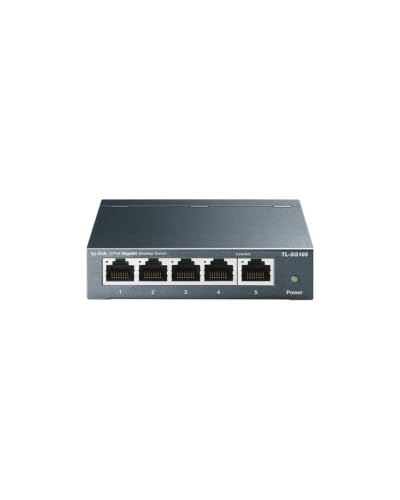
- TP-Link TL-SG105 or TL-SG108: Unmanaged 5- or 8-port gigabit switches suited to a desk, media cabinet, or small room setup. They are a simple choice when you want to connect devices and leave them alone.
- NETGEAR GS305 or GS308: Unmanaged 5- or 8-port gigabit alternatives for basic wired expansion. Compare the physical size, power adapter, and mounting options for your space.
- TP-Link TL-SG108E: An 8-port easy-smart option for people who want features such as VLAN configuration and traffic monitoring without stepping up to a full enterprise-style interface. It still requires configuration to make those features useful.
- NETGEAR GS308E: An 8-port smart-managed gigabit option when basic network segmentation or monitoring is needed. Confirm that its feature set matches your router and intended VLAN setup.
For a typical gaming room, the unmanaged models are the safer default: fewer settings to misconfigure and no meaningful gaming benefit from management features you will not use. Managed features are useful for network organization, not a shortcut to lower ping.
Port Count: Leave Room for the Whole Gaming Corner
Count the devices that need Ethernet, then include the cable back to the router. For example, a PC, console, TV, and access point require four device connections; the router uplink is a fifth port. A 5-port switch would be full, so an 8-port model gives room for a streaming box or another console.
Do not count on a switch’s port count being available entirely to end devices: one port connects upstream to the router. Also check that the router itself has a free LAN port for that uplink. Connecting the switch to a router’s LAN port is the normal arrangement; connecting it to another switch can work, but adds another link and makes cable planning more important.
Gigabit Bandwidth and Gaming Latency
Gigabit Ethernet provides a link rate of 1,000 megabits per second per port. Online games generally use far less bandwidth than that, so several players gaming at once are unlikely to saturate a gigabit switch through gameplay alone. Large downloads, cloud backups, and video streams can consume much more of the available internet connection.
A switch adds a very small amount of forwarding delay under normal conditions. In practice, ping is more often affected by the game server’s distance, the ISP route, Wi-Fi interference, or a busy internet connection. A managed switch’s quality-of-service settings may help prioritize traffic in a suitably configured network, but they cannot fix congestion beyond your home or guarantee lower latency.
There is one important speed limit: every link in the path matters. If a PC connects to a gigabit switch, and the switch connects to a router through a 100-megabit port or cable fault, that slower link becomes the bottleneck. Likewise, an internet plan above 1 Gbps will not reach a single device at full plan speed through a standard gigabit port.
Managed or Unmanaged?
Choose unmanaged for plug-and-play gaming
An unmanaged switch needs no web interface or network plan. Connect the router and devices, and it forwards traffic automatically. This is the right choice for most households adding Ethernet ports to a gaming setup.
Choose managed when you have a specific network task
A managed or smart-managed model can offer VLANs, port monitoring, or traffic controls. VLANs can isolate devices, but only if the router and any access points are configured to handle the same network separation. A switch alone cannot create a working guest network that bypasses router configuration. If you do not already know which feature you need, unmanaged is generally simpler.
PoE, Heat, and Placement
Power over Ethernet (PoE) is for equipment such as compatible access points, cameras, and some phones—not for a normal gaming PC or console. Before choosing PoE, check the device’s required PoE standard and wattage, then confirm both the switch’s per-port limit and its total PoE budget. For example, two devices drawing 8 W each need at least 16 W of total available power, plus a margin; a switch with a 15 W total budget would not be sufficient.
Most compact desktop gigabit switches are fanless, which avoids fan noise but does not mean they produce no heat. Leave airflow around the case, avoid stacking it under a warm console, and do not bury it in a tightly packed cabinet. If you need PoE for several devices, its higher power output can make ventilation especially important.
Cables: What Works and What to Check
For gigabit Ethernet, use a sound four-pair Cat 5e or Cat 6 cable. Cat 6 is a reasonable choice for new in-room runs, but replacing a working Cat 5e cable usually will not improve game latency. Check that the cable is fully seated at both ends and that the switch and device show a gigabit link; a damaged cable or poorly terminated connector can cause a link to fall back to 100 Mbps.
Keep permanent copper Ethernet runs within the usual 100-metre channel limit, including patch leads. Avoid pinching cables under furniture or tightly bending them, and use outdoor-rated cable if a run is exposed to weather. A cable’s category does not overcome a 100-megabit port elsewhere in the connection.
Buying Checklist
- Count connected devices plus one port for the router uplink.
- Choose unmanaged unless you can name a management feature you need.
- Make sure every device and uplink supports the speed you expect.
- Buy PoE only for compatible equipment, and check total as well as per-port power.
- Check placement, airflow, power-adapter location, and mounting options.
- Use Cat 5e or Cat 6 in good condition; investigate link speed before blaming the switch for high ping.
Frequently asked questions
Can I connect a switch to my router’s Wi-Fi network?
No, connect the switch to a free LAN port on the router, then connect wired devices to the switch. The switch expands Ethernet connections; it does not replace the router or create a separate wireless network. If you want guest or IoT separation, the router and any access points must also be configured to support the same VLAN arrangement.
Will a network switch improve my ping in online games?
Usually, no. A switch provides reliable wired connections and adds only a very small forwarding delay under normal conditions. Ping is more often affected by the game server’s distance, the ISP route, Wi-Fi interference, or a busy internet connection. A switch cannot make a game server respond faster, increase internet speed, or fix congestion beyond your home.
Why might my gigabit connection show only 100 Mbps?
A connection may fall back to 100 Mbps because of a damaged cable, a poorly terminated connector, or a 100-megabit port elsewhere in the path. Check that the cable is fully seated and that the switch and device show a gigabit link. Also inspect the router uplink, since its speed limits the connection between the switch and the rest of the network.
Do I need a special Ethernet cable for gaming?
No, a sound four-pair Cat 5e or Cat 6 cable works for gigabit Ethernet. Cat 6 is reasonable for new in-room runs, but replacing a working Cat 5e cable usually will not improve game latency. Avoid pinching cables under furniture or tightly bending them, and use outdoor-rated cable when a run is exposed to weather.
Can I hide a compact switch inside a cabinet?
You can place a compact switch in a cabinet only if it has adequate airflow. Most desktop gigabit switches are fanless, which avoids fan noise but does not mean they produce no heat. Leave space around the case, avoid stacking it under a warm console, and do not bury it in a tightly packed cabinet. PoE models may need extra ventilation.