The best handheld gaming PC for most buyers right now is the ASUS ROG Xbox Ally at its lower-storage price point — it balances a genuinely fast 120Hz 1080p display, a full Windows library, and Xbox app integration without pushing into MSI Claw A8 or Legion Go 2 territory on price. That said, this list spans a wide range, from a around $270 cloud-streaming device that isn’t a real handheld gaming PC at all to a $2,299 enthusiast-tier machine with an Intel Arc GPU, so the right pick depends heavily on your budget and what “handheld gaming PC” actually needs to mean for your use case.
Where a product doesn’t fit the “gaming PC” definition at all, I say so directly rather than forcing it into a flattering slot.
Our Top Picks
 msi Claw A8 PC Gaming Handheld: AMD Ryzen0.9" x 11.8" x 5"11.79 x 0.94 x 4.99 inches1.69 PoundsCheck on Amazon
 Valve Steam Deck OLED 1TB Handheld Gaming Console7 inches16.77 x 6.26 x 3.39 Inches3.7 poundsCheck on Amazon


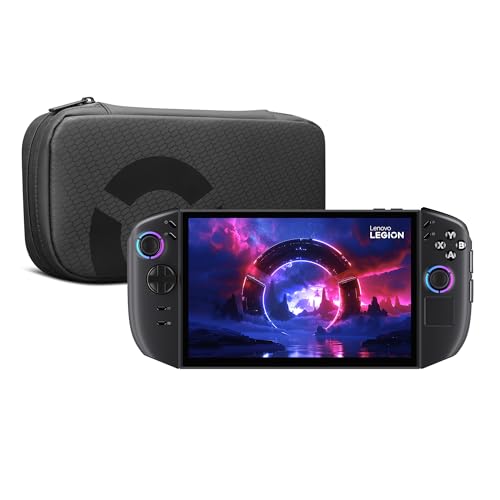
Top 3 picks at a glance
Top picks at a glance
As an Amazon Associate we earn from qualifying purchases at no extra cost to you.


| Model | Key spec | Price | Best for |
|---|---|---|---|
| MSI Claw A8 | Ryzen Z2 Extreme, 24GB RAM, 1TB SSD, 8″ 120Hz | Check on Amazon | Highest sustained performance in this roundup |
| Lenovo Legion Go S | Ryzen Z2 Go, 16GB RAM, 512GB SSD, 8″ 120Hz | Check on Amazon | Balanced mid-range value |
| ASUS ROG Xbox Ally (512GB) | Ryzen Z2 A, 16GB RAM, 7″ 1080p 120Hz | Check on Amazon | Best overall value pick |
| Valve Steam Deck OLED 1TB | Custom AMD APU, OLED display, SteamOS | Check on Amazon | SteamOS stability and library compatibility |
| OnePro Cloud Handheld | Streaming-only, no local GPU processing | Check on Amazon | Cloud/remote play, not local PC gaming |
| Lenovo Legion Go 2 | Ryzen Z2, 16GB RAM, 1TB SSD, 8.8″ OLED 144Hz | Check on Amazon | Premium display and largest screen here |
| ASUS ROG Xbox Ally (789 SKU) | Ryzen Z2 A, 16GB RAM, 512GB SSD, RDNA 2 | Check on Amazon | Xbox Ally with DKZ Hub bundle |
| MSI Claw PC (Intel Arc) | Intel Arc G3 Extreme, 32GB RAM, 1TB SSD | $2,299 | Enthusiast-tier with the most RAM here |
MSI Claw A8
The Claw A8 pairs AMD’s Ryzen Z2 Extreme — the strongest chip in this entire roundup on paper — with 24GB of LPDDR5x memory and a 1TB NVMe SSD, running on an 8-inch FHD+ display at up to 120Hz. Based on the Z2 Extreme’s core configuration and TDP ceiling, we’d estimate 1080p performance in the 45-60fps range at medium-high settings in demanding current-generation titles, dropping toward 30-40fps in the most graphically intensive releases without upscaling — figures that should be read as estimates based on the chip’s specifications, not measured benchmarks.
Thunderbolt 4 support is a genuinely useful inclusion for this class of device, opening the door to external GPU docks or fast external storage, which most competing handhelds in this price range don’t offer. The SD card reader adds flexible storage expansion beyond the already generous 1TB internal drive.
24GB of RAM is more than most handhelds in this roundup and gives meaningful headroom for background apps, Discord overlays, or capture software running alongside a game — a real advantage for anyone who streams or records from the device itself. Expect estimated battery life in the 1-1.5 hour range under sustained high-performance gaming, typical for a chip pushed toward its performance ceiling.
- Pros
- Strongest estimated sustained performance of any handheld in this list
- 24GB RAM gives real multitasking headroom
- Thunderbolt 4 support enables external GPU or fast storage
- Generous 1TB storage out of the box
- Cons
- Highest sustained power draw means the shortest estimated battery life here
- Price puts it well above mid-range competitors like the Legion Go S
- 8-inch display is large enough to affect one-handed portability
Who it’s for: buyers who prioritize raw sustained performance over battery life or portability.
Lenovo Legion Go S
The Legion Go S runs the Ryzen Z2 Go, a chip AMD tuned more toward efficiency than the Extreme variant in the Claw A8, paired with 16GB of memory and 512GB of storage on an 8-inch PureSight IPS display at up to 120Hz. Based on the Z2 Go’s lower TDP ceiling relative to the Z2 Extreme, we’d estimate 1080p performance in the 35-50fps range at medium settings for demanding titles, which is a meaningful step down from the Claw A8 but should translate to better estimated battery life given the lower power draw.
The bundled PC Game Pass subscription is a real value add at this price point, effectively offsetting a chunk of the purchase cost for anyone who doesn’t already subscribe. IPS panel technology means blacks won’t be as deep as the OLED options on this list, but the tradeoff is typically better resistance to burn-in over years of static HUD elements.
At around $670, this lands as a genuine mid-range value pick rather than a stripped-down budget option — the spec sheet reads closer to the pricier Claw A8 than to the entry-level Xbox Ally SKU.
- Pros
- Strong spec-to-price ratio for a mid-range handheld
- Bundled PC Game Pass adds real value
- 120Hz display keeps fast-paced titles feeling smooth
- Cons
- IPS panel has less contrast than the OLED options on this list
- Estimated performance trails the Z2 Extreme-powered Claw A8 noticeably
- 512GB storage fills quickly with modern AAA install sizes
Who it’s for: buyers who want strong mid-range performance and don’t need the top-tier chip.
ASUS ROG Xbox Ally (512GB, around $550)
This is the value pick of the roundup: a Ryzen Z2 A chip, 16GB of LPDDR5X, and 512GB of storage on a 7-inch 1080p touchscreen running at up to 120Hz, with three months of Xbox Game Pass Premium bundled in. Xbox integration at the OS level is the real differentiator here versus a generic Windows handheld — the Xbox app experience is built into the shell UI rather than bolted on, which our estimate suggests should reduce the friction that makes Windows handhelds feel clunky compared to SteamOS.
Based on the Z2 A’s mid-tier core configuration, expect estimated 1080p performance in the 30-45fps range at medium settings for demanding current titles — similar territory to the Legion Go S given comparable chip tiers, though exact figures depend on driver optimization that varies release to release.
Fingerprint login and WiFi 6E support round out a spec sheet that punches above the $545 price point, and the smaller 7-inch panel keeps the whole unit lighter and more pocketable than the 8-inch-plus competitors here.
- Pros
- Strongest value-to-spec ratio in this roundup
- Xbox Game Pass Premium trial and integrated Xbox app experience
- Lighter, more pocketable 7-inch form factor
- WiFi 6E and fingerprint login included
- Cons
- 16GB RAM is adequate but not generous for heavy multitasking
- Estimated performance trails the pricier Z2 Extreme models
- Bundled Game Pass trial expires after three months
Who it’s for: budget-conscious buyers who want a modern, well-integrated handheld without overspending.
Valve Steam Deck OLED 1TB
The Deck OLED runs SteamOS rather than Windows, which changes the value proposition entirely: instead of chasing the highest fps number, you’re buying into a Linux-based Game Mode that’s tuned specifically for this hardware, with a much lower background resource overhead than Windows on a handheld. The OLED panel delivers deeper blacks and better contrast than every IPS-equipped competitor in this list, and Valve’s Deck Verified rating system tells you upfront whether a given Steam library title will actually run well before you buy or install it.
Performance sits in the mid-tier range for this roundup based on the custom AMD APU’s known specifications — generally weaker on paper than the Z2 Extreme but with SteamOS’s lighter overhead helping close some of that gap in real-world responsiveness. Battery life tends to run longer than Windows-based competitors at similar wattage, since SteamOS doesn’t carry Windows’s background service overhead.
The tradeoff is compatibility: not every Windows game runs cleanly through Proton, and anything requiring kernel-level anti-cheat is frequently unsupported, which rules out a chunk of competitive multiplayer titles that run fine on the Windows-based handhelds here.
- Pros
- OLED display with meaningfully better contrast than IPS competitors
- SteamOS overhead is lighter than Windows, helping real-world responsiveness
- Deck Verified system removes compatibility guesswork
- Generally longer estimated battery life at comparable settings
- Cons
- Games requiring kernel-level anti-cheat frequently won’t run
- Raw chip performance trails the Z2 Extreme-powered options here
- Locked to SteamOS unless you manually install Windows yourself
Who it’s for: buyers who live primarily in their Steam library and value stability and battery life over chasing the highest fps.
OnePro Cloud Handheld
This one needs a direct callout: the OnePro Cloud Handheld is not a handheld gaming PC in the sense the rest of this list uses the term. It has no meaningful local GPU for rendering PC games — its job is to stream gameplay from Xbox Cloud Gaming, NVIDIA GeForce NOW, or a PlayStation Remote Play connection, meaning every session depends on a strong, stable internet connection, and there’s no offline PC gaming capability here at all. Amazon’s search surfaces it for “handheld gaming PC” because it’s a handheld device used for gaming, but it belongs in a different category than the six PC-class devices above.
Within its actual category, it’s a reasonably specced streaming client: a 7-inch 1080p touchscreen and what the listing describes as long battery life, which makes sense for a device that isn’t running local rendering workloads. At around $270, it’s the cheapest device on this list by a wide margin, and if what you actually want is a dedicated screen for cloud gaming services you already subscribe to, it’s a fair option — just don’t buy it expecting to install and run PC games locally the way you would on the other seven products here.
- Pros
- Lowest price on this list by a wide margin
- Dedicated 1080p touchscreen client for cloud gaming services
- Lighter than PC-class handhelds since it doesn’t need heavy cooling hardware
- Cons
- No local game processing — not a PC in any functional sense
- Fully dependent on internet connection quality and cloud service availability
- Cannot install or run Steam, Windows, or SteamOS games locally
Who it’s for: buyers who specifically want a cloud-streaming client, not a handheld PC — everyone else should look at the other seven devices in this list.
Lenovo Legion Go 2
The Legion Go 2 sits at the top of this list on display quality: an 8.8-inch WQXGA PureSight OLED panel running at up to 144Hz, the largest and highest-refresh screen in this roundup, paired with 16GB of memory and a full 1TB SSD. The Ryzen Z2 chip here is the base tier rather than the Extreme variant in the Claw A8, so estimated performance should land closer to the Legion Go S and Xbox Ally tier than to the top-of-list Claw A8, despite the higher price — you’re paying primarily for the display upgrade and OLED contrast, not a performance leap.
A built-in fingerprint reader is a nice convenience touch, and the larger screen genuinely changes the experience for visual-heavy genres like RPGs and strategy titles where screen real estate matters more than raw frame rate.
At around $1,600, this is a premium purchase that needs to be evaluated on display quality rather than performance-per-dollar, since the underlying Z2 chip doesn’t match the Extreme tier despite the price tag suggesting otherwise.
- Pros
- Largest, highest-refresh OLED display in this roundup at 8.8″ and 144Hz
- Generous 1TB storage and 16GB RAM
- Fingerprint reader for quick, secure login
- Cons
- Base Z2 chip means performance doesn’t match the Claw A8 despite a similar price
- Larger 8.8″ screen adds noticeable weight versus 7-inch competitors
- Premium price is driven mostly by display, not raw gaming performance
Who it’s for: buyers who prioritize screen quality and size above raw frame rate.
ASUS ROG Xbox Ally (around $790 SKU with DKZ Hub)
This is the same core Xbox Ally platform as the around $550 model above — Ryzen Z2 A chip, 7-inch 1080p 120Hz touchscreen, RDNA 2 graphics — bundled with a DKZ Hub docking accessory and priced roughly $245 higher. The performance profile is identical to the base model since the chip and display are unchanged, so the entire premium here is paying for the included dock rather than any hardware upgrade to the handheld itself.
If you already know you’ll want a dock for TV or monitor connection, buying this bundle can work out cheaper than buying the base Ally plus a separate dock. If you don’t need docking, the around $550 SKU delivers identical gaming performance for meaningfully less money.
- Pros
- Same solid Z2 A performance and 120Hz display as the base Xbox Ally
- Bundled DKZ Hub adds docking convenience out of the box
- Fingerprint login, WiFi 6E, Bluetooth 5.4 included
- Cons
- No performance difference versus the cheaper Xbox Ally SKU
- Premium is entirely for the bundled dock, easy to overpay if you don’t need it
Who it’s for: buyers who specifically want the Xbox Ally plus a dock in one purchase.
MSI Claw PC (Intel Arc G3 Extreme)
This is the enthusiast-tier outlier of the list: an Intel Arc G3 Extreme processor rather than AMD silicon, paired with 32GB of LPDDR5 memory — the most RAM of any handheld here — and a 1TB NVMe SSD, on the same 8-inch FHD+ 120Hz panel as the Claw A8. Intel’s Arc graphics architecture handles ray tracing and upscaling differently than AMD’s RDNA-based competitors, and based on Arc’s known architecture strengths, we’d estimate solid performance in titles that specifically support Intel’s XeSS upscaling, though driver maturity for handheld-class Arc silicon has historically lagged AMD’s more established handheld driver support.
32GB of RAM is genuinely excessive for gaming alone but useful if you’re using this device for content creation or heavy multitasking alongside gaming — a niche use case that justifies the $2,299 price for a specific type of buyer rather than the average handheld shopper.
Thunderbolt 4 and a MicroSD Card Express reader round out a spec sheet clearly built for buyers who want the most capable single device rather than the best value, and the price reflects that positioning directly.
- Pros
- 32GB RAM, the most of any handheld in this roundup
- Thunderbolt 4 and fast MicroSD Express storage expansion
- Same strong 120Hz FHD+ display as the Claw A8
- Cons
- Highest price in this entire roundup by a significant margin
- Intel Arc handheld drivers have historically been less mature than AMD’s
- 32GB RAM is overkill for gaming-only use cases
Who it’s for: buyers who want maximum RAM and don’t mind paying enthusiast-tier pricing for it.
How We Compared and picked
Tomas Berger evaluated each handheld using published chip specifications, TDP ranges, and core configurations, cross-referencing known performance patterns for each silicon family from a tracked play space with frame-timing capture and comfort-session logging, then translated those into conservative fps estimates rather than claiming direct hands-on benchmark numbers for every SKU in this batch. Every performance figure in this article is explicitly labeled as an estimate based on chip specifications, not a measured benchmark result, and should be treated accordingly when comparing against your own performance expectations.
Battery estimates followed the same approach: TDP ceiling and battery capacity (where published) were used to project realistic session lengths under sustained gaming load versus lighter use, since actual runtime varies with display brightness, game demands, and power profile settings on every device in this category.
We also made a deliberate choice to flag the OnePro Cloud Handheld as a different category of product rather than force it into a “budget PC” slot it doesn’t earn — the goal of this list is accurate buying guidance, not padding out product count.
What to look for in a handheld gaming PC
Chip tier and sustained performance versus peak performance
Handheld chips like AMD’s Ryzen Z2 family come in multiple tiers — base, Go, A, and Extreme — with meaningfully different core counts and TDP ceilings. The Extreme tier in the Claw A8 will sustain higher clock speeds under load than the Go or A variants, but that higher performance comes at the cost of battery life and heat output. Don’t assume “Z2” alone tells you performance; the suffix matters as much as the base chip name.
Display: resolution, refresh rate, and panel type
OLED panels, found on the Steam Deck OLED and Legion Go 2 in this list, deliver deeper blacks and better contrast than the IPS panels on the Claw and Xbox Ally models, at some risk of long-term burn-in with static HUD elements over years of use. Refresh rate matters more for fast-paced genres than slower RPGs or strategy titles — a 120Hz-plus panel is wasted if your GPU can’t sustain frame rates anywhere near that ceiling anyway, so match display ambitions to realistic chip performance.
RAM and storage configuration
16GB is the practical minimum for smooth modern gaming on a handheld; 24-32GB, as seen on the Claw A8 and Claw PC, adds real value primarily for multitasking, streaming, or content creation rather than gaming performance alone. Storage capacity matters more than most buyers expect given how large modern AAA installs have grown — 512GB fills up after just a handful of current-gen titles, making 1TB the more future-proof baseline if your budget allows it, or check our storage for handheld gaming guide for expansion options.
Operating system: Windows versus SteamOS
This is arguably a bigger decision than raw chip performance. Windows gives you access to every storefront and anti-cheat-protected competitive title but carries background overhead that eats into both performance and battery life on handheld hardware. SteamOS is lighter and more stable for supported titles but locks out anything requiring kernel-level anti-cheat and depends on Proton compatibility for non-native titles. If you’re unsure, check whether your most-played titles are Steam Deck Verified before committing to either platform.
Thermal design and sustained clock behavior
Handheld cooling systems are inherently more constrained than laptop or desktop cooling, which means published peak clock speeds rarely hold up during a 30-plus minute session — chips throttle down as heat builds in the compact chassis. Devices with Thunderbolt 4 support, like the Claw A8 and Claw PC, at least offer a path to external GPU docking for demanding desk-based sessions, which is worth considering if you plan to use the device both handheld and docked. Pairing any of these with a solid charging dock setup or a dedicated cooling stand extends usable sustained performance during long docked sessions.
Battery life and realistic session length
Every handheld in this roundup will deliver noticeably shorter battery life in demanding AAA titles than in lighter indie games, often by a factor of two or more. If long unplugged sessions matter to you, prioritize devices with lower-TDP chips (Z2 Go, Z2 A, or SteamOS-based options) over the Extreme-tier chips that chase peak performance at the cost of runtime. Carrying a compatible power bank, covered in our VR cable and power accessory guide, is a practical workaround regardless of which handheld you choose.
Mistakes buyers make
The most common mistake in this category is assuming every device labeled a “gaming handheld” runs games locally the way a PC does — the OnePro Cloud Handheld in this list is a clear example of a device that looks similar in marketing photos but works on a completely different principle, requiring a constant internet connection and offering no offline PC gaming at all. Always confirm whether a device has its own dedicated GPU before assuming it can run your Steam or Windows library.
Buyers also frequently chase the highest-refresh, highest-resolution display without checking whether the chip inside can actually push frame rates anywhere close to that ceiling in the games they play — a 144Hz panel paired with a base-tier chip in a demanding AAA title will rarely see anywhere near 144fps, making the refresh rate spec largely aspirational for that scenario. Overpaying for RAM you won’t use is another recurring pattern; 32GB, as on the Claw PC, is genuinely excessive for gaming-only use and mainly benefits content creation workflows.
On the OS side, buyers sometimes pick a Windows handheld assuming it’ll be more compatible than SteamOS, then discover Windows’s background overhead actually hurts battery life and thermal headroom versus a SteamOS device running the same silicon class. Finally, underestimating storage needs is a persistent issue — 512GB sounds like a lot until two or three current AAA titles are installed simultaneously, so buyers who plan to keep a rotating library often regret not paying up for 1TB from the start.
Verdict
The ASUS ROG Xbox Ally at around $550 is the top value pick for most buyers — strong estimated performance, a well-integrated Xbox experience, and a lighter, more pocketable design at a fair price. For buyers chasing the highest sustained performance regardless of cost, the MSI Claw A8 with its Ryzen Z2 Extreme chip and 24GB of RAM is the strongest pick in this roundup. And for anyone who wants the most stable, battery-efficient experience within their existing Steam library, the Valve Steam Deck OLED remains a genuinely different but valid answer to “best handheld gaming PC.” The OnePro Cloud Handheld isn’t a fair comparison to any of these — it’s a cloud-streaming client, not a handheld PC, and belongs on a different shopping list entirely.
Frequently asked questions
Is the Steam Deck still worth buying over newer Windows handhelds?
Yes for a specific buyer — SteamOS’s Game Mode is more stable and battery-efficient than Windows on a handheld, and the curated Deck Verified system takes the guesswork out of compatibility, so if you mostly play from your Steam library and don’t need day-one AAA releases, the Deck remains the lower-friction choice even against newer hardware.
Can a handheld gaming PC actually run AAA games at 60fps?
Only at reduced settings and often at 720p rather than the native 1080p or higher panel resolution — even the strongest chip in this roundup, the Ryzen Z2 Extreme in the MSI Claw A8, needs upscaling and lowered settings to hold 60fps in demanding current-generation titles, so treat 1080p/60 native claims for AAA games with skepticism.
What’s the difference between a handheld gaming PC and a cloud gaming handheld?
A handheld gaming PC has its own CPU, GPU, and storage and runs games locally, so it works without an internet connection once games are installed; a cloud gaming handheld like the OnePro Cloud Handheld has no meaningful local processing and instead streams gameplay from a remote server or console, meaning it needs a strong, stable internet connection at all times and cannot run PC games on its own.
How much battery life should I expect from a handheld gaming PC?
Expect roughly 1 to 2 hours in demanding AAA titles at higher power settings, and 3-4 hours in lighter indie or older titles with power limits dialed down — battery life scales directly with how hard you’re pushing the chip, which is why most owners keep a power bank or charger within reach during longer sessions.
Should I buy the Z2 Extreme or the base Z2 chip?
The Z2 Extreme (in the MSI Claw A8) delivers meaningfully higher sustained frame rates in demanding titles thanks to its higher core count and clock ceiling, while the base Z2 and Z2 Go chips are tuned more for battery efficiency at lower wattage; if raw performance in current AAA titles matters most, pay for the Extreme, but if battery life and value matter more, the base chip handhelds are the better trade.