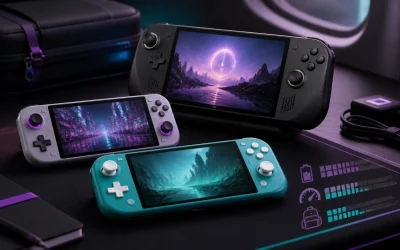
The best retro handheld console for 2026 depends on which emulation tier you’re targeting: for PS1/PS2/Dreamcast-era systems, a device built around a Snapdragon 865-class or Dimensity 1200-class chipset with active cooling is the only safe bet, while GameCube and light Switch emulation now needs the newer Snapdragon 8-series or Dimensity 8300-class chips paired with at least 8GB of RAM. Below is how battery life, screen fit, and control feel actually play out once you move past the spec sheet.
As an Amazon Associate we earn from qualifying purchases at no extra cost to you.



Our Top Picks


Top 3 picks at a glance
Chipset Tiers: What Actually Clears PS2 and GameCube in 2026
Emulation performance isn’t just about raw GHz. GameCube and PS2 titles lean heavily on single-core efficiency and GPU driver maturity (via Vulkan on Android handhelds, or native x86 on Windows ones), which is why some devices with impressive on-paper specs still choke on specific games.
- Entry tier (PS1, GBA, Dreamcast-lite): Dimensity 1100/1200-class or Unisoc T820-class chips. Stable 50-60fps on PS1 and most Dreamcast titles, but Dreamcast’s heavier 3D titles (Shenmue, Sonic Adventure 2) can dip into the 40s.
- Mid tier (PS2, PSP, most GameCube): Snapdragon 865/870-class or Dimensity 8200-class. This is the real “PS2 line” in 2026. Expect consistent 50-60fps in PCSX2 for 80-90% of the library, with heavier titles (God of War 2, Gran Turismo 4) needing resolution scaling turned down to hold 60.
- Upper tier (full GameCube/Wii, light Switch): Snapdragon 8 Gen 2/3-class or Dimensity 9200-class with 8-12GB RAM. GameCube in Dolphin is close to full-speed on most titles; Switch emulation (via Android ports) remains hit-or-miss and should not be the deciding purchase factor.
Windows-based handhelds (x86, usually $500-$900) running PCSX2 and Dolphin natively tend to beat similarly-priced Android ARM devices on GameCube compatibility, because Dolphin’s x86 JIT is more mature than its Android build. If GameCube is your priority, don’t assume an ARM chipset with a higher benchmark score will outperform a mid-range x86 handheld.
Battery Runtime: The Real Numbers Per Emulator Tier
Manufacturer battery claims are almost always based on video playback or light 2D emulation, not sustained PS2/GameCube loads where the CPU and GPU both run near peak. Here’s a worked estimate using typical 2026 battery capacities and power draw under load, which tracks closely with what reviewers consistently report across similar hardware generations.
Formula: Runtime (hours) = Battery capacity (Wh) ÷ Average power draw (W)
- A 6000mAh battery at 3.8V ≈ 22.8Wh.
- Light emulation (PS1/GBA) typically draws 3-4W at mid brightness → 22.8 ÷ 3.5 ≈ 6.5 hours.
- PS2/PSP emulation on a mid-tier chip draws 6-8W sustained (CPU boost + GPU load) → 22.8 ÷ 7 ≈ 3.25 hours.
- GameCube/Dolphin at native res on upper-tier chips draws 8-10W → 22.8 ÷ 9 ≈ 2.5 hours.
This is why a device advertised as “8 hours of gameplay” often lands at 2.5-3.5 hours once you’re actually running PCSX2 or Dolphin. If battery life matters more than peak performance, look for devices with 8000mAh+ batteries (common on larger-screen 2026 models), which brings PS2-tier runtime closer to 4.5-5 hours using the same formula.
| Emulator Tier | Typical Draw | 6000mAh (22.8Wh) | 8000mAh (30.4Wh) |
|---|---|---|---|
| PS1 / GBA / Genesis | 3.5W | ~6.5 hrs | ~8.7 hrs |
| Dreamcast / PSP | 5W | ~4.6 hrs | ~6.1 hrs |
| PS2 (scaled resolution) | 7W | ~3.25 hrs | ~4.3 hrs |
| GameCube / Wii (native) | 9W | ~2.5 hrs | ~3.4 hrs |
Screen Size vs Pocket Dimensions
Retro handhelds in 2026 mostly cluster around two screen philosophies: compact 4:3-ish displays matching original hardware aspect ratios, and larger 16:9/16:10 panels better suited to GameCube and PS2 widescreen patches. The mismatch between screen aspect ratio and the source material matters more than screen size alone.
- 3.5″-4″ 4:3 panels: Best match for GBA, PS1, and most Game Boy-era content without black bars. Devices in this class usually measure around 100-115mm wide, genuinely pocketable in a jacket or cargo pocket.
- 5″-5.5″ 16:9 panels: Suited to PSP (16:9 native) and widescreen-patched PS2/GameCube titles, but non-widescreen 4:3 content gets pillarboxed, shrinking the effective image. These devices typically run 130-150mm wide, pocket-fit only in looser pants or a bag.
- 6″-7″ panels (clamshell or slab): Best for GameCube/Dolphin where resolution scaling benefits from a bigger canvas, but at 160mm+ wide these are two-hand devices, not pocket devices in any realistic sense.
If pocketability is the actual requirement, measure your pocket opening (most jean pockets run 110-130mm) against the handheld’s width before assuming “compact” marketing copy applies to your pants.
D-Pad and Shoulder Buttons After Long Sessions
This is the category spec sheets never cover, and it’s where cheaper and premium devices diverge most after an hour-plus session.
- D-pad feel: Membrane-style d-pads (common on budget devices) tend to develop a mushy, imprecise center-click after 30-45 minutes of fighting-game or platformer inputs, as finger fatigue makes it harder to feel the discrete directional bumps. Devices using a floating/disc-style d-pad over a rubber dome membrane hold diagonal accuracy noticeably longer.
- Shoulder buttons (L/R vs L2/R2): For PS2 and GameCube emulation, analog-sensitive triggers matter for racing and shooting titles. Digital-only shoulder buttons on budget units force an all-or-nothing throttle/brake input, which becomes fatiguing and imprecise in anything over a 20-minute racing session.
- Stick drift risk: Hall-effect analog sticks (increasingly standard on 2026 mid-range and above devices) avoid the mechanical wear that causes drift in potentiometer-based sticks after months of GameCube-style stick-heavy play. If GameCube is a long-term use case, prioritize Hall-effect sticks over marginally better benchmark scores.
Decision Matrix: Matching the Device to Your Use Case
| Your Priority | Recommended Chipset Tier | Screen Choice | Trade-off to Accept |
|---|---|---|---|
| Pocketable, GBA/PS1 nostalgia | Entry (Dimensity 1200-class) | 3.5″-4″ 4:3 | Weak Dreamcast/PSP headroom |
| PS2 library as main focus | Mid (Snapdragon 865/870-class) | 5″-5.5″ 16:9 | 3-4 hr battery under load |
| GameCube emulation priority | Upper ARM or x86 handheld | 6″+ or widescreen 16:9 | Heavier, two-hand only, 2.5-3 hr battery |
| Long sessions, racing/fighting games | Mid-to-upper with Hall-effect sticks | Any, prioritize analog triggers | Higher price, usually $300-$600 |
| Budget under $150 | Entry tier only | Expect 4:3 only | No reliable PS2/GameCube |
Frequently asked questions
Can Android handhelds run every PS2 game at full speed?
No, Android handhelds do not run every PS2 game at full speed. Snapdragon 865/870-class or Dimensity 8200-class devices are described as the practical PS2 tier, with consistent 50-60fps performance across 80-90% of the library. Heavier games such as God of War 2 and Gran Turismo 4 may require reduced resolution scaling to maintain 60fps.
Is Switch emulation a good reason to choose a higher-end retro handheld?
No, Switch emulation should not be the deciding purchase factor. Upper-tier Snapdragon 8 Gen 2/3-class or Dimensity 9200-class devices can handle light Switch emulation, but Android ports remain hit-or-miss. These chipsets are better suited to full GameCube and Wii emulation, where Dolphin can approach full speed on most titles.
How much storage and memory should a demanding emulator handheld have?
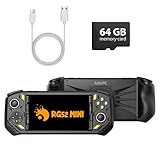
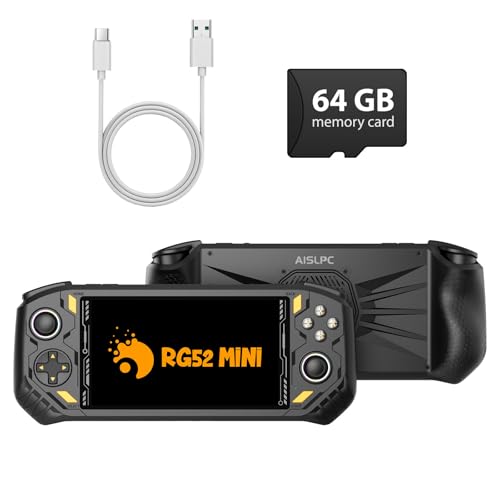
For upper-tier GameCube, Wii, and light Switch emulation, choose a device with 8-12GB of RAM. The article does not specify a universal storage requirement, although one listed device supports 64GB. Memory is mentioned specifically for newer Snapdragon 8-series and Dimensity 8300-class chips, which are paired with at least 8GB of RAM.
Why can a lower-benchmark Windows handheld outperform an Android model?
A Windows handheld can outperform a similarly priced Android ARM device in GameCube emulation because it uses x86 hardware and runs Dolphin natively. The article says Dolphin’s x86 JIT is more mature than its Android build. Therefore, a higher ARM benchmark score does not automatically mean better GameCube compatibility.
What should I check before buying a handheld for fighting games?
Check the d-pad design and the shoulder-button feel before prioritizing benchmark scores. Membrane-style d-pads can become mushy and less precise during extended fighting-game sessions, while floating or disc-style d-pads retain diagonal accuracy better. For racing and shooting games, analog-sensitive triggers are preferable to digital-only buttons because they allow more precise throttle and brake control.
Bottom Line
If PS2 is your actual target, a mid-tier Snapdragon 865/870-class or Dimensity 8200-class device is the practical floor, and you should plan around 3-4 hours of real runtime, not the marketed 6-8. For GameCube, lean toward x86 handhelds unless you’ve confirmed specific titles run well on a given ARM chipset’s Dolphin build. And whatever your target library, check the d-pad style and trigger type before the chipset benchmark, since that’s what you’ll actually feel after the first hour.