
For years, buying a third-party gaming controller was a gamble. Most gamers can recall the sting of being handed the “player two” controller—a lightweight, creaky piece of plastic with mushy buttons, unresponsive analog sticks, and a cable that was always three feet too short. Today, the landscape is entirely different. Third-party manufacturers are no longer just making cheap alternatives; they are often out-innovating the console makers themselves by introducing features like mechanical switches, swappable layouts, and drift-resistant joysticks long before they hit first-party gamepads.
However, this boom in innovation has created a new problem: an overwhelming market saturated with specs, marketing buzzwords, and massive price disparities. The most common mistake buyers make is falling for flashy aesthetics—like vibrant RGB lighting or aggressive shell designs—while ignoring the core engineering that dictates how a controller actually feels and performs over time. Another frequent pitfall is ignoring ergonomics and hand size, purchasing a bulky controller that causes cramping during extended play sessions. To help you navigate the noise, this guide breaks down exactly what to look for in a third party controller so you can invest in a gamepad that elevates your play rather than hindering it.
As an Amazon Associate we earn from qualifying purchases at no extra cost to you.


Our Top Picks


Top 3 picks at a glance
Decide These 3 Things First
Before diving into the fine details of stick tension and button actuation, you must narrow your search by establishing three fundamental baselines. This prevents you from falling in love with a controller that ultimately won’t fit your daily setup.
- Your Primary Platform and Ecosystem: Are you looking for a dedicated Nintendo Switch or Switch 2 gamepad, a multi-platform controller that seamlessly transitions between PC and mobile, or a legacy option for retro consoles like the Wii? A controller is only as good as its compatibility. If you play across SteamOS, Windows, and Android, look for controllers with a physical toggle switch to swap input protocols (such as X-input and D-input).
- Analog Stick Technology (Hall Effect vs. TMR vs. Potentiometer): Stick drift is the single greatest killer of modern gamepads. Traditional controllers use carbon-film potentiometers that physically wear down over time. If longevity is your priority, look for controllers utilizing Hall Effect sensors (which use magnets to measure position without physical contact) or newer TMR (Tunneling Magnetoresistance) joysticks, which offer even higher precision and lower power consumption.
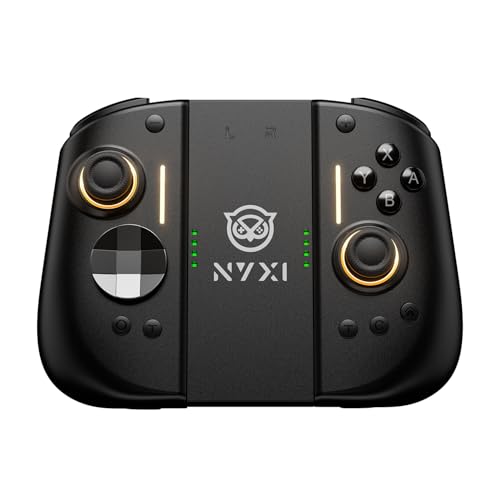
- Form Factor (Split-Pad vs. Traditional): If you are shopping for a handheld console like the Switch ecosystem, you must choose between a traditional one-piece wireless gamepad or a split-pad design (like the NYXI Hyperion series) that slides directly onto the sides of the console. Split-pads offer superior ergonomics in handheld mode, while traditional controllers are better suited for TV and tabletop play.
1. Size and Weight Dimensions
The physical footprint of a controller dictates how long you can play before hand fatigue sets in. A standard first-party controller typically measures roughly 150mm to 162mm in width, 100mm to 105mm in height, and 60mm to 65mm in depth. When shopping for third-party options, pay close attention to these dimensions, especially if you have smaller or larger-than-average hands.
Weight distribution is equally critical. A controller that is too light feels cheap and lacks stability, while one that is too heavy can strain your wrists over a multi-hour session. Premium third-party controllers usually weigh between 240 grams and 280 grams. If a controller weighs less than 180 grams (excluding retro or ultra-compact models), it often indicates thin plastic housing and a lack of internal rumble motors or structural steel reinforcement. Conversely, heavy-duty pro controllers with integrated screen mounts or massive batteries can push past 320 grams, which may require a brief adjustment period.
2. Material Composition and Surface Texture
The durability and tactile feel of a controller are determined entirely by its materials. High-quality third-party controllers are constructed using impact-resistant ABS (Acrylonitrile Butadiene Styrene) plastic with a minimum shell thickness of 1.5mm. This prevents the creaking and flexing that plagues budget-tier devices when you squeeze the grips during high-stress gaming moments.
Pay close attention to the contact points. Premium controllers feature dual-injection molded rubber grips or laser-etched micro-textures on the back handles to prevent slipping from sweat. Avoid controllers that rely on cheap, stick-on rubber decals, as the adhesive inevitably degrades and peels off over time. For the joysticks, look for metal or high-grade POM (Polyoxymethylene) rings around the stick necks. This self-lubricating plastic prevents the plastic-on-plastic grinding that creates fine white powder and eventually ruins the internal sensors.
3. Button Construction and Switch Types
How a button feels when pressed is the difference between a responsive action and a missed input. Traditional controllers use conductive rubber membrane pads under the face buttons. While comfortable, they can feel mushy and degrade over a few million presses.
Modern premium third-party controllers are increasingly adopting full mechanical microswitches (often sourced from gaming mouse manufacturers like Omron) for their face buttons and D-pads. These switches offer a clicky, tactile response with an actuation travel distance of just 0.3mm to 0.7mm, compared to the 1.2mm travel of membrane buttons. This shorter travel time can shave milliseconds off your reaction times. Additionally, look for controllers with swappable button layouts (such as magnetic ABXY caps) if you regularly jump between the Nintendo layout and the Xbox/PC layout.
4. Comfort, Ergonomics, and Performance
Ergonomics is a science of angles. A well-designed controller features handle angles between 105 and 110 degrees, allowing your wrists to remain in a neutral, un-bent position. The curvature of the grips should fill the palms of your hands naturally without forcing your fingers to stretch to reach the triggers or analog sticks.
Performance features to prioritize include:
- Configurable Back Buttons: Two to four remappable back paddles or buttons allow you to keep your thumbs on the analog sticks while performing actions like jumping or reloading. These should be placed exactly where your middle and ring fingers naturally rest.
- Adjustable Triggers: Look for triggers with physical hair-trigger locks or magnetic Hall Effect sensors. For racing games, you want a long, smooth pull (analog mode); for shooters, you want a short, instant click (digital mouse-click mode).
- Gyroscope Precision: For motion-heavy gaming, look for a built-in 6-axis or premium 9-axis gyroscope to ensure smooth, drift-free motion aiming.
5. Price Tiers and Value Propositions
The third-party controller market is vast, but it generally organizes into three distinct price brackets. Understanding what each tier offers prevents you from overpaying or under-specifying.
- Budget Tier ($20 to $40): Primarily wired options or basic wireless controllers with standard potentiometer joysticks and membrane buttons. These are excellent for casual players, secondary local multiplayer controllers, or retro setups (such as basic motion-sensing controllers for legacy consoles).
- Mid-Range Tier ($40 to $75): The sweet spot for most gamers. Here, you will find premium features like Hall Effect or TMR joysticks, 2.4GHz low-latency wireless dongles, mechanical face buttons, and basic back buttons. These offer durability and performance that often rival or exceed first-party controllers.
- Premium/Pro Tier ($75 to $150+): Built for competitive players and enthusiasts. This tier introduces swappable physical components (thumbsticks of varying heights, interchangeable D-pads), dedicated charging docks, advanced companion software for custom profile mapping, and multi-axis gyroscopes optimized for next-generation systems.
6. Battery Life, Charging, and Connectivity
A wireless controller is only as useful as its battery life. When evaluating wireless options, look for an internal lithium-ion battery capacity of at least 800mAh to 1000mAh. This should translate to roughly 20 to 40 hours of continuous play on a single charge. Be wary of controllers that boast high battery runtimes but achieve them by completely disabling rumble motors and LED lighting.
Charging should always be handled via a modern USB-C port, with a full recharge cycle taking no longer than 2 to 3 hours. Premium packages often include a magnetic charging dock, which serves as a clean storage solution on your desk while ensuring your controller is always topped off. For connectivity, look for controllers that offer “tri-mode” connectivity: low-latency 2.4GHz wireless via a USB dongle (essential for competitive PC gaming), Bluetooth (for mobile and casual console play), and a wired USB-C mode for zero-latency gameplay.
7. Warranty and Manufacturer Support
Because controllers are subjected to thousands of physical impacts, button mashes, and occasional accidental drops, the warranty is a critical safety net. Avoid fly-by-night brands that offer only a basic 30-day return window. Reputable third-party manufacturers will back their hardware with at least a 12-month (1-year) limited warranty.
Furthermore, look for brands that provide dedicated firmware update software (either via a PC client or a mobile app). As console operating systems update, controllers occasionally require firmware patches to remain compatible. A manufacturer that consistently rolls out over-the-air updates ensures your controller won’t become an expensive paperweight after a console system update.
Spec Checklist
With the release of next-generation hardware in 2026, the baseline expectation for third-party accessories has skyrocketed. Use this quick-reference table to see how a potential controller’s specs align with its price point.
| Feature/Spec | Budget ($20 – $40) | Mid-Range ($40 – $75) | Premium ($75+) |
|---|---|---|---|
| Joystick Sensors | Standard Potentiometers (prone to drift) | Hall Effect or TMR Sensors | Premium TMR or Custom-Tuned Hall Effect |
| Face Buttons | Conductive Rubber Membrane | Membrane or Hybrid Tactile Switches | Full Mechanical Microswitches (Omron/TTC) |
| Back Buttons | None or 2 basic buttons | 2 to 4 programmable buttons/paddles | 4 highly ergonomic, swappable paddles |
| Battery Capacity | 300mAh – 500mAh (or AA batteries) | 600mAh – 1000mAh | 1000mAh – 1200mAh+ (often with charging dock) |
| Wireless Latency | Bluetooth only (~15-20ms latency) | Bluetooth & 2.4GHz Dongle (~4-8ms latency) | Ultra-low latency 2.4GHz & 1000Hz polling rate |
| Build Weight | Under 180g (feels hollow) | 200g – 250g (well-balanced) | 250g – 300g (solid, reinforced chassis) |
Red Flags
When shopping online, look out for these warning signs that indicate a controller may not perform reliably over the long haul:
- No Mention of Sensor Type: If the product listing boasts “high precision” but completely fails to mention whether it uses Hall Effect, TMR, or standard potentiometer joysticks, it is almost certainly using cheap, drift-prone analog components.
- Unlabeled or Generic Mobile Apps: If a controller requires a sketchy, sideloaded mobile app to map buttons or update firmware, avoid it. Reputable brands have official apps on the Google Play Store, iOS App Store, or native Windows installer packages.
- Over-the-Top RGB with Poor Battery Specs: If a controller features massive LED light strips but only lists a 400mAh battery, you will spend more time charging the controller than actually playing games.
- Non-Standard Charging Interfaces: Any controller released today that still uses Micro-USB or a proprietary barrel jack for charging is outdated hardware that should be avoided.
FAQ
What is the difference between Hall Effect and TMR joysticks?
Traditional controllers use physical contact brushes that wear down, causing stick drift. Hall Effect joysticks solve this by using permanent magnets and electrical sensors to measure stick position without any physical contact. Tunneling Magnetoresistance (TMR) is an even newer technology that uses magnetic tunnel junctions. TMR sensors offer incredibly high resolution (more precise aiming), lower latency, and dramatically lower power consumption than standard Hall Effect sensors, resulting in longer battery life.
Are third-party controllers compatible with the Nintendo Switch 2?
Many premium third-party controllers designed for the original Switch ecosystem are forward-compatible, but you should look for controllers explicitly certified or updated for the Switch 2. Brands like NYXI and 8BitDo design their newer models with upgraded chipsets and gyroscopes to ensure seamless integration with next-generation console features.
Why do mechanical face buttons feel so different from standard buttons?
Standard controllers use a rubber membrane that squishes down to bridge an electrical gap. Mechanical face buttons use actual physical microswitches, similar to those found in high-end gaming mice or mechanical keyboards. They offer a distinct “click” sound, require less force to actuate, and reset to their starting position instantly, allowing for much faster rapid-fire inputs.
Can I use a third-party controller on both my PC and my console?
Yes, provided the controller features multi-platform firmware. Look for controllers that offer a physical connection switch (usually labeled with S, X, D, and A for Switch, X-input, Direct-input, and Android). This allows the controller to change how it identifies itself to the host device, ensuring plug-and-play compatibility without requiring tedious re-mapping software.
Related guides
- Best Free MMOs on Steam: Subscription Limits, Pay-to-Win and Time Cost (2026)
- Best Free Horror Games on Steam: How to Pick One That Fits Your PC and Your Nerves (2026)
- Black Frame Insertion vs VRR: Which Smoothness Feature Should You Use?
- Best Webcams for Streaming: 11 Listings Compared by Resolution, Focus and Light (2026)








